|
User Manuals for Soft Effects & Contrast FiltersYou have selected the product series Photography - Lens Filters - Soft Effects & Contrast Filters. Now choose the brand, model or product code you are looking for. If it is not available, you can request it from customer support.
Sub-categories – select a sub-category:
Contrast Control - Soft Focus & Diffusion
| Showing: 2051-2060 products | Total: 7736 products | | 1 ... 204 | 205 | 206 | 207 | 208 ... 774 |
|
Tiffen Filter Wheel 6 Soft FX |

 The Tiffen Filter Wheel 6 Soft FX 2 Filter diffuses strong light entering the lens and produces a glowing effect. While the resulting image appears softer and ethereal, there is little loss of clarity or detail. This filter works by diffusing the light entering the lens with small aberrations; by spreading the light more evenly, a soft glow is cre...
|
|
Tiffen Filter Wheel 3 Digital Diffusion |

 The Tiffen Filter Wheel 3 Digital Diffusion/FX 5 Filter is a softening and diffusion filter specifically meant to appear invisible, as if no filtration is being applied. Compared to other diffusion filters, this filter offers virtually no flare or loss of contrast for more subtle applications. It helps to lessen facial blemishes, wrinkles, and ge...
|
|
Tiffen Filter Wheel 3 Soft FX |

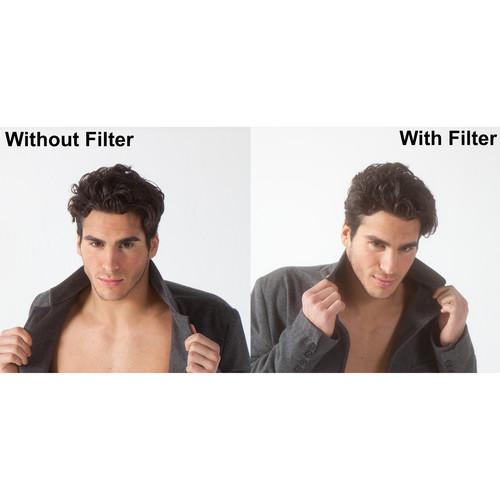 The Tiffen Filter Wheel 3 Soft/FX Black Pro-Mist 1/2 Filter is a combination of the Soft/FX and Black Pro-Mist filters. The 1/2 density of Soft/FX provides a small amount of softening and diffuses strong light entering the lens in order to produce a glowing effect. While the resulting image appears softer and ethereal, there is little loss of clar...
|
|
Tiffen 77mm Pearlescent 1 4 Filter |

 The Tiffen 77mm Pearlescent 1/4 Filter can be applied to purposely soften contrast and reduce sharpness. This can be useful for high-resolution digital cinematography in order to create a more flattering result of a subject by reducing the appearance of blemishes and softening highlights. Additionally, a pearlescent halo around highlights is creat...
|
|
Tiffen 4 x 4" Black Satin |
 The Tiffen 4 x 4" Black Satin 2 Filter can be applied to purposely reduce the appearance of blemishes and wrinkles while providing an intentional warming effect with granularity over an entire image. This can be useful for creating a more flattering result of a subject while highlights are softened, contrast is reduced, and textures are given a sm...
|
|
Tiffen Water White Infrared Neutral Density |
 Provided by third party: This Hollywood/FX filter was originally designed for the TV and motion picture industry, but is now available to all photographers and videographers. Key Features Offers all the benefits of the Pro-Mist filter in a more subtle formHighlight flares are controlledContrast is lowered, but with less lightening of shadows fo...
|
|
Tiffen 4 x 5.65" IRND 0.6 |
 Combining three distinct effects within a single filter, the 4 x 5.65" IRND 0.6 Digital Diffusion/FX 2 Filter from Tiffen offers a 2 stop exposure reduction, attenuates infrared wavelengths, and slightly softens skin details and textured backgrounds. Intended for use with high definition video capture with CMOS and CCD sensors, this filter compens...
|
|
Tiffen 4 x 5.65" IRND 0.6 |
 Combining three distinct effects within a single filter, the 4 x 5.65" IRND 0.6 Digital Diffusion/FX 1 Filter from Tiffen offers a 2 stop exposure reduction, attenuates infrared wavelengths, and slightly softens skin details and textured backgrounds. Intended for use with high definition video capture with CMOS and CCD sensors, this filter compens...
|
|
Tiffen 4 x 5.65" IRND 0.3 |

 Combining three distinct effects within a single filter, the 4 x 5.65" IRND 0.3 Digital Diffusion/FX 1 Filter from Tiffen offers a 1 stop exposure reduction, attenuates infrared wavelengths, and slightly softens skin details and textured backgrounds. Intended for use with high definition video capture with CMOS and CCD sensors, this filter compens...
|
|
Tiffen 4 x 4" Black Satin |
 The Tiffen 4 x 4" Black Satin 1/2 Filter can be applied to purposely reduce the appearance of blemishes and wrinkles while providing an intentional warming effect with granularity over an entire image. This can be useful for creating a more flattering result of a subject while highlights are softened, contrast is reduced, and textures are given a ...
|
|
| 1 ... 204 | 205 | 206 | 207 | 208 ... 774 | | Showing: 2051-2060 products | Total: 7736 products |
|
|
| Request for user manual |
You can’t find the operation manual you are looking for? Let us know and we will try to add the missing manual:
I’m looking for a manual / Request for manual
Current requests for instruction manuals:
tascoair2-7x32...
I need a user manual and parts diagram for a Manfrotto Super Salon 280 Camera Stand - 9’
Thanks!...
OBIHI phone model number obi1032...
Instructions manual for a SONY woofer Model number: SA-W10...
I need the manual for a printer Brother MFC-J805DW. Reason is cause my printer is not recognizing the generic color cartridges LC3035...
|
| Discussion |
Latest contributions to the discussion:
Single sheet tray
Name: Rosemary Probst
HP Color LaserJet Pro M281fdw All-in-One
Can you show me where he single sheet paper tray is. I want to print on light watercolor paper, but not sure how. Thanks...
Keeps reprinting
Name: Darlene
HP ENVY Photo 7155 All-in-One Inkjet
I printed a check from my bank a couple of days ago and now everytime I print something that bank check reprints. Today it reprinted 10 times....
demande
Name: lempens
NCH Software PhotoStage for Windows
recherche le guide pour me familiarise avec photo stage nch...
Query
Name: Bruce Dunn
Avid Sibelius | Ultimate Standalone Perpetual
I seem to have lost the lower right hand icon that allows me to input notes, rests, voices etc. Can you tell me how to get it back?...
Difficult to remove the gooseneck mic. Help or advice needed.
Name: Joe Matos
Telex MCP90-18 - Panel Mount Gooseneck
Hi, I picked up an RTS KP-32 intercom and it has a gooseneck MCP90 mic installed, however I can't get it to come off. I read that it is reverse threaded 1/ 4" TRS, however when I tried by gripping it hard and turning clockwise, it still didn't come off. And turning counterc...
|
|
