|
User Manual for Ableton Push 2 Kit with Novation Launch Control XL Click to enlarge the picture
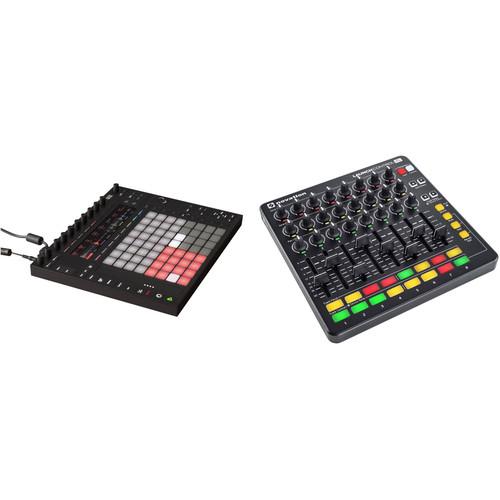 Contents of the user manual for the Ableton Push 2 Kit with Novation
- Product category: Control Surfaces Others
- Brand: Others
- Description and content of package
- Technical information and basic settings
- Frequently asked questions – FAQ
- Troubleshooting (does not switch on, does not respond, error message, what do I do if...)
- Authorized service for Others Control Surfaces
|
User manual for the Ableton Push 2 Kit with Novation contain basic instructions
that need to be followed during installation and operation.
Before starting your appliance, the user manual should be read through carefully.
Follow all the safety instructions and warnings, and be guided by the given recommendations.
User manual is an integral part of any Others product,
and if it is sold or transferred, they should be handed over jointly with the product.
Following the instructions for use is an essential prerequisite for protecting
health and property during use, as well as recognition of liability on the part of the manufacturer
for possible defects should you make a warranty claim. Download an official Others user manual in which you will find instructions on how to install, use, maintain and service your product.
And do not forget – unsuitable use of a Others product will considerably shorten its lifespan!
|
Product description This B&H Kit combines the Ableton Push 2 USB Software Controller with the Novation Launch Control XL to create a comprehensive controller set up for Ableton Live, which offers deep control of instruments and effects with the Push, while the Launch Control provides physical faders and knobs for Live's mixer section. - Ableton Push 2 USB Software Controller Push 2 from Ableton is a completely redesigned USB hardware controller for use with the company's Live 10 software. When hooked up to a computer running the software, Push 2 becomes, in effect, a recording workstation, beat-creation tool, and virtual instrument. With control of melody and harmony, beats, sounds, and song structure, the controller puts the fundamental elements of music-making at your fingertips.
The sixty-four velocity-and-pressure-sensitive pads allow for adjusting sounds and kits while playing with eight touch-sensitive endless encoders. Hold a pad to repeat notes in time with a track while adjusting swing or the repeat divisions in real time. Select a step and adjust timing and velocity individually for each cell.
In addition to creating beats and triggering loops, the controller has been set up to allow for playing melodies and chords. Using the virtual instruments supplied with Live, melodic patterns can be easily played in any key using the same fingering. Improvising and experimenting with song structure is a breeze and all ideas can be recorded to Live.
When all ideas and structures have been recorded, it is simply a matter of switching to the computer for fine-detail editing, further arranging, and song export. All work done using Push 2 is laid out in Live as if everything had been originally created in the software. Finally, for the ultimate in portability, the controller fits easily into a backpack with a laptop computer for transporting to a live performance. - What's New
-
- Complete redesign of the hardware interface by Ableton
- Redesigned browser simplifies the finding and loading of sounds, instruments and FX
- More focus on the hardware, less focus on the computer screen
- Encoders offer intuitive control of parameters
- Lower profile buttons with a tighter tolerance at the edges
- Easy-to-read light-up text on the buttons fade to black when inactive
- No color bleed when switching functions
- RGB display with waveform overview
- Enhanced integration with Ableton Live 10
- Sampling is now an integrated workflow
- Redesigned silicone pads are soft to the touch, but firm as you hit them
- Intuitive and dynamic control over parameters
- Plug-in integration works with Ableton effects and instruments, as well as AU and VST formats
- Anodized aluminum-surface finish is scratch-resistant
- General Features
-
- 64-pad controller for use with Ableton Live 10 software
- Play, step sequence, and navigate loops simultaneously
- Play beats with the velocity-sensitive pads, and adjust sounds and kits while playing using eight touch-sensitive endless encoders
- Hold a pad to repeat notes in time with a track while adjusting swing or the repeat divisions in real-time
- Play notes and chords in every key using the same finger patterns
- Move between keys at the touch of a button and explore new harmonies and phrases across the velocity- and pressure-sensitive pads
- Push 2 utilizes Ableton Live running on a computer and provides the controller with a comprehensive collection of instruments and effects
- Sounds are ready to be played, tweaked, and personalized
- Fine-tune parameters in the instruments and effects using the touch-sensitive encoders while monitoring everything from Push 2's display
- Improvise and play with song structure
- Capture all musical ideas, duplicate and create variations, trigger, re-arrange, and create new combinations
- When you're ready to get into arranging, detailed editing, and exporting your finished song, switch from Push 2 to the computer to find the music already laid out in Ableton Live
- Perfect performance controller with pads that can be instantly repurposed into a clip-launching grid
- Novation Launch Control XL Controller for Ableton Live (Black) The black Launch Control XL from Novation is a portable controller for Ableton Live. The sixteen buttons, twenty-four knobs, and eight faders all integrate seamlessly with Live for total hands-on control. The knobs are arranged in three rows, aligning perfectly with Ableton Live's mixer, while their multicolored LEDs help distinguish between sends, EQs or any other device. Eight 60mm faders offer precise control over levels, while the sixteen multicolor buttons offer immediate track focus and mixer control.
Customize the assignments of the controls to any parameters within Ableton including assigning custom colors, and then effortlessly switch between these mappings and Live's built-in functionality. Multiple units can be combined. Fully USB bus powered, simply plug the controller into a Mac or Windows computer or an iOS device and start performing. It's also possible to control all MIDI-compatible iOS music software via an optional Apple Camera Connection Kit. Additionally, the controller is now HUI enabled. Simply plug into Logic, Cubase, or Pro Tools and start controlling. Note: Register your Novation hardware to access innovative software every couple of months courtesy of the Sound Collective. - Hands-on control over Ableton Live
- Tweak sounds using twenty-four knobs with multicolored indicators
- Plug straight into a Mac/Windows computer or iPad and start performing
- Enhance a live performance by combining with Launchpad S
- Get precise control over levels with eight faders
- Sixteen multicolor buttons for immediate track focus and key mixer controls
- Create custom control layouts by freely assigning any control to any function in Ableton
- Control all MIDI-compatible iOS software via an optional Apple Camera Connection Kit
- HUI enabled for use with Logic, Cubase, or Pro Tools
- Includes Ableton Live Lite software and Loopmasters sample collection
- 4GB loop library from Loopmasters: A 4GB Loopmasters sample library is included with every Novation product and is packed with professional-quality, royalty-free loops and one-shots. The library offers a huge range of electronic and acoustic instrumentation and encompasses all contemporary genres, from blues, funk, and hip-hop to bass, techno, and all flavors of house. It's everything you need to start making music
- The Sound Collective is a platform that will provide a free third-party software instrument or creative effect to all of their registered Novation hardware users every two months
Register your Novation hardware to access innovative software every couple of months courtesy of the Sound Collective
Free and discounted synthesizers and effects available every two months, when you purchase and register any Novation product - Free keys and pad drumming lessons with Melodics help you get the most out of your controller straight out of the box
UPC: 815301000754 In the Box - Push 2 USB Software Controller ettabwtcwubfeeztbbxbxcszayb
- External Power Supply
- Ableton Live 10 Intro
- USB Cable
- Limited 1-Year Warranty
- Novation - Launch Control XL Controller for Ableton Live (Black)
Table of Contents
|
Upload User Manual
Have you got an user manual for the Ableton Push 2 Kit with Novation Launch Control XL in electronic form? Please send it to us and help us expand our library of instruction manuals.
Thank you, too, on behalf of other users.
To upload the product manual, we first need to check and make sure you are not a robot. After that, your "Submit Link" or "Upload File" will appear.
Technical parameters - Ableton Push 2 USB Software Controller
| Interface | USB | | Pads | 64 x velocity- and pressure-sensitive, RGB backlighting | | Rotary Controls | 11 x Rotary encoders | | Touchstrip | 6.7" / 17.0 cm | | LED | 31 x LED for navigation | | Display | High-resolution RGB LCD | | Connectors | 1 x USB Type-B
2 x 1/4" TRS phone Footswitch Input | | Included Software | Ableton Live 10 Intro (download) | | Software Supported | Any version of Ableton Live 10 (required) | | Power Requirements | USB bus power (low power mode when power supply is not connected)
External universal power supply, 100 to 240 VAC, 50/60 Hz (included)
Power Requirements: 12 VDC 1.25 A | | Windows System Requirements | Windows 7 (SP1), Windows 8 or Windows 10 (64-bit)
64-bit Intel Core or AMD multi-core processor (Intel Core processor or faster recommended)
4 GB RAM (8 GB or more recommended)
1366x768 display resolution
ASIO compatible audio hardware for Link support (also recommended for optimal audio performance)
USB port (USB 2.0 or better) for program installation
Access to an internet connection for authorizing Live (for downloading additional content and updating Live, a fast internet connection is recommended)
Approximately 3 GB disk space on the system drive for the basic installation (8 GB free disk space recommended)
Up to 76 GB disk space for additionally available sound content | | Mac System Requirements | OS X 10.11.6 or later
Intel Core 2 Duo Processor (Intel Core i5 processor or faster recommended)
4 GB RAM (8 GB or more recommended)
1280x800 display resolution
Core Audio compliant audio interface recommended
USB port (USB 2.0 or better) for program installation
Access to an internet connection for authorizing Live (for downloading additional content and updating Live, a fast internet connection is recommended)
Approximately 3 GB disk space on the system drive for the basic installation (8 GB free disk space recommended)
Up to 76 GB disk space for additionally available sound content | | Dimensions (WxDxH) | 14.9 x 12.0 x 1.7" / 378.0 x 304.0 x 42.0 mm | | Weight | 6.0 lb / 2.7 kg | | | | Box Dimensions (LxWxH) | 18.3 x 14.4 x 4.6" | - Novation Launch Control XL Controller for Ableton Live (Black)
| Controls | 24 x Rotary pots with 300° motion
24 x LEDs under the knobs
8 x 60 mm faders
16 x Assignable multicolor backlit buttons
8 x Additional assignable backlit buttons
2 x Template switch buttons | | Other | USB-MIDI class compliant
HUI compliant
Kensington security slot | | Power Requirements | USB bus power, including iPad | | Dimensions (WxHxD) | 9.5 x 9.5 x 1.5" (240 x 240 x 39 mm) | | | | Box Dimensions (LxWxH) | 11.1 x 10.6 x 2.6" |
Rating100% users recommend this product to others. And what about you?

This product has already been rated by 14 owners. Add your rating and experience with the product.
Discussion
 Ask our technicians if you have a problem with your settings,
or if anything is unclear in the user manual you have downloaded.
You can make use of our moderated discussion.
The discussion is public and helps other users of our website who may be encountering similar problems.
Ask our technicians if you have a problem with your settings,
or if anything is unclear in the user manual you have downloaded.
You can make use of our moderated discussion.
The discussion is public and helps other users of our website who may be encountering similar problems.
The discussion is empty - enter the first post
Post a new topic / query / comment:
|
|
|
| Request for user manual |
You can’t find the operation manual you are looking for? Let us know and we will try to add the missing manual:
I’m looking for a manual / Request for manual
Current requests for instruction manuals:
Call Of Duty World War Two For Xbox...
controller stratus XL...
stratus XL...
smart whatch serie S11 42mm...
Allen & Heath SQ-6 manual...
|
| Discussion |
Latest contributions to the discussion:
AEW R 4100
Name: MAURICIO ANGARITA
Audio-Technica AEW-R4100 UHF Diversity Receiver for
AEW R 4100 has the mute function blocked and does not allow audio to pass. I tried several times to turn off the mute from the transmitter but it does nothing, the mute stays on. Solution?
Thank you...
Instructions for assembling the 2015 Forecast Image Master Consoles GC3-A
Name: mike elam
Forecast Consoles GC3-A ImageMaster Editing Console
Looking for instructions for assembling this console. ...
EMPTY TONER ERROR MESSAGE AFTER REPLACING TONER
Name: LINDA BAD YELLOW EYES
Brother TN223BK Standard-Yield Toner
I HAD TO CHANGE OUT ALL THREE TONERS DUE TO LEAKS IN THE YELLOW AND CYAN. AFTER I REPLACED THEM, THE MACHINE KEEPS GIVING ME AN EMPTY TONER ERROR MESSAGE. HELP!!...
PS480D 20/24 pin Switching 480W Power Supply
Name: swkargo
Logisys 480W Power Supply
This item states in can run -5vdc .It is NOT listed on the board or I beleive is r4 is missing the resitior. Any body have thid issue. Shawn
...
Help needed
Name: Ann Carter
SanDisk 1TB Extreme Portable USB 3.1
When I click the link to download the user manual for my Sandisk Extreme external hard drive, it gives me the manual for the LG Cricket. Can you please change the link so I can download the Sandisk manual and begin using this drive? Thank you....
|
|


