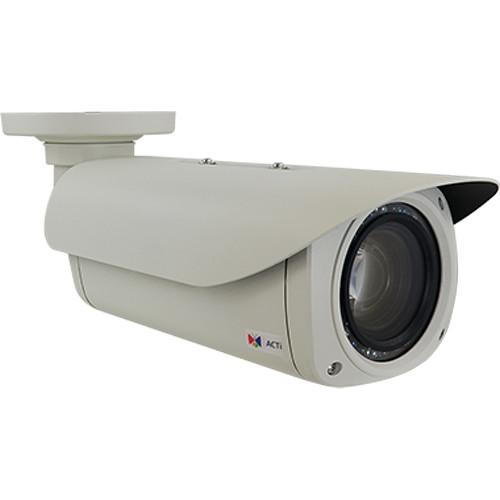
User Manual for ACTi B412 3MP Outdoor Network Bullet Camera with 4.7-47mm Lens & Night Vision Click to enlarge the picture
 Contents of the user manual for the ACTi B412 3MP Outdoor Network Bullet
- Product category: Wired IP Cameras ACTi
- Brand: ACTi
- Description and content of package
- Technical information and basic settings
- Frequently asked questions – FAQ
- Troubleshooting (does not switch on, does not respond, error message, what do I do if...)
- Authorized service for ACTi Wired IP Cameras
|
User manual for the ACTi B412 3MP Outdoor Network Bullet contain basic instructions
that need to be followed during installation and operation.
Before starting your appliance, the user manual should be read through carefully.
Follow all the safety instructions and warnings, and be guided by the given recommendations.
User manual is an integral part of any ACTi product,
and if it is sold or transferred, they should be handed over jointly with the product.
Following the instructions for use is an essential prerequisite for protecting
health and property during use, as well as recognition of liability on the part of the manufacturer
for possible defects should you make a warranty claim. Download an official ACTi user manual in which you will find instructions on how to install, use, maintain and service your product.
And do not forget – unsuitable use of a ACTi product will considerably shorten its lifespan!
|
Product description The B412 3MP Outdoor Network Bullet Camera from ACTi features a 1/2.8" progressive scan CMOS sensor and 4.7-47mm zoom lens for capturing videos at a maximum resolution of 2048 x 1536. This day/night camera provides 24-hour surveillance thanks to a removable IR cut filter and 10 adaptive IR LEDs with a range of up to 197'. Superior Low Light Sensitivity and extreme Wide Dynamic Range (145 dB) enhance image quality, and provide clear and crisp images in low-light environments. The camera is enclosed in an IP67-rated weather-resistant and IK10-rated vandal-resistant housing. It also features built-in heater and dehumidifier. UPC: 888034010147 In the Box ACTi B412 3MP Outdoor Network Bullet Camera with 4.7-47mm Lens & Night Vision Limited 3-Year Warranty Table of Contents
|
Upload User Manual
Have you got an user manual for the ACTi B412 3MP Outdoor Network Bullet Camera with 4.7-47mm Lens & Night Vision in electronic form? Please send it to us and help us expand our library of instruction manuals.
Thank you, too, on behalf of other users.
To upload the product manual, we first need to check and make sure you are not a robot. After that, your "Submit Link" or "Upload File" will appear.
Technical parametersACTi B412 Specs | | | Maximum Resolution | 3 MP | | Image Sensor | 1/2.8", progressive scan CMOS sensor | | Effective Pixels (H x V) | 2065 x 1553, 3.21 MP | | Day/Night | Yes via mechanical IR cut filter | | Minimum Illumination | Color: 0.1 lux at f/1.6 (30 IRE, 2400 K)
B&W: 0 lux at f/1.6 (IR LED on) | | Color to B/W Switch | ISP-based switch, configurable | | IR Sensitivity Range | 700 to 1100 nm | | IR LED | 10 x adaptive IR LED (850 nm) | | IR Working Distance | 196.9' (60 m) | | Electronic Shutter | 1/64,000 to 1/5 sec | | Horizontal Resolution | 1450 TVL | | S/N Ratio | 56 dB | | | | Focal Length | 4.7-47mm | | Aperture | f/1.6 to 3.0 | | Zoom | 10x optical | | Iris | DC iris | | Focus | Auto | | Lens Mount | Board mount | | Horizontal Viewing Angle | 60.9 to 6.43° | | | | Protocol | Visca, Pelco D, Pelco P, ACTi URL command | | | | Compression | H.265, H.264 (Baseline/Main/High profile), and MJPEG | | Maximum Frame Rate vs. Resolution | 30 fps at 2048 x 1536
30 fps at 1920 x 1080
30 fps at 1280 x 720
30 fps at 800 x 600
30 fps at 640 x 480
30 fps at 320 x 240 | | Multi-Streaming | Simultaneous triple streams based on 3 configurations | | Bit Rate | 128 kb/s to 12 Mb/s (per stream) | | Bit Rate Mode | Constant, variable | | Wide Dynamic Range | Extreme WDR (145 dB) | | Image Enhancement | White Balance, brightness, saturation, contrast, sharpness, automatic gain control, flicker less, digital image stabilizer, and defogging | | Digital Noise Reduction | 2D + 3D-DNR | | Privacy Masking | 4 configurable regions | | Text Overlay | Yes | | Analytics | Built-In: Object-based motion detection, tampering, shock detection, line crossing, enter area, missing object, unattended object, loitering, smoke detection, and fire detection (some of the algorithms may not be available in the first release)
VMS-Based: Object counting, people counting, face detection, object-based motion detection, tamper, line crossing, enter area, missing object, unattended object, smoke detection, heat map, dwell time, direction detection, license plate recognition, and people queue management (requires a PC-based or standalone IVS or ALPR server. Contact ACTi support for recommendations on how to maximize analytical accuracy) | | Image Orientation | Flip, mirror, rotation | | | | Type | 2-way, built-in microphone, mic-in, line-in, line-out | | Compression | 8 kHz, 16-bit encoding, mono, PCM, G.711 | | | | Protocols | IPv4/v6, TCP, UDP, DHCP, PPPoE, HTTP, HTTPS, DNS, DDNS, NTP, RTP, RTSP, RTCP, SMTP, FTP, IGMP, ICMP, ARP, Bonjour, UPnP, QoS, SNMP, and IEEE 802.1X | | Ethernet Port | 1 x RJ45 connector | | Security | IP address filtering, HTTPS encryption, password protected user level, anonymous login, and IEEE 802.1X network access control | | | | Event Trigger | Video motion detection (10 regions), external device through digital input, sound detection, and intelligent event detection | | Event Response | Notify control center, go to zoom preset point or preset tour, change camera settings, command other devices, email notification with snapshots, , push notification to mobile device, save video to local storage, upload video or snapshot to FTP server, and activate external device through digital output | | | | Unified Solution | Fully compatible with ACTi software | | Positioning | Manually set GPS | | Compliant Standards | ONVIF Profile S and Profile G
GB28181 | | Web Browser | IE 11 | | Firmware Upgrade | Auto | | | | Audio Interface | 1 input / 1 output
Built-in microphone
Cable with 3.5 mm phone jack | | Local Storage | microSDHC, microSDXC memory card slot (card sold separately) | | Digital Input/Output | 1/1 (cable with terminal block) | | | | Power Source | 12 VDC, High PoE | | Power Consumption | 25.5 W (PoE) | | Mounting Type | Supports wall, ceiling, pole, and gang box mounting (via integrated bracket) | | Environmental Casing | Weather-resistant (IP67-rated)
Vandal-resistant metal casing (IK10-rated)
Built-in heater and dehumidifier | | Starting Temperature | -22 to 140°F / -30 to 60°C | | Operating Temperature | -40 to 140°F / -40 to 60°C | | Operating Humidity | 10 to 85% RH | | Certification | CE (EN 55022 Class B, EN 55024)
FCC (Part15 Subpart B Class B)
IP67
NEMA 4X
IK10 (metal casing)
UL (for optional PoE injector and power adapter) | | Dimensions (Ø x L) | 4.1 x 4.9 x 14.5" / 105.1 x 124.1 x 368.5 mm | | Weight | Not specified by the manufacturer |
Rating90% users recommend this product to others. And what about you?

This product has already been rated by 86 owners. Add your rating and experience with the product.
Discussion
 Ask our technicians if you have a problem with your settings,
or if anything is unclear in the user manual you have downloaded.
You can make use of our moderated discussion.
The discussion is public and helps other users of our website who may be encountering similar problems.
Ask our technicians if you have a problem with your settings,
or if anything is unclear in the user manual you have downloaded.
You can make use of our moderated discussion.
The discussion is public and helps other users of our website who may be encountering similar problems.
The discussion is empty - enter the first post
Post a new topic / query / comment:
|
|


