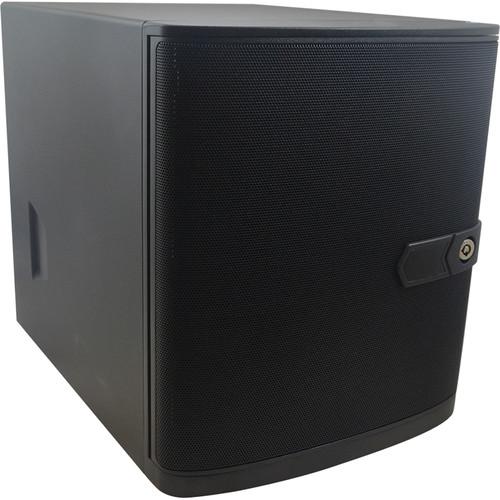
User Manual for ACTi ENR-320P 16-Channel 12MP NVR with 4TB HDD Click to enlarge the picture
 Contents of the user manual for the ACTi ENR-320P 16-Channel 12MP NVR with
- Product category: Network Video Recorders (NVRs) ACTi
- Brand: ACTi
- Description and content of package
- Technical information and basic settings
- Frequently asked questions – FAQ
- Troubleshooting (does not switch on, does not respond, error message, what do I do if...)
- Authorized service for ACTi Network Video Recorders (NVRs)
|
User manual for the ACTi ENR-320P 16-Channel 12MP NVR with contain basic instructions
that need to be followed during installation and operation.
Before starting your appliance, the user manual should be read through carefully.
Follow all the safety instructions and warnings, and be guided by the given recommendations.
User manual is an integral part of any ACTi product,
and if it is sold or transferred, they should be handed over jointly with the product.
Following the instructions for use is an essential prerequisite for protecting
health and property during use, as well as recognition of liability on the part of the manufacturer
for possible defects should you make a warranty claim. Download an official ACTi user manual in which you will find instructions on how to install, use, maintain and service your product.
And do not forget – unsuitable use of a ACTi product will considerably shorten its lifespan!
|
Product description Manage and record from up to 16 cameras with the ENR-320P 16-Channel 12MP NVR from ACTi at resolutions of up to 12MP at 480 fps. Equipped with four 3.5" Serial ATA ports, each of which can accommodate an HDD up to 10TB, this NVR supports up to 40TB of storage (4TB preinstalled). External storage options include PCs via internet connection, network servers, and USB storage devices. It supports H.265, H.264, and MJPEG compressions which help optimize network bandwidth use while ensuring high-quality recording and playback.
The NVR enables simultaneous recording and playback of up to 16 channels locally and remotely. It can support up to one local, two remote, and one mobile clients simultaneously. A maximum combined throughput of 300 Mb/s is supported and this NVR features 16 PoE ports, a USB 3.0 port, two USB 2.0 ports, a WAN port, a LAN port with RJ45 connector, two digital inputs, two digital outputs, and an HDMI port. An audio input and output allow for two-way audio and this NVR supports video export in raw or AVI format. - Supports dewarping function with ACTi fisheye view technology
- Event trigger, response, and notification
- 16-channel license included
- Plug-and-play with built-in DHCP server
In the Box ACTi ENR-320P 16-Channel 12MP NVR with 4TB HDD Power Adapter Power Cord Socket Converter Screw Pack 2 x Hard Disk Bay Keys USB Mouse 2 x Terminal Blocks Limited 3-Year Warranty Table of Contents
|
Upload User Manual
Have you got an user manual for the ACTi ENR-320P 16-Channel 12MP NVR with 4TB HDD in electronic form? Please send it to us and help us expand our library of instruction manuals.
Thank you, too, on behalf of other users.
To upload the product manual, we first need to check and make sure you are not a robot. After that, your "Submit Link" or "Upload File" will appear.
Technical parametersACTi ENR-320P-4TB Specs | | | Maximum Number of Clients | Local: 1
Remote (IE, CMS2, VMS workstation): 2
Mobile (iOS/Android): 1 | | Maximum Number of Devices | Video: 16
Access Control, Parking Management System, and Network I/O: 16
POS: 16 | | Video Compression | H.265, H.264, MJPEG | | Audio Compression | G.711 (U-Law, A-Law), PCM | | Maximum Camera Resolution | 12 MP | | Maximum Resolution | Local Display: 2 MP (1920 x 1080) | | Fisheye Mode | Original, dewarping, panorama, double panorama, panorama focus, quad | | | | Display Layout Mode | Dynamic layouts (max 32 channels), channels could be utilized by end user with extended devices | | Integration | Metadata overlap on video (position, dwell time, font and color, motion event alarm), event and thumbnail overlay display | | Device Management | Camera setup, search, add (ACTi, ONVIF), associate POS, AC, Network DIO, PMS device with camera, firmware management, local storage management | | Digital Zoom | Zoom in/out digitally by mouse scroll wheel or by zoom control buttons | | Event | Display status for network, record, motion, DI, video loss upon every video region | | Two-Way Audio | Yes | | | | Control | Continuous pan, tilt, and zoom with speed control
Focus mode setting (auto/manual) | | Zoom | Zoom in/out optically or digitally by control buttons | | Preset Points and Tours | Add, go to, delete, replace | | Number of Preset Points | Unlimited | | Operation | Joystick, virtual joystick, mouse | | Supported Protocols | ACTi or ONVIF | | | | Source | Video: Dual streams
Audio: Audio input from camera or local audio device | | Scheduled Recording | Record video with user defined schedule (regular and specific schedule), auto recycling by video ageing and user settings (reserved days: 1-999) | | Event Recording | Record video when event is triggered | | Pre-Event Recording | 10 seconds | | Post-Event Recording | User-defined time period to record after event occurs, maximum buffer is 3600 seconds | | Manual Recording | Instant recording upon mouse click | | Recording Frame Rate | 480 fps total max. | | Maximum Recording Throughput | 300 Mb/s | | | | HDD | 4 x 10 TB 3.5" Serial ATA
4 TB preinstalled | | External Storage | Samba, NFS, iSCSI, USB flash drive | | | | Video Search | By event, recording thumbnail and bookmark | | Playback Control | Play forward and backward with speeds: x2, x4, x8, x16, x1/2, x1/4, x1/8, pause | | Synchronized Playback | Local: 16 channels at 30 fps
Remote: 16 channels at 60 fps | | Snapshot | Manual: Create snapshot from playback for export, channel or full-screen snapshot | | Length | Video Clipping: 1 to 30 minutes local, 1 to 1440 minutes remote | | Video Export | Raw, AVI
One or all channel view, text overlap on video, Metadata on video (POS, AC, Network DIO, PMS) | | | | Event Trigger | System Event: Storage access error, no recording device found, S.M.A.R.T test failed
Camera Event: Motion/sound detection, video loss/recovery, event from ACTi Analytics camera, external device through digital input | | Event Response | Play alert beep, activate external device through digital output, email notification with snapshots and messages, start and stop recording, push notification, go to PTZ preset point | | Schedule | Event Handling: Regular (weekly calendar in 24 hours; 20 minutes per unit) and specific scheduler | | | | Firmware Upgrade | USB or network storage | | Backup & Restore | System configuration backup and restore via USB and network storage, password protection | | Permission Control | Multi-group/users, live view/playback/setup/remote level permission | | Client PC Operating System | Windows 10, Windows 8.1, Windows 7 SP1 | | Server Operating System | Linux, embedded | | System Status Monitor | Real time status and message on screen | | Language | English, multi-language support | | | | PC Web Browser | Microsoft Internet Explorer (IE 10/11) with live view, PTZ, playback, event management, setup | | PC Client Program | User interface program (ACTi VMS workstation) with live view, playback, event management, setup | | Mobile Client Program | Mobile device application (ACTi mobile client) supports live view, PTZ control, event or time based search and playback
Supported Devices: iPhone, iPad, iPod Touch, and Android device | | | | Unified Solution | Fully compatible with ACTi cameras, video encoders, intelligent video surveillance software | | Open Platform | Supports ONVIF compliant devices | | Integration | Device: POS (Point of Sales): NCR-Aloha, pcAmerica-Cash Register Express, NEC/NEC, standard/standard, POSNET/KASY and DRUKARKI, import the raw data from COM port
PMS (Parking Management Station): Sunpark
Network DIO: Advantech Adam 60xx input/output Modbus TCP module
AC (Access Control): R11C-30, R12CP-30, R11-20, Q950, Q951 | | | | CPU | Hi3536 | | RAM | 4 GB, 8 x DDR3 1800 MHz 512 MB | | USB | 1 x USB 3.0
2 x USB 2.0 | | Ethernet Ports | 1 x RJ45, WAN Ethernet 1000Base-T
1 x RJ45, LAN Ethernet 1000Base-T
16 x RJ45, PoE Ethernet 10/100Base-T | | Power Budget | 180 W (Max 30 W per port) | | Audio | 1 x terminal block, input
1 x terminal block, output | | Digital Input/Output | 2 x terminal block, input
2 x terminal block, output | | Interface | 1 x HDMI | | Power Source and Consumption | 100-240 VAC, 280 W max. | | Network Protocols | Pv4/v6, TCP, UDP, DHCP (server/client), PPPoE, HTTP, HTTPS, DNS, DDNS, NTP, RTP, RTSP, SMTP, ICMP, ARP, UPnP, iSCSi, Samba, NFS, LDAP (client) | | Approvals | CE (EN 55032 Class B, EN 55024), FCC (Part 15 Subpart B Class B)
Adapter: CE, FCC, UL, PSE, Efficiency level VI | | Fan | Yes | | Operating Temperature | 32 to 104°F / 0 to 40°C | | Operating Humidity | 10-85% RH | | Dimensions | 8.3 x 9.6 x 11.1" / 210.1 x 245.0 x 281.2 mm | | Weight | 15.75 lb / 7.1 kg |
Rating80% users recommend this product to others. And what about you?

This product has already been rated by 32 owners. Add your rating and experience with the product.
Discussion
 Ask our technicians if you have a problem with your settings,
or if anything is unclear in the user manual you have downloaded.
You can make use of our moderated discussion.
The discussion is public and helps other users of our website who may be encountering similar problems.
Ask our technicians if you have a problem with your settings,
or if anything is unclear in the user manual you have downloaded.
You can make use of our moderated discussion.
The discussion is public and helps other users of our website who may be encountering similar problems.
The discussion is empty - enter the first post
Post a new topic / query / comment:
|
|


