User Manual for ACTi INR-340 64-Channel 6-Bay RAID Tower Standalone NVR Click to enlarge the picture
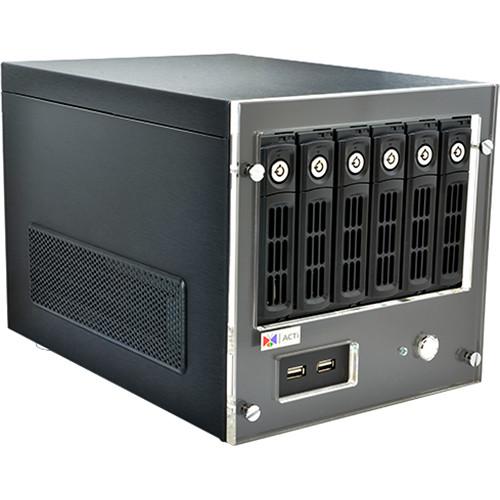 Contents of the user manual for the ACTi INR-340 64-Channel 6-Bay RAID Tower
- Product category: Network Video Recorders (NVRs) ACTi
- Brand: ACTi
- Description and content of package
- Technical information and basic settings
- Frequently asked questions – FAQ
- Troubleshooting (does not switch on, does not respond, error message, what do I do if...)
- Authorized service for ACTi Network Video Recorders (NVRs)
|
User manual for the ACTi INR-340 64-Channel 6-Bay RAID Tower contain basic instructions
that need to be followed during installation and operation.
Before starting your appliance, the user manual should be read through carefully.
Follow all the safety instructions and warnings, and be guided by the given recommendations.
User manual is an integral part of any ACTi product,
and if it is sold or transferred, they should be handed over jointly with the product.
Following the instructions for use is an essential prerequisite for protecting
health and property during use, as well as recognition of liability on the part of the manufacturer
for possible defects should you make a warranty claim. Download an official ACTi user manual in which you will find instructions on how to install, use, maintain and service your product.
And do not forget – unsuitable use of a ACTi product will considerably shorten its lifespan!
|
Product description The ACTi INR-340 64-Channel 6-Bay RAID Tower Standalone NVR comes with 32 pre-licensed channels. It can record videos from up to 64 cameras by purchasing additional licenses (available separately), and the NVR supports up to 1 local and 4 remote clients. It can hold up to 6 SATA HDDs (one system disk included). The standalone NVR supports H.264, MPEG-4, and M-JPEG compression formats and features dual stream management. The NVR features hardware RAID 0, 1, 5, 10 and is ONVIF conformant for integration with third-party systems. - Maximum 64-channel support; 32 licenses pre-installed
- H.264, MPEG-4, M-JPEG compression formats
- Scheduled, event, manual, speed up recording
UPC: 888034008311 In the Box ACTi INR-340 64-Channel 6-Bay RAID Tower Standalone NVR Limited 2-Year Warranty (Maximum Total 5 Years with Extension) Table of Contents
|
Upload User Manual
Have you got an user manual for the ACTi INR-340 64-Channel 6-Bay RAID Tower Standalone NVR in electronic form? Please send it to us and help us expand our library of instruction manuals.
Thank you, too, on behalf of other users.
To upload the product manual, we first need to check and make sure you are not a robot. After that, your "Submit Link" or "Upload File" will appear.
Technical parametersACTi INR-340 Specs | Maximum Number of Cameras | 64 | | Maximum Number of Clients | 1 local, 4 remote | | Processor | Intel Core i7-4770S | | Licenses Included | 32 free licenses | | Video Resolution | Supports all ACTi cameras in all resolutions | | Compression | H.264, MPEG-4, M-JPEG | | Audio | 2-way (Mic-in, Line-in, Line-out) | | Network Connectors | 1 x RJ45 | | Power Source | 110 to 240 VAC | | Recording Modes | Scheduled, event, manual, speed up | | Streaming | Dual stream management | | HDD Interface | 6 x SATA disks maximum (1 system disk included) | | External Storage Interface | eSATA, iSCSI, USB | | RAID Level | Hardware RAID 0, 1, 5, 10 | | Display Layout Mode | Local: 1, 4, 6, 8, 9, 10, 12, 16
Remote: 1, 4, 9, 16, 25, 36, 49, 64 | | Zoom | Digital | | Event Display | Display event status upon alarm or upon connection loss or recovery between server and client or when the allocated disk space is full | | Instant Playback | Instant playback in live view window | | E-Map | Yes | | PTZ Control | Yes | | Playback Control | Continuous forward and backward playback with speeds of 1x/2x/4x/8x or frame-by-frame; pause; stop | | Synchronized Playback | 9 channels (local), 64 channels (remote) | | Access | Local: HDMI / VGA / Display port for monitor, USB joystick, keyboard, & mouse | | Remote Access | Workstation, web client (IE), mobile client (iOS & Android) | | Event Trigger | Video motion detection; Passive IR sensor; External device through digital input; Video loss and recovery; Network loss and recovery; Server loss and recovery; Disk full; Disk not found | | Event Response | Record video; Pop-up window; Hotspot window; Beep; Digital output; Snapshot to FTP; Execute system command; email with snapshots; Go to PTZ preset point | | Permission Control | Unlimited number of users, Active Directory, Customizable permissions for user groups | | Video Export | eSATA, iSCSI, USB | | Server Operating System | Embedded Windows 7 | | Client PC Operating System | Windows 8, Windows 7, Windows Server 2008, Windows Server 2012 | | PC Web Browser | IE 10 and 11 | | Unified Solution | Fully compatible with ACTi cameras, encoders, central management system, TV wall and intelligent video surveillance software | | Operating Temperature | 32 to 104°F (0 to 40°C) | | Approvals | CE, FCC, UL (for built-in power adapter) |
Rating90% users recommend this product to others. And what about you?

This product has already been rated by 93 owners. Add your rating and experience with the product.
Discussion
 Ask our technicians if you have a problem with your settings,
or if anything is unclear in the user manual you have downloaded.
You can make use of our moderated discussion.
The discussion is public and helps other users of our website who may be encountering similar problems.
Ask our technicians if you have a problem with your settings,
or if anything is unclear in the user manual you have downloaded.
You can make use of our moderated discussion.
The discussion is public and helps other users of our website who may be encountering similar problems.
The discussion is empty - enter the first post
Post a new topic / query / comment:
|
|


