User Manual for ACTi INR-460 200-Channel Rackmount Standalone 1080p NVR Click to enlarge the picture
 Contents of the user manual for the ACTi INR-460 200-Channel Rackmount Standalone 1080p
- Product category: Network Video Recorders (NVRs) ACTi
- Brand: ACTi
- Description and content of package
- Technical information and basic settings
- Frequently asked questions – FAQ
- Troubleshooting (does not switch on, does not respond, error message, what do I do if...)
- Authorized service for ACTi Network Video Recorders (NVRs)
|
User manual for the ACTi INR-460 200-Channel Rackmount Standalone 1080p contain basic instructions
that need to be followed during installation and operation.
Before starting your appliance, the user manual should be read through carefully.
Follow all the safety instructions and warnings, and be guided by the given recommendations.
User manual is an integral part of any ACTi product,
and if it is sold or transferred, they should be handed over jointly with the product.
Following the instructions for use is an essential prerequisite for protecting
health and property during use, as well as recognition of liability on the part of the manufacturer
for possible defects should you make a warranty claim. Download an official ACTi user manual in which you will find instructions on how to install, use, maintain and service your product.
And do not forget – unsuitable use of a ACTi product will considerably shorten its lifespan!
|
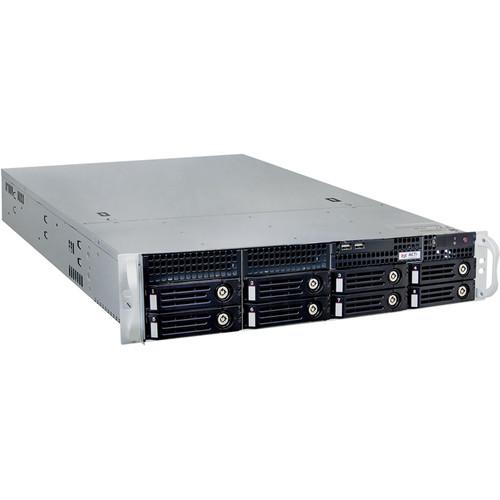
Product description Stream and record up to 200 channels of video with this INR-460 ACTi Rackmount Standalone 1080p NVR, with a maximum combined bit rate of 300 Mb/s. A 64-channel license is included, and licenses for additional video channels are available separately. The NVR is equipped with an 8-bay SATA interface for local storage of footage (HDDs available separately), and supports RAID 0, 1, 5, and 10 configurations to accommodate your performance, capacity, and redundancy needs. External storage options include PCs via internet connection, network servers, eSATA devices, and USB storage devices. Network bandwidth is optimized while ensuring high-quality recording and playback using H.265, H.264, MPEG-4, and MJPEG compression.
The NVR enables local simultaneous live viewing of up to 16 channels and simultaneous playback of up to 9 channels via its DVI-D, VGA, and dual DisplayPort outputs, at resolutions up to 1920 x1080. Remotely, up to 64 channels can be viewed live or played back with a variety of display layout modes on PCs and Android/iOS mobile devices by up to five simultaneous users. Audio input and output ports allow for bidirectional audio. - View manager interface for defining display layouts and pre-setting cameras within layout in public or private view
- Automatic switch between different views or devices
- View panel list of pre-defined views for quick launch
- Digital zoom by mouse scroll wheel or by control buttons
- Drag and drop video source from camera tree into display layout
- Instant recording upon mouse click and instant snapshot upon mouse click or hot key
- Event status display upon alarm, upon connection loss/recovery between server and client, or when the allocated disk space is full
- Access control and network I/O status display on event panel
- Audio broadcast to multiple devices at the same time
- Instant playback in live view window
- Display and connect to pre-configured embedded website
UPC: 888034009097 In the Box ACTi INR-460 200-Channel Rackmount Standalone 1080p NVR (No HDD) HDD Tray Keys Pack Disk Screws Pack Front Cover Power Cord Universal Converter Limited 3-Year Warranty Table of Contents
|
Upload User Manual
Have you got an user manual for the ACTi INR-460 200-Channel Rackmount Standalone 1080p NVR in electronic form? Please send it to us and help us expand our library of instruction manuals.
Thank you, too, on behalf of other users.
To upload the product manual, we first need to check and make sure you are not a robot. After that, your "Submit Link" or "Upload File" will appear.
Technical parametersACTi INR-460 Specs | | | Maximum Number of Clients | 1 x local, 5 x remote | | Maximum Number of Cameras | 200 channels | | Maximum Number of Devices | POS: 200 channels
Access Control and Network I/O: 200 channels | | License | 64-channel license included (additional licenses available separately) | | Compression | H.265, H.264, MPEG-4, MJPEG | | Local Display | Resolution: 1920 x 1080 max. | | | | Display Layout Mode | Local: 1, 4, 5, 6, 8, 9, 10, 12, 16
Remote: 1, 4, 5, 6, 8, 9, 10, 12, 16, 18, 24, 25, 35, 36, 48, 49, 64 | | Multi-View Streaming | Live view of stream 1, stream 2, or stream 3 of multi-stream devices | | | | Layout | Area maps with camera icons, small live view windows; hyperlinked | | Type | Google Maps, static map (JPEG image) | | Setup | e-Map image upload, google maps settings and preset management, camera positioning, vision angle and pointed direction of camera, view positioning, source positioning, extended devices for POS (Point-of-Sale), access control and network I/O | | PTZ Mode | Mouse PTZ mode to control e-Map video streams | | | | Control | Pan/tilt/zoom and speed controls, both via buttons or mouse | | Preset Points and Tours | Create preset points
Create auto tours between preset points | | Number of Preset Points | 32 | | Joystick | USB-based joystick supported | | Default Protocol | Auto-detect camera's PTZ protocol
Available Protocols: ACTi, Pelco P, Pelco D, Dynacolor, Visca | | | | Maximum Recording Throughput | 300 Mb/s total bit rate | | Scheduled Recording | Record video with user-defined schedule | | Event Recording | Record video when the alarm event is triggered, including the pre-event buffered video clip | | Speed | Various recording frame rate settings for non-event and triggered event | | Manual Recording | Instant recording upon mouse click | | Pre-Event Recording | Maximum Buffer: 60 seconds, user-defined (5 seconds default) | | Post-Event Recording | Maximum Buffer: 3600 seconds, user-defined (30 seconds default) | | Multi-Streaming | Recording of stream 1, stream 2, or stream 3 of multi-stream devices | | Recording Frame Rate | 6000 fps total max., 30 fps per camera max. | | | | HDD | Bundled System: 120 GB SSD | | HDD Bay | 8 x SATA (HDDs available separately) | | RAID Level | Hardware RAID 0, 1, 5, 10 (RAID 5 supports up to 100 channels) | | External Storage | iSCSi, USB mass storage, and eSATA supported | | | | Recording Search Method Type | Time, events (motion, DI, video status, network status, manual recordings, extended device status, event confirm status with invalid or valid), channel, bookmark, notification, and listed as clickable time-based thumbnails for full-size view and snapshot download | | Smart Search | By motion detection and tamper | | Playback Control | Continuous forward and backward playback with speeds 1x/2x/4x/8x/16x or frame-by-frame
Pause
Stop | | Synchronized Playback | Up to 9 channels locally
Up to 64 channels remotely | | Snapshot | Manual: Instant snapshot from playback upon mouse click | | Digital Zoom | Zoom in/out digitally by PiP (Picture-in-Picture) | | Cropping | Crop short video clip from long recording file and save it as independent file | | Video Export | EXE, AVI, or raw format
Text overlay and POS (Point-of-Sale) transaction data supported | | | | Event Trigger | NVR: Disk full, disk not found, disk is available, schedule service start/stop, video push start/stop, CPU limit exceeded
Video Device: Video motion detection, passive IR sensor, external device through digital input, sound detection, intelligent event detection, video push start/stop, video loss and recovery, network loss and recovery
Extended Device: POS (Point-of-sale) status, network I/O status, access control allowed/denied, car park status | | Event Response | Pop-up window with live video and event confirmation activation, switch to hotspot window, switch to customize view, command a PTZ device to go to a preset point, play alert sound, activate external device through digital output, execute system command to activate other programs, upload video or snapshot to FTP server, email notification with snapshots, push notification | | Manual Event | Manually activate external devices through digital output via live view monitor | | Handling | Define the schedule of event manager | | | | Permission Control | Unlimited number of users, active directory, customizable permissions for user groups, account lockout, playback password protected, password validity period | | Operating System | Windows 7 (standard) embedded | | Language | Multi-language support
Import or export language packs for local language management | | User Interface | Customizable layout for live view and playback | | GPS | Position: Manual setting | | | | PC Client Program | User interface program (workstation) with live view, PTZ, playback, e-Map, video push, event management, setup | | PC Web Browser | Microsoft Internet Explorer with live view, PTZ, playback, e-Map, video push, event management, setup | | Mobile Client Program | Mobile device application (Active Mobile Client) supports live view, PTZ control, video push, or event- or time-based search and playback
Supported Devices: iPhone, iPad, iTouch, and Android | | | | Protocol | IPv4/v6, TCP, UDP, DHCP client, HTTP, DNS, NTP, RTP, RTSP, SMTP, FTP, ICMP, ARP, UPnP, LDAP (client), iSCSi | | Ethernet Port | 2 x Ethernet 1000Base-T RJ45 ports (non-PoE) | | | | Compatibility | ACTi cameras, encoders, central management system, TV wall and intelligent video surveillance software | | Compliance | Supports ONVIF-compliant devices | | ISV CMS Integration | Software Development Kit (SDK) downloadable from ACTi website | | Integration | Third-Party: POS (Point-of-Sale), access control, network I/O, car park | | | | CPU | Intel Core i7-4770S | | RAM | 8 GB | | Operating Temperature | 32 to 104°F / 0 to 40°C | | Operating Humidity | 10-85% RH | | Power Source | 100-240 VAC, 50/60 Hz | | Approvals | CE (EN 55022 class B, EN 55024), FCC (part 15, subpart B, class B), UL (only for power supply unit) | | USB | 2 x USB 3.0
4 x USB 2.0 ports | | Audio | 1 x microphone input
1 x line output | | Display | 1 x DVI-D
1 x VGA
2 x DisplayPorts | | Dimensions | 19.00 x 3.46 x 22.05" / 48.26 x 8.80 x 56.00 cm | | Weight | 25.17 lb / 11.42 kg |
Rating80% users recommend this product to others. And what about you?

This product has already been rated by 07 owners. Add your rating and experience with the product.
Discussion
 Ask our technicians if you have a problem with your settings,
or if anything is unclear in the user manual you have downloaded.
You can make use of our moderated discussion.
The discussion is public and helps other users of our website who may be encountering similar problems.
Ask our technicians if you have a problem with your settings,
or if anything is unclear in the user manual you have downloaded.
You can make use of our moderated discussion.
The discussion is public and helps other users of our website who may be encountering similar problems.
The discussion is empty - enter the first post
Post a new topic / query / comment:
|
|


