|
User Manual for ACTi Q91 2MP Outdoor Mini Dome Camera Click to enlarge the picture
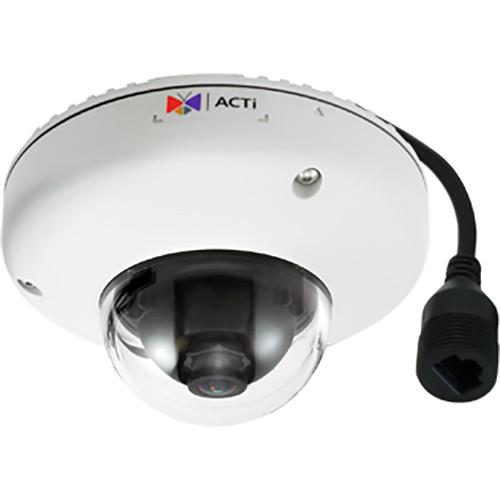 Contents of the user manual for the ACTi Q91 2MP Outdoor Mini Dome
- Product category: Wired IP Cameras ACTi
- Brand: ACTi
- Description and content of package
- Technical information and basic settings
- Frequently asked questions – FAQ
- Troubleshooting (does not switch on, does not respond, error message, what do I do if...)
- Authorized service for ACTi Wired IP Cameras
|
User manual for the ACTi Q91 2MP Outdoor Mini Dome contain basic instructions
that need to be followed during installation and operation.
Before starting your appliance, the user manual should be read through carefully.
Follow all the safety instructions and warnings, and be guided by the given recommendations.
User manual is an integral part of any ACTi product,
and if it is sold or transferred, they should be handed over jointly with the product.
Following the instructions for use is an essential prerequisite for protecting
health and property during use, as well as recognition of liability on the part of the manufacturer
for possible defects should you make a warranty claim. Download an official ACTi user manual in which you will find instructions on how to install, use, maintain and service your product.
And do not forget – unsuitable use of a ACTi product will considerably shorten its lifespan!
|
Product description The 2MP Outdoor Mini Dome Camera from ACTi features a 1/2.8" progressive scan CMOS sensor and a 2.55mm fixed focal lens. Utilizing these, the Q91 can capture images at a resolution of up to 2MP. It supports H.264 and MJPEG compression formats with simultaneous triple streaming.The camera offers wide dynamic range of 145 dB to capture images under varied lighting conditions. It comes with a built-in microSDHC card slot (card not included) for on-board storage. With the IP68-rated weather-resistant and IK10-rated vandal-proof housing, this camera is suitable for outdoor applications. - People Counting
- As a manager of a retail store or shopping center, you want to know how many people, and at what time, enter and exit the venue. The people counting feature provides you this information as comprehensive graphs so you can make decisions regarding item stocking or schedule management.
- Object Based Motion Detection
- Object-based motion detection allows you to specify what type of motion will trigger predefined events. Depending on the configuration, the object can be anything, from a small item falling from a conveyor belt in a production line to a person moving in a restricted area.
- Tamper Detection
- This feature detects unwanted manipulation of the camera, like attempts to break it or refocus and obstruct its view.
- Digital Image Stabilizer
- Digital image stabilizer functionality eliminates vibrations caused by wind or passing vehicles.
- Crowd Detection
- The crowd detection function allows you to service customers. You will be automatically notified when the number of customers waiting in a line exceeds a set limit so you can open another checkout counter.
- Face Detection
- Face detection recognizes people in predefined areas and triggers an alert. In many situations, typically in factories or automated warehouses, many moving objects appear in a scene, but it's only the presence of people that should be noted. This face detection feature will recognize people and alert controlling personnel to stop the machinery.
- Line Crossing
- An event is triggered every time a person crosses a virtual line. This feature can protect properties (burglar trespassing on private premises) or save human lives (passenger falling from platform into a railway track).
- Enter/Exit Area
- This feature makes sure that any unauthorized person won't enter a prohibited area. You can select regions that will be monitored for entrance or exit of people and objects and every such event will trigger a predefined action, for example an alarm.
- Missing Object
- Transported items can be stolen during transit. You can avoid such situations by monitoring the vehicle interior and detecting any objects that disappear between scheduled offload locations.
- Unattended Object
- Unattended objects, such as shopping trolleys left in a parking lot, can be obstacles for pedestrians and cars. An abandoned handbag can also pose a severe security threat in a crowded area. You can use ACTi video analytics to detect unattended items and deal with them properly.
- Direction Detection
- Prevent road accidents by detecting vehicles driving in wrong direction. The system will immediately display warnings on electric roadside signs and notify the authorities.
- Vehicle Counting
- Detect and prevent congestion and manage traffic flow by dynamically opening and closing road lanes and redirecting transit to alternative routes.
- Heat Map
- Rework product placement, refine promotions, and optimize checkout services by using heat map. The map provides visual information about customer density and flow in a store.
- License Plate Recognition
- License plate recognition lets only certain vehicles enter restricted areas. Any vehicle with a license plate not on a white list will be immediately reported. You can also use LPR to automatically charge highway tolls.
Note:Some functions may require PC-based or standalone IVS or ALPR Server. In the Box ACTi Q91 2MP Outdoor Mini Dome Camera Drill Template Hex Screwdriver Mounting Hardware Dome Cover Tab Limited 3-Year Warranty Table of Contents
|
Upload User Manual
Have you got an user manual for the ACTi Q91 2MP Outdoor Mini Dome Camera in electronic form? Please send it to us and help us expand our library of instruction manuals.
Thank you, too, on behalf of other users.
To upload the product manual, we first need to check and make sure you are not a robot. After that, your "Submit Link" or "Upload File" will appear.
Technical parametersACTi Q91 Specs | Type | Mini dome | | Maximum Resolution | 2 MP | | Application | Outdoor | | Image Sensor | Progressive scan CMOS | | Sensor Size | 1/2.8" | | Effective Pixels (H x V) | 1944 x 1244 (2.38 MP) | | Low Light Sensitivity | Superior | | Minimum Illumination | Color: 0.1 lux at f/2.2 (30 IRE, 2400K) B&W: 0.1 lux at f/2.2 (30 IRE, 2400K) | | Horizontal Resolution | 1100 TVL | | S/N Ratio | 56 dB | | Focal Length | Fixed focal, 2.55mm | | Aperture | f/2.2 | | Iris | Fixed focus | | Lens Mount | Board mount | | Horizontal Viewing Angle | 110.3° | | Viewing Angle Adjustment | Pan: ±90°
Tilt: 0 to 90° | | Compression | H.264 (Baseline/ Main/ High profile), MJPEG | | Maximum Frame Rate vs. Resolution | 60 fps at 1920 x 1080
60 fps at 1280 x 720
30 fps at 640 x 480
30 fps at 320 x 240 | | Multi-Streaming | Simultaneous triple streams | | Wide Dynamic Range | Extreme WDR (145 dB) | | Image Enhancement | Digital image stabilizer, defogging | | Digital Noise Reduction | 2D- and 3D-DNR | | Privacy Masking | 4 configurable regions | | Analytics | Built-In: People counting, object counting, object based motion detection, tamper VMS-Based: Digital image stabilizer, crowd detection, face detection, line crossing, enter area, exit area, appear in area, missing object, unattended object, direction detection, vehicle counting, heat map, license plate recognition, speed estimation Require PC-based or standalone IVS or ALPR Server. | | Image Orientation | Rotation | | Audio | 1-way, mic-in, line-in | | Network Protocol | TCP, UDP, HTTP, HTTPS, DHCP, PPPoE, RTP, RTSP, IPv6, DNS, DDNS, NTP, ICMP, ARP, IGMP, SMTP, FTP, UPnP, SNMP, Bonjour | | Ethernet Port | 1 x RJ45 connector | | Local Storage | microSDHC/SDXC memory card slot (card not included) | | Power Source | PoE class 2 (IEEE802.3af) | | Power Consumption | 3.92 W (PoE) | | Environmental Casing | Weatherproof (IP68), Vandal proof (IK10), Vibrationproof (EN50155) | | GPS | Positioning manual setting | | Web Browser | IE 8.0 or newer, Firefox with VLC, Chrome with VLC, Safari with QuickTime | | Approvals | CE, FCC, IP68, IK10, NEMA 4X, EN50155, UL (for optional PoE injector) | | Starting Temperature | -4 to 122°F (-20 to 50°C) | | Operating Temperature | -4 to 122°F (-20 to 50°C) |
Rating90% users recommend this product to others. And what about you?

This product has already been rated by 36 owners. Add your rating and experience with the product.
Discussion
 Ask our technicians if you have a problem with your settings,
or if anything is unclear in the user manual you have downloaded.
You can make use of our moderated discussion.
The discussion is public and helps other users of our website who may be encountering similar problems.
Ask our technicians if you have a problem with your settings,
or if anything is unclear in the user manual you have downloaded.
You can make use of our moderated discussion.
The discussion is public and helps other users of our website who may be encountering similar problems.
The discussion is empty - enter the first post
Post a new topic / query / comment:
|
|
|
| Request for user manual |
You can’t find the operation manual you are looking for? Let us know and we will try to add the missing manual:
I’m looking for a manual / Request for manual
Current requests for instruction manuals:
Call Of Duty World War Two For Xbox...
controller stratus XL...
stratus XL...
smart whatch serie S11 42mm...
Allen & Heath SQ-6 manual...
|
| Discussion |
Latest contributions to the discussion:
AEW R 4100
Name: MAURICIO ANGARITA
Audio-Technica AEW-R4100 UHF Diversity Receiver for
AEW R 4100 has the mute function blocked and does not allow audio to pass. I tried several times to turn off the mute from the transmitter but it does nothing, the mute stays on. Solution?
Thank you...
Instructions for assembling the 2015 Forecast Image Master Consoles GC3-A
Name: mike elam
Forecast Consoles GC3-A ImageMaster Editing Console
Looking for instructions for assembling this console. ...
EMPTY TONER ERROR MESSAGE AFTER REPLACING TONER
Name: LINDA BAD YELLOW EYES
Brother TN223BK Standard-Yield Toner
I HAD TO CHANGE OUT ALL THREE TONERS DUE TO LEAKS IN THE YELLOW AND CYAN. AFTER I REPLACED THEM, THE MACHINE KEEPS GIVING ME AN EMPTY TONER ERROR MESSAGE. HELP!!...
PS480D 20/24 pin Switching 480W Power Supply
Name: swkargo
Logisys 480W Power Supply
This item states in can run -5vdc .It is NOT listed on the board or I beleive is r4 is missing the resitior. Any body have thid issue. Shawn
...
Help needed
Name: Ann Carter
SanDisk 1TB Extreme Portable USB 3.1
When I click the link to download the user manual for my Sandisk Extreme external hard drive, it gives me the manual for the LG Cricket. Can you please change the link so I can download the Sandisk manual and begin using this drive? Thank you....
|
|


