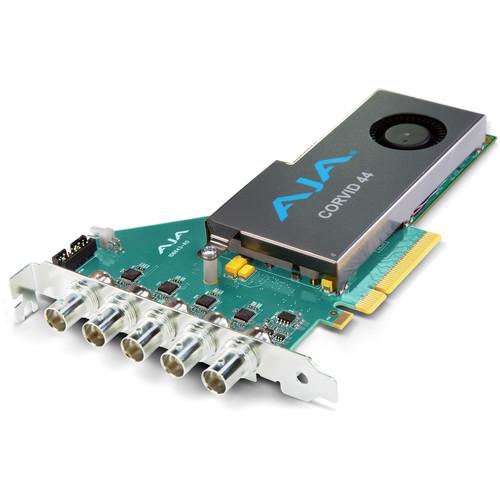
User Manual for AJA Corvid 44 BNC Flexible Multi-Format I O Card with Fan Click to enlarge the picture
 Contents of the user manual for the AJA Corvid 44 BNC Flexible Multi-Format
- Product category: Computer Hardware AJA
- Brand: AJA
- Description and content of package
- Technical information and basic settings
- Frequently asked questions – FAQ
- Troubleshooting (does not switch on, does not respond, error message, what do I do if...)
- Authorized service for AJA Computer Hardware
|
User manual for the AJA Corvid 44 BNC Flexible Multi-Format contain basic instructions
that need to be followed during installation and operation.
Before starting your appliance, the user manual should be read through carefully.
Follow all the safety instructions and warnings, and be guided by the given recommendations.
User manual is an integral part of any AJA product,
and if it is sold or transferred, they should be handed over jointly with the product.
Following the instructions for use is an essential prerequisite for protecting
health and property during use, as well as recognition of liability on the part of the manufacturer
for possible defects should you make a warranty claim. Download an official AJA user manual in which you will find instructions on how to install, use, maintain and service your product.
And do not forget – unsuitable use of a AJA product will considerably shorten its lifespan!
|
Product description The Corvid 44 BNC Multi-Format I/O Card from AJA increases your video and audio I/O capacity with 3G-SDI connectivity over full size BNC connectors. It allows you to configure each SDI connection individually as input or output and mix formats for up to 4 HD or SD channels on a single card. It also combines multiple SDI connections into a single 4K/UHD channel, allowing higher flexibility. - Multi-Stream, Multi-format PCIe I/O Card
-
- Allows AJA Developer Partner applications to access up to four simultaneous input and output streams on a single PCIe card, making it ideal for a wide variety of medium-density applications
- Flexible Multi-Format I/O
-
- Each BNC connection on the board with 3G-SDI can be set programmatically as either an input or output, and each can support a different video format, provided all formats use the same clock timing
- Connections can also be linked together to support Dual Link or 4K/UHD formats
- High Frame Rate Support
-
- Supports 4K (4096 x 2160) and UltraHD (3840 x 2160) High Frame Rate (HFR) workflows
- Working at frame rates of 48p, 50p, and 60p ensures smooth motion for 4K and UHD applications
- Multiple 720p and 1080p HD inputs and outputs are also supported at frame rates up to 50p and 60p, making Corvid 44 BNC Card flexible for different applications
- LTC and Reference input
-
- Provides one external, switchable LTC/Reference input connection on the back of the card
- A second LTC input is available on an internal header for providing additional reference to Corvid 44 BNC
- RS-422
-
- Built-in RS-422 connection is available as an external connection
- RS-422 allows control of external devices for frame accurate ingest and layoffs
- General
-
- PCIe Express Gen 2.0 8-lane
- 8/10-bit YCbCr and 12-bit RGB frame buffer formats
- Two independent Mixer/Keyer widgets
- Analog Color Black or HD tri-level sync
- Powerful Platforms for Development Partners
-
- AJA's Developer Program allows partner companies to incorporate AJA products into their systems
- By utilizing existing, proven video I/O devices, Developer Partners leverage AJA's expertise to develop and support these technologies, saving money and getting their integrated products to market quickly
In the Box AJA Corvid 44 BNC Flexible Multi-Format I/O Card with Fan Limited 3-Year Warranty Table of Contents
|
Upload User Manual
Have you got an user manual for the AJA Corvid 44 BNC Flexible Multi-Format I O Card with Fan in electronic form? Please send it to us and help us expand our library of instruction manuals.
Thank you, too, on behalf of other users.
To upload the product manual, we first need to check and make sure you are not a robot. After that, your "Submit Link" or "Upload File" will appear.
Technical parametersAJA CORVID 44 BNC Specs | Video Formats | (DCI 4K) 4096 x 2160p: 23.98, 24, 25, 29.97, 30, 48 A/B, 50 A/B, 59.94 A/B, 60 A/B
(UHD 4K) 3840 x 2160p: 23.98, 24, 25, 29.97, 30, 48 A/B, 50 A/B, 59.94 A/B, 60 A/B
(2K) 2048 x 1080p: 23.98, 24, 25, 29.97, 30, 48 A/B, 50 A/B, 59.94 A/B, 60 A/B
(2K) 2048 x 1080PsF: 23.98, 24, 25, 29.97, 30, 48 A/B, 50 A/B, 59.94 A/B, 60 A/B
(HD) 1080p: 23.98, 24, 25, 29.97, 30, 50 A/B, 59.94 A/B, 60 A/B
(HD) 1080PsF: 23.98, 24, 25, 29.97, 30
(HD) 1080i: 25, 29.97, 30
(HD) 720p: 50, 50.94, 60
(SD) 625i: 25
(SD) 525i: 29.97 | | Video Input Digital | 4 x 3G-SDI BNC | | Video Output Digital | 4 x 3G-SDI BNC | | Audio Input Digital | 16-Channel 24-bit SDI embedded, 48 kHz synchronous | | Audio Output Digital | 16-Channel 24-bit SDI embedded, 48 kHz synchronous | | Power | 17 W typical, 19 W maximum | | Environmental | Operating Altitude: <10,000' (3,000 m) | | Dimensions (W x D x H) | 0.7 x 6.6 x 2.7" (1.8 x 17 x 69 cm) | | Weight | 0.4 lb (0.2 kg) | | | | Package Weight | 0.8 lb | | Box Dimensions (LxWxH) | 9.7 x 6.3 x 3.2" |
Rating80% users recommend this product to others. And what about you?

This product has already been rated by 67 owners. Add your rating and experience with the product.
Discussion
 Ask our technicians if you have a problem with your settings,
or if anything is unclear in the user manual you have downloaded.
You can make use of our moderated discussion.
The discussion is public and helps other users of our website who may be encountering similar problems.
Ask our technicians if you have a problem with your settings,
or if anything is unclear in the user manual you have downloaded.
You can make use of our moderated discussion.
The discussion is public and helps other users of our website who may be encountering similar problems.
The discussion is empty - enter the first post
Post a new topic / query / comment:
|
|


