|
User Manual for AJA HDR Image Analyzer Click to enlarge the picture
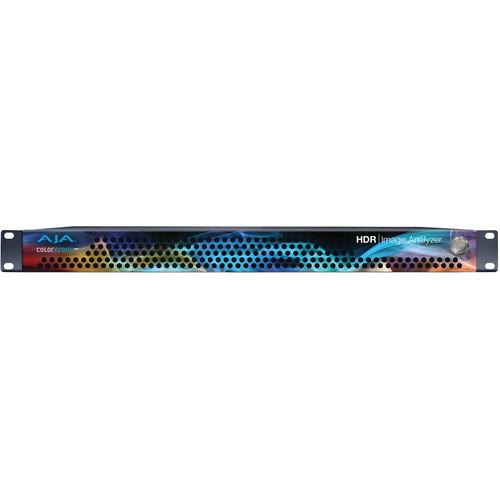 Contents of the user manual for the AJA HDR Image Analyzer
- Product category: Waveform Monitors & Scopes AJA
- Brand: AJA
- Description and content of package
- Technical information and basic settings
- Frequently asked questions – FAQ
- Troubleshooting (does not switch on, does not respond, error message, what do I do if...)
- Authorized service for AJA Waveform Monitors & Scopes
|
User manual for the AJA HDR Image Analyzer contain basic instructions
that need to be followed during installation and operation.
Before starting your appliance, the user manual should be read through carefully.
Follow all the safety instructions and warnings, and be guided by the given recommendations.
User manual is an integral part of any AJA product,
and if it is sold or transferred, they should be handed over jointly with the product.
Following the instructions for use is an essential prerequisite for protecting
health and property during use, as well as recognition of liability on the part of the manufacturer
for possible defects should you make a warranty claim. Download an official AJA user manual in which you will find instructions on how to install, use, maintain and service your product.
And do not forget – unsuitable use of a AJA product will considerably shorten its lifespan!
|
Product description Analyze 4K/UltraHD HDR video in real time with the AJA HDR Image Analyzer developed with Colorfront HDR monitoring and analysis software. The 1 RU device provides four 3G-SDI inputs and four 3G-SDI outputs that support up to 4096 x 2160 4K and 3840 x 2160 UltraHD resolutions with high dynamic range, wide color gamut, and LOG color formats.
The Image Analyzer supports dynamic range inputs such as Rec.709, ST 2084, and HLG, and BT.2020 and BT.709 color gamuts common in live production, DIT workflow, broadcast monitoring, post production, and final mastering. The software UI is accessed via DisplayPort and USB ports and gives you access to tools such as waveform, histogram, vectorscope, color gamut, error logging with timecode, brightness levels, data analysis, and advanced error detection.
The Analyzer also supports up to 16 channels of audio for monitoring with level display. There's an audio phase meter that can be configured for stereo or surround display, and it can provide level warnings in your logs.
In addition to the eight 3G-SDI in/out ports, the unit also features a REF input and four DisplayPort connections for monitoring at up to 3840 x 2160 at 60p. Three USB 3.0 and two USB 2.0 ports provide keyboard and mouse control, as well as to plug in external drives for offloading log data or upgrading firmware. The unit also features two redundant 110 VAC power supplies and comes with two power cables. Key Features - Broad Input
- Input formats include LOG, HDR, and SDR. High Dynamic Range (HDR) and Wide Color Gamut (WGC) arrive in a range of forms, and AJA's HDR Image Analyzer covers them all:
Cameras supported:- ARRI
- Canon
- Panasonic
- RED
- Sony
Dynamic Range Inputs:- SDR (REC 709)
- PQ (ST 2084)
- HLG
Color Gamuts:3G-SDI Support:- 3G-SDI up to 4K/UltraHD 60p
- SDI auto signal detection
- Flexible Monitoring and Analysis
- A 1 RU device for rack-mounting anywhere, the HDR Image Analyzer has been specifically developed to serve a range of environments with a convenient 1 RU form factor with four 3G-SDI ports for up to 4K/UltraHD 60p input and pass-through:
- Live production
- DIT pipelines
- Broadcast monitoring
- Post production
- QC needs in a range of environments
- Final HDR mastering
- Monitor, Analyzer, Log the Results
- Features a high-quality UltraHD user interface for native resolution picture display, critical for close analysis of your video materials, making the most of the tools you need:
- Waveform
- Histogram
- Vectorscope
- Color Gamut
- cd/m2 brightness level
- File-based error logging with timecode
- Data analyzer with advanced pixel picker
- Advanced, out of gamut and out of brightness detection with error tolerance
Interface and Tools - Camera LOG Inputs
- Provides direct input for a range of camera LOG inputs, allowing direct connections from various camera brands and immediate analysis of production feeds.
- Video Resolution
- Address your video resolution setup needs with quick access from the Video Resolution menu, with easy access for RGB, YCbCR, and Quad split vs. 2SI configurations.
- Choose Setups and Capture Scenes
- Setups can be saved and recalled for quick configuration when moving between projects and tool configurations. Scenes can be captured for quick recall and saving to be shared with others for a great visual representation of any issues that need to be addressed.
- Color Space
- Several different color spaces can be utilized for analysis including 709, P3, XYZ, and 2020, as well as camera native color spaces. HDR Image Analyzer also offers an Auto HDR mode change for automatic HDR color space triggering when possible.
- Waveform Lumi Color
- Offers a range of views for waveform representations including Waveform Lumi Color. Waveform Lumi Color offers a gorgeous combination of both luminance and colors in the project's color space.
- Vectorscope
- Vectorscope displays the color saturation of each pixel in the video frame, with the middle of the circle indicating a lower saturation level, and the edge of the circle indicating a higher saturation level. The vectorscope additionally offers a zoom feature and a skin tone line, whose value can be manually set as desired, especially useful for ensuring consistent skin tone results for sequence work and camera matching.
- Whitepoint
- HDR Image Analyzer allows you to set a white point relevant for the project at hand. Choose between DCI, D65, or simply turn it off.
- CIE XY Gamut View
- In HDR mode the CIE XY Gamut View can be used to check the encoded colors, and whether they are within the valid limit of color range. This is relevant when working in the Rec.2020 color space where the actual pixels are supposed to be limited to the P3 color gamut.
- False Color - Gamut Warning
- Out of Gamut False Color mode provides a clear visual representation of areas of your image that may present a problem. The results can be saved automatically within your logged files for QC needs.
- Pixel Picker
- Glide your mouse across your footage and use the Pixel Picker to give you a read out of the exact pixels cd/m2 level, Hex, or Decimal code values.
- Logs
- Detect P3 gamut violations and brightness violations in HDR events and logs them with time stamps in a log file and on screen. Log files can then be collected for sharing with your team as necessary.
- Timecode
- Timecode may be overlayed on screen to assist with quickly identifying any areas of concern at particular moments in a sequence or shot.
- Audio Metering
- An audio level meter is included for up to 16 channels of metered monitoring and display of peak dB levels. An audio phase meter can also be configured to display either 2-channel (stereo) or 8-channel (surround) audio. Audio level warnings may be set to generate notes into your logs.
- Analyzer Gain
- Analyzer Gain allows you to increase or decrease the gain put out to your display, simplifying your ability to monitor critical items with dark footage in particular.
Physical Features - Video and Audio
-
- 4 x 3G-SDI inputs and 4 x 3G-SDI outputs up to 4096 x 2160 4K and 3840 x 2160 UltraHD
- 16-channel, 24-bit, SDI-embedded, 48 kHz synchronous audio
- Control and Monitoring
-
- 4 x USB 3.0 for keyboard, mouse, external media
- 2 x USB 2.0 for keyboard, mouse, external media
- 4 x DisplayPort for monitoring up to 3840 x 2160 at 60p (UltraHD)
- Power
- 2 x redundant 110 VAC power supplies with C13/C14 plugs
UPC: 812321031690 In the Box AJA HDR Image Analyzer 2 x Power Cables Limited 3-Year Warranty Table of Contents
|
Upload User Manual
Have you got an user manual for the AJA HDR Image Analyzer in electronic form? Please send it to us and help us expand our library of instruction manuals.
Thank you, too, on behalf of other users.
To upload the product manual, we first need to check and make sure you are not a robot. After that, your "Submit Link" or "Upload File" will appear.
Technical parametersAJA HDR IMAGE ANALYZER Specs | Supported Video Formats | 4096 x 2160p: 23.98/24/25/29.97/30/48 A/B/50 A/B/59.94 A/B/60 A/B
3840 x 2160p: 23.98/24/25/29.97/30/48 A/B/50 A/B/59.94 A/B/60 A/B
2048 x 1080p: 23.98/24/25/29.97/30/48 A/B/50 A/B/59.94 A/B/60 A/B
2048 x 1080PsF: 23.98/24/25/29.97/30/48 A/B/50 A/B/59.94 A/B/60 A/B
1080i: 50/59.94/60
1080PsF: 23.98/24/25/29.97/30
1080p: 23.98/24/25/29.97/30/50 A/B/59.94 A/B/60 A/B
720p: 50/50.94/60 | | Video Input & Outputs | 4 x 3G-SDI BNC inputs
4 x 3G-SDI BNC outputs | | Reference Input | REF: Analog video sync (Blackburst or Tri-Level) | | Display Output | 4 x DisplayPort
Supports up to 3840 x 2160, 60p (UltraHD) | | Audio Input & Output | 16-channel, 24-bit, SDI-embedded, 48 kHz synchronous | | Keyboard / Mouse Interface | 4 x USB 3.0
2 x USB 2.0
(USB ports can also be used for data input/output) | | Power | 190 W, typical
245 W, maximum
2 x redundant 110 VAC C13/C14 plugs | | Operating Temperature | 41 to 95°F / 5 to 35°C | | Operating Relative Humidity | 8-90%, non-condensing | | Storage Temperature | -40 to 140°F / -40 to 60°C | | Storage Relative Humidity | 5-95%, non-condensing | | Dimensions | 17.2 x 16.9 x 1.7" / 44 x 43 x 4.3 cm (1 RU) | | Weight | 18 lb / 8.2 kg | | | | Package Weight | 27.4 lb | | Box Dimensions (LxWxH) | 26.0 x 23.0 x 7.5" |
Rating60% users recommend this product to others. And what about you?

This product has already been rated by 59 owners. Add your rating and experience with the product.
Discussion
 Ask our technicians if you have a problem with your settings,
or if anything is unclear in the user manual you have downloaded.
You can make use of our moderated discussion.
The discussion is public and helps other users of our website who may be encountering similar problems.
Ask our technicians if you have a problem with your settings,
or if anything is unclear in the user manual you have downloaded.
You can make use of our moderated discussion.
The discussion is public and helps other users of our website who may be encountering similar problems.
The discussion is empty - enter the first post
Post a new topic / query / comment:
|
|
|
| Request for user manual |
You can’t find the operation manual you are looking for? Let us know and we will try to add the missing manual:
I’m looking for a manual / Request for manual
Current requests for instruction manuals:
Call Of Duty World War Two For Xbox...
controller stratus XL...
stratus XL...
smart whatch serie S11 42mm...
Allen & Heath SQ-6 manual...
|
| Discussion |
Latest contributions to the discussion:
AEW R 4100
Name: MAURICIO ANGARITA
Audio-Technica AEW-R4100 UHF Diversity Receiver for
AEW R 4100 has the mute function blocked and does not allow audio to pass. I tried several times to turn off the mute from the transmitter but it does nothing, the mute stays on. Solution?
Thank you...
Instructions for assembling the 2015 Forecast Image Master Consoles GC3-A
Name: mike elam
Forecast Consoles GC3-A ImageMaster Editing Console
Looking for instructions for assembling this console. ...
EMPTY TONER ERROR MESSAGE AFTER REPLACING TONER
Name: LINDA BAD YELLOW EYES
Brother TN223BK Standard-Yield Toner
I HAD TO CHANGE OUT ALL THREE TONERS DUE TO LEAKS IN THE YELLOW AND CYAN. AFTER I REPLACED THEM, THE MACHINE KEEPS GIVING ME AN EMPTY TONER ERROR MESSAGE. HELP!!...
PS480D 20/24 pin Switching 480W Power Supply
Name: swkargo
Logisys 480W Power Supply
This item states in can run -5vdc .It is NOT listed on the board or I beleive is r4 is missing the resitior. Any body have thid issue. Shawn
...
Help needed
Name: Ann Carter
SanDisk 1TB Extreme Portable USB 3.1
When I click the link to download the user manual for my Sandisk Extreme external hard drive, it gives me the manual for the LG Cricket. Can you please change the link so I can download the Sandisk manual and begin using this drive? Thank you....
|
|


