User Manual for Amazon Echo Dot Pair Kit Click to enlarge the picture
 Contents of the user manual for the Amazon Echo Dot Pair Kit
- Product category: Virtual Assistant Speakers & Displays Amazon
- Brand: Amazon
- Description and content of package
- Technical information and basic settings
- Frequently asked questions – FAQ
- Troubleshooting (does not switch on, does not respond, error message, what do I do if...)
- Authorized service for Amazon Virtual Assistant Speakers & Displays
|
User manual for the Amazon Echo Dot Pair Kit contain basic instructions
that need to be followed during installation and operation.
Before starting your appliance, the user manual should be read through carefully.
Follow all the safety instructions and warnings, and be guided by the given recommendations.
User manual is an integral part of any Amazon product,
and if it is sold or transferred, they should be handed over jointly with the product.
Following the instructions for use is an essential prerequisite for protecting
health and property during use, as well as recognition of liability on the part of the manufacturer
for possible defects should you make a warranty claim. Download an official Amazon user manual in which you will find instructions on how to install, use, maintain and service your product.
And do not forget – unsuitable use of a Amazon product will considerably shorten its lifespan!
|
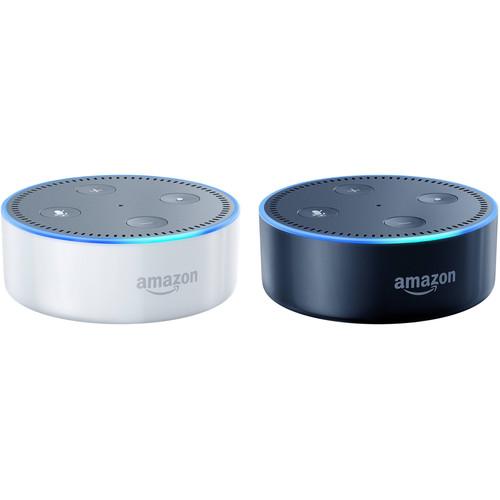
Product description Create a two-room Bluetooth streaming and control experience with your powered speakers and this Kit that includes one black and one white 2nd-generation Amazon Echo Dot. Simply plug each one into a pair of your powered speakers, and you'll enjoy Bluetooth music streaming, voice control of a number of smart home systems, and the benefits of the Alexa ecosystem. The Echo Dots provide access to Internet-based functions such as Amazon and other online shopping, weather reports, sports results, and more via built-in Wi-Fi connectivity and voice control. - Amazon Echo Dot (2nd Generation, White) Make nearly any pair of speakers Bluetooth-enabled with the white 2nd-generation Amazon Echo Dot. It is equipped with Bluetooth connectivity to allow streaming from your mobile device or to a Bluetooth speaker. Its 1/8" audio output will allow you to connect external speakers so you can wirelessly stream to them through the Echo Dot from your smart device. The Echo Dot provides access to Internet-based functions such as Amazon and other online shopping, weather reports, sports results, and more via built-in Wi-Fi connectivity and voice control. Note: Certain Alexa- and location-based features will have limited functionality outside the US. Please see the manufacturer's website for more information.
- Provides Hands-Free Connectivity to Your Speakers
- The Echo Dot is a hands-free, voice-controlled device that connects to your speakers or headphones over Bluetooth or through an 1/8" audio cable to deliver stereo sound to the speakers you choose. It also has a small built-in speaker in case you prefer to use it on its own. The Dot connects to the Alexa Voice Service to play music, provide information, news, sports scores, weather, and more, instantly.
- Made to Work in Any Room
- Its compact 3.3"-diameter x 1.3"-tall design makes the Echo Dot a convenient addition to any room in the house. With its built-in speaker, you can place the Dot in the bedroom and use it as a smart alarm clock that can also turn off your lights. Or use the Dot in the kitchen to set timers and shop tens of millions of Amazon products using just your voice. The Echo Dot can also directly connect to speakers using an 1/8" stereo cable or Bluetooth to add voice control to your home stereo system.
- ESP-Upgradeable
- If you have more than one Echo or Echo Dot, Alexa responds intelligently from the Echo you're closest to with ESP (Echo Spatial Perception), available via a future firmware upgrade.
- Voice Control Your Music
- The Echo Dot provides hands-free voice control for Amazon Music, Prime Music, Pandora, Spotify, iHeartRadio, and TuneIn. Playing your music is easy – just ask for your favorite artist or song, a playlist from Spotify or Pandora, or let Alexa pick the music for you.
- Voice Control Your Smart Home
- Use the Echo Dot to switch on the lamp before getting out of bed, turn up the thermostat while reading in your favorite chair, or dim the lights from the couch to watch a movie – all without lifting a finger or raising your voice. The Echo Dot works with smart home devices such as lights, switches, fans, thermostats, and more from Philips Hue, TP-Link, ecobee, WeMo, SmartThings, INSTEON, Lutron, Nest, Wink, Honeywell, and more.
- Far-Field Voice Recognition
- Tucked under the light ring is an array of seven microphones that use beam-forming technology and enhanced noise cancellation. With its processor, the Echo Dot has improved wake-word performance to hear you ask a question from any direction – even in noisy environments or while playing music. When you want to use the Echo Dot, simply say the wake word, "Alexa," and the Dot lights up and streams audio to the cloud, where the Alexa Voice Service is leveraged to recognize and respond to your request instantly.
- Alexa Updates Itself
- Alexa – the brain behind Echo Dot – is built in the cloud, so it is always getting smarter. The more you use Dot, the more it adapts to your speech patterns, vocabulary, and personal preferences. And because Echo Dot is always connected, updates are delivered automatically.
- Do More with the Alexa App
- With the free Alexa App on Fire OS, Android, iOS, and desktop browsers, you can set up and manage your Echo Dot as well as access any of its skills.
- Discover Alexa's Skills
- Skills add more capabilities like ordering a pizza from Domino's, requesting a ride from Uber, tracking your fitness with Fitbit, ordering flowers from 1-800-Flowers, and more. Simply discover skills you want to use in the Alexa App. To enable a new skill, just ask Alexa. New skills are added often. You can also see ratings and reviews to learn what other customers are saying about the thousands of skills available in the Alexa App.
- Designed for Simple Setup & Use
- Plug in the Echo Dot, connect to the Internet with the Alexa App, and ask it for music, weather, news, and more.
UPC: 815332021551 - Amazon Echo Dot (2nd Generation, Black) Make nearly any pair of speakers Bluetooth-enabled with the black 2nd-generation Amazon Echo Dot. It is equipped with Bluetooth connectivity to allow streaming from your mobile device or to a Bluetooth speaker. Its 1/8" audio output will allow you to connect external speakers so you can wirelessly stream to them through the Echo Dot from your smart device. The Echo Dot provides access to Internet-based functions such as Amazon and other online shopping, weather reports, sports results, and more via built-in Wi-Fi connectivity and voice control. Note: Certain Alexa- and location-based features will have limited functionality outside the US. Please see the manufacturer's website for more information.
- Provides Hands-Free Connectivity to Your Speakers
- The Echo Dot is a hands-free, voice-controlled device that connects to your speakers or headphones over Bluetooth or through an 1/8" audio cable to deliver stereo sound to the speakers you choose. It also has a small built-in speaker in case you prefer to use it on its own. The Dot connects to the Alexa Voice Service to play music, provide information, news, sports scores, weather, and more, instantly.
- Made to Work in Any Room
- Its compact 3.3"-diameter x 1.3"-tall design makes the Echo Dot a convenient addition to any room in the house. With its built-in speaker, you can place the Dot in the bedroom and use it as a smart alarm clock that can also turn off your lights. Or use the Dot in the kitchen to set timers and shop tens of millions of Amazon products using just your voice. The Echo Dot can also directly connect to speakers using an 1/8" stereo cable or Bluetooth to add voice control to your home stereo system.
- ESP-Upgradeable
- If you have more than one Echo or Echo Dot, Alexa responds intelligently from the Echo you're closest to with ESP (Echo Spatial Perception), available via a future firmware upgrade.
- Voice Control Your Music
- The Echo Dot provides hands-free voice control for Amazon Music, Prime Music, Pandora, Spotify, iHeartRadio, and TuneIn. Playing your music is easy – just ask for your favorite artist or song, a playlist from Spotify or Pandora, or let Alexa pick the music for you.
- Voice Control Your Smart Home
- Use the Echo Dot to switch on the lamp before getting out of bed, turn up the thermostat while reading in your favorite chair, or dim the lights from the couch to watch a movie – all without lifting a finger or raising your voice. The Echo Dot works with smart home devices such as lights, switches, fans, thermostats, and more from Philips Hue, TP-Link, ecobee, WeMo, SmartThings, INSTEON, Lutron, Nest, Wink, Honeywell, and more.
- Far-Field Voice Recognition
- Tucked under the light ring is an array of seven microphones that use beam-forming technology and enhanced noise cancellation. With its processor, the Echo Dot has improved wake-word performance to hear you ask a question from any direction – even in noisy environments or while playing music. When you want to use the Echo Dot, simply say the wake word, "Alexa," and the Dot lights up and streams audio to the cloud, where the Alexa Voice Service is leveraged to recognize and respond to your request instantly.
- Alexa Updates Itself
- Alexa – the brain behind Echo Dot – is built in the cloud, so it is always getting smarter. The more you use Dot, the more it adapts to your speech patterns, vocabulary, and personal preferences. And because Echo Dot is always connected, updates are delivered automatically.
- Do More with the Alexa App
- With the free Alexa App on Fire OS, Android, iOS, and desktop browsers, you can set up and manage your Echo Dot as well as access any of its skills.
- Discover Alexa's Skills
- Skills add more capabilities like ordering a pizza from Domino's, requesting a ride from Uber, tracking your fitness with Fitbit, ordering flowers from 1-800-Flowers, and more. Simply discover skills you want to use in the Alexa App. To enable a new skill, just ask Alexa. New skills are added often. You can also see ratings and reviews to learn what other customers are saying about the thousands of skills available in the Alexa App.
- Designed for Simple Setup & Use
- Plug in the Echo Dot, connect to the Internet with the Alexa App, and ask it for music, weather, news, and more.
UPC: 841667112640 In the Box - Echo Dot (2nd Generation, White) buzyrszvywycrzfasrvysdaawfcdvysw
- 9W Power Adapter
- USB Cable
- Limited 90-Day Warranty
- Echo Dot (2nd Generation, Black)
Table of Contents
|
Upload User Manual
Have you got an user manual for the Amazon Echo Dot Pair Kit in electronic form? Please send it to us and help us expand our library of instruction manuals.
Thank you, too, on behalf of other users.
To upload the product manual, we first need to check and make sure you are not a robot. After that, your "Submit Link" or "Upload File" will appear.
Technical parameters - Amazon Echo Dot (2nd Generation, White)
| | | Virtual Assistant Support | Amazon Alexa | | | | Audio | 1 x 1/8" (3.5 mm) Output | | Ethernet | None | | USB | 1 x Micro-USB (Power) | | Supported Bluetooth Profiles | A2DP
AVRCP | | Wi-Fi Standards | Wi-Fi 4 (802.11n) | | Wi-Fi Bands | 2.4 GHz, 5 GHz | | | | Dimensions (W x H x D) | 1.3 x 3.3 x 3.3" / 32.0 x 84.0 x 84.0 mm | | Weight | 5.7 oz / 163 g | | | | Box Dimensions (LxWxH) | 4.7 x 3.5 x 1.9" | - Amazon Echo Dot (2nd Generation, Black)
| | | Virtual Assistant Support | Amazon Alexa | | | | Audio | 1 x 1/8" (3.5 mm) Output | | Ethernet | None | | USB | 1 x Micro-USB (Power) | | Supported Bluetooth Profiles | A2DP
AVRCP | | Wi-Fi Standards | Wi-Fi 4 (802.11n) | | Wi-Fi Bands | 2.4 GHz, 5 GHz | | | | Dimensions (W x H x D) | 1.3 x 3.3 x 3.3" / 32.0 x 84.0 x 84.0 mm | | Weight | 5.7 oz / 163 g | | | | Box Dimensions (LxWxH) | 4.6 x 3.4 x 1.9" |
Rating70% users recommend this product to others. And what about you?

This product has already been rated by 28 owners. Add your rating and experience with the product.
Discussion
 Ask our technicians if you have a problem with your settings,
or if anything is unclear in the user manual you have downloaded.
You can make use of our moderated discussion.
The discussion is public and helps other users of our website who may be encountering similar problems.
Ask our technicians if you have a problem with your settings,
or if anything is unclear in the user manual you have downloaded.
You can make use of our moderated discussion.
The discussion is public and helps other users of our website who may be encountering similar problems.
The discussion is empty - enter the first post
Post a new topic / query / comment:
|
|


