User Manual for Analog Way PLS350-3G 8x1 3G HD SD-SDI Seamless Switcher Mixer Click to enlarge the picture
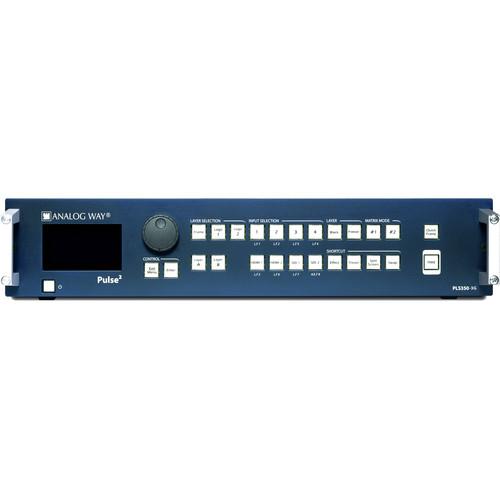 Contents of the user manual for the Analog Way PLS350-3G 8x1 3G HD
- Product category: Routers & Switchers Analog Way
- Brand: Analog Way
- Description and content of package
- Technical information and basic settings
- Frequently asked questions – FAQ
- Troubleshooting (does not switch on, does not respond, error message, what do I do if...)
- Authorized service for Analog Way Routers & Switchers
|
User manual for the Analog Way PLS350-3G 8x1 3G HD contain basic instructions
that need to be followed during installation and operation.
Before starting your appliance, the user manual should be read through carefully.
Follow all the safety instructions and warnings, and be guided by the given recommendations.
User manual is an integral part of any Analog Way product,
and if it is sold or transferred, they should be handed over jointly with the product.
Following the instructions for use is an essential prerequisite for protecting
health and property during use, as well as recognition of liability on the part of the manufacturer
for possible defects should you make a warranty claim. Download an official Analog Way user manual in which you will find instructions on how to install, use, maintain and service your product.
And do not forget – unsuitable use of a Analog Way product will considerably shorten its lifespan!
|
Product description The PLS350-3G Pulse2 8x1 3G/HD/SD-SDI Seamless Switcher/Mixer from Analog Way features 8 seamless inputs with 14 input plugs and 1 3G/HD/SD-SDI output. The switcher/mixer can be controlled and operated either via the front panel, from your computer, with the included RCS (Remote Control Software), or with one of the Event Controllers (sold separately). In addition, the unit features Mixer and Native Matrix operating modes. - Full audio digital compliant on DVI-D & HDMI Plugs
- EDID management on 6 inputs
- Ability to read and display the output EDIDs
- Ability to modify the Program in real time without using the Preview
- Capability to switch between any 14-input plugs (4 x DVI-D, 4 x HDMI, 4 x Universal Analog & 2 x 3G/HD/SD-SDI)
- 3D filter for SDTV composite sources
- CVBS, YPbPr, and 3G-SDI video outputs
- Computer formats up to 2K/2048 x 1152
- All live layers fully resizable
Dynamic layer (Moving from A to B) with Flying, Zooming, or Cropping
Pan & Zoom resizing up to 1000%
Open/Close animation
Border and shadow (Edge: 1 x color, 1 x width, 1 x height) - Transitions - Fade (dissolve), Cut, Wipe, and Slide
- Audio inputs can be embedded or de-embedded on all plugs
- Balanced stereo audio on all outputs
- 2 x S/PDIF inputs and 2 x S/PDIF outputs
- Chroma/Luma key and titling
- 8 memory presets per output (64 via RCS²)
- 8 full frames, 8 logo memories & 1 animated Logo
In the Box Analog Way PLS350-3G 8x1 3G/HD/SD-SDI Seamless Switcher/Mixer Power Supply Cord Ethernet Crossover Cable Remote Control Software Set of 6 Audio 5-Pin Screw Terminals Front Rack Ears Limited 3-Year Warranty Table of Contents
|
Upload User Manual
Have you got an user manual for the Analog Way PLS350-3G 8x1 3G HD SD-SDI Seamless Switcher Mixer in electronic form? Please send it to us and help us expand our library of instruction manuals.
Thank you, too, on behalf of other users.
To upload the product manual, we first need to check and make sure you are not a robot. After that, your "Submit Link" or "Upload File" will appear.
Technical parametersAnalog Way PLS350-3G Specs | Analog Inputs | SDTV:
Composite, S.Video, YUV, RGsB, or RGBSNTSC: 15.735 kHz/60 Hz
PAL/SECAM: 15.625 kHz/50 Hz
ED/HD-TV:
RGsB, RGBS, or YUV
480p/60 Hz - 576p/50 Hz - 720p, 1080i, 1035i/50 or 60 Hz - 1080p/24, 25, 30, 50 or 60 Hz - 1080psF/24, 25 or 30 Hz
Computer:
RGBHV, RGBS, or RGsBResolution up to 1600 x 1200/60 Hz, 1920 x 1200/60 Hz or 2048 x 1080/60 Hz
Horizontal frequency from 31.5 to 130 kHz
Vertical frequency up to 120 Hz
FpxMax = 165 MHz | | Digital Input Connectors | DVI-D (Input #1 to #4) (HDMI compliant): SD-TV, ED-TV, HD-TV, and Computer formats
HDMI (Input #3 to #6): SD-TV, ED-TV, HD-TV, and Computer formats
SDI (Input #7 to #8): SD-TV & HD-TV - YUV/10 bits/4:2:2, 3G-SDI
Automatic synchronization detection | | Outputs | Computer Digital & Analog:
RGBHV, RGBS or RGsB and DVIResolution up to 1600x1200/60 Hz, 1920 x 1200/60 Hz or 2048 x 1080/60 Hz
Vertical frequency 50, 60, 72, or 75 Hz depending on output format
FpxMax = 165 MHz
HD-TV:
RGsB, RGBS or YUV, DVI and HD-SDI, or 3G-SDI
720p, 1080i, 1035i/50 or 60 Hz - 1080p/24, 25, 30, 50, or 60 Hz - 1080psF/24, 25 or 30 Hz | | Video Output | SD-TV: SD-SDI
HD-TV: HD-SDI or 3G-SDI | | Operation Standards | SMPTE: ST 259:2008, ST 260:1999, ST 274:2008, ST 292-1:2012, ST 296:2012, ST 424:2012, ST 428-19:2010
VESA: GTF1.1, CVT 1.1, DMT1.0 rev.12 | | Audio Stereo In/Out | Inputs:
DVI (as HDMI)/HDMI/SDI/Audio De-Embedding: 1 stereo pair
Analog Inputs: 4 audio stereo inputs, balanced/unbalanced, Vi = +15 dBu, Zi = 20 kOhms (unbalanced)/40 kOhms (balanced), adjustable level per input
S/PDIF Inputs: 2 inputs, AES3id compatible, Zi = 75 Ohms, Input Level Min: 200 mVpp, Input Level Max: 2,8 Vpp, Protocol: AES3 or S/PDIF sub-code format
Outputs:
DVI (as HDMI)/SDI Audio Embedding: 1 stereo pair
Analog Inputs: 2 independent outputs, balanced/unbalanced, Vo = +9 dBu/300 Ohms (unbalanced), Vo = +15 dBu/600 Ohms (balanced)
S/PDIF Inputs: 2 outputs, AES3id compatible, Zi = 75 Ohms, Output Level: 0,5 Vpp (S/PDIF mode) or 1 Vpp (AES3 mode), Input Level Max: 2,8 Vpp, Protocol: AES3 or S/PDIF sub-code format | | User Control | Front Panel
Standby On/Off
Input, Layer and Logo direct access
Freeze/Black
Matrix mode output selection
Preset and effect menu shortcuts
Swap and Split Screen function shortcuts
Quick Frame, Take
Large Graphic VFD screen with control knob and buttons for easy and fast access to menus and adjustments | | Operating Modes | Two Operating Modes: Mixer and Native Matrix modes
Seamless switching with full Preview in Mixer mode with 1 layer
Seamless switching in Native Matrix mode
1 Title on Live Background in Mixer
1 layer on Still Background in Mixer mode
1 layer on Live Background in Mixer mode
2 layers on Still Background in Mixer mode
1 Live Background in Native Matrix mode | | Connectors (Rear Panel) | Input #1 and #2 Connectors:
DVI-D Female: (Digital SD/ED/HD-TV and Computer)
HD15-F (Analog SD/ED/HD-TV and Computer)
Input #3 and #4 Connectors:
DVI-D Female: (Digital SD/ED/HD-TV and Computer)
HD15-F (Analog SD/ED/HD-TV and Computer)
HDMI Female: (Digital SD/ED/HD-TV and Computer)
Input #5 to #6 Connectors:
HDMI Female: (Digital SD/ED/HD-TV and Computer)
Input #7 to #8 Connectors:
BNC: (3G/HD/SD-SDI)
Program and Preview Output Connectors:
Each output is fitted with: DVI-I Female: (Digital and Analog) RGB or YUV
HD15 Female: RGB or YUV
Video Output Connector:
BNC: (3G/HD/SD-SDI)
Audio:
5-pin MCO connectors: 4 for analog audio inputs and 2 for analog audio outputs
4 RCA connectors: 2 for S/PDIF audio inputs
2 for S/PDIF audio outputs
Miscellaneous:
DB9: RS-232 for remote control
RJ45: Ethernet connection
AC main connector with fuse and On/Off switch | | Power Supply | 100 to 240 VAC, 2.5 A, 50/60 Hz, 110 W | | Dimensions | 15.7 x 17.3 x 3.5" (39.8 x 43.9 x 8.9 cm) | | Weight | 13.9 lb (6.30 kg) |
Rating100% users recommend this product to others. And what about you?

This product has already been rated by 34 owners. Add your rating and experience with the product.
Discussion
 Ask our technicians if you have a problem with your settings,
or if anything is unclear in the user manual you have downloaded.
You can make use of our moderated discussion.
The discussion is public and helps other users of our website who may be encountering similar problems.
Ask our technicians if you have a problem with your settings,
or if anything is unclear in the user manual you have downloaded.
You can make use of our moderated discussion.
The discussion is public and helps other users of our website who may be encountering similar problems.
The discussion is empty - enter the first post
Post a new topic / query / comment:
|
|


