User Manual for Apantac ULTRA-DE-4K Multiviewer Click to enlarge the picture
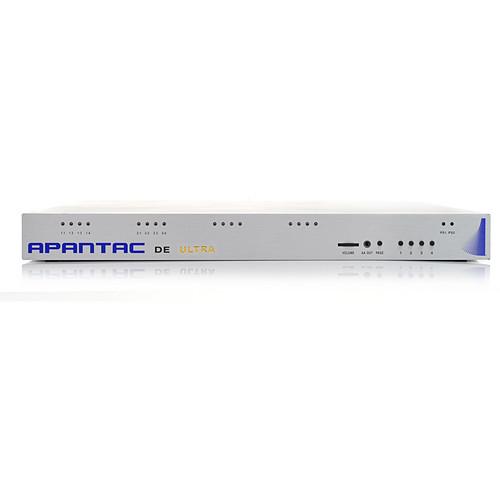 Contents of the user manual for the Apantac ULTRA-DE-4K Multiviewer
- Product category: Multiviewer Processors Apantac
- Brand: Apantac
- Description and content of package
- Technical information and basic settings
- Frequently asked questions – FAQ
- Troubleshooting (does not switch on, does not respond, error message, what do I do if...)
- Authorized service for Apantac Multiviewer Processors
|
User manual for the Apantac ULTRA-DE-4K Multiviewer contain basic instructions
that need to be followed during installation and operation.
Before starting your appliance, the user manual should be read through carefully.
Follow all the safety instructions and warnings, and be guided by the given recommendations.
User manual is an integral part of any Apantac product,
and if it is sold or transferred, they should be handed over jointly with the product.
Following the instructions for use is an essential prerequisite for protecting
health and property during use, as well as recognition of liability on the part of the manufacturer
for possible defects should you make a warranty claim. Download an official Apantac user manual in which you will find instructions on how to install, use, maintain and service your product.
And do not forget – unsuitable use of a Apantac product will considerably shorten its lifespan!
|
Product description The TAHOMA ULTRA-DE-4K Multiviewer from Apantac boasts a 3840 x 2160 4K output that offers high-quality resolution for multi-image display processing and monitoring. It is designed for high-end medical applications that use 4K monitors or a 2 x 2 video wall consisting of four 1920 x 1080 displays.
This Multiviewer includes an integrated CATx extender for extending sources up to 115' (35m). It includes 2 channels of embedded HDMI audio, 16 channels of embedded audio, or 4 channels of discrete analog or digital audio, which are available as options.
The TAHOMA ULTRA Multiviewer also uses TAHOMA Cynergy, a software option that lets users control all computer inputs on one or multiple TAHOMA Multiviewers with a single mouse and keyboard. It features a seamless interface between a single mouse and keyboard with all computers that are part of the TAHOMA Multiviewer system. So, users can move the mouse across all windows on single display or multiple displays, as well as copy and paste information between connected computers.
The ULTRA-DE-4K accepts both computer and broadcast signals - 4 to 8 DVI, VGA, YPbPr, YC, and composite sources for multi-image display. The mix and match of both computer and broadcast signals offers an integrative approach to signal monitoring. This device even utilizes a skin technology that allows users to customize their on-screen display of graphics, including borders, labels, fonts, tally LEDs, clock faces, logos, embedded audio, discrete audio meters, and audio / video alarms. Video windows on the display may include multiple labels, and support UMD, OMD, IMD, and standalone labels.
The Multiviewer offers a robust solution for virtually any multi-image display-processing application whether in government applications, education and distance learning, corporate or medical, and traditional control room or broadcast and professional AV environments. Furthermore, the TAHOMA Multiviewer hardware offers a sleek unit with redundant power and several control methods: via the front panel buttons, a simple preset panel, the Apantac ASCII protocol, via a Control Module with GPI inputs assigned to presets, and the Apantac Director software - a configuration and control application. - Output resolution at 3840 x 2160
- 4-8 DVI, VGA, YPbPr, YC, and composite inputs
- Up to 16 channels of embedded audio per input
- Field upgradable to allow discrete audio (AES/AA)
- Multiple outputs in DVI or HDMI
- Multiple labels per video windows - UMD, OMD, IMD, and standalone labels
- Automatic input aspect ratio detection
- Built-in video, audio alarm detections - no audio, audio high/low, no video, video black, and video frozen
- Apantac skin technology allows on-screen graphical elements to be designed with any graphics tool
- Front panel headphone jack with volume adjustment for audio monitoring
- Front panel buttons for quick preset recalls
- 1 RU with optional redundant power supply
In the Box Apantac ULTRA-DE-4K Multiviewer 3.0' (0.9m) CAT5 Cable DVI & HDMI Short Distance Receiver Rack Mount SCSI to DB9 for GPI RJ-50 to DB9 for GPI per Module RJ-45 to DB9 for Serial Limited 3-Year Warranty Table of Contents
|
Upload User Manual
Have you got an user manual for the Apantac ULTRA-DE-4K Multiviewer in electronic form? Please send it to us and help us expand our library of instruction manuals.
Thank you, too, on behalf of other users.
To upload the product manual, we first need to check and make sure you are not a robot. After that, your "Submit Link" or "Upload File" will appear.
Technical parametersApantac ULTRA-DE-4K Specs | Video Inputs | Up to 8 DVI/VGA/HDMI/3G/HD/Composite/YPbPr/YC | | Connectors | BNC IEC 61169-8 Annex A, DVI-I (DVI-I-VGA adapter) | | Total windows | 4 or 8 | | Serial | Digital: SMPTE 424M, 292M, 259M | | Equalization | 120 m at 2.97 Gb/s, 140 m at 1.48 Gb/s, 400 m at 270 Mb/s with Belden 1694A | | Return Loss | >15 dB up to 1.485 Gb/s
>10 dB up to 3G | | Embedded Audio | SMPTE-272M-A | | Composite | NTSC (SMPTE-170M), PAL (ITU624-2) | | Signal Level | 1 V nominal | | DC Offset | 0 V, ±0.1 V | | Impedance | 75 Ω for BNC, 100 Ω for DVI-I | | Return Loss | 40 dB up to 5 MHz | | Alarms | No audio, audio high/low, no video, video black, video frozen | | Control | Front panel buttons for quick preset recalls, GPIs, Apantac ASCII Protocol (AXP), Director (configuration & control application) | | AES Audio | Discrete: Up to 4 channels / video input (2 pairs, balanced / unbalanced) | | Analog Audio | Discrete: Up to 4 channels / video input (2 pairs, balanced / unbalanced) | | Outputs | 4 DVI, HDMI (RJ-45) | | Output Resolution | 3840 x 2160 @ 60 Hz | | On Screen Display | Skin Technology for customizing borders, labes (4/window), fonts, tally LED, clock faces, logos, UMD, OMD, IMD | | I/O | General Purpose: Up to 24 inputs with DB9 connectors | | Serial Port | RS232 with RS422 or 485 option
Connector: RJ-45, Baud Rate up to 115200
Format, TSL, TSI, AXP | | IP | 100 Base-Tx, TSL, AXP, Connector: RJ-45 | | Electrical | 100 W, 90 to 250 V 50/60 Hz | | EMI/RFI | Complies with FCC Part 15 Class A, CE, EU
EMC, C-tick | | Size | Height: 1 RU
W x D: 17.5 x 19.7" (44.5 x 50 cm) | | | | Package Weight | 2.0 lb | | Box Dimensions (LxWxH) | 26.0 x 23.0 x 8.0" |
Rating20% users recommend this product to others. And what about you?

This product has already been rated by 62 owners. Add your rating and experience with the product.
Discussion
 Ask our technicians if you have a problem with your settings,
or if anything is unclear in the user manual you have downloaded.
You can make use of our moderated discussion.
The discussion is public and helps other users of our website who may be encountering similar problems.
Ask our technicians if you have a problem with your settings,
or if anything is unclear in the user manual you have downloaded.
You can make use of our moderated discussion.
The discussion is public and helps other users of our website who may be encountering similar problems.
The discussion is empty - enter the first post
Post a new topic / query / comment:
|
|


