User Manual for APC AP7532 Basic Rack Power Distribution Unit Click to enlarge the picture
 Contents of the user manual for the APC AP7532 Basic Rack Power Distribution
- Product category: Power Strips APC
- Brand: APC
- Description and content of package
- Technical information and basic settings
- Frequently asked questions – FAQ
- Troubleshooting (does not switch on, does not respond, error message, what do I do if...)
- Authorized service for APC Power Strips
|
User manual for the APC AP7532 Basic Rack Power Distribution contain basic instructions
that need to be followed during installation and operation.
Before starting your appliance, the user manual should be read through carefully.
Follow all the safety instructions and warnings, and be guided by the given recommendations.
User manual is an integral part of any APC product,
and if it is sold or transferred, they should be handed over jointly with the product.
Following the instructions for use is an essential prerequisite for protecting
health and property during use, as well as recognition of liability on the part of the manufacturer
for possible defects should you make a warranty claim. Download an official APC user manual in which you will find instructions on how to install, use, maintain and service your product.
And do not forget – unsuitable use of a APC product will considerably shorten its lifespan!
|
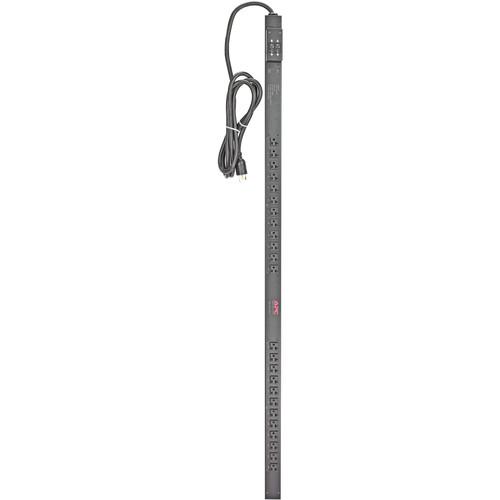
Product description The AP7532 Basic Rack Power Distribution Unit from APC is a power strip designed for use in rackmount environments. It features a 0U rackmount form factor and 24 x NEMA 5-20R outlets, drawing its power via its NEMA L5-30P plug. It is designed to be installed vertically inside the rack.
This PDU operates using a 100 & 120 VAC input, a 120 VAC output, and has a load capacity of 2880 VAC. Its operational frequency is 50/60 Hz. A 10' power cord provides power to the PDU. AP7532 Features - Resettable Circuit Breakers
- Helps enable a quick recovery from overload events
- Toolless Rack Mounting Capabilities
- Server cases do not require additional tools to mount into NetShelter Enclosures, which helps users to quickly and easily mount units in the rear of the enclosure
- Vertical Mounting Capabilities
- Easily mounts vertically in racks or enclosures and occupies zero U of valuable rack space, which allows more equipment in the rack. Units that mount vertically are optimized to fit in a NetShelter enclosures
Basic Rack PDU Features & Benefits - Rack Mountable
- This model employs a vertical mount and puts power where it is needed most - in the racks near the equipment
- Single-Input Power Source
- Supply power from one branch whip to multiple pieces of equipment, conveniently powering rack-mount equipment. Saves time and money during installation by using one branch whip and standard connections
- Product Distribution
- Anguilla, Antigua And Barbuda, Argentina, Aruba, Bahamas, Barbados, Belize, Bermuda, Bolivia, Brazil, Canada, Chile, Colombia, Costa Rica, Cuba, Dominica, Dominican Republic, Ecuador, El Salvador, Falkland Islands (Malvinas), Grenada, Guadeloupe, Guatemala, Guyana, French Guiana, Haiti, Honduras, Jamaica, Madagascar, Martinique, Mauritius, Mayotte, Mexico, Netherlands Antilles, Nicaragua, Panama, Paraguay, Peru, Puerto Rico, Reunion, Saint Kitts And Nevis, Saint Lucia, Saint Vincent And The Grenadines, Trinidad And Tobago, Turks And Caicos Islands, United States, Uruguay, Venezuela, Virgin Islands (United States)
UPC: 731304225522 In the Box APC AP7532 Basic Rack Power Distribution Unit Limited 2-Year Warranty Table of Contents
|
Upload User Manual
Have you got an user manual for the APC AP7532 Basic Rack Power Distribution Unit in electronic form? Please send it to us and help us expand our library of instruction manuals.
Thank you, too, on behalf of other users.
To upload the product manual, we first need to check and make sure you are not a robot. After that, your "Submit Link" or "Upload File" will appear.
Technical parametersAPC AP7532 Specs | | | Wall Plug Type | NEMA L5-30P | | Outlets | 24 x NEMA 5-20R | | USB Ports | None | | Ethernet | None | | Coaxial | None | | RJ11 | None | | | | AC Input Power | 100 VAC, 60 Hz | | Load Capacity | 2880 W | | Rated Current | 30 A | | | | Certifications | RoHS, as per Manufacturer | | Operating Temperature | 32 to 113°F / 0 to 45°C | | Operating Humidity | 0 to 95% | | Storage Temperature | -13 to 149°F / -25 to 65°C | | Storage Humidity | 0 to 95% | | | | Cable Length | 10' / 3 m | | Cable Management | None | | Dimensions (L x W x H) | 63.7 x 2.2 x 1.7" / 161.8 x 5.6 x 4.3 cm | | Weight | 12.3 lb / 5.6 kg | | | | Package Weight | 17.2 lb | | Box Dimensions (LxWxH) | 84.0 x 7.0 x 5.0" |
Rating100% users recommend this product to others. And what about you?

This product has already been rated by 91 owners. Add your rating and experience with the product.
Discussion
 Ask our technicians if you have a problem with your settings,
or if anything is unclear in the user manual you have downloaded.
You can make use of our moderated discussion.
The discussion is public and helps other users of our website who may be encountering similar problems.
Ask our technicians if you have a problem with your settings,
or if anything is unclear in the user manual you have downloaded.
You can make use of our moderated discussion.
The discussion is public and helps other users of our website who may be encountering similar problems.
The discussion is empty - enter the first post
Post a new topic / query / comment:
|
|


