|
User Manual for APC NetShelter SX 24U Enclosure Click to enlarge the picture
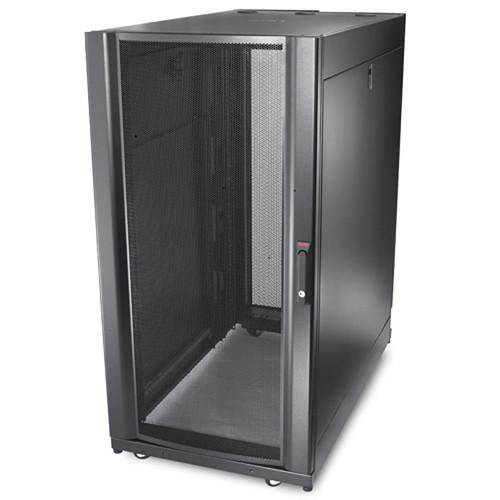 Contents of the user manual for the APC NetShelter SX 24U Enclosure
- Product category: UPS Accessories APC
- Brand: APC
- Description and content of package
- Technical information and basic settings
- Frequently asked questions – FAQ
- Troubleshooting (does not switch on, does not respond, error message, what do I do if...)
- Authorized service for APC UPS Accessories
 |
User manual for the APC NetShelter SX 24U Enclosure contain basic instructions
that need to be followed during installation and operation.
Before starting your appliance, the user manual should be read through carefully.
Follow all the safety instructions and warnings, and be guided by the given recommendations.
User manual is an integral part of any APC product,
and if it is sold or transferred, they should be handed over jointly with the product.
Following the instructions for use is an essential prerequisite for protecting
health and property during use, as well as recognition of liability on the part of the manufacturer
for possible defects should you make a warranty claim. Download an official APC user manual in which you will find instructions on how to install, use, maintain and service your product.
And do not forget – unsuitable use of a APC product will considerably shorten its lifespan!
|
Product description The black NetShelter SX 24U Enclosure from APC is optimized for storage of industry-standard EIA-310, 19" rack-mounted hardware, including cable management systems. This product is also optimized for use with high -capacity cable management systems that attach to equipment mounting rails within enclosures. This helps equipment to align with mounting U-spaces and provides channels for routing and managing cabling. This product works with IT enclosures to help provide an infrastructure support system, and is compatible with Schneider Electric rack accessory products to create a complete rack system.
Large cable-access slots in the roof provide for overhead cable egress. The roof also includes openings with pre-installed brush strips in locations that favor the front of the enclosure, allowing data cables to pass through, as well as provisions for air containment. The bottom allows for cable access through a raised floor. Additionally, this enclosure is equipped with a perforated front door with a curved profile, quick-release doors, half-height side panels with optional brush strips for passthrough, a removable cable access roof, eyebolt support, equipment mounting rails that integrate with a patch cabling system, and more. This enclosure includes a hardware bag that may be used for mounting IT equipment and tools for simple enclosure adjustment. NetShelter SX Features & Benefits Compatibility - Integrated with InfraStruxure Products
- Schneider Electric cooling, power distribution, and cable management products work with IT enclosures to provide a complete infrastructure support system
- Schneider Electric Rack Systems Compatible
- Compatible with a variety of Schneider Electric rack accessory products to provide the ability to create a complete rack system. Configure rack solutions using the Schneider Electric Design Portal - Small IT Solution Designer configurator complete with verification of product compatibility and a 3rd party equipment catalog to aid in visualizing your rack solution
- Optimized for High Capacity Cable Management Systems
- NetShelter SX enclosures are optimized for use with high capacity cable management systems that attach to equipment mounting rails inside enclosures aligning with equipment mounting u-spaces and provide channels for routing and managing cabling
- Optimized for High Capacity Cable Management Systems
- Vendor-neutral mounting for compatibility with all EIA-310 compliant 19" equipment. The "Fits Like a Glove" money back guarantee provides peace of mind that all of your EIA-310-E compliant rack-mount equipment will physically fit in a NetShelter
Convenience - Cable Access Openings with Pre-Installed Brushes
- Large cable-access slots in the roof provide access for overhead cable egress. The bottom design allows for unobstructed cable access through a raised floor. The roof includes openings with brush strips pre-installed in locations towards the front of the enclosure to allow for data-cable passthrough and provisions for air containment
- Simple Selection
- There is no need to spend hours choosing from and compiling dozens of part numbers to create a single enclosure. Schneider Electric has made it easy by handling the details and providing complete enclosures with single part numbers
- Perforated Front Door with Curved Profile
- Perforated front and rear doors provide ample ventilation for servers and networking equipment. The front door perforated area is optimized with a curved profile to provide greater surface area and allowance of more perforation coverage and a higher perforation rating
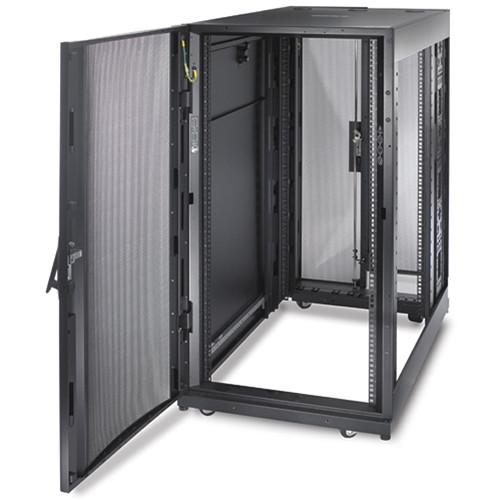
- Quick-Release Doors
- The front door can be moved to the opposite side or interchanged with the rear doors. Doors are removed with a simple lift-off design
- Half-Height Side Panels and Option with Brush Strips for Pass-Through
- Half-height quick-release side panels reduce size and weight for easy handling and access to equipment. Side panels are lockable utilizing a single key with the doors. Now available are side panel options integrated with pass-through holes and brush strips for routing cabling to adjacent racks in a row while still maintaining proper airflow
- Removable Cable Access Roof
- The roof can be removed with simple pull-pin hinges for access during equipment installation or even with cabling already in place and routed through the cable openings. Once removed, the roof is reversible to reposition the larger cable openings for power distribution plugs and connectors
- Eyebolt Support Integrated into the Enclosure Frame
- Integrated eyebolt holes at the top of the enclosure frame allow the enclosure to be lifted for movement and enclosure placement using eyebolt lifting mechanisms. Refer to enclosure user documentation for detailed specifications on eyebolt requirements and enclosure weight limits
- Equipment Mounting Rails Integrate with Patch Cabling Systems
- Equipment mounting rails include zero U mounting holes beside the EIA 19" mounting space that allow the installation of Data Distribution Cable (DDC) patch systems without taking up any critical equipment U-space. AV and networking enclosure designs do not include hole locations for integration of DDC cabling. Other 1U, 2U, and rear enclosure zero U options are available for use with these enclosures
- Enclosure Adjustment Tools and Hardware Provided
- All enclosures are provided standard with a hardware bag that includes hardware for mounting IT equipment and tools for simple enclosure adjustment
Agility - Pre-Installed Full-Enclosure Height Rear Accessory Channels
- An integrated and adjustable rear accessory channel provides zero U mounting locations for toolless accessories. Each channel has two mounting bays to support a combination of up to four accessories such as PDUs and vertical cable organizers. A 42.13" / 1070mm deep enclosure and networking enclosure includes two channels. Channels are pre-installed at the factory in the rear of the enclosure but can be moved to other locations of the enclosure along the side brace to resituate cable management where it is needed most
- Adjustable Mounting Rails with Captive Hardware and Rapid Alignment
- The vertical mounting rails can be adjusted in 1/4" / 6.4mm increments covering virtually any mounting requirement for IT equipment. Easy alignment features are integrated into the enclosure mounting rail and side braces for quick alignment verification without the use of tools to verify alignment. U positions are numbered front and back for rapid installation of equipment
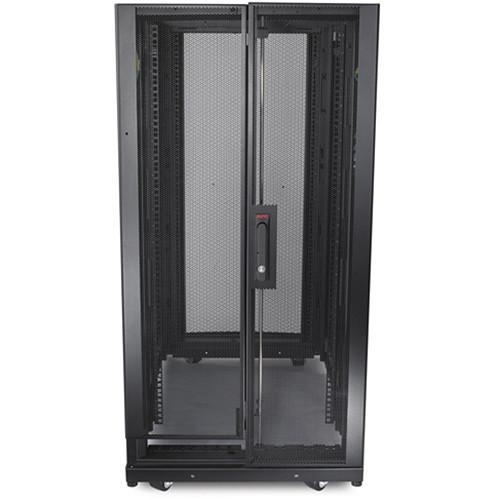
- Split Rear Doors
- Split rear doors improve access and serviceability to rear of rack-mounted equipment. The split rear doors help to maximize floor space. Only 11.0" / 279.4 mm of clearance is required behind the enclosures to allow for door swing
- Low-Profile Casters and Adjustable Leveling Feet from Underneath or Above
- Enclosures are shipped standard with both leveling feet and casters. Leveling feet can be quickly adjusted with a screwdriver or drill, eliminating the need to reach underneath with a wrench
- Integrated Joining Hardware with Multiple Width Enclosure Alignment
- Enclosures include pre-installed joining hardware to join enclosures in a row and provide additional stability to the enclosure. The pre-installed joining hardware includes holes for joining to an adjacent enclosure at 600mm centers or 24" centers depending upon the floor layout
- Special Packaging Options for Shipping Rack with Equipment Mounted
- Enclosures with shock packaging are standard enclosures with provisions in the packaging design and enclosure assembly for shipping the enclosures with equipment mounted inside
- Enclosure Assemble-to-Order (ATO) Options Capable
- The Enclosure ATO (Assemble-to-Order) options provide a level of customization for enclosure customers beyond the standard enclosure models. For example, the enclosure can be assembled without sides, doors, or neither. This customization is limited to the assembly of the enclosure itself and does not include additional enclosure mounted components.
Safety - Designed for Enhanced Structural Stability
- A proven frame design, heavy-gauge mounting rails, and heavy-duty casters provide for 3,006.31 lb / 1363.64 kg static (leveling feet) and 2254.73 lb / 1022.73 kg dynamic (caster) load ratings. Enclosures have been tested and approved to be combined with proper bolt-down accessories to meet various seismic requirements
- Integrated Electrical Grounding
- The roof, side panels, and front and rear doors are grounded to the frame of the enclosure. Eight additional electrical grounding inserts are located on the frame for external grounding
UPC: 731304262275 In the Box APC NetShelter SX 24U Enclosure (600 x 1070mm, Black) 60 x Plastic Cup Washers 60 x M6 x 16 Phillips Slot Screws More info from APC ssaxutdwcfvqdytutcrzdcrayftwyeueezrw Table of Contents
|
Upload User Manual
Have you got an user manual for the APC NetShelter SX 24U Enclosure in electronic form? Please send it to us and help us expand our library of instruction manuals.
Thank you, too, on behalf of other users.
To upload the product manual, we first need to check and make sure you are not a robot. After that, your "Submit Link" or "Upload File" will appear.
Technical parametersAPC AR3104SP1 Specs | | | Weight Capacity | Static Load: 3006.31 lb / 1363.64 kg
Dynamic Load: 2254.73 lb / 1022.73 kg | | Mounting Depth | Minimum: 7.52" / 191.00 mm
Maximum: 36.02" / 915.00 mm | | Rack Height | 24U | | Rack Width | 19.00" / 48.26 cm | | Vertical Posts | 16 gauge | | Front Door | 16 gauge | | Rear Door | 18 gauge | | Roof | 18 gauge | | EIA Mounting Rails | 14 gauge | | Side Panels | 18 gauge | | Color | Black | | | | Regulatory Approvals | UL 2416, UL 60950-1 | | Standards | EIA-310-E | | | | RoHS | Compliant | | REACH | REACH: Contains No SVHCs | | Other Environmental Compliance | China RoHS | | | | Dimensions | 47.17 x 23.62 x 42.13" / 1,198.00 x 600.00 x 1,070.00 mm | | Weight | 196.41 lb / 89.09 kg | | | | Package Weight | 438.0 lb | | Box Dimensions (LxWxH) | 48.0 x 48.0 x 30.0" |
Rating60% users recommend this product to others. And what about you?

This product has already been rated by 59 owners. Add your rating and experience with the product.
Discussion
 Ask our technicians if you have a problem with your settings,
or if anything is unclear in the user manual you have downloaded.
You can make use of our moderated discussion.
The discussion is public and helps other users of our website who may be encountering similar problems.
Ask our technicians if you have a problem with your settings,
or if anything is unclear in the user manual you have downloaded.
You can make use of our moderated discussion.
The discussion is public and helps other users of our website who may be encountering similar problems.
The discussion is empty - enter the first post
Post a new topic / query / comment:
|
|
|
| Request for user manual |
You can’t find the operation manual you are looking for? Let us know and we will try to add the missing manual:
I’m looking for a manual / Request for manual
Current requests for instruction manuals:
Call Of Duty World War Two For Xbox...
controller stratus XL...
stratus XL...
smart whatch serie S11 42mm...
Allen & Heath SQ-6 manual...
|
| Discussion |
Latest contributions to the discussion:
AEW R 4100
Name: MAURICIO ANGARITA
Audio-Technica AEW-R4100 UHF Diversity Receiver for
AEW R 4100 has the mute function blocked and does not allow audio to pass. I tried several times to turn off the mute from the transmitter but it does nothing, the mute stays on. Solution?
Thank you...
Instructions for assembling the 2015 Forecast Image Master Consoles GC3-A
Name: mike elam
Forecast Consoles GC3-A ImageMaster Editing Console
Looking for instructions for assembling this console. ...
EMPTY TONER ERROR MESSAGE AFTER REPLACING TONER
Name: LINDA BAD YELLOW EYES
Brother TN223BK Standard-Yield Toner
I HAD TO CHANGE OUT ALL THREE TONERS DUE TO LEAKS IN THE YELLOW AND CYAN. AFTER I REPLACED THEM, THE MACHINE KEEPS GIVING ME AN EMPTY TONER ERROR MESSAGE. HELP!!...
PS480D 20/24 pin Switching 480W Power Supply
Name: swkargo
Logisys 480W Power Supply
This item states in can run -5vdc .It is NOT listed on the board or I beleive is r4 is missing the resitior. Any body have thid issue. Shawn
...
Help needed
Name: Ann Carter
SanDisk 1TB Extreme Portable USB 3.1
When I click the link to download the user manual for my Sandisk Extreme external hard drive, it gives me the manual for the LG Cricket. Can you please change the link so I can download the Sandisk manual and begin using this drive? Thank you....
|
|


