|
User Manual for APC Smart-UPS Battery Backup with Network Card Click to enlarge the picture
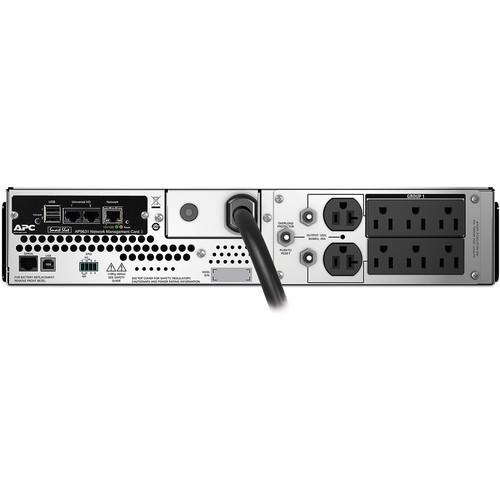 Contents of the user manual for the APC Smart-UPS Battery Backup with Network
- Product category: UPS Backup APC
- Brand: APC
- Description and content of package
- Technical information and basic settings
- Frequently asked questions – FAQ
- Troubleshooting (does not switch on, does not respond, error message, what do I do if...)
- Authorized service for APC UPS Backup
|
User manual for the APC Smart-UPS Battery Backup with Network contain basic instructions
that need to be followed during installation and operation.
Before starting your appliance, the user manual should be read through carefully.
Follow all the safety instructions and warnings, and be guided by the given recommendations.
User manual is an integral part of any APC product,
and if it is sold or transferred, they should be handed over jointly with the product.
Following the instructions for use is an essential prerequisite for protecting
health and property during use, as well as recognition of liability on the part of the manufacturer
for possible defects should you make a warranty claim. Download an official APC user manual in which you will find instructions on how to install, use, maintain and service your product.
And do not forget – unsuitable use of a APC product will considerably shorten its lifespan!
|
Product description The Smart-UPS Battery Backup with Network Card from APC features an output power capacity of 1920 VA / 1920W, a maximum configurable power output of 2200 VA / 1920W, an input range of 75-154 VAC @ 50-60 Hz, two NEMA 5-20R battery backup and surge-protected outputs, six NEMA 5-15R battery backup and surge-protected outputs, a surge energy rating of 530 joules, line interactive topology, and a sine waveform. The integrated 8' power cord has a NEMA 5-20P input connection and uses 120V at 50/60 Hz ±3 Hz. This Smart-UPS operates with up to 97.5% efficiency and can last for up to 5.4 minutes under a full load and up to 15.9 minutes with a half load. The battery is hot-swappable, user-replaceable, can be recharged in up to 3 hours, and has a life of 3-5 years.
Included PowerChute Network Shutdown management software helps to provide unattended, yet proper shutdowns of network operating systems, and also included is a pre-installed APC AP9631 Network Management Card, rackmount support rails and hardware, and a USB cable. Support is provided by a limited 3-year repair or replace warranty that excludes the battery, as a limited 2-year battery warranty, and a $150,000 equipment protection policy. General Features - Protects Electronic Equipment from Power Disruptions
- Keep your electronic equipment protected through blackouts, brownouts, surges, and other power disturbances with an APC Smart-UPS. It provides runtimes while on battery so you can continue working during medium-length power outages. Providing a greater level of control, this UPS has one switchable outlet group that allows individual control separate from the UPS, which allows for the ability to reboot hung devices, program sequences to switch on and off, and the non-critical load shedding of equipment.
Automatic Voltage Regulation (AVR) adjusts high and low voltages to a safe level, helping to ensure your equipment has reliable power while preserving the life of the battery. The pure sine wave output while on battery provides a high degree of compatibility for active power factor corrected (PFC) servers and sensitive electronics.
A pre-installed Network Management Card (NMC) with Environmental Monitoring allows users to monitor and control their APC Smart-UPS via secure network browsers or external command line interfaces. The card provides multi-user access, multi-language support, and notifications. The card operates on a network using IPv6 and SNMPv3 protocols. - Green Mode Reduces Power Consumption
- Operate efficiently with the Smart-UPS green mode, which helps conserve energy without sacrificing protection when power quality is within acceptable levels and power conditioning is not necessary. The UPS will enter and exit green mode automatically, ensuring you can operating at the high levels of efficiency while saving utility costs and generating less heat. To help you monitor your energy usage, this UPS has an energy meter that provides actual kWh (kilowatt hours) of usage.
- Intelligent Battery Management Increases Performance
- For battery maintenance, this Smart-UPS provides a predictive month and year for when battery replacement is recommended. It also helps prolong battery life by regulating the charge voltage according to battery temperature. Detect faulty batteries with the periodic battery self-test and disconnected battery notification.
- Bright LCD Interface Is Easy to Operate
- Quickly view the UPS utility status thanks to multiple status indicators on the bright LCD interface. It provides information with multiple language options, and the intuitive navigation keys make it simple to configure settings. This UPS can be configured to shut down and reboot connected equipment in a pre-determined order.
- PowerChute Software Provides Safe System Shutdown
- Designed for usability, PowerChute Business Edition software provides safe system shutdown in the event of an extended power outage while helping to prevent potential data corruption. It is fast and easy to install, and you can tailor settings to meet your individual needs. Find cost savings by using PowerChute to monitor your equipment's energy consumption.
UPC: 731304332763 In the Box APC Smart-UPS Battery Backup with Network Card UPS Network Management Card 2 with Environmental Monitoring USB Cable Rackmount Support Rails and Hardware PowerChute Software Limited Lifetime $150,000 Equipment Protection Policy Limited 2-Year Warranty (Battery Only) Limited 3-Year Warranty More info from APC Table of Contents
|
Upload User Manual
Have you got an user manual for the APC Smart-UPS Battery Backup with Network Card in electronic form? Please send it to us and help us expand our library of instruction manuals.
Thank you, too, on behalf of other users.
To upload the product manual, we first need to check and make sure you are not a robot. After that, your "Submit Link" or "Upload File" will appear.
Technical parametersAPC Smart-UPS 2200VA Specs | | | Total Outlets | 8 | | Protected Outlets | 2 x NEMA 5-20R (Battery and Surge)
6 x NEMA 5-15R (Battery and Surge) | | Plug Type | NEMA 5-20P | | USB Charging Ports | None | | SmartSlot Interface | 1 | | Coax Protection | None | | Data Line Protection | None | | Communications | None | | Emergency Power Off (EPO) Support | Yes | | Topology | Line Interactive | | Transfer Time | 4 to 8 ms | | | | Surge Energy Rating | 530 Joules | | Maximum Wattage | 1920 W | | Nominal Input Voltage | 120 VAC | | Input Voltage Range | 82 to 143 VAC | | Input Voltage Adjustable Range | 75 to 154 VAC | | Input Frequency | 50/60 Hz ± 3 Hz (Auto Sensing) | | Nominal Output Voltage | 120 VAC | | Output Frequency | 50/60 Hz ± 3 Hz | | Voltage Distortion | <5% | | Load Capacity | 2200 VA | | Thermal Dissipation | 215 BTU/Hour | | Maximum Efficiency | 97.5% | | Waveform | Sine Wave | | | | Chemistry | Lead-Acid | | Full-Load Runtime | 5.4 Minutes | | Half-Load Runtime | 15.9 Minutes | | Charging Time | 3 Hours | | User Replaceable | Yes | | Replacement Battery | RBC43 | | Hot-Swap Support | Yes | | External Battery Connection | None | | | | Operating Temperature | 32 to 104°F / 0 to 40°C | | Operating Humidity | 0 to 95% | | Storage Temperature | 5 to 113°F / -15 to 45°C | | Storage Humidity | 0 to 95% | | Operating Altitude | 0 to 10,000' / 0.00 to 3048 m | | Storage Altitude | 0 to 50,000' / 0.00 to 15,240 m | | Noise Level | 55 dBA | | Certifications | CSA, ENERGY STAR, FCC, REACH, RoHS, UL, as per Manufacturer | | | | Cable Length | 8' / 2.44 m | | Rack Form Factor | 2 RU | | Dimensions (W x H x D) | 18.9 x 3.4 x 26.9" / 48.0 x 8.6 x 68.3 cm | | Weight | 93.3 lb / 42.3 kg | | | | Package Weight | 28.85 lb | | Box Dimensions (LxWxH) | 38.5 x 23.5 x 9.5" |
Rating70% users recommend this product to others. And what about you?

This product has already been rated by 08 owners. Add your rating and experience with the product.
Discussion
 Ask our technicians if you have a problem with your settings,
or if anything is unclear in the user manual you have downloaded.
You can make use of our moderated discussion.
The discussion is public and helps other users of our website who may be encountering similar problems.
Ask our technicians if you have a problem with your settings,
or if anything is unclear in the user manual you have downloaded.
You can make use of our moderated discussion.
The discussion is public and helps other users of our website who may be encountering similar problems.
The discussion is empty - enter the first post
Post a new topic / query / comment:
|
|
|
| Request for user manual |
You can’t find the operation manual you are looking for? Let us know and we will try to add the missing manual:
I’m looking for a manual / Request for manual
Current requests for instruction manuals:
Call Of Duty World War Two For Xbox...
controller stratus XL...
stratus XL...
smart whatch serie S11 42mm...
Allen & Heath SQ-6 manual...
|
| Discussion |
Latest contributions to the discussion:
AEW R 4100
Name: MAURICIO ANGARITA
Audio-Technica AEW-R4100 UHF Diversity Receiver for
AEW R 4100 has the mute function blocked and does not allow audio to pass. I tried several times to turn off the mute from the transmitter but it does nothing, the mute stays on. Solution?
Thank you...
Instructions for assembling the 2015 Forecast Image Master Consoles GC3-A
Name: mike elam
Forecast Consoles GC3-A ImageMaster Editing Console
Looking for instructions for assembling this console. ...
EMPTY TONER ERROR MESSAGE AFTER REPLACING TONER
Name: LINDA BAD YELLOW EYES
Brother TN223BK Standard-Yield Toner
I HAD TO CHANGE OUT ALL THREE TONERS DUE TO LEAKS IN THE YELLOW AND CYAN. AFTER I REPLACED THEM, THE MACHINE KEEPS GIVING ME AN EMPTY TONER ERROR MESSAGE. HELP!!...
PS480D 20/24 pin Switching 480W Power Supply
Name: swkargo
Logisys 480W Power Supply
This item states in can run -5vdc .It is NOT listed on the board or I beleive is r4 is missing the resitior. Any body have thid issue. Shawn
...
Help needed
Name: Ann Carter
SanDisk 1TB Extreme Portable USB 3.1
When I click the link to download the user manual for my Sandisk Extreme external hard drive, it gives me the manual for the LG Cricket. Can you please change the link so I can download the Sandisk manual and begin using this drive? Thank you....
|
|


