User Manual for Apple 10.5" iPad Air Click to enlarge the picture
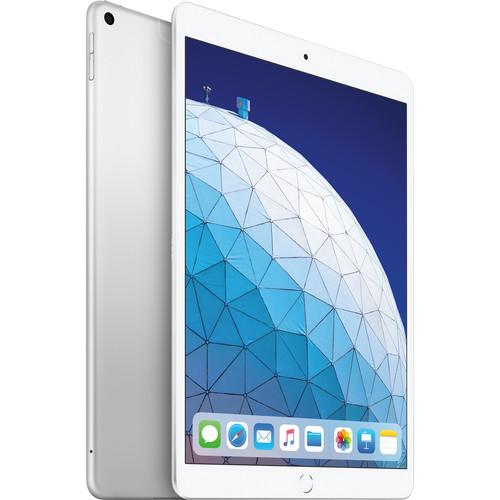 Contents of the user manual for the Apple 10.5" iPad Air
- Product category: iPads & Tablets Apple
- Brand: Apple
- Description and content of package
- Technical information and basic settings
- Frequently asked questions – FAQ
- Troubleshooting (does not switch on, does not respond, error message, what do I do if...)
- Authorized service for Apple iPads & Tablets
|
User manual for the Apple 10.5" iPad Air contain basic instructions
that need to be followed during installation and operation.
Before starting your appliance, the user manual should be read through carefully.
Follow all the safety instructions and warnings, and be guided by the given recommendations.
User manual is an integral part of any Apple product,
and if it is sold or transferred, they should be handed over jointly with the product.
Following the instructions for use is an essential prerequisite for protecting
health and property during use, as well as recognition of liability on the part of the manufacturer
for possible defects should you make a warranty claim. Download an official Apple user manual in which you will find instructions on how to install, use, maintain and service your product.
And do not forget – unsuitable use of a Apple product will considerably shorten its lifespan!
|
Product description Microsoft Surface Pro, an Ideal Mobile Video Editing Machine? Read More The 10.5" iPad Air from Apple, updated from the same one you know and love, features a few improvements to provide you with a better experience. The previous A10 Fusion chip is replaced with the A12 Bionic chip, which is more powerful and supports Neural Engine machine learning. Its 9.7" Retina display now measures 10.5" with a 500 cd/m² brightness rating, a 2224 x 1668 resolution, wide color coverage, True Tone technology, and an anti-glare coating. Lastly, for all content creators, the iPad Air now supports the first-generation Apple Pencil, so you can write and draw freely. Other integrated features include its front 7MP FaceTime HD camera, 8MP rear camera, and a 3.5mm combo audio jack.
This iPad comes preloaded with iOS. Please check your device settings for the latest available update. - A12 Bionic Chip
- The Apple A12 Bionic Chip with Neural Engine utilizes real-time machine learning to enhance everything you do such as photo editing, gaming, 3D modelling, streaming videos, and more. Meanwhile, its quad-core graphics engine gives you the power to enjoy augmented reality experiences, photo-realistic effects in 3D games, and details graphics within apps.
- Retina Display
- The iPad Air has a 10.5" Retina Display with P3 wide color gamut coverage for vivid colors. It also has True Tone, high brightness, and an anti-glare coating for better viewing. True Tone optimizes the white balance of the display to best fit your ambient light, so it's easy on the eyes.
- Cameras
- Whether you're taking selfies or pictures of the world, the iPad Air has you covered with a front 7MP Facetime HD camera and a rear 8MP camera. Capture pictures and videos in 1080p, and even in slow motion at 120 fps. With the power of the A12 Bionic chip and front- and rear-cameras, you'll be able to experience augmented reality in games, apps, and more.
- Apple Pencil
- If you want to write or draw, the iPad Air supports the first-generation Apple Pencil, so you can create freely as if you had a pen and paper.
- Touch ID
- Like every Apple product, the iPad Air was designed with your privacy and security in mind. Touch ID makes unlocking your iPad Air simple and secure. You can make purchases conveniently and safely with Apple Pay. Just place your finger on the Touch ID sensor and you're good to go.
- Accessibility
- Apple believes technology is most powerful when it's most accessible to everyone. That's why the iPad Air comes with accessibility features that support vision, interaction, hearing, and learning needs such as VoiceOver, which tells you what's happening on your screen, and Switch Control, which lets you interact with your device without touching it.
UPC: 190199088573 In the Box Apple 10.5" iPad Air (Early 2019, 256GB, Wi-Fi + 4G LTE, Silver) Lightning to USB Cable USB Power Adapter Limited 1-Year Warranty Table of Contents
|
Upload User Manual
Have you got an user manual for the Apple 10.5" iPad Air in electronic form? Please send it to us and help us expand our library of instruction manuals.
Thank you, too, on behalf of other users.
To upload the product manual, we first need to check and make sure you are not a robot. After that, your "Submit Link" or "Upload File" will appear.
Technical parametersApple iPad air Specs | | | Operating System | iOS | | Chipset | Apple A12 | | CPU | Apple 64-Bit Hexa-Core | | Coprocessor | M12: Motion, Neural/AI, Voice | | GPU | Apple Quad-Core | | Storage | Flash 256 GB | | Sensors | Accelerometer, Ambient Light Sensor, Barometer (Altimeter), Face ID, Gyroscope, Touch | | | | E-Paper Light | No | | Touchscreen Technology | Capacitive | | Size | 10.5" | | Aspect Ratio | 4:3 | | Native Resolution | 2224 x 1668 | | Pixel Density | 264 ppi | | Brightness | 500 cd/m² | | | | Ports | 1 x Lightning | | Audio | 1 x 1/8" / 3.5 mm Headphone/Microphone | | Flash Media Slot | None | | ExpressCard Slot | No | | SIM Card Size | 1 x Nano | | | | Wi-Fi | Yes, Wi-Fi 5 (802.11ac) | | Bluetooth | Bluetooth 5.0 | | NFC | No | | GSM 3G/3.5G | UMTS, HSPA+: 850, 900, 1700, 1900, 2100 MHz | | 4G LTE | LTE: 1, 2, 3, 4, 5, 7, 8, 11, 12, 13, 14, 17, 18, 19, 20, 21, 25, 26, 29, 30, 34, 38, 39, 40, 41, 46, 66, 71 Bands | | GNSS Support | GLONASS, GPS | | | | Resolution | 7.0 MP / Video: 1920 x 1080p 30fps | | Aperture | f/2.2 | | | | Resolution | 8.0 MP / Video: 1920 x 1080p | | Aperture | f/2.4 | | | | Keyboard | Virtual | | Pointing Device | None | | Battery | Lithium-PolymerProviding up to 10 Hours per Charge (30.2 Wh) | | Temperature | Operating
32 to 95°F (0 to 35°C)
Humidity: 5 - 95%
Storage
-4 to 113°F (-20 to 45°C) | | Dimensions (W x H x D) | 6.9 x 9.9 x 0.2" / 174.1 x 250.6 x 6.1 mm | | Weight | 1.02 lb / .46 kg | | | | Package Weight | 2.5 lb | | Box Dimensions (LxWxH) | 10.0 x 7.6 x 2.0" |
Rating50% users recommend this product to others. And what about you?

This product has already been rated by 10 owners. Add your rating and experience with the product.
Discussion
 Ask our technicians if you have a problem with your settings,
or if anything is unclear in the user manual you have downloaded.
You can make use of our moderated discussion.
The discussion is public and helps other users of our website who may be encountering similar problems.
Ask our technicians if you have a problem with your settings,
or if anything is unclear in the user manual you have downloaded.
You can make use of our moderated discussion.
The discussion is public and helps other users of our website who may be encountering similar problems.
The discussion is empty - enter the first post
Post a new topic / query / comment:
|
|


