|
User Manual for Apple 27" iMac Pro with Retina 5K Display Click to enlarge the picture
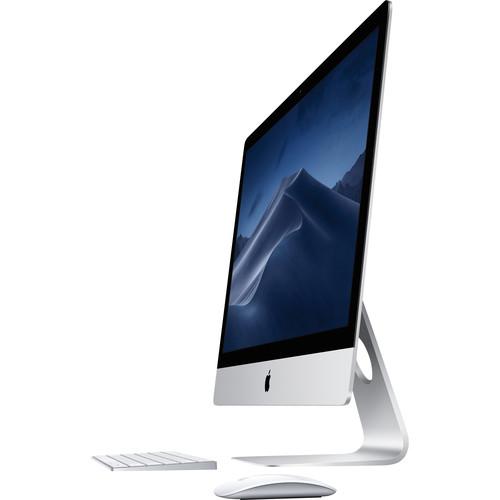 Contents of the user manual for the Apple 27" iMac Pro with Retina
- Product category: iMac Apple
- Brand: Apple
- Description and content of package
- Technical information and basic settings
- Frequently asked questions – FAQ
- Troubleshooting (does not switch on, does not respond, error message, what do I do if...)
- Authorized service for Apple iMac
|
User manual for the Apple 27" iMac Pro with Retina contain basic instructions
that need to be followed during installation and operation.
Before starting your appliance, the user manual should be read through carefully.
Follow all the safety instructions and warnings, and be guided by the given recommendations.
User manual is an integral part of any Apple product,
and if it is sold or transferred, they should be handed over jointly with the product.
Following the instructions for use is an essential prerequisite for protecting
health and property during use, as well as recognition of liability on the part of the manufacturer
for possible defects should you make a warranty claim. Download an official Apple user manual in which you will find instructions on how to install, use, maintain and service your product.
And do not forget – unsuitable use of a Apple product will considerably shorten its lifespan!
|
Product description Experience workstation-class performance in the iMac form factor with the space gray Apple 27" iMac Pro with Retina 5K Display (Early 2019). To handle even more demanding tasks, these models are equipped with 256GB of 2666 MHz DDR4 ECC memory, which is the maximum amount supported.
Featuring a 2.5 GHz Intel Xeon W 14-Core processor, the iMac Pro is designed to handle intensive professional workflows, such as photo, video, 3D animation, music, science, and software development. The iMac Pro also has a 1TB PCIe SSD, which has a 3.3 GB/s write speed and a 2.8 GB/s read speed, for loading huge files and launching apps faster.
In addition to a workstation-class processor, the iMac Pro also provides workstation-class graphics, thanks to the dedicated AMD Radeon Pro Vega 64 graphics card. With 16GB of HBM2 (High-Bandwidth Memory) VRAM and up to a 512 GB/s memory bandwidth, the Radeon Pro Vega 64 GPU delivers up to 11 teraflops of single precision and up to 22 teraflops of half precision.
Still just 5mm at its edge, the iMac Pro features a 27" Retina 5K display with a 5120 x 2880 resolution and a 16:9 aspect ratio. With up to 500 nits of brightness, a P3 wide color gamut, and support for one billion colors with 10-bit spatial and temporal dithering, the Retina 5K display delivers a vivid, true-to-life viewing experience. If you want to create a multi-monitor setup, up to two additional 5K (5120 x 2880) displays are supported, or opt for four UHD 4K (3480 x 2160) displays. Both of these options support refresh rates of 60 Hz and 1 billion colors. Also supported are four 4K (4096 x 2304) displays with refresh rates of 60 Hz and millions of colors.
The iMac Pro features a 10Gb Ethernet port, which is up to 10 times faster than the 10/100/1000 Mbps Gigabit Ethernet port found on the previous generation iMacs. The 10Gb Ethernet port also supports Nbase-T industry-standard 1Gb, 2.5Gb, and 5Gb link speeds. If you would rather go wireless, you can utilize dual-band Wi-Fi 5 (802.11ac). The iMac Pro also has Bluetooth 4.2 technology, as well as an SDXC media card slot, four 40 Gb/s Thunderbolt 3 ports, four USB 3.0 Type-A ports, a FaceTime Full HD 1080p webcam, stereo speakers, and four mics. There is also the Apple T2 chip for enhanced integration and security.
Included with the iMac Pro is the matching space gray Apple Magic Keyboard with numeric keypad, the space gray Apple Magic Mouse 2, and a power cord. A Lightning to USB Type-A cable is also included so you can charge your peripherals. Protection is provided by 90 days of complimentary technical support and a limited 1-year warranty, which can be extended by purchasing AppleCare+ for Mac.
This Mac comes preloaded with macOS. Updates can be downloaded for free via the Mac App Store. Please check Apple's website for upgrade eligibility. General Features - Power to the Pro
- Pros love iMac. So Apple created one just for you. It's packed with the powerful graphics and processors, along with advanced storage, memory, and I/O - all behind a Retina 5K display in a sleek, all-in-one design. For everyone from photographers to video editors to 3D animators to musicians to software developers to scientists, iMac Pro is ready to turn your biggest ideas into your greatest work.
- 14 Cores
- An iMac with 4 cores is remarkable enough. But an iMac with 14 cores is an entirely different creature. Add Turbo Boost speeds up to 4.3 GHz, and the iMac Pro has the power and flexibility to balance multi-core processing with single-thread performance. With AVX-512 vector instructions and a cache architecture, the processor handles even more data even more quickly, which means you can render images, edit up to 8K video, manipulate photos, create real-time audio effects, or compile your next app - all at lightning speed.
- Particle Simulation? Elementary
- Billowing smoke. Torrential rain. A wheat field in the wind. With up to 14 cores and Hyper-Threading, the iMac Pro lets you build and render particle systems of all kinds - static or animated, 2D or 3D.
- AMD Radeon Pro Vega 64 Graphics
- Featuring AMD Radeon Pro Vega 64 graphics, the iMac Pro delivers workstation-class graphics. This model has 16GB of High Bandwidth Memory, which helps deliver a jump in performance and is up to three times faster than the GPU in the Mac Pro. This translates to higher frame rates, real-time 3D rendering, more lifelike special effects, and gameplay at max settings. It also supports both single- and half-precision computing, so operations that don't require a full 32 bits of precision can be performed twice as fast. How fast? Up to 22 teraflops fast.
- More Memory for Massive Projects
- With four channels of memory, the iMac Pro can now accommodate up to 256GB. So you can visualize, simulate, and render huge 3D models, create multiple test environments for cross-platform development, and keep numerous apps open at the same time. It's all powerful, for all the things you want to do.
- High-Performance Storage. Load Faster, Launch Faster
- Up to 1TB of all-flash storage lets you work on large 4K and HD projects, regardless of the codec. And with up to 3.3 GB/s of write performance and 2.8 GB/s of read performance, loading huge files and launching apps is fast.
- Apple T2 Security Chip - Enhanced Integration and Security
- Every iMac Pro is equipped with the Apple T2 Security Chip, Apple's second-generation custom Mac silicon. By redesigning and integrating several controllers found in other Mac systems - like the system management controller, image signal processor, audio controller, and SSD controller - the T2 Security Chip delivers robust capabilities to the Mac. For instance, the image signal processor works with the FaceTime HD camera to enable enhanced tone mapping, improved exposure control, and face detection-based auto exposure and auto white balance. The T2 also makes iMac Pro even more secure, thanks to a Secure Enclave coprocessor that provides the foundation for encrypted storage and secure boot capabilities. The data on your SSD is encrypted using dedicated AES hardware with no effect on the SSD's performance, while keeping the Intel Xeon processor free for your compute tasks. And secure boot helps ensure that the lowest levels of software aren't tampered with and that only operating system software trusted by Apple loads at startup. The Apple T2 Security Chip also brings a familiar voice to iMac Pro - Hey Siri is always ready to heed your call.
- Serious I/O for Serious Work
- There are plenty of high-speed ports to create a high-performance workstation. Four Thunderbolt 3 ports let you connect two 5K monitors via the DisplayPort protocol - for 44 million pixels total - and transfer data at up to 40 Gb/s. Thunderbolt 3 also supported 10 Gb/s USB 3.1. And there's something you probably didn't expect in an iMac: 10Gb Ethernet. So, sharing files between desktops, or working with high-performance network storage, is up to 10 times faster.
- Retina 5K Display - Dream in a Billion Colors
- It almost goes without saying: If it's an iMac, it will have a gorgeous display. And iMac Pro doesn't disappoint. In fact, its 27" screen features 500 nits of brightness across its 14.7 million pixels. It's as if the sleek, all-in-one design disappears behind the stunning screen, so you can focus on your content. Along with P3 color and support for a billion colors, the iMac Pro delivers vivid, true-to-life images with smooth gradients and greatly reduced banding.
- All-In-One Design. More Creative Freedom
- The iMac Pro puts the power of a workstation behind a Retina 5K display, in a sleek enclosure just 5mm wide at its edge. With your whole system powered by a single cable, your workspace stays free of clutter.
- Advanced Thermal Management
- Packing all that performance into such a slim all-in-one design required a unique approach to cooling the system. Apple redesigned the thermal architecture of the iMac Pro with dual blowers, a high-capacity heatsink, and extra venting. The result? Almost 75% more airflow and an 80% increase in system thermal capacity, which lets the iMac Pro handle 500W, or 67% more power than the 27" iMac.
- Dynamic Speakers
- The enhanced stereo speakers in the iMac Pro deliver broad frequency response, rich bass, and impressive volume. So, you'll be able to hear that crashing cymbal, multilayered effect, or sample-based sound, all with high fidelity. And with four beamforming mics, your voice is heard loud and clear over most background noise.
- Accessories with a Dark Side
- You even get space gray accessories to match your iMac Pro - all wireless and rechargeable. The Magic Keyboard includes a numeric keypad, and the Magic Mouse 2 is also included.
In the Box Apple 27" iMac Pro with Retina 5K Display (Early 2019) Magic Wireless Keyboard with Numeric Keypad (Space Gray) Magic Mouse 2 (Space Gray) USB Type-A to Lightning Cable (Space Gray, 3.3') Power Cord 90-Days of Complimentary Technical Support Limited 1-Year Warranty Table of Contents
|
Upload User Manual
Have you got an user manual for the Apple 27" iMac Pro with Retina 5K Display in electronic form? Please send it to us and help us expand our library of instruction manuals.
Thank you, too, on behalf of other users.
To upload the product manual, we first need to check and make sure you are not a robot. After that, your "Submit Link" or "Upload File" will appear.
Technical parametersApple iMac Pro 27" 5K Display Early 2019 Specs | Operating System | macOS (64-Bit) | | | | CPU | 2.5 GHz Intel Xeon W 14-Core | | Maximum Boost Speed | 4.3 GHz | | L3 Cache | 33.25 MB | | Memory Type | 2666 MHz DDR4 | | Total Installed Memory | 256 GB | | Memory Configuration | 256 GB (Onboard) | | Maximum Memory Capacity | 256 GB | | ECC Memory | Yes | | Graphics Type | Dedicated | | GPU | AMD Radeon Pro Vega 64 with 16 GB HBM2 VRAM | | | | Panel Type | IPS | | Size | 27" | | Aspect Ratio | 16:9 | | Resolution | 5120 x 2880 | | Touchscreen | No | | Finish | Glossy | | Maximum Brightness | 500 cd/m2 | | Refresh Rate | 60 Hz | | | | Total Installed Capacity | 1 TB | | Solid State Storage | 1 x 1 TB Integrated PCIe | | Optical Drive | None | | | | Ports | 4 x USB Type-A (USB 3.1 Gen 1) | | USB Type-C Ports | 4 x Thunderbolt 3 (Supports DisplayPort/HDMI/VGA) | | Audio | 1 x 1/8" / 3.5 mm Headphone Output | | Built-In Speakers | 2 | | Built-In Microphones | 4 | | Media Card Slots | 1 x SDXC | | | | Ethernet | 1 x RJ45 (10GbE) | | Wi-Fi | Wi-Fi 5 (802.11ac); Dual-Band (2.4 & 5 GHz) | | Bluetooth | 4.2 | | NFC | No | | Webcam | User-Facing: 1080p | | | | Keyboard | Wireless Full-Size Keyboard with Number Pad | | Pointing Device | Wireless Mouse | | | | AC Input Power | 100 to 240 VAC, 50 / 60 Hz | | Operating Temperature | 50 to 95°F / 10 to 35°C | | Operating Humidity | 5 to 95% | | Dimensions | 25.6 x 20.3 x 8" / 65.02 x 51.56 x 20.32 cm | | Weight | 21.5 lb / 9.8 kg |
Rating90% users recommend this product to others. And what about you?

This product has already been rated by 93 owners. Add your rating and experience with the product.
Discussion
 Ask our technicians if you have a problem with your settings,
or if anything is unclear in the user manual you have downloaded.
You can make use of our moderated discussion.
The discussion is public and helps other users of our website who may be encountering similar problems.
Ask our technicians if you have a problem with your settings,
or if anything is unclear in the user manual you have downloaded.
You can make use of our moderated discussion.
The discussion is public and helps other users of our website who may be encountering similar problems.
The discussion is empty - enter the first post
Post a new topic / query / comment:
|
|
|
| Request for user manual |
You can’t find the operation manual you are looking for? Let us know and we will try to add the missing manual:
I’m looking for a manual / Request for manual
Current requests for instruction manuals:
Call Of Duty World War Two For Xbox...
controller stratus XL...
stratus XL...
smart whatch serie S11 42mm...
Allen & Heath SQ-6 manual...
|
| Discussion |
Latest contributions to the discussion:
AEW R 4100
Name: MAURICIO ANGARITA
Audio-Technica AEW-R4100 UHF Diversity Receiver for
AEW R 4100 has the mute function blocked and does not allow audio to pass. I tried several times to turn off the mute from the transmitter but it does nothing, the mute stays on. Solution?
Thank you...
Instructions for assembling the 2015 Forecast Image Master Consoles GC3-A
Name: mike elam
Forecast Consoles GC3-A ImageMaster Editing Console
Looking for instructions for assembling this console. ...
EMPTY TONER ERROR MESSAGE AFTER REPLACING TONER
Name: LINDA BAD YELLOW EYES
Brother TN223BK Standard-Yield Toner
I HAD TO CHANGE OUT ALL THREE TONERS DUE TO LEAKS IN THE YELLOW AND CYAN. AFTER I REPLACED THEM, THE MACHINE KEEPS GIVING ME AN EMPTY TONER ERROR MESSAGE. HELP!!...
PS480D 20/24 pin Switching 480W Power Supply
Name: swkargo
Logisys 480W Power Supply
This item states in can run -5vdc .It is NOT listed on the board or I beleive is r4 is missing the resitior. Any body have thid issue. Shawn
...
Help needed
Name: Ann Carter
SanDisk 1TB Extreme Portable USB 3.1
When I click the link to download the user manual for my Sandisk Extreme external hard drive, it gives me the manual for the LG Cricket. Can you please change the link so I can download the Sandisk manual and begin using this drive? Thank you....
|
|


