User Manual for Apple HomePod Click to enlarge the picture
 Contents of the user manual for the Apple HomePod
- Product category: Virtual Assistant Speakers & Displays Apple
- Brand: Apple
- Description and content of package
- Technical information and basic settings
- Frequently asked questions – FAQ
- Troubleshooting (does not switch on, does not respond, error message, what do I do if...)
- Authorized service for Apple Virtual Assistant Speakers & Displays
|
User manual for the Apple HomePod contain basic instructions
that need to be followed during installation and operation.
Before starting your appliance, the user manual should be read through carefully.
Follow all the safety instructions and warnings, and be guided by the given recommendations.
User manual is an integral part of any Apple product,
and if it is sold or transferred, they should be handed over jointly with the product.
Following the instructions for use is an essential prerequisite for protecting
health and property during use, as well as recognition of liability on the part of the manufacturer
for possible defects should you make a warranty claim. Download an official Apple user manual in which you will find instructions on how to install, use, maintain and service your product.
And do not forget – unsuitable use of a Apple product will considerably shorten its lifespan!
|
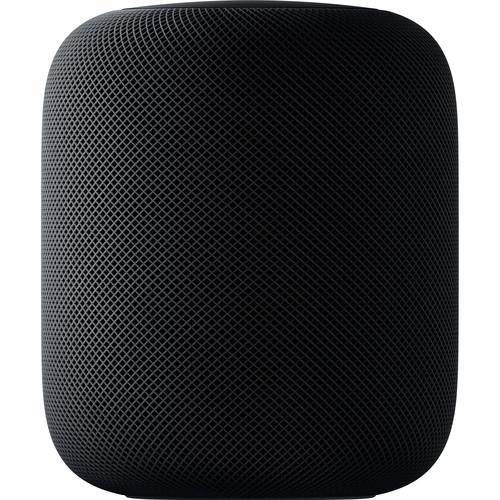
Product description Things We Love: Apple HomePod Read More The space gray Apple HomePod is a wireless music speaker, a smart home hub, and a Siri-enabled intelligent assistant all rolled into one device. Packed with Apple-engineered audio technology, HomePod uses advanced software for real-time acoustic modeling, audio beamforming, echo cancellation, and more. Powered by the Apple A8 chip, the HomePod delivers a wide, spacious soundstage. Using spatial awareness to sense its location in the room, the HomePod automatically adjusts the audio to sound optimal wherever it's placed. The large Apple-designed woofer delivers deep, clean bass while the custom array of seven beamforming tweeters provide pure high frequency acoustics with directional control. The array of six microphones can pick up your "Hey Siri" from across the room, even when loud music is playing. Paired with an Apple Music subscription (sold separately), the HomePod provides access to up to 45 million songs. It also learns preferences and tastes that are shared across devices. Using Siri to deliver deep knowledge of artists, songs, albums, and more, HomePod can handle advanced searches within Apple Music's catalog, so users can ask questions like, "Hey Siri, when was this song released?" or "Hey Siri, can you play something totally different?" to change the mood. The HomePod is more than just a wireless speaker. It has Siri built-in so you can send messages, set timers and reminders, and check the weather — all with just your voice. The latest business news, headlines, and sports updates stream directly to the HomePod from popular media sources, like NPR, CNN, ESPN, and more. HomePod can also be used as a speakerphone with the Apple iPhone for a hands-free conversation. With HomeKit support, HomePod can control multiple home devices and control a number of different accessories at the same time. HomePod can turn on the lights, raise the shades, set the desired temperature, and more. You can even enable remote access and automations for certain times of the day. The HomePod features 802.11ac Wi-Fi and Bluetooth 5.0 technology. It is compatible with the iPhone 5s and later, iPad (5th gen) or later, iPad Pro, iPad Air or later, iPad mini 2 or later, or iPod touch (6th gen), running iOS 11.2.5 or later. - Deep Bass
- The high-excursion woofer with a custom amplifier can play a wide range of deep, rich bass. A powerful motor drives the diaphragm a full 20mm. Meanwhile, HomePod uses an advanced algorithm that continuously analyzes the music and dynamically tunes the low frequencies for smooth, immersive sound.
- Seven Tweeters
- The HomePod has a unique array of seven beamforming tweeters, each with its own amplifier and transducer, and each custom designed with a precision acoustic horn that focuses sound for directional control. The seven tweeters create an all-encompassing sense of space and consistent, high-fidelity audio in the room.
- Apple A8 Chip
- An Apple-designed A8 chip powers the HomePod and its complex audio features, like real-time modeling of the woofer mechanics, buffering faster than real time, upmixing both direct and ambient audio, beamforming so the microphone can hear you over the music, and advanced echo cancellation.
- Stylish Design
- The HomePod is wrapped in a seamless mesh fabric designed for both aesthetics and acoustic performance. It also stands just under seven inches tall for a compact design.
- Spatial Awareness
- Setting up the HomePod is quick and easy. Simply plug it in and your iOS device will detect it. Equipped with spatial awareness, HomePod automatically analyzes the acoustics, adjusts the sound based on the speaker's location, and separates the music into direct and ambient sound. Direct sound is beamed to the middle of the room, while ambient sound is diffused into left and right channels and bounced off the wall. It can even hear your requests from across the room while loud songs are playing.
- Apple Music
- With an Apple Music subscription (sold separately), you'll have access to over 45 million songs. Siri helps you find exactly what you want to hear and what you want to hear next, including new music across a wide range of genres and moods. And friends connected to your Wi-Fi network can stream their music right to your HomePod.
When you're really into a song, say "Hey Siri, I like this" or "Hey Siri, add this to my party playlist." Based on what you say and play, Apple Music learns your taste in music, which means you can also just let it pick the songs. And when you open Apple Music on any other device, your playlists and preferences are right where you left them. - Touch Surface
- Tap the top of the HomePod to play, pause, skip a song, or adjust the volume. Touch and hold the top to talk to Siri. You'll know Siri is listening by the LED waveform that animates with your every word.
- Siri
- With Siri, you'll be able to set timers, convert measurements, get translations, get live news, sports, weather, and traffic. You can also create lists that anyone can add to.
- Calls & Texts
- Use HomePod to send messages using just your voice. And when you receive a text, Siri can read it to you. For hands-free conversations, start or receive a call on your iPhone and hand it off to HomePod.
- HomeKit
- Just say "Hey Siri, turn on the lights" or "Hey Siri, make the room cooler." You can even ask Siri to set scenes, like "Good morning," that put multiple accessories to work — all at once. A wide range of accessories work with Apple's HomeKit platform. Just add an accessory to the Home app, then control it with your voice on HomePod.
UPC: 190198504524 In the Box Apple HomePod (Space Gray) Limited 1-Year Warranty Apple HomePod: The Best-Sounding Smart Speaker M. Brett Smith 05/08/2018 Table of Contents
|
Upload User Manual
Have you got an user manual for the Apple HomePod in electronic form? Please send it to us and help us expand our library of instruction manuals.
Thank you, too, on behalf of other users.
To upload the product manual, we first need to check and make sure you are not a robot. After that, your "Submit Link" or "Upload File" will appear.
Technical parametersApple HomePod Specs | | | Virtual Assistant Support | Apple Siri | | OS Compatibility | iOS | | Processor | Apple A8 | | Supported Audio Formats | AAC, AIFF, Apple Lossless, FLAC, HE-AAC, MP3, Protected AAC (M4P), WAV (LPCM) | | | | Audio | None | | Ethernet | None | | USB | None | | NFC | No | | Bluetooth | 5.0 | | Wi-Fi Standards | Wi-Fi 5 (802.11ac) | | Wi-Fi Bands | 2.4 GHz, 5 GHz | | | | AC Input Power | 100 to 240 VAC, 50 / 60 Hz | | | | Dimensions (W x H x D) | 5.6 x 6.8" / 14.2 x 17.3 cm | | Weight | 5.5 lb / 2.5 kg | | | | Package Weight | 8.65 lb | | Box Dimensions (LxWxH) | 11.2 x 8.8 x 8.8" |
Rating92% users recommend this product to others. And what about you?

This product has already been rated by 68 owners. Add your rating and experience with the product.
Discussion
 Ask our technicians if you have a problem with your settings,
or if anything is unclear in the user manual you have downloaded.
You can make use of our moderated discussion.
The discussion is public and helps other users of our website who may be encountering similar problems.
Ask our technicians if you have a problem with your settings,
or if anything is unclear in the user manual you have downloaded.
You can make use of our moderated discussion.
The discussion is public and helps other users of our website who may be encountering similar problems.
The discussion is empty - enter the first post
Post a new topic / query / comment:
|
|


