|
User Manual for Apricorn Aegis Padlock Fortress 256GB USB 3.1 Gen 1 SSD w PIN Access Click to enlarge the picture
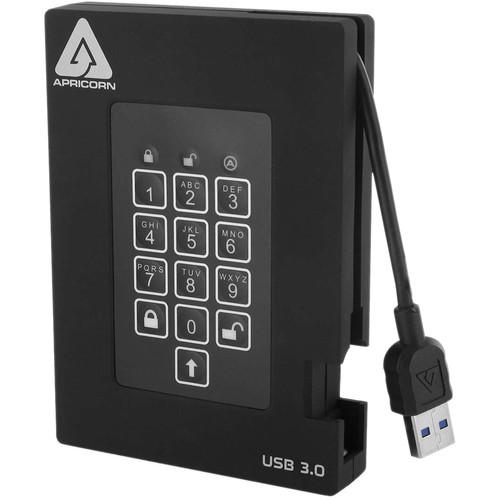 Contents of the user manual for the Apricorn Aegis Padlock Fortress 256GB USB
- Product category: External Drives Apricorn
- Brand: Apricorn
- Description and content of package
- Technical information and basic settings
- Frequently asked questions – FAQ
- Troubleshooting (does not switch on, does not respond, error message, what do I do if...)
- Authorized service for Apricorn External Drives
|
User manual for the Apricorn Aegis Padlock Fortress 256GB USB contain basic instructions
that need to be followed during installation and operation.
Before starting your appliance, the user manual should be read through carefully.
Follow all the safety instructions and warnings, and be guided by the given recommendations.
User manual is an integral part of any Apricorn product,
and if it is sold or transferred, they should be handed over jointly with the product.
Following the instructions for use is an essential prerequisite for protecting
health and property during use, as well as recognition of liability on the part of the manufacturer
for possible defects should you make a warranty claim. Download an official Apricorn user manual in which you will find instructions on how to install, use, maintain and service your product.
And do not forget – unsuitable use of a Apricorn product will considerably shorten its lifespan!
|
Product description The Aegis Padlock Fortress 256GB USB 3.0 SSD w/ PIN Access from Apricorn is certified to NIST FIPS 140-2 Level 2 requirements. This drive is tested on 11 cryptographic levels. All data on the drive is protected with real-time hardware AES-XTS 256-bit encryption. With no software required for installation or operation, this drive needs no admin rights. With no moving parts, this drive is drop and vibration resistant, unaffected by high humidity and works in extreme temperatures. Impervious to key logging attacks, you access the drive with your own unique PIN via an onboard keypad. The 256GB solid state drive comes with an integrated USB 3.0 cable. - FIPS 140-2 Level 2 Validated
- Tested and validated by the National Institute of Standards and Technology (NIST), the Aegis Padlock Fortress is validated to meet the Federal Information Processing Standards (FIPS) 140-2 Level 2 specification. FIPS 140-2 validation is the cryptography standard required by the US federal government for protection of sensitive data. It covers 11 areas of its cryptographic security system, including physical security, cryptographic key management, and design integrity Drives validated to the FIPS 140-2 specification are required to be used by U.S. government branches as well as civilian companies in the US, Canada, and the United Kingdom that contract to the US government Additionally governments and public companies worldwide in the education, healthcare, and financial services industries have adopted using FIPS 140-2 validated drives as the regulations requiring their use is continuously expanding. Enterprises that wish to use strong encryption available have also adopted using FIPS 140-2 drives
- Design
- With an easy-to-use keypad design and software-free setup, the Aegis Padlock Fortress secure drive enables you to access the drive with your own unique PIN. The embedded keypad prevents hardware and software key logging attempts to capture your password entered via the host system
- Utilizes Military Grade FIPS PUB 197 Validated Encryption Algorithm
- Featuring 256-bit AES-XTS hardware encryption, the Aegis Padlock Fortress encrypts all data on the drive in real-time, keeping your data safe even if the solid state drive is removed from its enclosure
- Software-Free Design - With No Admin Rights to Contend With
- With no software installation required for setup or operation and the ability to run on any platform, the Aegis Padlock Fortress provides stress-free deployment in corporate environments
- Independent Admin and User PINs
- The Aegis Padlock can be configured with independent admin and user PINs. The administrator feature allows enrollment of up to five unique User ID's and one administrator, making it a useful business collaboration tool. If the user forgets their PIN, the drive can be unlocked using the admin PIN. With its forced enrollment feature, the Aegis Padlock Fortress requires you to create your own unique PIN at first use, ensuring a secure PIN from the get-go
- Drive Reset Feature
- The Aegis Padlock Fortress also employs a useful drive reset feature, which can be implemented with a unique command. This clears all PINs and data, and creates a new randomly generated encryption key, enabling the drive to be reset and redeployed as many times as needed
- Auto-Lock Feature
- The unattended Aegis Padlock Fortress can be configured to lock after a pre-determined amount of time of your choosing. Suitable for protecting your data when you are away from your desk
- Data at Rest Protection
- All data, PINs, and encryption keys are always encrypted while at rest
- Brute Force Self Destruct Feature
- The Aegis Padlock Fortress uses a three-pronged approach to protect against a Brute-Force attack. The first step is to deny access to the drive until the drive can verify the user PIN. After several incorrect attempts, the drive will lock itself, requiring the drive to be plugged in again to input a PIN. This feature blocks automated attempts to enter PIN numbers. Lastly, after a predetermined number of failed PIN entries, the Padlock Fortress assumes it is being attacked and will destroy the encryption key and lock itself, rendering the data useless and requiring a total reset to redeploy the Padlock Fortress
- Sealed from Physical Attacks by Tough Epoxy Coating
- In addition to encrypting all of the PINs, data, and the encryption key itself, the Aegis Padlock adds another barrier between your data and a hacker. The encryption chip and circuitry of the Aegis Padlock is completely protected by an epoxy compound, which is virtually impossible to remove without causing permanent damage to the electronics. This barrier prevents a potential hacker from accessing the encryption circuitry and launching a variety of potential attacks
- VTC (Variable Timing Circuit) Technology
- Protection against hacker attempts does not stop with Brute Force. Incorporated into the Aegis Padlock Fortress electronics is Apricorn's Variable Time Circuit (VTC) technology, working to thwart "timing attacks" aimed at accessing the drive by studying the behavior and infiltrating the Padlock's electronics
- Wear Resistant Keypad - Water and Dust Resistant
- Designed with protection in mind, this Aegis Padlock Fortress incorporates 'wear resistant' keypads to hide key usage and avoid tipping off a potential hacker to the commonly used keys
- Compact, Rugged Design
- The Aegis Padlock Fortress low powered design is suitable for using with notebooks. The Aegis Padlock Fortress has a compact, pocketable and a robust design, and features a convenient integrated USB cable. It eliminates the need to carry around cords and allows you to be connected at the flick of a fingertip
- USB 3.0 Connection - Data Transfer Speeds up to 10x faster than USB 2.0
- With USB 3.0 data transfer rates up to ten times faster than traditional USB 2.0 drives, the Aegis Padlock Fortress performance is comparable to that of your computer's internal drive, enabling you transfer large files in seconds or quickly backup an entire system. The Aegis Padlock Fortress is also backwards compatible with USB 2.0 and 1.1 ports
Other Features - Onboard keypad protects against hardware and software key logging attacks
- Administrator Password Feature: Suitable for IT departments looking to secure their mobile users, by allowing setup of administrator access to the drive before being distributed to their mobile users
- Virtually shock and vibration resistant
- The Aegis Padlock is suitable for government, education, health care, financial institutions, and executives with sensitive data
UPC: 708326913775 In the Box Apricorn Aegis Padlock Fortress 256GB USB 3.1 Gen 1 SSD w/ PIN Access Y-Auxiliary USB 3.0 Power Cable Travel Pouch User Manual PDF 1.5mbetvuurvqdeebuwfzsccqbzutatvvdbebrqszrb Table of Contents
|
Upload User Manual
Have you got an user manual for the Apricorn Aegis Padlock Fortress 256GB USB 3.1 Gen 1 SSD w PIN Access in electronic form? Please send it to us and help us expand our library of instruction manuals.
Thank you, too, on behalf of other users.
To upload the product manual, we first need to check and make sure you are not a robot. After that, your "Submit Link" or "Upload File" will appear.
Technical parametersApricorn Padlock Fortress Specs | Storage Capacity | 256 GB | | Connection Interface | 1 x USB 3.1 Gen 1 (USB Type-A) | | Maximum Read Speed | 180 MB/s | | Pre-Format | NTFS | | Encryption | 256-Bit AES, FIPS 140-2 Level 2 | | | | Type | Solid-State Drive | | Cache Memory | 8 MB | | | | Bus Power | USB | | Environmental Resistance | Shock | | Operating Temperature | -40 to 158°F / -40 to 70°C |
Rating100% users recommend this product to others. And what about you?

This product has already been rated by 74 owners. Add your rating and experience with the product.
Discussion
 Ask our technicians if you have a problem with your settings,
or if anything is unclear in the user manual you have downloaded.
You can make use of our moderated discussion.
The discussion is public and helps other users of our website who may be encountering similar problems.
Ask our technicians if you have a problem with your settings,
or if anything is unclear in the user manual you have downloaded.
You can make use of our moderated discussion.
The discussion is public and helps other users of our website who may be encountering similar problems.
The discussion is empty - enter the first post
Post a new topic / query / comment:
|
|
|
| Request for user manual |
You can’t find the operation manual you are looking for? Let us know and we will try to add the missing manual:
I’m looking for a manual / Request for manual
Current requests for instruction manuals:
Call Of Duty World War Two For Xbox...
controller stratus XL...
stratus XL...
smart whatch serie S11 42mm...
Allen & Heath SQ-6 manual...
|
| Discussion |
Latest contributions to the discussion:
AEW R 4100
Name: MAURICIO ANGARITA
Audio-Technica AEW-R4100 UHF Diversity Receiver for
AEW R 4100 has the mute function blocked and does not allow audio to pass. I tried several times to turn off the mute from the transmitter but it does nothing, the mute stays on. Solution?
Thank you...
Instructions for assembling the 2015 Forecast Image Master Consoles GC3-A
Name: mike elam
Forecast Consoles GC3-A ImageMaster Editing Console
Looking for instructions for assembling this console. ...
EMPTY TONER ERROR MESSAGE AFTER REPLACING TONER
Name: LINDA BAD YELLOW EYES
Brother TN223BK Standard-Yield Toner
I HAD TO CHANGE OUT ALL THREE TONERS DUE TO LEAKS IN THE YELLOW AND CYAN. AFTER I REPLACED THEM, THE MACHINE KEEPS GIVING ME AN EMPTY TONER ERROR MESSAGE. HELP!!...
PS480D 20/24 pin Switching 480W Power Supply
Name: swkargo
Logisys 480W Power Supply
This item states in can run -5vdc .It is NOT listed on the board or I beleive is r4 is missing the resitior. Any body have thid issue. Shawn
...
Help needed
Name: Ann Carter
SanDisk 1TB Extreme Portable USB 3.1
When I click the link to download the user manual for my Sandisk Extreme external hard drive, it gives me the manual for the LG Cricket. Can you please change the link so I can download the Sandisk manual and begin using this drive? Thank you....
|
|


