|
User Manual for Aquatica A7r II Underwater Housing for Sony a7R II or a7S II with 2 Lighting Arms Click to enlarge the picture
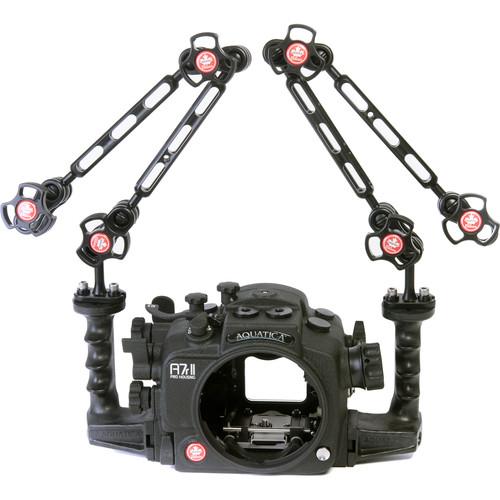 Contents of the user manual for the Aquatica A7r II Underwater Housing for
- Product category: Still Cameras & Housings Aquatica
- Brand: Aquatica
- Description and content of package
- Technical information and basic settings
- Frequently asked questions – FAQ
- Troubleshooting (does not switch on, does not respond, error message, what do I do if...)
- Authorized service for Aquatica Still Cameras & Housings

 |
User manual for the Aquatica A7r II Underwater Housing for contain basic instructions
that need to be followed during installation and operation.
Before starting your appliance, the user manual should be read through carefully.
Follow all the safety instructions and warnings, and be guided by the given recommendations.
User manual is an integral part of any Aquatica product,
and if it is sold or transferred, they should be handed over jointly with the product.
Following the instructions for use is an essential prerequisite for protecting
health and property during use, as well as recognition of liability on the part of the manufacturer
for possible defects should you make a warranty claim. Download an official Aquatica user manual in which you will find instructions on how to install, use, maintain and service your product.
And do not forget – unsuitable use of a Aquatica product will considerably shorten its lifespan!
|
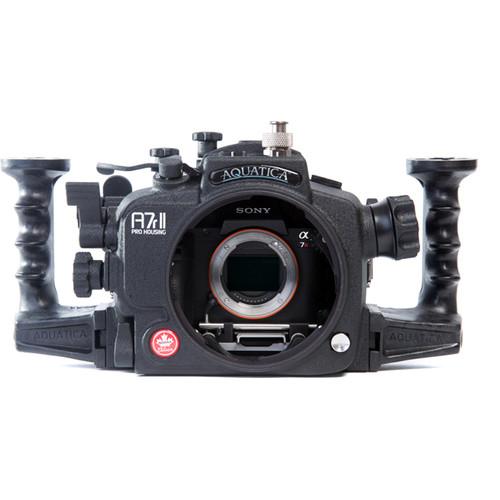
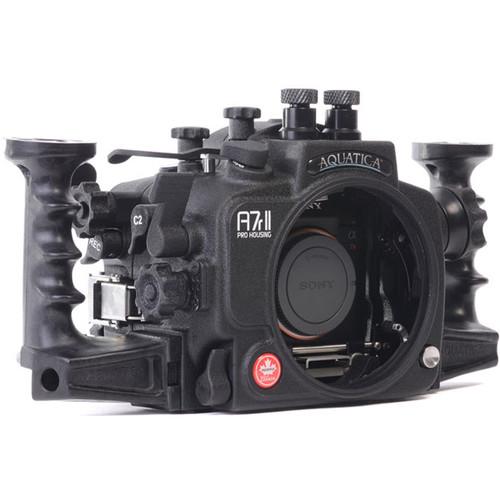
Product description Capture brilliant photos and 4K UHD video of coral, parrot fish, and pygmy seahorses with your Sony Alpha a7R II or a7S II mirrorless camera in Aquatica's A7r II Underwater Housing. It features a depth rating of 295', which is upgradeable to 426' for free upon request. This version of the housing ships without strobe connectors and is specifically intended for video recording. The standard, coated eyepiece offers a full view of the camera's viewfinder.
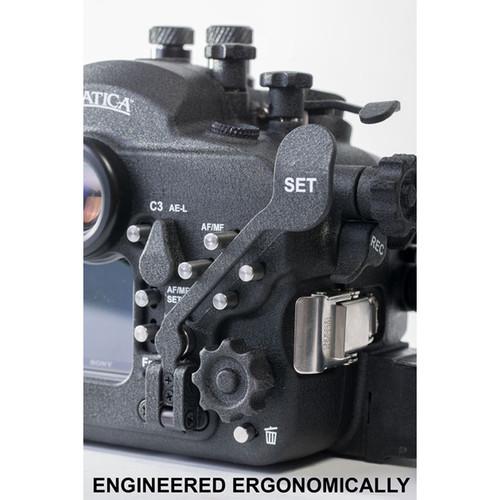
The housing provides access to virtually all camera functions via mechanical controls. It also has an ergonomic design with 2 grips that offer improved handling and attachment points for the 2 included Delta 3 #77514 lighting arms. Built for durability, especially resistance to corrosion, the housing is constructed from anodized, machined aluminum and stainless steel.
The A7r II ships without a required lens port, though various interchangeable ports are available for different lenses. For full compatibility details, see the Port Chart and System Chart. - Waterproofing
-
- Depth rating of 295', which is upgradeable to 426' for free upon request
- SURVEYOR moisture alarm (audible and visible) and vacuum sensor lets you confirm watertight integrity before dive, and alerts you in the unlikely event of a breach in the waterproof seal
- SURVEYOR uses LED indicators
- Features temperature compensation for accuracy
- SURVEYOR can be used with optional vacuum valve and extracting pump, which enable you to remove excess air and actually create a vacuum
- Controls, Handling, and Operation
-
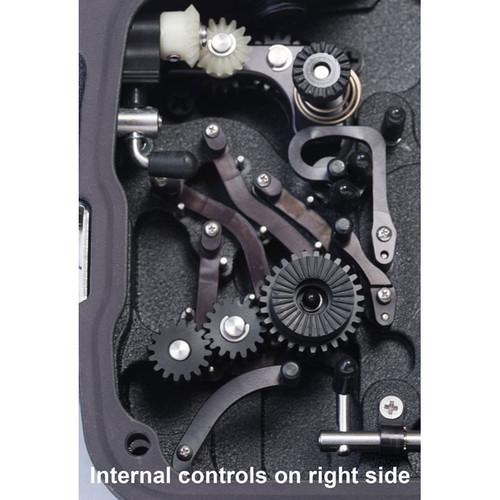
- Provides easy access to virtually all camera functions via mechanical controls, including push-buttons, levers, and grooved dials/knobs
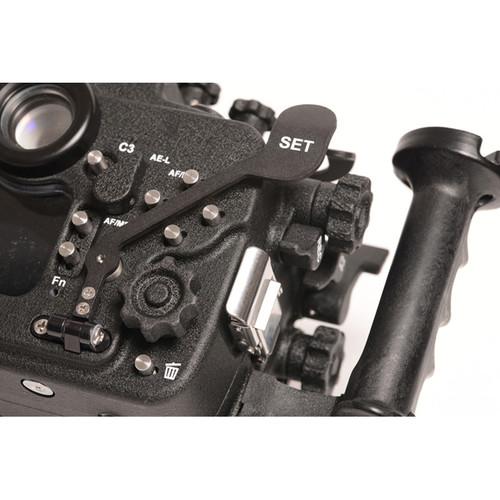
- Ergonomic design with 2 comfortable, grooved grips, which offer improved handling and attachment points for the 2 included Delta 3 #77514 lighting arms
- Each arm is a kit consisting of both an 8" double-ball middle and 8" double-ball top section, plus 3 clamps and a 1" ball mount-to-flat plate
- Arms offer flexible support for your video lights, enabling different lighting angles and positions and allowing you to swap out the standard 1" ball arm sections for others of different lengths
- Arms require ball head adapters, which will vary depending on which video lights you wish to use
- Grips can be extended a little farther from housing using optional spacers
- Vital controls are accessible with your fingertips while hands are on grips
- Knobs are large for ease of use when wearing diving gloves
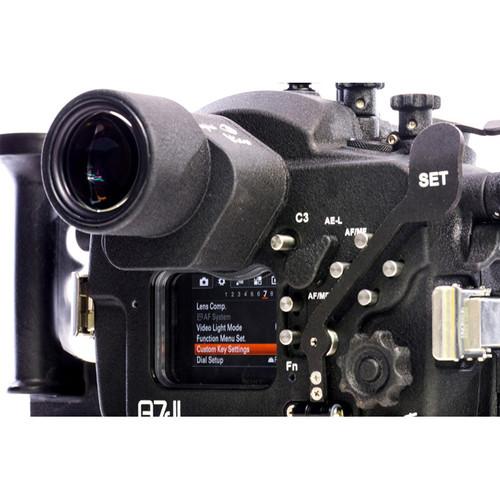
- Provides easy access via your thumb to the camera's rear control dial, to which many custom features can be assigned to suit your preferences
- SET button is accessible by way of an extender, enabling you to activate this function quickly and comfortably with your hand on the grip and your eye looking through the finder
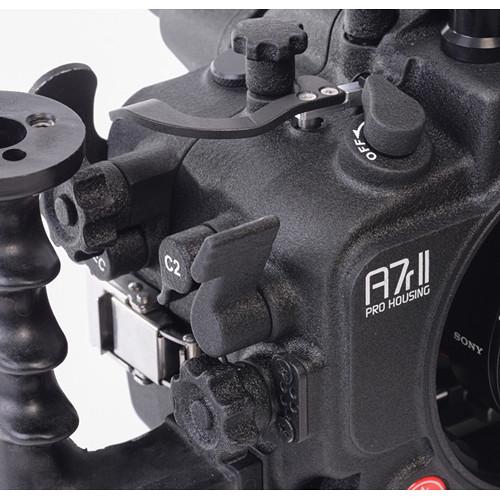
- Custom function buttons C1 and C2 are located in optimal positions, with C1 extended so as to be right at your fingertips
- Extended mechanical shutter release lever
- Large knurled knob for aperture control
- Oversized knurled knob for focus/zoom with lens
- Easy-access knob for mode control and custom function buttons
- Standard, coated eyepiece offers a full view of the camera's viewfinder
- Optional, coated 45° and 180° Aqua View Finders offer an enlarged, enhanced view with 100% coverage, corner-to-corner sharpness, and dioptric adjustment
- Construction Details
-
- Precision-machined in Canada from 6061 T6 aluminum alloy, which has been anodized to MIL-A-8625 Type 2, Class 2 specifications for noteworthy resistance to corrosion
- Black polyester powder coating is baked on at a high temperature for extra protection (A.A.M.A 2603-98 certified)
- Control shafts and push buttons are made of Type 304 stainless steel
- Sacrificial zinc anodes protect sensitive parts of the housing bottom to prevent them from corroding
- Tested in harsh conditions in Canada to ensure extreme durability
- Lens Port System
-
- Ships without a required lens port
- Various interchangeable dome and flat ports, along with extension rings and focus/zoom gears, are available for an array of different lenses
- For full compatibility details, see the port and system charts linked above
- Housing is equipped with a port-locking mechanism to prevent accidental rotation of the port or extension that is mounted
- External Strobe and Light Use
-
- This version of the housing ships without strobe connectors and is specifically intended for video recording
- Mounting
-
- Top 1/4"-20 accessory hole
- Dual 1/4"-20 threaded holes on top of grips for attaching optional lighting arms
- Multiple bulkhead entry/access points for connecting optional accessories, such as external monitors or remote triggering devices like pole-mounted RCS remote camera system
- Three 1/4"-20 threaded holes on bottom for optional bracket, tray, or tripod
In the Box Aquatica A7r II Underwater Housing for Sony a7R II or a7S II with 2 Lighting Arms SURVEYOR Moisture Alarm and Vacuum Sensor 2 x Ergonomic Hand Grip 2 x DELTA 3 Strobe Arm Kit with 8.0" Double Ball Middle and Top Sections Limited 1-Year Warranty Table of Contents
|
Upload User Manual
Have you got an user manual for the Aquatica A7r II Underwater Housing for Sony a7R II or a7S II with 2 Lighting Arms in electronic form? Please send it to us and help us expand our library of instruction manuals.
Thank you, too, on behalf of other users.
To upload the product manual, we first need to check and make sure you are not a robot. After that, your "Submit Link" or "Upload File" will appear.
Technical parametersAquatica 20079- DELTA3 Specs | Depth Rating | 295'/ 90 m, upgradeable to 426' / 130 m | | Control Type | Mechanical push-buttons, levers, and grooved dials/knobs | | Controls | Camera tray release tab, lens release tab, lens release actuating lever, shutter release lever, C2 access lever, front dial access knob, rear dial access knob, video recording lever, exposure control knob, exposure compensation, ISO sensitivity, mode dial access knob, on/off switch, focus/zoom control release disc, focus/zoom control knob, focus/zoom control pinion gear, focus area selector, lens release button, lens release button lever, port bayonet flange, port release mechanism lever, C3 access button, AF/MF & AEL switch lever, AF/M & AEL engaging button, Fn access button, multi-controller button array, control wheel access knob, delete, C4 access button, set lever, C1 access lever, playback lever, menu button, and info button | | Material of Construction | Housing: Anodized, machined 6061 T6 aluminum alloy (MIL-A-8625 Type 2, Class 2 specification)
Control Shafts and Push Buttons: Type 304 stainless steel | | Lens Port | Ships without a required lens port
Various interchangeable dome and flat ports are available for an array of different lenses
For full compatibility, see port chart and system chart linked in Overview | | Buoyancy | Varies depending on choice of lens and port | | External Strobe Connector | Ships without strobe connectors and is specifically intended for video recording | | Viewfinder | Standard, coated eyepiece offers a view of camera's viewfinder
Optional, coated 45° and 180° Aqua View Finder offer enlarged, enhanced view with 100% coverage, corner-to-corner sharpness, and dioptric adjustment | | Moisture Alarm | SURVEYOR moisture alarm & vacuum/pressure sensor with on/off switch
Can be used with optional vacuum valve and extracting pump | | Mounting | 2x Delta 3 #77514 lighting arms, each with 8.0" / 20.3 cm double-ball middle and top sections and 3 clamps (ball head adapter for video lights not included)
Camera quick-release tray
Top 1/4"-20 accessory hole
2x 5/16"-20 threaded holes and fasteners for grip attachment
2x 1/4"-20 threaded holes on top of grips
16 mm front left bulkhead entry point
0.5" top left bulkhead entry point
0.5" right accessory bulkhead entry point
0.5" bottom accessory bulkhead entry point
Adaptable bulkhead insert
Three 1/4"-20 threaded holes on bottom for optional bracket, tray, or tripod
2x rear LCD sunshade mounting holes | | Dimensions | Not specified by manufacturer | | Weight | 5.5 lb / 2.5 kg without grips
6.4 lb / 2.9 kg with grips |
Rating70% users recommend this product to others. And what about you?

This product has already been rated by 81 owners. Add your rating and experience with the product.
Discussion
 Ask our technicians if you have a problem with your settings,
or if anything is unclear in the user manual you have downloaded.
You can make use of our moderated discussion.
The discussion is public and helps other users of our website who may be encountering similar problems.
Ask our technicians if you have a problem with your settings,
or if anything is unclear in the user manual you have downloaded.
You can make use of our moderated discussion.
The discussion is public and helps other users of our website who may be encountering similar problems.
The discussion is empty - enter the first post
Post a new topic / query / comment:
|
|
|
| Request for user manual |
You can’t find the operation manual you are looking for? Let us know and we will try to add the missing manual:
I’m looking for a manual / Request for manual
Current requests for instruction manuals:
Call Of Duty World War Two For Xbox...
controller stratus XL...
stratus XL...
smart whatch serie S11 42mm...
Allen & Heath SQ-6 manual...
|
| Discussion |
Latest contributions to the discussion:
AEW R 4100
Name: MAURICIO ANGARITA
Audio-Technica AEW-R4100 UHF Diversity Receiver for
AEW R 4100 has the mute function blocked and does not allow audio to pass. I tried several times to turn off the mute from the transmitter but it does nothing, the mute stays on. Solution?
Thank you...
Instructions for assembling the 2015 Forecast Image Master Consoles GC3-A
Name: mike elam
Forecast Consoles GC3-A ImageMaster Editing Console
Looking for instructions for assembling this console. ...
EMPTY TONER ERROR MESSAGE AFTER REPLACING TONER
Name: LINDA BAD YELLOW EYES
Brother TN223BK Standard-Yield Toner
I HAD TO CHANGE OUT ALL THREE TONERS DUE TO LEAKS IN THE YELLOW AND CYAN. AFTER I REPLACED THEM, THE MACHINE KEEPS GIVING ME AN EMPTY TONER ERROR MESSAGE. HELP!!...
PS480D 20/24 pin Switching 480W Power Supply
Name: swkargo
Logisys 480W Power Supply
This item states in can run -5vdc .It is NOT listed on the board or I beleive is r4 is missing the resitior. Any body have thid issue. Shawn
...
Help needed
Name: Ann Carter
SanDisk 1TB Extreme Portable USB 3.1
When I click the link to download the user manual for my Sandisk Extreme external hard drive, it gives me the manual for the LG Cricket. Can you please change the link so I can download the Sandisk manual and begin using this drive? Thank you....
|
|


