User Manual for Arecont Vision MegaNVR AV800 8-Channel 10MP NVR with 4TB HDD Click to enlarge the picture
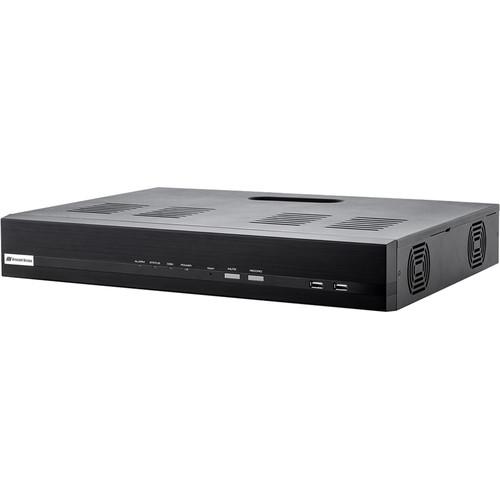 Contents of the user manual for the Arecont Vision MegaNVR AV800 8-Channel 10MP
- Product category: Network Video Recorders (NVRs) Arecont Vision
- Brand: Arecont Vision
- Description and content of package
- Technical information and basic settings
- Frequently asked questions – FAQ
- Troubleshooting (does not switch on, does not respond, error message, what do I do if...)
- Authorized service for Arecont Vision Network Video Recorders (NVRs)
|
User manual for the Arecont Vision MegaNVR AV800 8-Channel 10MP contain basic instructions
that need to be followed during installation and operation.
Before starting your appliance, the user manual should be read through carefully.
Follow all the safety instructions and warnings, and be guided by the given recommendations.
User manual is an integral part of any Arecont Vision product,
and if it is sold or transferred, they should be handed over jointly with the product.
Following the instructions for use is an essential prerequisite for protecting
health and property during use, as well as recognition of liability on the part of the manufacturer
for possible defects should you make a warranty claim. Download an official Arecont Vision user manual in which you will find instructions on how to install, use, maintain and service your product.
And do not forget – unsuitable use of a Arecont Vision product will considerably shorten its lifespan!
|
Product description Stream and record from up to eight channels of video with this MegaNVR AV800 NVR from Arecont Vision. It supports up to five channels channels of 10MP at 96 fps or eight channels of 5MP at 192 fps. Equipped with two SATA ports, each of which can accommodate an HDD up to 6TB, this NVR supports up to 12TB of storage (4TB preinstalled). External storage options include PCs via internet connection, network servers, and USB storage devices. H.265, H.264, MPEG4, and MJPEG compression help optimize network bandwidth use while ensuring high-quality recording and playback.
The NVR can play back up to four channels locally and 8 remotely. It can support unlimited remote clients and 128 simultaneous connections. A maximum combined throughput of 320 Mb/s is supported and an HDMI port, VGA port, USB 3.0 port, two USB 2.0 ports, and an RJ45 Ethernet port are built in. Also featured is an integrated 16-channel PoE switch. An audio input and output allow for two-way audio. - Smart plug-and-play with Auto Discover and Auto Configuration
- Customer replaceable hard disk drives
- SNAPstream (Smart Noise Adaptation and Processing) technology support
- Free mobile app for remote viewing and playback
In the Box Arecont Vision MegaNVR AV800 8-Channel 10MP NVR with 4TB HDD Power Cord Mouse Limited 3-Year Warranty Table of Contents
|
Upload User Manual
Have you got an user manual for the Arecont Vision MegaNVR AV800 8-Channel 10MP NVR with 4TB HDD in electronic form? Please send it to us and help us expand our library of instruction manuals.
Thank you, too, on behalf of other users.
To upload the product manual, we first need to check and make sure you are not a robot. After that, your "Submit Link" or "Upload File" will appear.
Technical parametersArecont Vision AV800-4T0 Specs | | | Video Input | 8 Channels | | Decoding Formats | H.265, H.264, MPEG4 & MJPEG | | Recording Bandwidth | 160 Mb/s | | Resolution | 10 MP (Up to 5 Channels Only), 4 K (Up to 5 Channels Only), 5 MP, 3 MP, 1080p, 1.2 MP, 720p, D1, CIF, QCIF
Support: Surround Video 40 MP Camera, 4 K Resolution Camera | | Live View / Playback | 1080p x 8 at 240 fps, 3 MP x 8 at 240 fps, 5 MP x 8 at 192 fps, 4 K x 5 at 120 fps, 10 MP x 5 at 96 fps | | Two-Way Audio | G.711, G.726 | | Storage | 2 x 6 TB SATA HDD Capacity, 12 TB Max.
2 x 2 TB HDD Preinstalled | | Displays | Supports Dual Displays
Main Display: Live View, Playback, Settings, Event
Sub Display: Live View (Multi-Screen Display / Sequence Display) | | | | Display Mode | Live View, Instant Playback, Full Screen, Sequence View | | Multi-Screen Display | 1, 4, 6, 8 Channels | | Snapshot | Video Snapshot in JPEG Format | | | | Synchronized Playback | Local Display: 4 Channels Max.
Web Display: 8 Channels Max. | | Playback Control | Play, Pause, Stop, Forward, Reverse, Speed Adjust, Frame by Frame | | Search Modes | Search Video by Date, Event, Bookmark | | Video Export | Export Playback Videos to Local Computer or USB in AVI Format | | | | Modes | Manual, Continuous, Schedule, Event | | Event Recording | Pre-Alarm: 0 to 5 Seconds
Post-Alarm: 5 to 60 Seconds | | | | Type | System: System Start, Disk Fail, Camera Disconnection, Log Space Insufficient, Disk Space Insufficient, Disk Recycle, High Disk Temperature, Hardware Event Notification
Camera: Motion Detection, Digital Input | | Action Type | Mail, FTP, Recording, Buzzer | | | | Configuration | Auto Discover, Auto Configuration | | Streaming Standards | Compression Format, Resolution, Frame Rate, Bit Rate Control, Quality Setting, Multi-Stream Setting (Up to 4 Streams) | | Image Settings | Zoom, Focus, Auto Focus, Day and Night Mode, Brightness, Saturation, Image Rotation, Flicker Control, Illumination Mode, IR Light Control, Casino Mode, SNAPstream | | Event Actions | Motion Detection, Digital Input | | | | Maximum Number of Groups | 7 (Administrator, Guest, 5 User Defined) | | User Privileges | Live View, Playback, System Configurations, Camera Configurations, Video, Recording Configurations | | Power | Status Utility: Live View, Playback, System Configurations, Camera Configurations, Video, Recording Configurations | | | | Protocol Support | System: SHTTP, SMTP, DHCP, ARP, NTP, DDNS, UPnP, FTP
Camera: Arecont Vision, ONVIF Profile S | | Bandwidth | Outgoing: 320 Mb/s | | Max. Remote Users | Unlimited Remote Clients, 128 Connections (Live View / Playback) | | | | Web Browser | Microsoft Internet Explorer (IE10 or Above), Apple Safari (9.0.1 or Above) | | Security | Group Permission, User Access Log, Export Video Authenticity | | Log | Types: Alarm, Event, User Access | | Language | English, Traditional Chinese, Simplified Chinese, Japanese | | System Control | Keyboard, Mouse (Included) | | | | Indicator | Alarm, Status, Disk, Power | | Control Buttons | On Front: Record, Reset, Mute
On Back: Power, System Power Supply | | Connectors | 2 x USB 2.0 Ports, On Front
1 x USB 3.0 Port, On Rear
1 x HDMI Port, On Rear
1 x VGA Port, On Rear
1 x RJ45 10/100/1000M Ethernet Port, On Rear
1 x RCA Audio, Input
1 x RCA Audio, Output | | PoE | 8 x Independent 100 Mb/s PoE Network Interfaces
Max 20 W for Single Port, Max 200 W in Total
Up to IEEE 802.3at at 20 W Per Channel | | Supported Resolutions | HDMI: 3840 x 2160 at 60/30 Hz, 1920 x 1080p at 60/50 Hz, 1600 x 1200, 1280 x 1024, 1280 x 720, 1024 x 768 at 60 Hz
VGA: 1920 x 1080p at 60/50 Hz, 1600 x 1200, 1280 x 1024, 1280 x 720, 1024 x 768 at 60 Hz | | | | Operating Temperature | 32 to 104°F / 0 to 40°C | | Humidity (Non-condensing) | 0 to 80% | | | | Input Voltage | 100 to 240 VAC, 50/60 Hz | | Power | 28 W | | | | Industry Standards | ONVIF, Profile S | | Network Standard | IEEE 802.3af/at | | | | Dimensions | 2.7 x 13.0 x 17.5" / 6.8 x 33.0 x 44.5 cm | | Weight | 9.31 lb / 4.22 kg |
Rating70% users recommend this product to others. And what about you?

This product has already been rated by 31 owners. Add your rating and experience with the product.
Discussion
 Ask our technicians if you have a problem with your settings,
or if anything is unclear in the user manual you have downloaded.
You can make use of our moderated discussion.
The discussion is public and helps other users of our website who may be encountering similar problems.
Ask our technicians if you have a problem with your settings,
or if anything is unclear in the user manual you have downloaded.
You can make use of our moderated discussion.
The discussion is public and helps other users of our website who may be encountering similar problems.
The discussion is empty - enter the first post
Post a new topic / query / comment:
|
|


