User Manual for ARRI SkyPanel S30-C LED Softlight Click to enlarge the picture
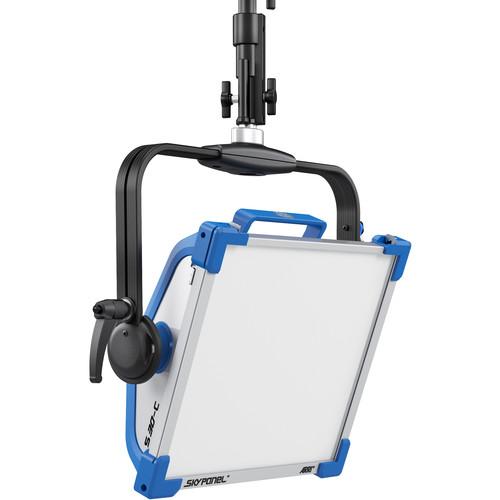 Contents of the user manual for the ARRI SkyPanel S30-C LED Softlight
- Product category: LED Lights ARRI
- Brand: ARRI
- Description and content of package
- Technical information and basic settings
- Frequently asked questions – FAQ
- Troubleshooting (does not switch on, does not respond, error message, what do I do if...)
- Authorized service for ARRI LED Lights
|
User manual for the ARRI SkyPanel S30-C LED Softlight contain basic instructions
that need to be followed during installation and operation.
Before starting your appliance, the user manual should be read through carefully.
Follow all the safety instructions and warnings, and be guided by the given recommendations.
User manual is an integral part of any ARRI product,
and if it is sold or transferred, they should be handed over jointly with the product.
Following the instructions for use is an essential prerequisite for protecting
health and property during use, as well as recognition of liability on the part of the manufacturer
for possible defects should you make a warranty claim. Download an official ARRI user manual in which you will find instructions on how to install, use, maintain and service your product.
And do not forget – unsuitable use of a ARRI product will considerably shorten its lifespan!
|
Product description ARRI continues to broaden their LED line and reaffirm their commitment to accurate color rendering with the introduction of the black SkyPanel S30-C LED Softlight. Supported by a pole operated aluminum yoke, the panel's surface area measures 14 x 11.8", making it an ideal portable, on-the-go light source for mobile applications. Output is controlled via interchangeable thermoplastic diffusers that range from Standard to Lite to Heavy to soften the light and wrap its output around your subject and the SkyPanel S30-C outputs the equivalent of a 1000W tungsten soft light while drawing a maximum of only 240W.
Using technology originally designed for the L7-C Fresnel, the SkyPanel S30-C is fully color "tuneable" allowing output of a warm 2800K to icy blue 10,000K light and also uses the full RGB+W color gamut with hue and saturation control for fine adjustments. Full minusgreen to full plusgreen is also possible, so if you're lighting for blue or greenscreen, you can simply dial your color chosen in. This wide degree of control is responsible for a very high CRI of 95 and a rating of 91 with the newer TLCI standard. All of these functions as well as 0-100% dimming can adjusted locally with the SkyPanel's onboard controller or remotely via DMX or over a LAN. Besides inputs and outputs appropriate to these functions, the light also has a USB-A port for downloading firmware upgrades from a thumb drive, Windows or Mac.
The SkyPanel S30-C can be used worldwide, thanks to its included 90-250 VAC power supply, but it can also use optional 23-36 VDC batteries when mains power is unavailable. Besides the power supply, the light comes with a combo baby/junior (5/8" | 1-1/8") pin and a standard diffuser. This version of the light comes with a 3.3'-long bare ends DC power cable. - Fully Tuneable, Precise Color Rendering
- Incorporating features of ARRI's successful L-Series LED Fresnels, the SkyPanel is one of the most versatile soft lights on the market, as well as one of the brightest. Like the L-Series, SkyPanel "C" (Color) versions are fully tuneable, meaning that correlated color temperature is adjustable between 2800K and 10,000K, with accurate color rendition over the entire range. Full plus and minusgreen correction can be achieved with the simple turn of a knob, and in addition to CCT control, vivid color selection and saturation adjustment is also possible. Applications for this controllability range from quickly adjusting the CCT to set the mood of a scene, to selecting the chroma green output for green screen color keying. Each LED light engine is computer calibrated in order to ensure unit-to-unit and batch-to-batch consistency, as well as accurate color temperatures.
- True Soft Light Beam Quality
- Soft lights are known for their smooth quality of light and even, uniform beam field. SkyPanel's combination of a precise selection of diffusion panels, LED mixing chamber and large surface area allow for the light output to wrap around objects, eliminating sharp shadows and making for an ideal beauty light. The beam field is homogeneous in both color and intensity.
- Natural Shadow Rendition
- Mixing calibrated red, green, blue and white LEDs into one homogeneous beam of soft light, the SkyPanel produces not just impressive light quality, but excellent shadows rendering as well. The soft shadows cut cleanly without exhibiting multiple edges or color fringing.
- Versatility Built In
-
- While the SkyPanel was designed to be used primarily as a soft light to illuminate people, various built-in features make it extremely adaptable to other uses. The diffuser panels on the front of the lamp head are interchangeable, so going from the Heavy to the Lite diffusion panel can be done in a matter of seconds.
- With the onboard battery input, SkyPanel can be run off industry-standard batteries. The S30 can be operated at full power on battery power.
- The SkyPanel also makes an effective space light outputting a large downward-directed pool of color controllable soft light through an optional silk cylinder.
- Built to Last
- Made in Germany to the high standards for which all ARRI products are known, SkyPanel is constructed from resilient materials and assembled by hand with great care. The combination of an aluminum core with fiberglass-reinforced thermoplastics results in a solid fixture that can withstand heavy daily use on busy film sets. The easily-services electronics have been designed to last beyond a minimum of 25,000, up to a maximum of 50,000 hours while the LED light engine even allows for re-calibration.
- Highly Controllable
- The SkyPanel user interface is designed for ease of use with a wide range of controls available to the user. Three simple knobs adjust the color temperature, green/magenta balance, light intensity and hue and saturation instantly. In addition to the on-board controls, all functions can be remotely adjusted via DMX or LAN connections.
- Photometrics
- At 16.4' / 5 m and 3200K
- With Standard Diffusion: 217 lux/ 20 fc
- With Lite Diffusion: 235 lux/ 22 fc
- With Heavy Diffusion: 180 lux/ 17 fc
- With Intensifier: 282 lux/ 26 fc
At 16.4' / 5 m and 5600K
- With Standard Diffusion: 222 lux/ 21 fc
- With Lite Diffusion: 240 lux/ 22 fc
- With Heavy Diffusion: 185 lux/ 17 fc
- With Intensifier: 289 lux/ 27 fc
In the Box ARRI SkyPanel S30-C LED Softlight (Black, Bare Ends) Standard Diffusion Panel Power Supply Unit Power Supply Unit Rail Mount Limited 1-Year Warranty Table of Contents
|
Upload User Manual
Have you got an user manual for the ARRI SkyPanel S30-C LED Softlight in electronic form? Please send it to us and help us expand our library of instruction manuals.
Thank you, too, on behalf of other users.
To upload the product manual, we first need to check and make sure you are not a robot. After that, your "Submit Link" or "Upload File" will appear.
Technical parametersARRI S30-C Specs | | | Beam Angle | 110° | | Color Temperature | 2800 to 10,000K ± 100K (with 200K Shift over Lifetime) | | Color Accuracy Standard | CRI 95
TLCI 91 | | Cooling System | None | | Dimming | Yes, 0 to 100% (Continuous) | | Display | None | | Expected Lamp Life | 50,000 Hours (L70) | | Rectangular Panel Size | 14 x 11.8" / 35.5 x 30.0 cm | | Fixture Dimensions | 15.6 x 13.5 x 5.2" / 39.7 x 34.2 x 13.3 cm
20.0 x 22.0 x 5.2" / 50.7 x 55.9 x 13.3 cm (Including Yoke) | | Fixture Weight | 19.4 lb / 8.8 kg (Including Yoke) | | | | Power Input Connector | 3-Pin XLR, 4-Pin XLR | | DMX Connector | 5-Pin XLR, EtherCON | | Service Connector | USB Type-A | | | | Fixture Mount | Combination 1-1/8" Stud and 5/8" Receiver | | Accessory Mount | None | | | | Yoke Material | Aluminum | | Yoke Type | Pole Operated | | Tilt | 180
Rating60% users recommend this product to others. And what about you?

This product has already been rated by 09 owners. Add your rating and experience with the product.
Discussion
 Ask our technicians if you have a problem with your settings,
or if anything is unclear in the user manual you have downloaded.
You can make use of our moderated discussion.
The discussion is public and helps other users of our website who may be encountering similar problems.
Ask our technicians if you have a problem with your settings,
or if anything is unclear in the user manual you have downloaded.
You can make use of our moderated discussion.
The discussion is public and helps other users of our website who may be encountering similar problems.
The discussion is empty - enter the first post
Post a new topic / query / comment:
|
|
|
| Request for user manual |
You can’t find the operation manual you are looking for? Let us know and we will try to add the missing manual:
I’m looking for a manual / Request for manual
Current requests for instruction manuals:
Call Of Duty World War Two For Xbox...
controller stratus XL...
stratus XL...
smart whatch serie S11 42mm...
Allen & Heath SQ-6 manual...
|
| Discussion |
Latest contributions to the discussion:
AEW R 4100
Name: MAURICIO ANGARITA
Audio-Technica AEW-R4100 UHF Diversity Receiver for
AEW R 4100 has the mute function blocked and does not allow audio to pass. I tried several times to turn off the mute from the transmitter but it does nothing, the mute stays on. Solution?
Thank you...
Instructions for assembling the 2015 Forecast Image Master Consoles GC3-A
Name: mike elam
Forecast Consoles GC3-A ImageMaster Editing Console
Looking for instructions for assembling this console. ...
EMPTY TONER ERROR MESSAGE AFTER REPLACING TONER
Name: LINDA BAD YELLOW EYES
Brother TN223BK Standard-Yield Toner
I HAD TO CHANGE OUT ALL THREE TONERS DUE TO LEAKS IN THE YELLOW AND CYAN. AFTER I REPLACED THEM, THE MACHINE KEEPS GIVING ME AN EMPTY TONER ERROR MESSAGE. HELP!!...
PS480D 20/24 pin Switching 480W Power Supply
Name: swkargo
Logisys 480W Power Supply
This item states in can run -5vdc .It is NOT listed on the board or I beleive is r4 is missing the resitior. Any body have thid issue. Shawn
...
Help needed
Name: Ann Carter
SanDisk 1TB Extreme Portable USB 3.1
When I click the link to download the user manual for my Sandisk Extreme external hard drive, it gives me the manual for the LG Cricket. Can you please change the link so I can download the Sandisk manual and begin using this drive? Thank you....
|
|


