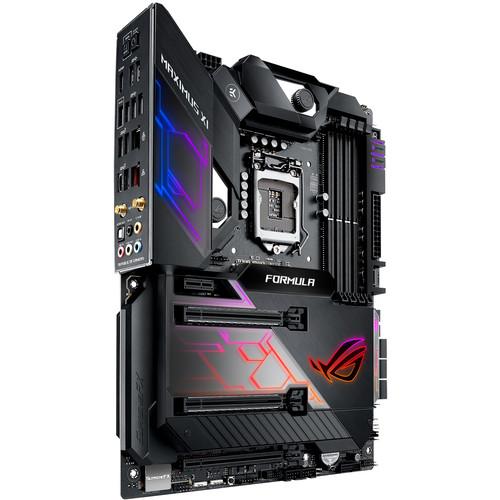
User Manual for ASUS Republic of Gamers Maximus XI Formula LGA 1151 ATX Motherboard Click to enlarge the picture
 Contents of the user manual for the ASUS Republic of Gamers Maximus XI
- Product category: Motherboards ASUS
- Brand: ASUS
- Description and content of package
- Technical information and basic settings
- Frequently asked questions – FAQ
- Troubleshooting (does not switch on, does not respond, error message, what do I do if...)
- Authorized service for ASUS Motherboards
 |
User manual for the ASUS Republic of Gamers Maximus XI contain basic instructions
that need to be followed during installation and operation.
Before starting your appliance, the user manual should be read through carefully.
Follow all the safety instructions and warnings, and be guided by the given recommendations.
User manual is an integral part of any ASUS product,
and if it is sold or transferred, they should be handed over jointly with the product.
Following the instructions for use is an essential prerequisite for protecting
health and property during use, as well as recognition of liability on the part of the manufacturer
for possible defects should you make a warranty claim. Download an official ASUS user manual in which you will find instructions on how to install, use, maintain and service your product.
And do not forget – unsuitable use of a ASUS product will considerably shorten its lifespan!
|
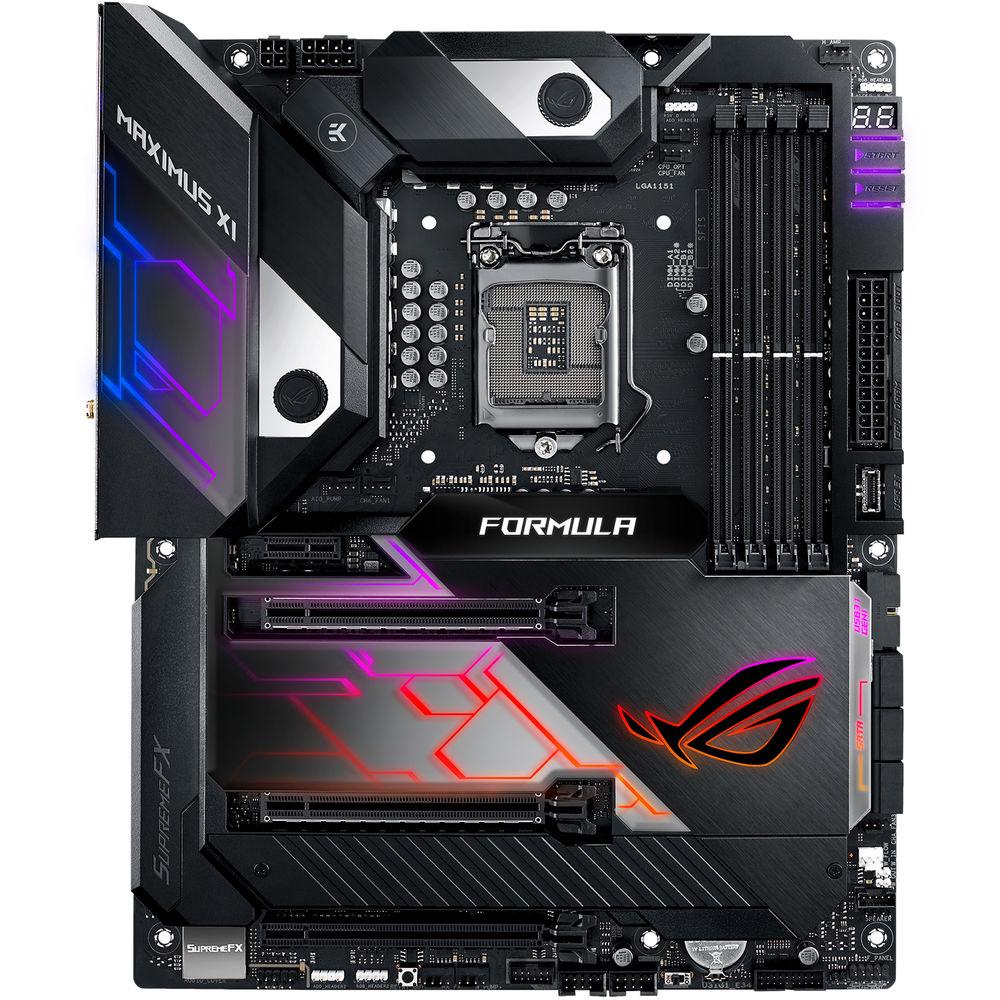
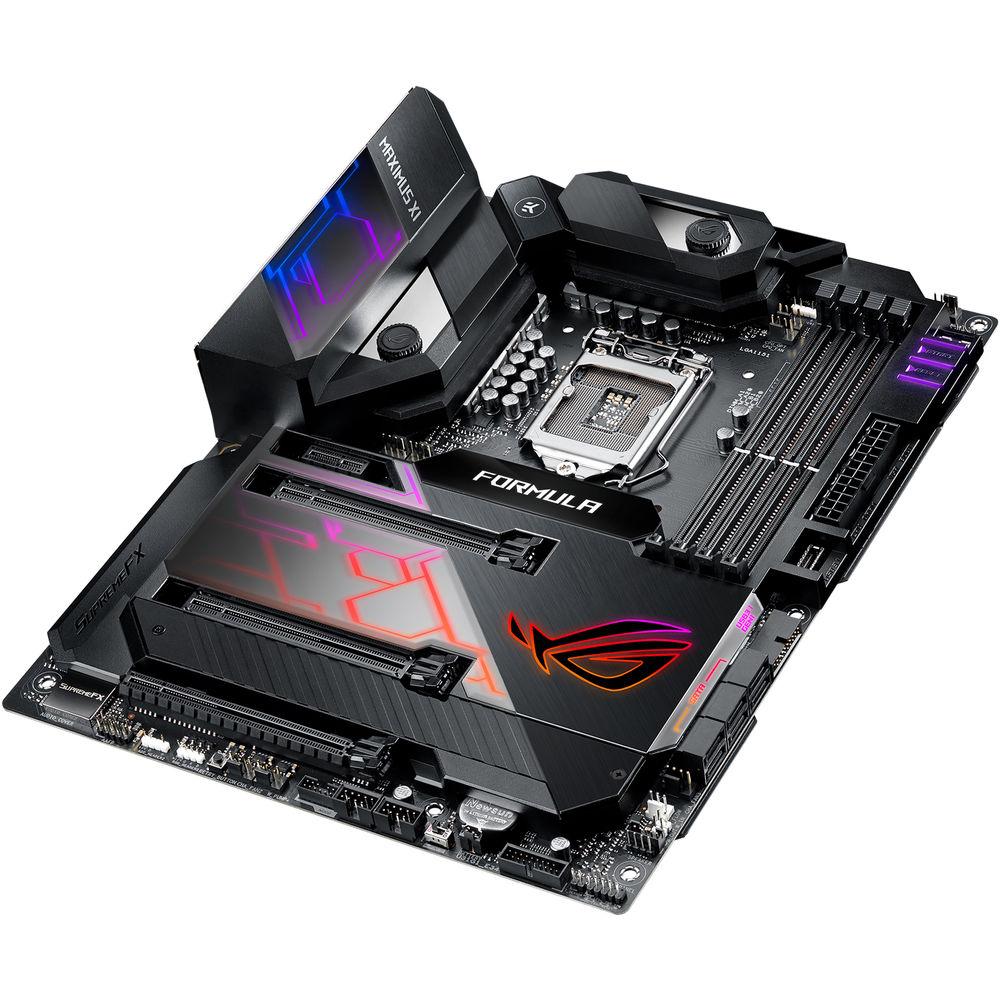
Product description Powered exclusively by 8th and 9th Generation Intel Core, Pentium Gold, and Celeron processors, the Republic of Gamers Maximus XI Formula LGA 1151 ATX Motherboard from ASUS is designed for gaming with CrossChill EK III and Water Cooling Zone, Aura Sync RGB lighting, 5G and Gigabit LAN, 802.11ac Wi-Fi, dual M.2 slots, USB 3.1 Gen 2 Type-C and Type-A, 5-Way Optimization with AI Overclocking, SupremeFX and Sonic Studio III, and more. This motherboard is designed to fit in ATX sized cases, supports the LGA 1151 socket, the Intel Z390 chipset, and is compatible with Windows 10 (64-bit).
The ATX form factor of the Maximus XI Formula can support up to 64GB of DDR4 RAM over four dual-channel slots, or 16GB per slot at speeds of 4400 (OC), 4266 (OC) 4133 (OC), 4000 (OC), 3866 (OC), 3733 (OC), 3600 (OC), 3466 (OC), 3400 (OC), 3333 (OC), 3300 (OC), 3200 (OC), 3000 (OC), 2800 (OC), 2666 (OC), 2400 (OC), and 2133 MHz non-ECC unbuffered memory. For storage, there are six SATA III 6 Gb/s ports and two M.2 Socket 3 with M key, one of which supports type 2242, 2260, 2280, and 22110 PCIe 3.0 x4 and SATA SSDs, while the other supports type 2242, 2260, and 2280 PCIe 3.0 x4 SSDs.
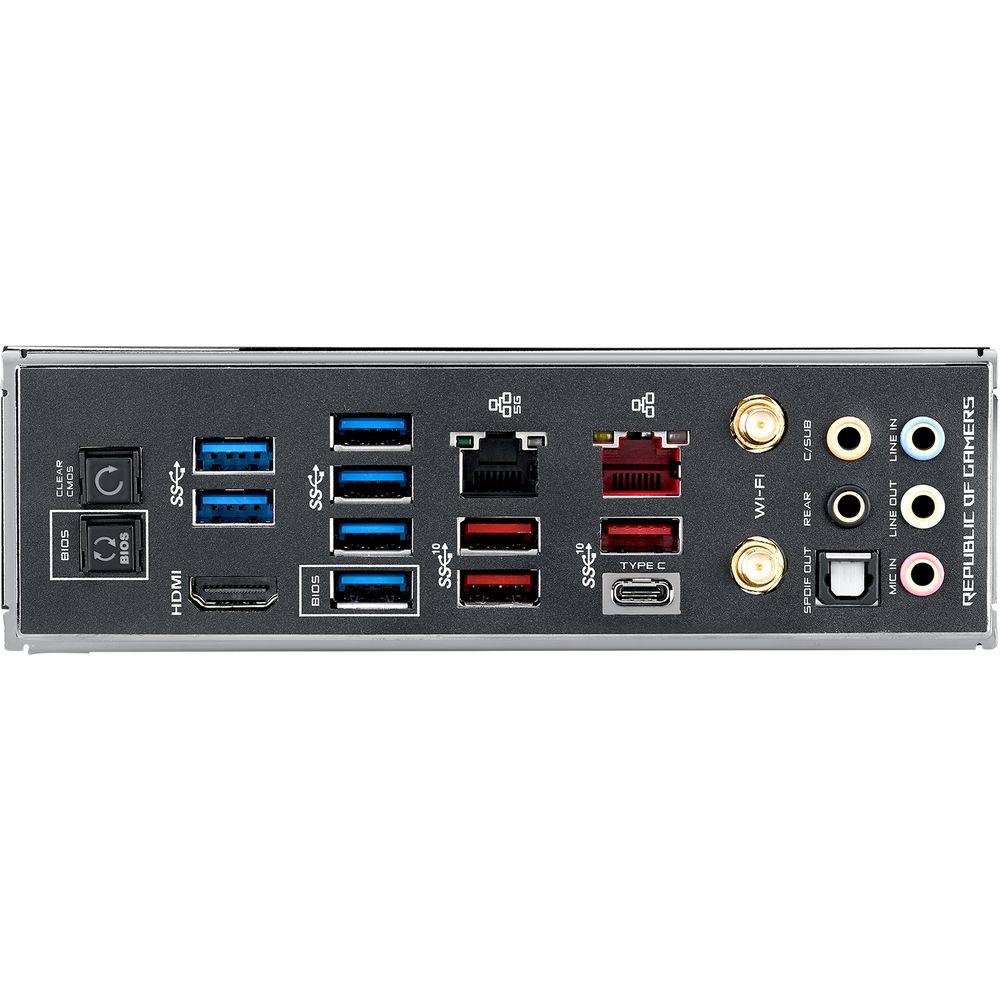
There is also one USB 3.1 Gen 2 Type-C port (rear panel), three USB 3.1 Gen 2 Type-A ports (rear panel), six USB 3.1 Gen 1 Type-A ports (rear panel), one USB 3.1 Gen 2 connector (front panel), plus more internal USB headers that support USB 3.1 Gen 1 and USB 2.0. For those looking to expand their system using PCIe, there are two PCIe 3.0 x16 slots, one PCIe 3.0 x16 slot (max at x4 mode), and one PCIe 3.0/2.0 x1 slot.
For delivering sharp, clear graphics, this motherboard supports Intel HD Graphics with one HDMI 1.4b output that supports a maximum resolution of 4096 x 2160 at 30 Hz. For users looking to take advantage of multi-GPUs, the Maximus XI Formula supports NVIDIA 2-Way SLI and AMD 3-Way CrossFireX technologies.
Using the ROG SupremeFX S1220 8-channel HD audio codec, the Maximus XI Formula can support audio with higher fidelity than standard controllers. Audio can also be output using the integrated five 3.5mm audio outputs or S/PDIF output. This motherboard is also equipped with features such as OptiMem II, GameFirst V, a TurboV Processing Unit (TPU), and Energy Processing Unit (EPU), Fan Xpert 4, Digi+ Power Control, ASUS' Turbo app, UEFI BIOS, dual-band Wi-Fi 5 (802.11) with MU-MIMO, Bluetooth 5.0, and more. This motherboard is protected by a limited 3-year warranty. General Features Power Performance - Built for Overclocking
- By default, all of Coffee Lake's major bus frequencies are derived from the same reference clock, limiting the control and flexibility needed to harness the full overclocking potential of the platform. The ROG Maximus XI Code features a dedicated onboard clock generator that supplies dynamic reference clocks to the CPU cores and major subdomains, giving you the freedom to coax more MHz of headroom from the system.
- DDR4 4400 MHz+
- Whether you're gunning for high memory frequencies or tuning timings for the low latency, ROG Maximus XI Code provides the tools you need to exploit the Coffee Lake architecture's full potential: carefully optimized trace pathways maintain signal integrity, and ROG firmware offers the necessary tweaks to ensure stability while maximizing memory performance. Load up with a high-density memory kit for heavy multitasking, or run a focused setup that delivers the bandwidth your favorite games and applications need.
- OptiMem II
- To provide Intel's CPUs unfettered access to memory bandwidth, ASUS has reimagined motherboard trace routing from the ground up. Their OptiMem II tech carefully maps memory signal pathways across different PCB layers to reduce vias and also adds shielding zones that significantly reduce crosstalk. And to further enhance overclocking headroom for fully stacked memory configurations, they've employed a highly customized T-Topology layout that delivers time-aligned signaling.
Cooling Design - CrossChill EK III
- CrossChill EK III lets you cool with air and water. The redesigned cooling channels provide wider copper, delivering up to 99°F / 37.2°C lower MOSFET temperatures on water, and the standard G1/4" threaded fittings mean CrossChill EK III fits existing setups so you can enjoy efficient, quiet cooling with minimum effort.
- Cooler by Design - Comprehensive Cooling Zone
- The ROG Maximus XI Formula features comprehensive cooling controls, configurable via Fan Xpert 4 or the UEFI BIOS.
Multiple Temperature Sources
Each header can be set to monitor and react to three user-configurable thermal sensors, for workload based cooling. All easily managed by Fan Xpert 4 or UEFI.
Water Pump+
A dedicated header that can supply over 3A to high-performance PWM or DC water pumps.
4-Pin PWN/DC Fan
Every onboard header supports auto-detection of PWM or DC fans. W_PUMP+ and AIO PUMP are also PWM/DC controllable.
Fan Extension Header
Allows expansion of three additional DC or PWM fan headers, plus three thermal-probe headers.
Smart Protection
A dedicated integrated circuit that protects each fan header from over-temperature and over-current.
Water In/Out
Allows for monitoring of temperature at the input/out of any component.
Water Flow
Allows for constant monitoring of the flow rate of entire loop.
AIO Pump
An All-In-One header that supports auto-detection of PWM, DC fans, and water pumps. Networking - Built-In 5G Ethernet
- Designed for the demanding requirements of power users and content creators who push the envelope, onboard 5 Gb/s Ethernet plugs you into a faster era of home networking. With up to 5x the bandwidth of standard Gigabit Ethernet, you'll enjoy streaming uncompressed 4K UHD videos, backups, and file transfers, and there's also support for intermediate 2.5 Gb/s connectivity, allowing you to step up to faster networks for more flexibility. Choose the bandwidth that meets your needs and enjoy low latency. Category 5e (30M) network cables support up to 5 Gb/s operation.
Control Your Rig - Fast, intuitive control is vital for effective command of your rig, so ASUS has loaded the ROG Maximus XI Code with simple, flexible tools that let you tweak almost every aspect of the system. Enjoy intelligent automated tuning with 5-Way Optimization technology, or dive deep into the ROG UEFI BIOS to take full manual control. The ROG Maximus XI Code also makes short work of fine-tuning everything from audio to storage, so it's easy to get every park of your system up to speed.
Intelligent Control - AI Overclocking
- ASUS AI Overclocking makes automatic tuning faster and smarter than before. Available in Windows or directly through the UEFI BIOS, it profiles the CPU and cooling to predict the optimal configuration for each individual system.
CPU Potential
ASUS created a proprietary algorithm that evaluates the capabilities of your processor.
Cooling Capability
The onboard intelligence also watches systems vitals like temperatures, fan speeds, and power draw to gauge cooling performance.
AI Overclocking
Utilizes onboard intelligence to perform automated clocking and provides target frequency and voltage estimations for veterans that prefer manual tuning. - 5-Way Optimization
- Take care of complex tuning with just one click. ASUS 5-Way Optimization is a system-wide tuning utility that overclocks the processor and tunes fan speeds to ensure the best balance between cooling and acoustics. The automated CPU tuning feature of 5-Way Optimization leverages the same onboard intelligence as AI Overclocking, but goes further by running a Prime95-based stress test to deliver a result that's well-tuned from the get-go.
TPU Insight The TurboV Processing Unit (TPU) Insight provides AI Suite 3 with the intelligence needed to automatically fine tune voltages, monitor system stats, and adjust overclocking.
EPU Guidance
The Energy Processing Unit (EPU) Guidance enables system-wide power efficiency, automatically optimizing consumption to maximize savings.
Fan Xpert 4
Enjoy comprehensive control over fans, water pumps, and all-in-one (AIO) coolers via either Fan Expert 4 or ASUS' UEFI BIOS.
Digital Power Controls
The Digi+ Voltage Regulator Module (VRM) delivers real-time control over voltage droop, switching frequency and power efficiency settings, allowing you to fine tune CPU voltage regulation for stability and performance.
Turbo App
Intel's processors feature per-core tuning, and the ASUS Turbo app makes use of this feature by letting you assign applications to specific processor cores, prioritizing computing power where it's needed most. - UEFI Bios
- The ROG UEFI (BIOS) provides everything you need to configure, tweak, and tune your rig. It offers intelligently simplified options for newcomers to PC DIY, as well as comprehensive features for seasoned veterans.
- EZ Mode
- Designed to simplify setup, EZ Mode presents vital settings and stats on a single page. With guided wizards, drag-and-drop functionality, and one-click application of important settings, your rig will be up and running quickly.
EZ Tuning Wizard
Streamline your RAID configuration for faster data retrieval and backups.
AI OC Guide
The AI OC Guide allows you to enable the AI Optimization or view a quick guide.
Intuitive Graphical Fan Control
Fine-tune individual fans simply by dragging a curve with the mouse.
SATA Information
View SATA port details for easy device recognition.
Fast Clock Adjustment
Use mouse controls to change the time and date.
Aura On/Off Mode (Stealth)
Easily enable or disable Aura RGB lighting or every onboard LED, for a more subdued aesthetic. - Advanced Mode
- When you're ready for a deeper dive into the configuration of your system, delve into the UEFI's Advanced Mode and take complete control. Each section is intuitively organized, and a built-in search feature makes it easy to find the options you need. Advanced functions are coded with the intelligence to adapt to your settings, and when you're ready to take charge, parameters have the granularity to dial in performance just the way you want. In Advanced Mode, you will find:
Prediction
AI OC monitors system vitals like temperatures, fan speeds, and power draw to estimate overclocking performance.
My Favorites
Quickly find tuning options and add preferred tools to the list.
EZ Flash 3
Flash the latest BIOS via the internet from within the BIOS.
AI OC Guide
The AI OC Guide allows you to enable the AI Optimization or view a quick guide.
SMART Check your storage devices' Self-Monitoring, Analysis, and Reporting Technology logs to gauge reliability and to identify potential failures.
GPU POST
Automatically detect selected ASUS graphics cards to view detailed information.
Secure Erase
Restore your SSDs to factory-fresh condition.
Last Modified Log
Track the latest changes and save preferred profiles onto a USB drive.
SATA Port Renaming
Rename SATA ports for easy identification.
Search Function
Quickly and easily find the option or setting you're looking for.
ASUS User Profile Port configuration settings between different BIOS versions or share them with friends. Audio - SupremeFX
- Immerse yourself in sound with SupremeFX audio technology. Utilizing the S1220 codec, SupremeFX is the integrated-audio solution that's engineered to provide a flat frequency response for a neutral, detailed sound signature. And to ensure that pristine signature is well preserved, the front panel output is driven with dual op amps, delivering sonics with the scale and authority to create virtual worlds via your gaming headset.
- S1220 Codec
- 10 DAC channels, simultaneous 7.1 channel playback, independent 2.0-channel, multiple-stream stereo to front panel outputs.
- ESS ES9023P
- Creates a balance for audio clarity capable of -112 dB THD.
- Nichicon Caps
- Japanese-made components that produce a warmer, natural sound with strong clarity and fidelity.
- Gold-Plated Audio Jacks
- Backlit audio jacks save you from fumbling around in the dark.
- Switching MOSFETs
- This design allows the codec's impedance-sensing function to be ported with either the front or rear headphone outputs.
- Sonic Rader III
- Enjoy visualized audio detail that eliminates the need to crank up the volume. It's a good tool for practice rounds and tuning untrained ears.
- Sonic Studio III
- Explore a range of EQ options and one-click presets that allow you to tailor acoustics to suit personal preferences or the characteristics of your audio device, and make use of the APO injection technology to apply your audio profiles to USB, HDMI, and Bluetooth gear.
Utility - GameFirst V
- GameFirst V is the ROG-exclusive tool that optimizes network traffic for faster, lag-free online gaming. Team your gateways, keeps tabs on bandwidth-hogging apps, and make adjustments on the fly.
Smart/Auto Modes
Optimize network traffic for active apps or allocate more bandwidth to games.
One-Click Prioritization
Speed network packets for specific applications, helping to reduce latency.
ROG First
Interface directly with an ROG router and automatically configure QoS to prioritize network bandwidth to games.
Network Insight
View real-time traffic by biggest hogs, app groups, and task types, or drill down for detailed connection information. - Improved Status Overlay
- View or adjust network settings during your game, without interrupting play.
- Team with ROG Routers for More Wins
- ROG Networking Edge: ROG Motherboard with GameFirst + ROG Wi-Fi Router = Low-Latency Gaming.
- RAMCache III
- RAMCache turns milliseconds into microseconds to boost game-load times. Fully compatible with NVM Express storage options, its intelligent technology effectively caches an entire storage device so that favorite games and apps launch at fast speeds.
Armoury Crate - Armoury Crate
- The Armoury Crate portal keeps you updated with drivers and BIOS releases. Its user-friendly UI can be configured to show a variety of information, including security updates, bug patches, ROG news, gaming events, and special offers.
Personalized for You - With Aura Sync to unleash synchronized effects that extend from motherboard to a vast ecosystem of compatible components, the ROG Maximus XI Code is primed for virtually limitless personalization.
- Grow Your Gaming World
- Gear up with ROG components, from graphics and monitors, to mice and keyboards, and up your game with complementary aesthetics, control, and compatibility. The ROG ecosystem is extensive, so enjoy greater choice as your system expands.
- LiveDash OLED
- The Maximus XI Formula is equipped with LiveDash, a built-in 2" OLED panel that displays useful information and customizable graphics. During the power-on, self-test (POST) phase, LiveDash shows key progress stats in simple language and via traditional POST codes. Then, during normal operation, the panel shows a choice of CPU frequency, device temperatures, fan speeds or information from the Water Cooling Zone. You're even able to customize the default LiveDash GIF, so that it'll display your own image or animation.
The Power of Intel - Ready for Socket 1151 for 9th / 8th Gen Intel Core, Pentium Gold, and Celeron Processors
- This motherboard supports Socket 1151 for 9th Gen and 8th Gen Intel Core, Pentium Gold, and Celeron processors, with integrated graphics, memory, and PCI Express controllers to support onboard graphics output with dedicated chipsets, dual-channel (4-DIMM) DDR4 memory, and 16 PCI Express 3.0/2.0 lanes for great performance.
- Intel Z390 Chipset
- The Intel Z390 is a single-chipset design that supports Socket 1151 for 9th Gen and 8th Gen Intel Core, Pentium Gold, and Celeron processors. It provides improved performance by utilizing serial point-to-point links, allowing increased bandwidth and stability. Additionally, the chipset provides a maximum of six USB 3.1 Gen 2 ports, four USB 3.1 Gen 1 ports, and 32 Gb/s M.2 and PCIe 3.0 lane speed support for faster data retrieval. Intel Z390 also supports integrated-graphics, so you'll enjoy great graphics performance.
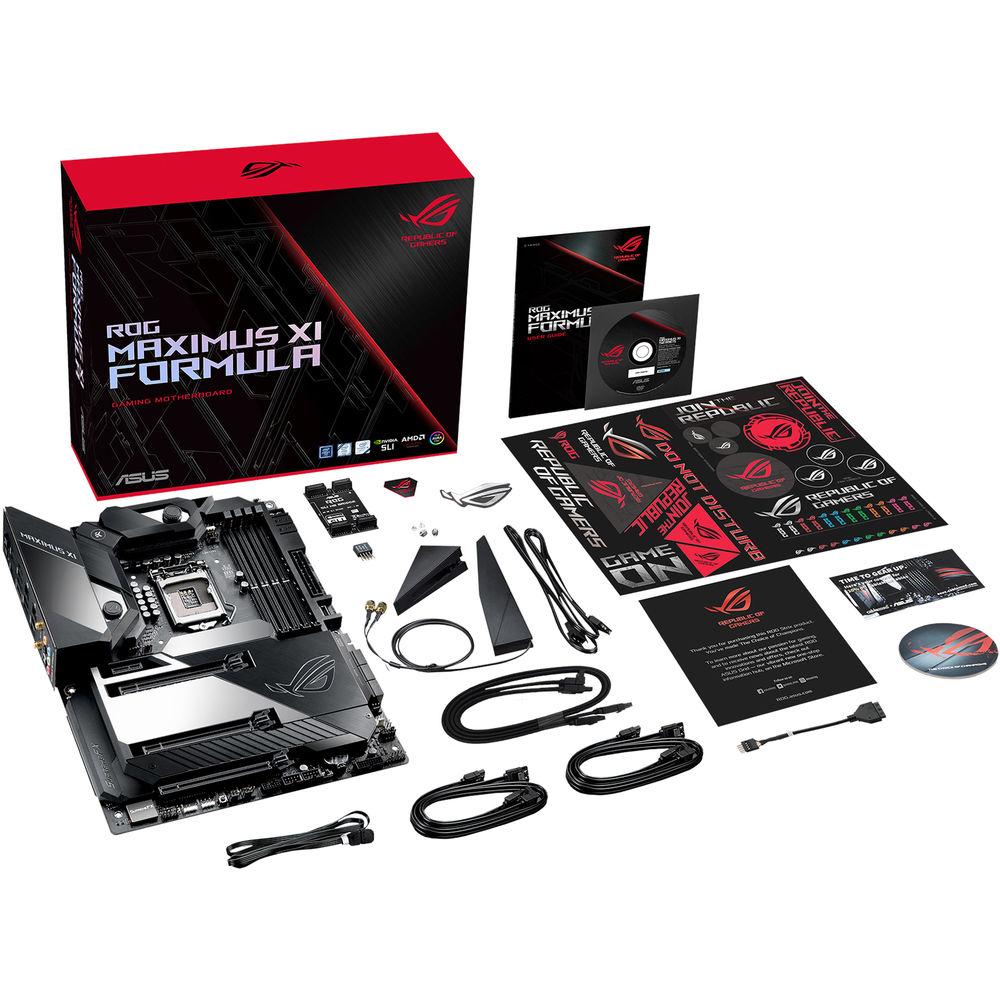
UPC: 192876131282 In the Box ASUS Republic of Gamers Maximus XI Formula LGA 1151 ATX Motherboard 2 x SATA III 6 Gb/s Cables ASUS 2T2R Dual-Band Wi-Fi Moving Antennas (Wi-Fi 802.11a/b/g/n/ac compliant) Q-Connector Thermistor Cable ROG Coaster Thermistor Cable ROG Weave SATA III 6 Gb/s Cable Limited 3-Year Warranty User Manual PDF 7.8mb More info from ASUS Table of Contents
|
Upload User Manual
Have you got an user manual for the ASUS Republic of Gamers Maximus XI Formula LGA 1151 ATX Motherboard in electronic form? Please send it to us and help us expand our library of instruction manuals.
Thank you, too, on behalf of other users.
To upload the product manual, we first need to check and make sure you are not a robot. After that, your "Submit Link" or "Upload File" will appear.
Technical parametersASUS MAXIMUS IX FORMULA Specs | | | Chipset | Intel Z390 | | CPU Socket | LGA 1151 | | | | USB | 1 x USB 3.1 Gen 2 Type-C
3 x USB 3.1 Gen 2 Type-A
6 x USB 3.1 Gen 1 Type-A | | Display | 1 x HDMI 1.4b | | Audio | 5 x 3.5 mm
1 x S/PDIF | | Ethernet / Controller | 1 x Intel I219V Gigabit
1 x Aquantia AQC-111C 5G | | Wi-Fi Antenna | 2 x Connector | | Buttons | BIOS Flashback, Clear CMOS | | | | Memory Slots | 4 x 288-Pin | | Memory Support | DDR4 2133, 2400, 2666, 2800, 3000, 3200, 3300, 3333, 3400, 3466, 3600, 3733, 3866, 4000, 4133, 4266, 4400 MHz | | Maximum Capacity | 64 GB | | Channel Architecture | Dual Channel | | ECC Support | Non-ECC Unbuffered | | | | SATA | 6 x SATA III | | M.2 | 1 x M Key 2242, 2260, 2280, 22110 (PCIe 3.0 x4, SATA (Unspecified))
1 x M Key 2242, 2260, 2280 (PCIe 3.0 x4) | | U.2 | None | | Optane Memory Support | Yes | | | | Expansion Slots | 2 x PCIe 3.0 x16
1 x PCIe 3.0 x16 (x4 mode)
1 x PCIe 3.0 x1 | | USB | 2 x USB 3.1 Gen 1 Header (Supports 2 USB Type-A Ports)
2 x USB 2.0 Header (Supports 2 USB Type-A Ports)
1 x USB 2.0 Header (Supports 2 USB Type-A Ports) | | Multi-GPU Support | 2-Way NVIDIA SLI
3-Way AMD CrossFireX | | Air Cooling | 1 x 4-Pin CPU
2 x 4-Pin System
1 x 4-Pin Assistant
1 x 5-Pin Extension
1 x Thermal Sensor
1 x 2-Pin W_IN
1 x 2-Pin W_OUT
1 x 3-Pin W_FLOW | | Liquid Cooling | 2 x 4-Pin Pump | | Power Connectors | 1 x 4-Pin CPU
1 x 24-Pin Mainboard
1 x 8-Pin CPU | | LED Header | 4 x RGB | | Audio | None | | Diagnostics | Reset, Start | | | | I/O Connection Headers | AAFP, USB 3.1 | | | | Audio Codec | SupremeFX S1220 (8-Channel) | | | | Bluetooth | 5.0 | | Wi-Fi | Wi-Fi 5 (802.11ac) (MU-MIMO) | | | | Supported Operating Systems | Windows 10 (64-Bit) | | | | Form Factor | ATX | | Dimensions | 12 x 9.6" / 30.48 x 24.38 cm | | | | Package Weight | 7.4 lb | | Box Dimensions (LxWxH) | 14.8 x 12.5 x 4.6" |
Rating40% users recommend this product to others. And what about you?

This product has already been rated by 07 owners. Add your rating and experience with the product.
Discussion
 Ask our technicians if you have a problem with your settings,
or if anything is unclear in the user manual you have downloaded.
You can make use of our moderated discussion.
The discussion is public and helps other users of our website who may be encountering similar problems.
Ask our technicians if you have a problem with your settings,
or if anything is unclear in the user manual you have downloaded.
You can make use of our moderated discussion.
The discussion is public and helps other users of our website who may be encountering similar problems.
The discussion is empty - enter the first post
Post a new topic / query / comment:
|
|


