User Manual for ASUS TUF Z390-Plus Gaming Z390 LGA 1151 ATX Motherboard Click to enlarge the picture
 Contents of the user manual for the ASUS TUF Z390-Plus Gaming Z390 LGA
- Product category: Motherboards ASUS
- Brand: ASUS
- Description and content of package
- Technical information and basic settings
- Frequently asked questions – FAQ
- Troubleshooting (does not switch on, does not respond, error message, what do I do if...)
- Authorized service for ASUS Motherboards
 |
User manual for the ASUS TUF Z390-Plus Gaming Z390 LGA contain basic instructions
that need to be followed during installation and operation.
Before starting your appliance, the user manual should be read through carefully.
Follow all the safety instructions and warnings, and be guided by the given recommendations.
User manual is an integral part of any ASUS product,
and if it is sold or transferred, they should be handed over jointly with the product.
Following the instructions for use is an essential prerequisite for protecting
health and property during use, as well as recognition of liability on the part of the manufacturer
for possible defects should you make a warranty claim. Download an official ASUS user manual in which you will find instructions on how to install, use, maintain and service your product.
And do not forget – unsuitable use of a ASUS product will considerably shorten its lifespan!
|
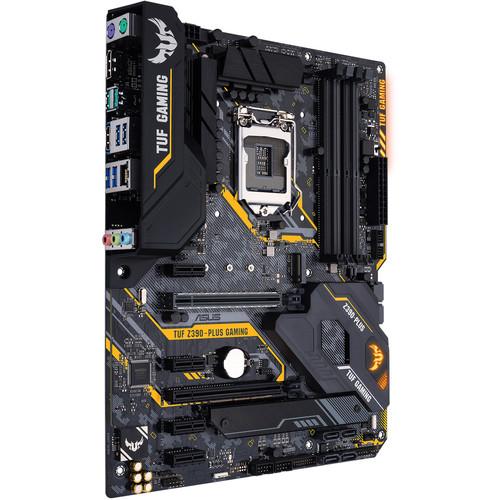
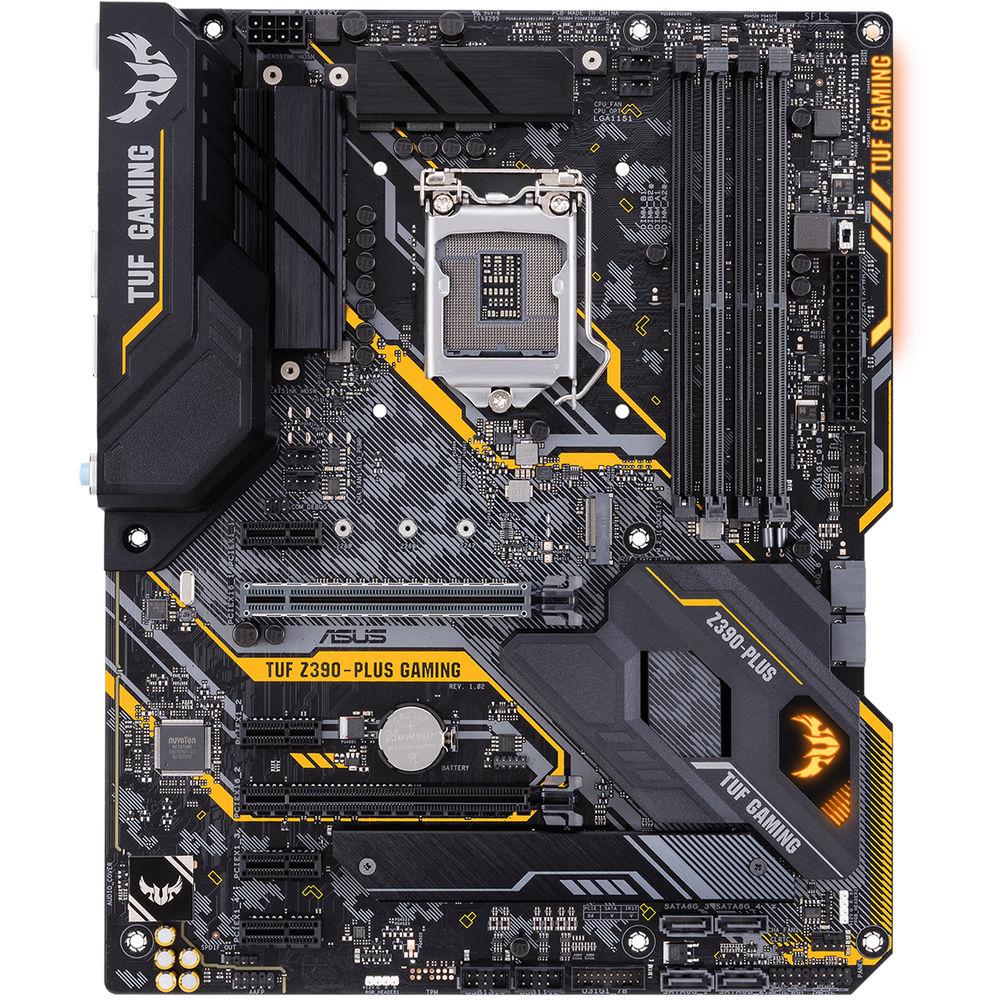
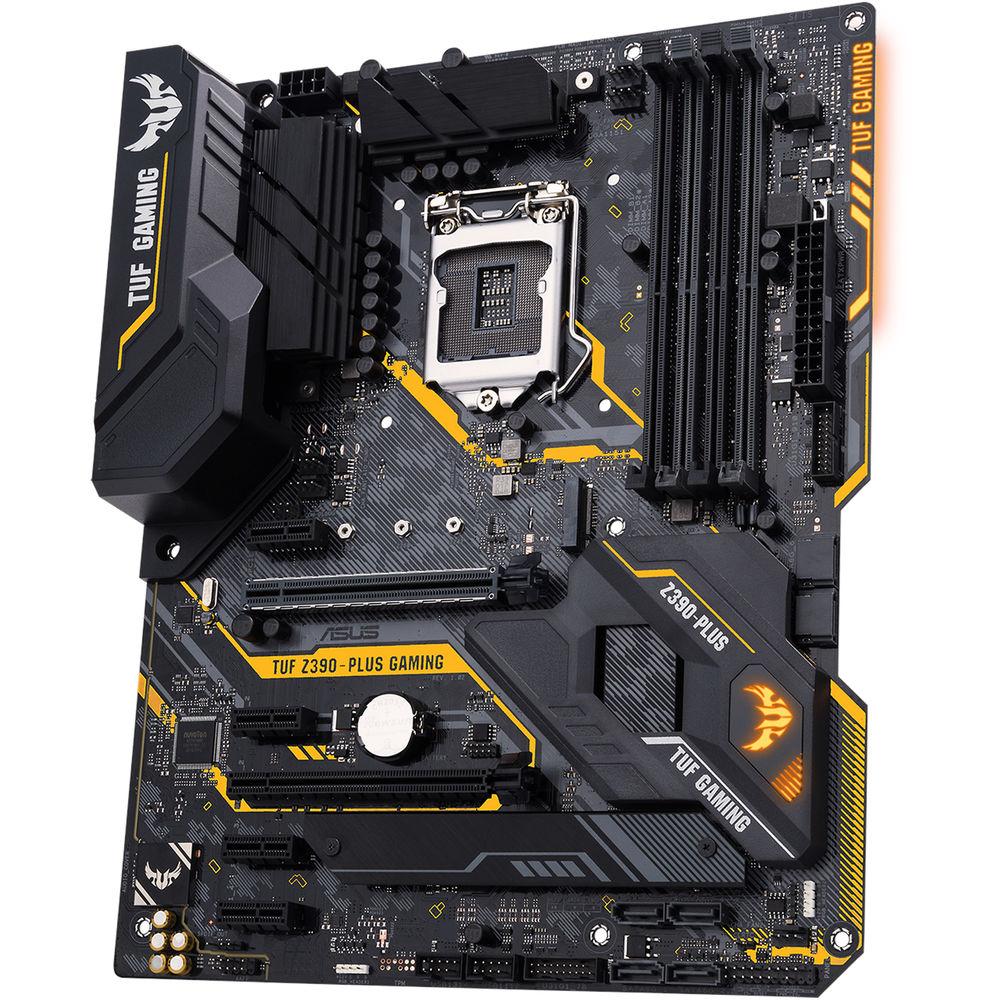
Product description Powered exclusively by 8th and 9th Generation Intel Core, Pentium Gold, and Celeron processors, the TUF Z390-Plus Gaming Z390 LGA 1151 ATX Motherboard from ASUS is designed and tested to survive and thrive where other boards would struggle. It offers a safe and user-friendly DIY build by leveraging its design, engineering, and military-grade components. This motherboard will fit in ATX sized cases, supports the LGA 1151 socket, the Intel Z390 chipset, and is compatible with Windows 10 (64-bit).
The ATX form factor of the TUF Z390-Plus Gaming can support up to 64GB of DDR4 RAM over four dual-channel slots, or 16GB per slot at speeds of 4266 (OC) 4133 (OC), 4000 (OC), 3866 (OC), 3733 (OC), 3600 (OC), 3466 (OC), 3400 (OC), 3333 (OC), 3300 (OC), 3200 (OC), 3000 (OC), 2800 (OC), 2666, 2400, and 2133 MHz non-ECC unbuffered memory. For storage, there are six SATA III 6 Gb/s ports and two M.2 Socket 3 with M key, both of which support PCIe 3.0 x4 and SATA SSDs. One of the M.2 slots supports type 2242, 2260, 2280, and 22110 PCIe 3.0 x4 SSDs, while the other supports type 2242, 2260, and 2280. The TUF Z390-Plus Gaming supports Intel Optane Memory and allows its storage to be configured as RAID 0, 1, 5, and 10.
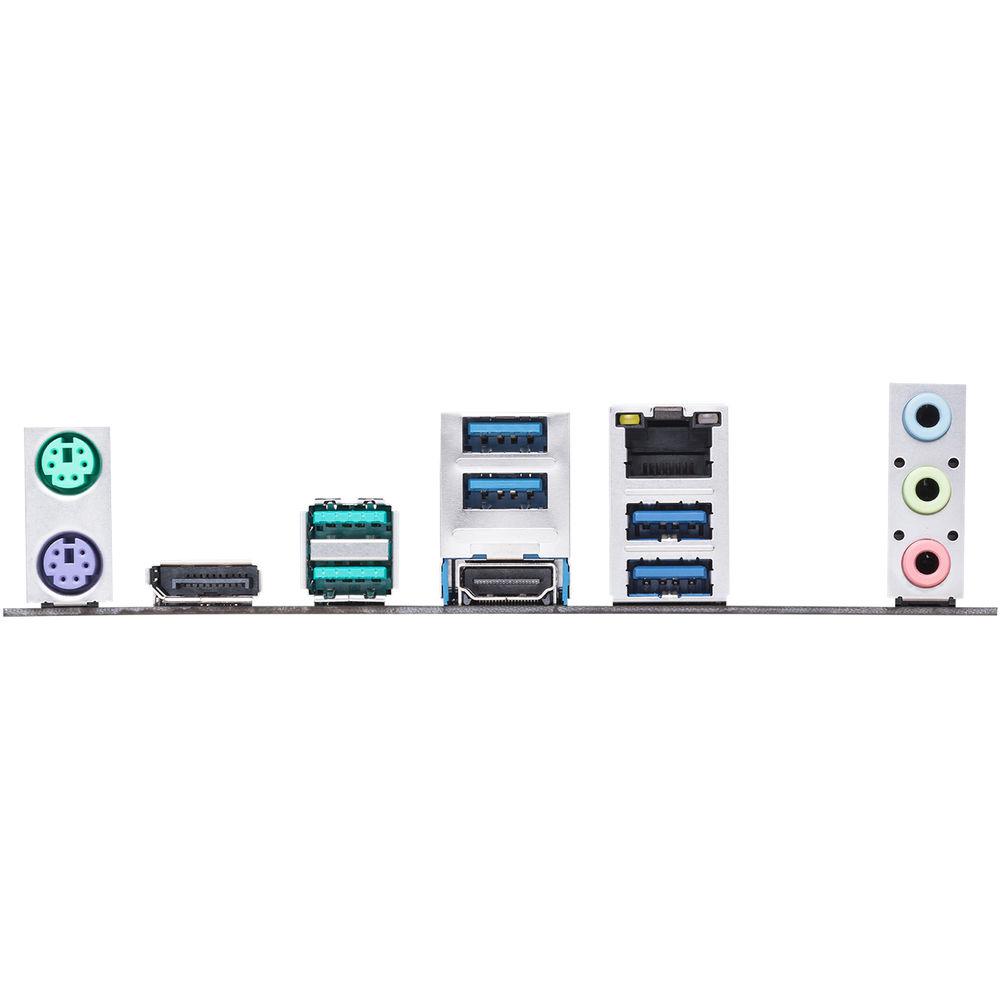
There are also two USB 3.1 Gen 2 Type-A ports (rear panel), four USB 3.1 Gen 1 Type-A ports (rear panel), and more internal USB headers that support USB 3.1 Gen 1 and USB 2.0. For those looking to expand their system using PCIe, there is one PCIe 3.0/2.0 x16 slot (x16 or x8+x4+x4), one PCIe 3.0/2.0 x16 slot (max at x4 mode), and four PCIe 3.0/2.0 x1 slots.
For delivering sharp, clear graphics, this motherboard supports Intel UHD Graphics with one HDMI output and one DisplayPort output. The DisplayPort supports a maximum resolution of 4096 x 2304 @ 60 Hz, while the HDMI port supports a maximum resolution of 4096 x 2160 @ 30 Hz. For users looking to take advantage of multiple GPUs, the TUF Z390-Plus supports AMD CrossFireX technology.
Using the Realtek ALC S1200A 8-channel HD audio codec, the TUF Z390-Plus Gaming can support audio with higher fidelity than standard controllers. Audio can also be output using the integrated three 3.5mm audio outputs, internal S/PDIF header, or front panel audio connectors. This motherboard is also equipped with features such as OptiMem II, EZ Flash 3, CrashFree BIOS 3, AI Suite 3, Ai Charger, SafeSlot, ESD Guards, Overvoltage Protection, LANGuard, and more. Protection is provided by a limited 3-year warranty. General Features - Arm Your Battle Station
- TUF Gaming motherboards are specially designed and tested to survive and thrive in conditions where other boards would struggle. Engineered with highly durable components, these motherboards deliver stability for gaming sessions that last as long as you demand.
When you build with a TUF Gaming motherboard, you also benefit from the TUF Gaming Alliance, an ASUS collaboration with trusted industry partners that ensures easier building, the broad compatibility, and complementary aesthetics from components to case. Easy PC DIY - TUF Gaming motherboards offer easy and safe DIY builds by leveraging great design, innovative engineering, and strong partnerships with major component manufacturers. The combination of military-grade TUF Components, TUF Protection, and the TUF Gaming Alliance means that you can rest assured that your gaming rig will go the distance.
- TUF Gaming Alliance
- TUF Gaming Alliance is a collaboration between ASUS and trusted PC-component brands to ensure compatibility with a wide range of parts, such as PC cases, power supplies, CPU coolers, memory kits, and more. With more partnerships and components being added regularly, the TUF Gaming Alliance will continue to grow even stronger.
- TUF Protection
- SafeSlot
SafeSlot is the PCIe slot reinvented by ASUS and engineered to provide improved retention and shearing resistance. Manufactured in a single step using an insert-molding process, SafeSlot integrates fortifying metal for an inherently stronger slot, which is then firmly anchored to the PCB through additional solder points.
ESD Guards
ESD Guards prolong the life of components while preventing damage from electrostatic discharge, providing protection for up to ±10kV of air discharge and ±6kV of contact discharge, surpassing the respective industry standards of ±6kV and ±4kV. Keyboard and mouse connectors have additional on-circuit ESD transient voltage suppression, while USB connectors have TVS diodes for surface-mount and dual-line package.
Digi+ VRM
The Digi+ VRM voltage-regulator module (VRM) ensures smooth and clean power delivery to the CPU.
DRAM Overvoltage Protection
Onboard resettable fuses prevent overcurrent and short circuit damage. This extends beyond I/O ports to DRAM to safeguard the lifespan of your system and connected devices.
Stainless Steel Back I/O
TUF's corrosion-resistant stainless steel back I/O panels, bonded with chromium oxide, have a lifespan that's longer than traditional panels. TUF Gaming motherboards pass a 72-hour salt fog test. - TUF Components
- TUF Chokes
Certified military-grade TUF chokes deliver steady power to the CPU, helping to improve system stability.
TUF Capacitors
Greater temperature tolerance and a longer lifespan.
TUF MOSFETs
Certified military-grade MOSFETs with lower RDS(on), which results in better power efficiency and reduced heat generation.
TUF LANGuard
TUF LANGuard is a military-grade innovation that integrates advanced signal-coupling technology and premium surface-mounted capacitors to improve throughput, protecting the motherboard from lightning strikes and static electricity. - Built for Hard Duty
- Optimized Thermal Design
The TUF Z390-Plus Gaming's VRM and inductor array is coupled to a large heatsink that has ample surface area to deal with the thermals of Intel's latest processors.
ProCool Socket (Enhanced EATX 8-Pin Socket)
Compared with traditional power inputs, ProCool sockets are built to tight specifications to ensure flush contact with the PSU power lines. They are solid and more durable, with lower impedance, which helps to prevent hotspots and connector failure.
OptiMem II Support - DDR4 OC 4266 MHz+
To provide Intel's latest processors' access to memory bandwidth, ASUS has reimagined motherboard trace routing from the ground up. Their OptiMem II tech carefully maps memory signal pathways across different PCB layers to reduce vias and also adds shielding zones that reduce crosstalk. And to further enhance overclocking headroom for fully stacked memory configurations, ASUS has employed a customized T-Topology layout that delivers time-aligned signaling.
ASUS OptiMem Benefits
Improved memory stability and compatibility, allows lower memory latencies at equivalent voltages, and improved memory frequency margins. Setup and Configuration - TUF Gaming motherboards are designed to be easy to set up and configure just the way you want, even for first-time builders. With simplified CPU and memory overclocking to optimize and boost performance, intelligent cooling controls for better system stability, and helpful troubleshooting tools to get you up and running quickly if you encounter problems, TUF Gaming motherboards give you everything you need to build your dream gaming rig without adding complexity.
- User-Friendly Troubleshooting / MemOK! II
- MemOK! II automatically fixes boot failures that arise due to memory overclocking and instability. When a DRAM-related POST error occurs, the motherboard adjusts memory parameters until the system is able to start.
- Quick Installation
- ASUS Q-Installer software provides automatic download and installation of drivers and utilities for your TUF Gaming motherboard. Choose just the options you want from a user-friendly interface and Q-Installer will do the rest.
- Smart Cooling
- GPU Temperature Sensing
System temperatures are key to a stable gaming rig―especially GPU temperatures. TUF Gaming motherboards include Fan Xpert 4 software that's able to intelligently control system fans based upon the input of multiple sensors, including the temperature of ASUS graphics cards. This ensures that your TUF Gaming system stays well cooled.
Fan Xpert 4
TUF Z390-Plus Gaming features comprehensive fan controls, configurable via Fan Expert 4.
Multiple Temperature Sources
With Fan Xpert 4 you're able to control system fans based on inputs from up to three temperature sources. For example, Fan Xpert 4 can be set to spin up the chassis fans in response to the GPU temperature. So, when the gaming action heats up, additional cooling kicks in, just when you most need it. Choose your temperature sources and thresholds, from motherboard and CPU to GPU, and leave Fan Xpert 4 to do the rest.
All-in-One Water Cooling Set
Enables full control of PWM or DC water pumps, good for both custom and self-contained cooling setups.
4-Pin PWM/DC Fan
Every onboard header supports auto-detection of PWM or DC fans.
Smart Protection
A dedicated integrated circuit protects each fan header from over-temperature and overcurrent. Gaming Performance and Aesthetic Customization - The TUF Gaming Z390 provides a complete, high-performance gaming package with a long list of features to improve your experience, including fast networking for smoother online gameplay, immersive audio with positional cues for FPS gaming, and onboard RGB lighting that syncs with attached accessories to help you create a cohesive gaming atmosphere.
- Efficient LAN Support
- Intel Ethernet
The TUF Z390-Plus Gaming features Intel Ethernet. Intel's LAN has the advantage of reducing CPU overhead and offering high TCP and UDP throughput for faster, smoother data transfers.
Turbo LAN
Turbo LAN with cFosSpeed traffic-shaping technology adds even more lag-reducing support and an intuitive user interface, so you'll reduce lag by up to 1.45x with no expert knowledge. It even includes Game mode to prioritize game-related data transmissions, smoothing network operations every time you play. - Gaming Audio
- TUF Gaming Audio Cover
Effective shielding preserves the integrity of audio to help ensure high quality.
Audio Enjoyment
Japanese audio capacitors provide warm, natural, and immersive sound.
S1200A Codec
Delivers an expansive soundstage and authoritative dynamics.
Audio Shielding
Separates analog/digital signal domains, significantly reducing multi-lateral interference.
Signal-to-Noise Ratio
ASUS TUF Gaming Z390 motherboards utilize a unique audio codec designed in close collaboration with Realtek, the Realtek S1200A. It also features a 108-dB signal-to-noise ratio for the stereo line-out and a 103-dB SNR for the line-in, providing high audio quality.
DTS Custom for Gaming Headsets
Hone your battle skills with DTS Custom onboard audio. Utilizing emulsion techniques to create positional cues via stereo headphones, DTS Custom takes onboard audio to higher levels. With three presets for different genres (Aerial, Soundscape, and Tactical), you'll have an advantage while gaming.
Aerial Mode
Experience audio as though hovering above the game world, with sound coming from ahead, good for MOBA, RTA, strategy and sports titles.
Soundscape Mode
This mode is made for MMO, RPG, action, and horror games. Your ears will put you in the center of the action.
Tactical Mode
Shhh - is that an enemy just around the corner? DTS Custom emphasizes detail for stealthy play, so you'll detect and locate every footstep. - RGB Lighting / Aura Sync
- A well-tuned system deserves a matching aesthetic. ASUS Aura offers full RGB lighting control with a variety of functional presets for the built-in RGB LEDs, as well as strips connected to the onboard RGB headers. And it can all be synced with an ever-growing portfolio of Aura-capable hardware.
- Intel Optane Memory
- Intel Optane is a non-volatile memory technology supported by TUF Gaming motherboards. Intel Optane memory modules accelerate attached storage to reduce boot and load times, so everything feels faster and more responsive.
Intel CPU and Chipset Features - Intel Z390 Chipset
- The Intel Z390 is a single chipset design that supports Socket 1151 for 9th Gen and 8th Gen Intel Core, Pentium Gold, and Celeron processors. It provides improved performance by utilizing serial point-to-point links, allowing increased bandwidth and stability. Additionally, the chipset provides a maximum of six USB 3.1 Gen 2 ports, four USB 3.1 Gen 1 ports, and 32 Gb/s M.2 and PCIe 3.0 lane speed support, for faster data retrieval. Intel Z390 also supports integrated-graphics, so you'll enjoy the very latest in graphics performance.
- Ready for Socket 1151 for 9th / 9th Gen Intel Core, Pentium Gold, and Celeron Processors
- This motherboard supports Socket 1151 for 9th Gen and 8th Gen Intel Core, Pentium Gold, and Celeron processors, with integrated graphics, memory, and PCI Express controllers to support onboard graphics output with dedicated chipsets, dual-channel (4-DIMM) DDR4 memory, and 16 PCI Express 3.0/2.0 lanes for great performance.
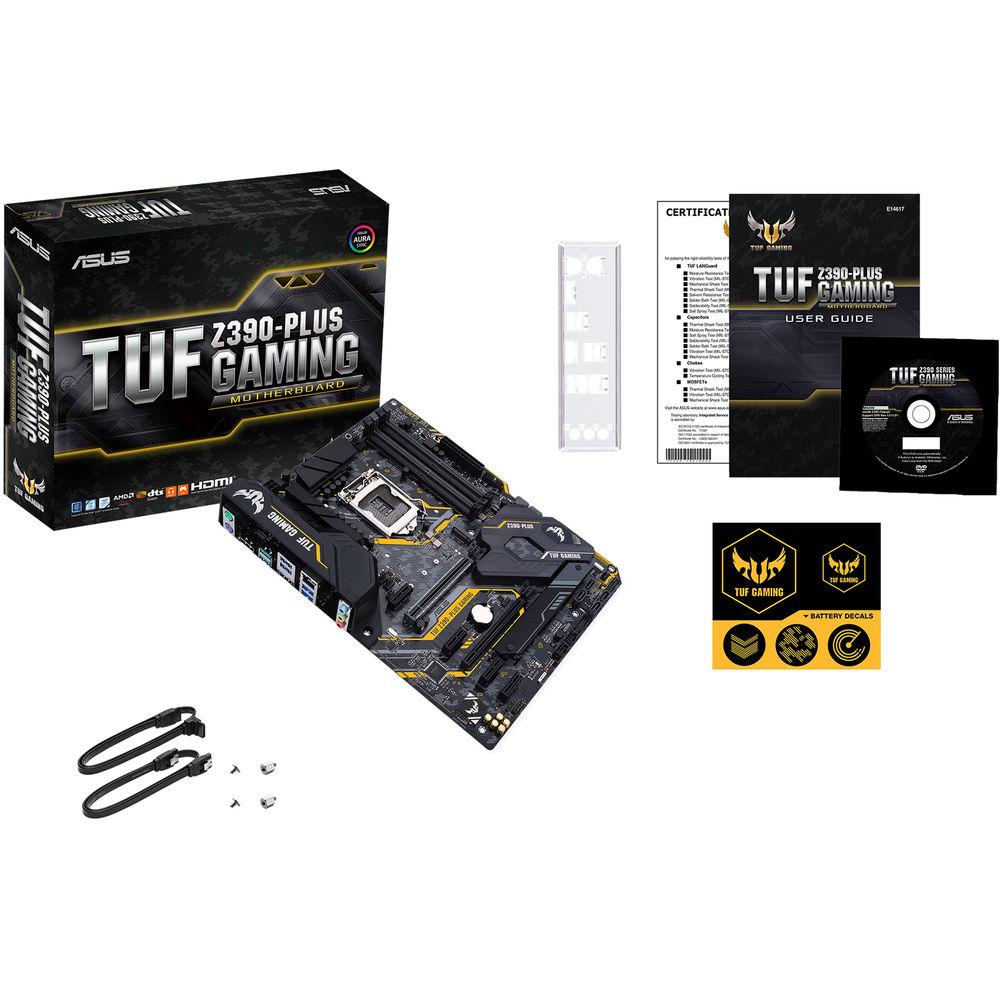
UPC: 192876126202 In the Box ASUS TUF Z390-Plus Gaming Z390 LGA 1151 ATX Motherboard I/O Shield 2 x SATA III 6 Gb/s Cables M.2 Screw Package TUF Gaming Sticker TUF Certification Card Limited 3-Year Warranty User Manual PDF 3.9mb More info from ASUS Table of Contents
|
Upload User Manual
Have you got an user manual for the ASUS TUF Z390-Plus Gaming Z390 LGA 1151 ATX Motherboard in electronic form? Please send it to us and help us expand our library of instruction manuals.
Thank you, too, on behalf of other users.
To upload the product manual, we first need to check and make sure you are not a robot. After that, your "Submit Link" or "Upload File" will appear.
Technical parametersASUS Z390-PLUS Specs | | | Chipset | Intel Z390 | | CPU Socket | LGA 1151 | | | | USB | 2 x USB 3.1 Gen 2 Type-A
4 x USB 3.1 Gen 1 Type-A | | Thunderbolt | None | | Display | 1 x DisplayPort 1.2
1 x HDMI | | Audio | 3 x 3.5 mm | | Ethernet / Controller | 1 x Intel I219V Gigabit | | PS/2 | 2 x PS/2 | | | | Memory Slots | 4 x 288-Pin | | Memory Support | DDR4 2133, 2400, 2666, 2800, 3000, 3200, 3300, 3333, 3400, 3466, 3600, 3733, 3866, 4000, 4133, 4266 MHz | | Maximum Capacity | 64 GB | | Channel Architecture | Dual Channel | | ECC Support | Non-ECC Unbuffered | | | | SATA | 6 x SATA III | | M.2 | 1 x M Key 2242, 2260, 2280, 22110 (PCIe 3.0 x4, SATA III)
1 x M Key 2242, 2260, 2280 (PCIe 3.0 x4, SATA III) | | U.2 | None | | Optane Memory Support | Yes | | RAID Support | RAID 0, 1, 5, 10 | | | | Expansion Slots | 1 x PCIe 3.0 x16
1 x PCIe 3.0 x16 (x4 mode)
4 x PCIe 3.0 x1 | | USB | 2 x USB 3.1 Gen 1 Header (Supports 4 USB Type-A Ports)
2 x USB 2.0 Header (Supports 4 USB Type-A Ports) | | Multi-GPU Support | AMD CrossFireX | | Air Cooling | 1 x 4-Pin CPU
1 x 4-Pin Assistant
2 x 4-Pin System
1 x Thermal Sensor | | Liquid Cooling | 1 x 4-Pin Pump | | Power Connectors | 1 x 24-Pin Mainboard
1 x 8-Pin CPU | | LED Header | 2 x RGB | | Audio | 1 x S/PDIF | | Diagnostics | Clear CMOS | | | | I/O Connection Headers | AAFP | | | | Audio Codec | Realtek S1200A (8-Channel) | | | | Supported Operating Systems | Windows 10 (64-Bit) | | | | Form Factor | ATX | | Dimensions | 12 x 9.6" / 30.48 x 24.38 cm | | | | Package Weight | 3.9 lb | | Box Dimensions (LxWxH) | 13.0 x 11.0 x 3.0" |
Rating100% users recommend this product to others. And what about you?

This product has already been rated by 95 owners. Add your rating and experience with the product.
Discussion
 Ask our technicians if you have a problem with your settings,
or if anything is unclear in the user manual you have downloaded.
You can make use of our moderated discussion.
The discussion is public and helps other users of our website who may be encountering similar problems.
Ask our technicians if you have a problem with your settings,
or if anything is unclear in the user manual you have downloaded.
You can make use of our moderated discussion.
The discussion is public and helps other users of our website who may be encountering similar problems.
The discussion is empty - enter the first post
Post a new topic / query / comment:
|
|


