User Manual for ATEN 8-Port PS 2-USB VGA LCD KVM over IP Switch Kit with 8 USB KVM Cables Click to enlarge the picture
 Contents of the user manual for the ATEN 8-Port PS 2-USB VGA LCD
- Product category: LCD KVM Consoles ATEN
- Brand: ATEN
- Description and content of package
- Technical information and basic settings
- Frequently asked questions – FAQ
- Troubleshooting (does not switch on, does not respond, error message, what do I do if...)
- Authorized service for ATEN LCD KVM Consoles
|
User manual for the ATEN 8-Port PS 2-USB VGA LCD contain basic instructions
that need to be followed during installation and operation.
Before starting your appliance, the user manual should be read through carefully.
Follow all the safety instructions and warnings, and be guided by the given recommendations.
User manual is an integral part of any ATEN product,
and if it is sold or transferred, they should be handed over jointly with the product.
Following the instructions for use is an essential prerequisite for protecting
health and property during use, as well as recognition of liability on the part of the manufacturer
for possible defects should you make a warranty claim. Download an official ATEN user manual in which you will find instructions on how to install, use, maintain and service your product.
And do not forget – unsuitable use of a ATEN product will considerably shorten its lifespan!
|
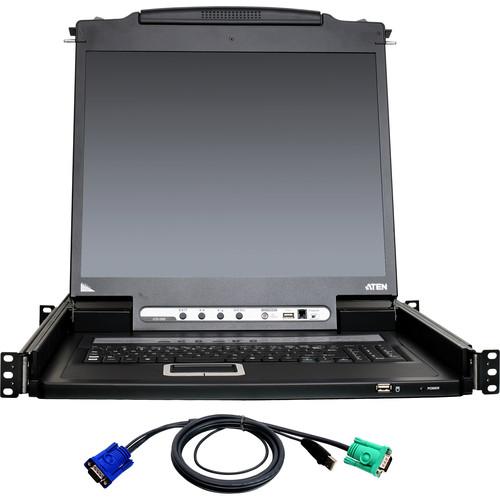
Product description This Kit from ATEN combines an 8-Port PS/2-USB VGA KVM Switch with four 6' and four 10' USB KVM cables. The 8-Port PS/2-USB VGA KVM Switch is an IP-based KVM control unit that allows you to monitor and access up to eight computers from a single KVM console. The included cables connect the SPHD-17 KVM ports of the switch to the computers you wish to control, using USB connections for the keyboards & mice and HDB-15 connections for the VGA monitors. - 8-Port PS/2-USB VGA KVM over IP Switch with 19" LCD The 8-Port PS/2-USB VGA KVM Switch from ATEN is an IP-based KVM control unit that allows local and remote operators to monitor and access up to 8 computers from a single PS/2 or USB KVM console. Up to 15 additional KVM switches can be daisy chained to the switch to control up to 128 computers from a single KVM console. Remote users access the switches over the Internet by means of a web browser using TCP/IP for its remote communications protocol. Up to 32 concurrent user logins are supported for single-bus computer access. The Message Board—a built-in feature that resembles an Internet chat program—lets users communicate with each other and exchange information in real time, allowing for smooth and efficient cooperative management of installations.
Space-saving and streamlined, the CL5708IN integrates a keyboard, a 19" LED-backlit LCD monitor, and touchpad in a 1 RU rackmountable sliding housing. The KVM section can be detached from the switch section for maintenance and repair. The security protocols supported by the switch include TLS 1.2 encryption for the browser, and RC4 128-bit encryption for keyboard, mouse, and video data transmission. For easier and more efficient user management integration, the CL5708IN also supports authentication and authorization via 3rd-party authorized servers such as RADIUS, LDAP, LDAPS, and MS Active Directory. - Hardware
-
- LED illumination for keyboard and touchpad visibility in low-light conditions
- Integrated KVM console with 19" LED-backlit LCD monitor in a Slideaway housing
- Space saving technology—up to two consoles (one bus) control up to 8 computers
- Daisy chain up to 15 additional units to control up to 128 computers from a single console (compatible KVM switches: ACS1208A, ACS1216A, CS1708A, CS1716A)
- Extra console port for computer management from an external console (VGA monitor, USB or PS/2 keyboard, and mouse)
- Up to 1280 x 1024 at 75 Hz, DDC2B for local console
- Up to 1920 x 1200 at 60 Hz / 24-bit color depth for remote sessions
- Dual interface, supports computers and console with PS/2 or USB keyboards and mice
- LCD module's USB port allows connected computers to access USB peripherals (the USB peripheral function only works with USB cable set connections)
- Auto-sensing of station's position on daisy chained installations without need for manual dip switch setting
- Front panel LED indicates station's position in daisy chain
- Hot-plug functionality allows adding or removing computers without powering down the switch
- Keyboard and mouse emulation (PS/2 and USB) for smooth switching and simultaneous booting of multiple computers even when the console focus is elsewhere
- Supports multimedia USB keyboards for Windows, Mac, and Sun
- Supports external USB mouse
- Video DynaSync stores the console monitor's EDID (Extended Display Identification Data) to optimize display resolution
- Rackmountable in a 1 RU system rack
- LCD module rotates up to 115° for a more comfortable viewing angle
- Management
-
- Convenient computer selection via front panel push buttons, hotkeys, and multilingual on-screen-display menus
- Up to 32 concurrent logins
- Multilanguage web UI support featuring a tree-structured local and remote OSD
- Adjustable video quality for flexible adaptation to diverse network environments
- Auto Scan mode enables continuous monitoring of user-selected computers
- Broadcast mode enables operations to be performed from the keyboard on all selected computers on the installation simultaneously (software installation, system-wide shutdown, etc.)
- Firmware upgrades to all the daisy chained KVM switches at the same time via the daisy chain cable
- Integration with CC2000 Centralized Management Software
- Backup and restore configuration and user account settings
- Event logging
- IPv6 capable
- Ease-to-Use Interface
-
- Browser-based and AP GUIs, together with a menu-driven OSD for the local console, provide a powerful, intuitive, user-friendly, multi-language interface to minimize user training time and increase productivity
- Multiplatform support (Windows, Linux, Mac, and Sun)
- Multi-browser support (IE, Mozilla, Firefox, Safari, Opera, Netscape)
- Panel array mode enables user to monitor multiple servers from single screen at the same time, each in a separate panel
- Windows client and Java client software support (Java client works with all operating systems)
- Beeper on/off via hotkey and OSD
- Keyboard supports English (US), English (UK), French, German, German (Swiss), Greek, Hungarian, Italian, Japanese, Korean, Russian, Spanish, Swedish, and Traditional Chinese
- Advanced Security
-
- Secure keyboard/mouse/video transmission via RC4 128-bit encryption
- Supports TLS 1.2 data encryption and RSA 2048-bit certificates for secure user logins from a browser
- Two-level password security for computer view and control
- Up to 64 user accounts with separate profiles for each
- External (remote) authentication via RADIUS, LDAP, LDAPS, and MS Active Directory
- Support for IP/MAC filter
- Local and remote access, logged and authenticated
- Virtual Remote Desktop
-
- Resizable remote desktop window
- Message board allows logged-in users to communicate with each other, and allows a user to take exclusive control of the KVM functions
- Mouse DynaSync
- On-screen keyboard with multi-language support
- BIOS-level access
UPC: 672792007491 - 2L-5202U USB KVM Cable (6') The 6' 2L-5202U USB KVM Cable from ATEN is designed for use with KVM switches and extenders . This cable can be used to connect a KVM switch with an SPHD-15 connection to a console using a USB connection for the keyboard and mouse and an HDB-15 connection for the monitor. UPC: 672792151217
- 2L-5203U USB KVM Cable (10') The 10' 2L-5203U USB KVM Cable from ATEN is designed for use with KVM switches and extenders . This cable can be used to connect a KVM switch with an SPHD-15 connection to a console using a USB connection for the keyboard and mouse and an HDB-15 connection for the monitor. UPC: 672792151552
In the Box Bundle Items 8-Port PS/2-USB VGA KVM over IP Switch with 19" LCD srfuxezeuwfyyute 4 x 2L-5202U USB KVM Cable (6') 4 x 2L-5203U USB KVM Cable (10') Table of Contents
|
Upload User Manual
Have you got an user manual for the ATEN 8-Port PS 2-USB VGA LCD KVM over IP Switch Kit with 8 USB KVM Cables in electronic form? Please send it to us and help us expand our library of instruction manuals.
Thank you, too, on behalf of other users.
To upload the product manual, we first need to check and make sure you are not a robot. After that, your "Submit Link" or "Upload File" will appear.
Technical parameters - 8-Port PS/2-USB VGA KVM over IP Switch with 19" LCD
| | | Computer Connections | Direct: 8
Maximum: 128 (via daisy chain) | | Port Selection | OSD, hotkey, and push buttons | | Connectors | 1 x SPHD-18 male, external console port (yellow)
1 x USB Type-A female, external mouse port
8 x SPHD-17 female, KVM ports (yellow)
1 x DB-25 male, daisy chain port (black)
1 x RJ11 female, firmware upgrade
1 x 3-prong AC power socket
1 x USB Type A female port
1 x RJ45 female LAN port | | Switches | 1 x semi-recessed reset push button
1 x rocker power switch
1 x firmware upgrade switch
4 x LCD adjustment push buttons
1 x LED LCD on/off push button (orange)
2 x port selection push buttons
2 x station selection push buttons | | LEDs | 2 x 7-segment LED display, port ID (yellow)
2 x 7-segment LED display, station ID (yellow)
1 x power (dark green)
1 x num lock (green)
1 x caps lock (green)
1 x scroll lock (green)
8 x online (orange) | | LCD Module | 19" / 48.26 cm TFT-LCD | | Response Time | 5 ms | | Viewing Angle | Horizontal: 170°
Vertical: 160° | | Pixel Pitch | 0.294 x 0.294 mm | | Color Support | 16.7 million colors | | Contrast Ratio | 1000:1 | | Luminance | 250 cd/m² | | Keyboard / Mouse Emulation | PS/2 and USB | | Video Resolution | Local: 1280 x 1024 at 75 Hz, DDC2B
Remote: 1920 x 1200 at 60 Hz | | Scan Interval | 1-255 seconds | | Maximum Input Power | 100-240 VAC, 50-60 Hz, 1 A | | Power Consumption | 120 V: 24 W
230 V: 25 W | | Operating Temperature | 32 to 122°F / 0 to 50°C | | Storage Temperature | -4 to 140°F / -20 to 60°C | | Humidity | 0-80% RH (non-condensing) | | Housing | Metal and plastic | | Dimensions | 18.89 x 27.13 x 1.73" / 48.00 x 68.92 x 4.40 cm | | Weight | 29.56 lb / 13.41 kg | | | | Box Dimensions (LxWxH) | 33.45 x 26.5 x 5.5" | - 2L-5202U USB KVM Cable (6')
| PC Connectors | Monitor: 1 x HDB-15 male
Keyboard and Mouse: 1 x USB Type A male | | Console Connectors | Switch: 1 x SPHD-15 male | | Compatibility | Compatible with the following ATEN products: CE700A, CL1308, CL1316, CL3000, CL5708, CL5716, CL5800, CL5808, CL5816, CN8000, CS1308, CS1316, CS1708A, CS1708i, CS1716A, CS1716i, CS1742, CS1744, CS231, CS82U, CS84U, IP8000, CL1758, CS1708, CS1716, KA9233, KL1100, KL3116, KL3116T | | Length | 5.9' / 1.8 m | | | | Box Dimensions (LxWxH) | 6.0 x 5.3 x 1.3" | - 2L-5203U USB KVM Cable (10')
| PC Connectors | Monitor: 1 x HDB-15 male
Keyboard and Mouse: 1 x USB Type A male | | Console Connectors | Switch: 1 x SPHD-15 male | | Compatibility | Compatible with the following ATEN products: CE700A, CL1308, CL1316, CL3000, CL5708, CL5716, CL5800, CL5808, CL5816, CN8000, CS1308, CS1316, CS1708A, CS1708i, CS1716A, CS1716i, CS1742, CS1744, CS231, CS82U, CS84U, IP8000, CL1758, CS1708, CS1716, KL1100, KL3116, KL3116T | | Length | 9.8' / 3.0 m | | | | Box Dimensions (LxWxH) | 6.1 x 5.7 x 1.0" |
Rating60% users recommend this product to others. And what about you?

This product has already been rated by 09 owners. Add your rating and experience with the product.
Discussion
 Ask our technicians if you have a problem with your settings,
or if anything is unclear in the user manual you have downloaded.
You can make use of our moderated discussion.
The discussion is public and helps other users of our website who may be encountering similar problems.
Ask our technicians if you have a problem with your settings,
or if anything is unclear in the user manual you have downloaded.
You can make use of our moderated discussion.
The discussion is public and helps other users of our website who may be encountering similar problems.
The discussion is empty - enter the first post
Post a new topic / query / comment:
|
|


