User Manual for Atlona 4K UHD 5-Input HDMI Switcher with Two HDBaseT In & Mirrored HDMI HDBaseT Out Click to enlarge the picture
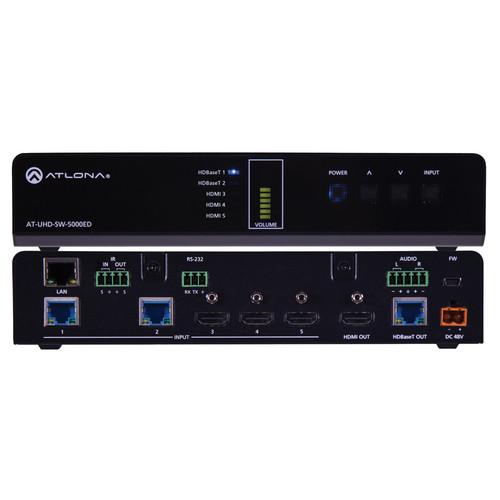 Contents of the user manual for the Atlona 4K UHD 5-Input HDMI Switcher
- Product category: Routers & Switchers Atlona
- Brand: Atlona
- Description and content of package
- Technical information and basic settings
- Frequently asked questions – FAQ
- Troubleshooting (does not switch on, does not respond, error message, what do I do if...)
- Authorized service for Atlona Routers & Switchers
|
User manual for the Atlona 4K UHD 5-Input HDMI Switcher contain basic instructions
that need to be followed during installation and operation.
Before starting your appliance, the user manual should be read through carefully.
Follow all the safety instructions and warnings, and be guided by the given recommendations.
User manual is an integral part of any Atlona product,
and if it is sold or transferred, they should be handed over jointly with the product.
Following the instructions for use is an essential prerequisite for protecting
health and property during use, as well as recognition of liability on the part of the manufacturer
for possible defects should you make a warranty claim. Download an official Atlona user manual in which you will find instructions on how to install, use, maintain and service your product.
And do not forget – unsuitable use of a Atlona product will considerably shorten its lifespan!
|
Product description The 4K/UHD 5-Input HDMI Switcher from Atlona comes with two HDBaseT inputs, three HDMI inputs, and mirrored HDMI and HDBaseT outputs. It also features balanced audio output, automatic input selection, and automatic display control capability. The HDBaseT inputs match perfectly with the HDVS-200-TX modules to enable VGA and HDMI sources to be easily integrated into a system. The switcher supports 4K/UHD @ 60 Hz, 4:2:0; (10.2 Gbps). It transmits AV signals along with Ethernet, power, and control over a single cable to displays up to 328’ from the switcher. Control options include automatic input selection, front-panel buttons, and compatibility with IR, RS-232, or TCP/IP-based control systems. Displays are automatically turned on and off using CEC, IP, or RS-232.The switcher enables two HDVS transmitters to be used in a single system. With Ethernet-enabled HDBaseT transmission to the HDVS transmitters and the receiver control, setup and maintenance is easy. Automatic input selection and display control simplify the system, reducing cost and setup time, and resulting in a better end-user experience. - Two Ethernet-Enabled HDBaseT Inputs
-
- Supports two HDVS-150 or HDVS-200 series transmitters for placement at remote sources near lecterns, conference tables, and instructor desks
- Simplifies integration of remote sources by eliminating power supplies when used with PoE-powered transmitters; single category cable carries AV signal, control, and power
- Mirrored Dual Outputs on HDMI and HDBaseT
-
- Supports dual display environments (local and extended) up to a distance of 328’
- Eliminates the need for extra extension components, simplifying installation
- HDMI output can be used with additional HDBaseT transmitter (compatible with AT-UHD-EX-100CE-RX receiver)
- Automatic Display Control
-
- Automatically changes projector power state based on active or standby mode of switcher; control signals are transmitted via CEC, IP, or RS-232
- Enables display and volume control directly; CEC enables control of low-cost consumer displays
- Any product that has mirrored output with HDMI and HDBaseT will have CEC functionality through the HDBaseT output
- Automatic Input Selection Using Hot Plug Detect & Video Detection
-
- Selects active input when sources are connected or if there is a change in source power status
- Eliminates need for complex control system in AV systems
- Ethernet-Enabled HDBaseT
-
- Simplifies installation, maintenance with IP controlled switcher, transmitters, and receivers using Atlona AMS
- Configure, back up, update, maintain, and monitor from a simple PC interface
- IR, RS-232, & Ethernet HDBaseT Insertion
-
- Adds internally or externally generated display control signals to the HDBaseT transmission
- Simplifies display control from third-party control systems
- EDID & HDCP Management
-
- Manages EDID communication between source and display; allows integrators to force sources to preferred resolution
- Ensures desired audio formats and video resolutions are provided to the AV system; enables PC output to non-compliant codecs
- UHD 4K Capability
-
- Compatible with Ultra High Definition sources and displays
- Supports high-resolution applications such as CAD, desktop publishing, and detailed financial reporting
- Supports up to HDCP 1.4 (does not support HDCP 2.2 devices)
- AV, Ethernet, Power, & Control over HDBaseT
-
- Delivers 4K UHD video, audio, 100Base-T Ethernet, power, and control through a single cable
- Eliminates multiple cable runs between source, control system router, and display
- Power over Ethernet for Remote-Powered HDBaseT Receivers
-
- Industry standard IEEE 802.3af PoE supplied by the switcher over HDBaseT
- No local AC outlet required; saves time and integration costs
- TCP/IP, RS-232, & IR Control
-
- Flexible control options compatible with third-party control systems
- Reduces integration time and costs
- Easy GUI-Based Configuration Using Integrated Web Server
-
- Offers menu-based configuration of network settings, RS-232 settings, input switching, EDID, and HDCP management and audio
- Allows fast configuration of internal product settings and troubleshooting from a tablet, smartphone, or PC in the field
- Volume Controls
-
- Volume up and volume down buttons adjust output level to sound system
- Alternatively send RS-232 or TCP/IP commands to external control device
- Volume Setting Indicator
-
- Displays volume level of the switcher
- Provides quick indication of level during setup
- Balanced Line Level Output
-
- Reduces noise and need for external components
- Matches requirements of commercial sound systems
- Multi-Channel Audio Compliant
-
- Supports PCM, Dolby Digital, Dolby Digital Plus, Dolby TrueHD, Dolby Atmos, DTS Digital Surround, and DTS-HD Master Audio
- Allows any multi-channel audio stream to be used within a professional audio system
1 Please Note: Note: Only PCM sources are de-embedded and routed by the AT-UHD-SW-5000ED close - Rack-Mountable, 1 RU, Half Rack Width Enclosure
-
- Installs easily in rack-mounted systems with included 19” rackmount brackets
- Simplifies installations and allows two units to be mounted together
- Works with AMS
-
- This IP-controllable product can be remotely managed by the Atlona Management System software
- Integrates product configuration, management, and updates to reduce installation time and enable remote support
UPC: 846352004729 In the Box Atlona 4K/UHD 5-Input HDMI Switcher with Two HDBaseT In & Mirrored HDMI/HDBaseT Out IR Handheld Remote Control Rackmount Bracket Kit Desktop Power Supply Detachable Power Cable Limited 10-Year Warranty Table of Contents
|
Upload User Manual
Have you got an user manual for the Atlona 4K UHD 5-Input HDMI Switcher with Two HDBaseT In & Mirrored HDMI HDBaseT Out in electronic form? Please send it to us and help us expand our library of instruction manuals.
Thank you, too, on behalf of other users.
To upload the product manual, we first need to check and make sure you are not a robot. After that, your "Submit Link" or "Upload File" will appear.
Technical parametersAtlona AT-UHD-SW-5000ED Specs | Video Resolution | 4096 x 2160 @ 24/25/30/50/60 Hz
3840 x 2160 @ 24/25/30/50/60 Hz
2048 x 1080p
1080p @ 23.98/24/25/29.97/30/50/59.94/60 Hz
1080i @ 50/59.94/60 Hz
720p @ 50/59.94/60 Hz
576p, 576i
480p, 480i | | VESA | 2560 x 2048 / 1600
2048 x 1536
1920 x 1200
1680 x 1050
1600 x 1200 / 900
1440 x 900
1400 x 1050
1366 x 768
1360 x 768
1280 x 1024 / 800 / 768
1152 x 864
1024 x 768
800 x 600
640 x 480 | | Color Space | YUV, RGB | | Chroma Subsampling | 4:4:4, 4:2:2, 4:2:0 | | Color Depth | 8-bit, 10-bit, 12-bit | | Analog Audio Input | PCM 2-Ch (De-embedded) | | HDMI | PCM 2-Ch, LPCM 5.1, LPCM 7.1, Dolby Digital, DTS 5.1, Dolby Digital Plus, Dolby TrueHD, DTS-HD Master Audio, Dolby Atmos, DTS:X | | Sample Rate | 32 kHz, 44.1 kHz, 48 kHz, 88.2 kHz, 96 kHz, 176.4 kHz, 192 kHz | | Bit Rate | Up to 24-bit | | Distance | Cat5e/6 @ 4K: Up to 230' (70 m)
Cat6a/7 @ 4K: Up to 328' (100 m)
Cat5e/6 @ 1080p: Up to 328' (100 m)
HDMI In/Out @ 4K: Up to 15' (5 m)
HDMI In/Out @ 1080p: Up to 30' (10 m) | | Signal | Bandwidth: 10.2 Gbps
CEC Compliant
HDCP Switchable - Compliant/Non-Compliant | | Certification | Unit: CE, FCC Power Supply: CE, FCC, Level VI, RoHS, cULus, RCM, CCC | | Temperature | Operating: 32 to 122°F (0 to 50°C)
Storage: -4 to 140°F (-20 to 60°C)
Humidity: 20 to 90%, Non-condensing | | Power | Consumption: 44.22 W
Idle Consumption: 22 W
Supply:
Input: 100 to 240 VAC ~ 50/60 Hz
Output: 48 VDC / 3.125 A | | Dimensions (H x W x D) | 1.7 x 8.8 x 10.3" (44.0 x 222.3 x 261.0 mm)
Rack Unit: 1 RU, 1/2 rack | | Weight | 3.7 lb (1.7 kg) | | | | Package Weight | 6.7 lb | | Box Dimensions (LxWxH) | 16.8 x 12.0 x 4.0" |
Rating60% users recommend this product to others. And what about you?

This product has already been rated by 79 owners. Add your rating and experience with the product.
Discussion
 Ask our technicians if you have a problem with your settings,
or if anything is unclear in the user manual you have downloaded.
You can make use of our moderated discussion.
The discussion is public and helps other users of our website who may be encountering similar problems.
Ask our technicians if you have a problem with your settings,
or if anything is unclear in the user manual you have downloaded.
You can make use of our moderated discussion.
The discussion is public and helps other users of our website who may be encountering similar problems.
The discussion is empty - enter the first post
Post a new topic / query / comment:
|
|


