User Manual for Atlona 4K UHD 5-Input Universal Switcher with Wireless Presentation Link Click to enlarge the picture
 Contents of the user manual for the Atlona 4K UHD 5-Input Universal Switcher
- Product category: Routers & Switchers Atlona
- Brand: Atlona
- Description and content of package
- Technical information and basic settings
- Frequently asked questions – FAQ
- Troubleshooting (does not switch on, does not respond, error message, what do I do if...)
- Authorized service for Atlona Routers & Switchers
|
User manual for the Atlona 4K UHD 5-Input Universal Switcher contain basic instructions
that need to be followed during installation and operation.
Before starting your appliance, the user manual should be read through carefully.
Follow all the safety instructions and warnings, and be guided by the given recommendations.
User manual is an integral part of any Atlona product,
and if it is sold or transferred, they should be handed over jointly with the product.
Following the instructions for use is an essential prerequisite for protecting
health and property during use, as well as recognition of liability on the part of the manufacturer
for possible defects should you make a warranty claim. Download an official Atlona user manual in which you will find instructions on how to install, use, maintain and service your product.
And do not forget – unsuitable use of a Atlona product will considerably shorten its lifespan!
|
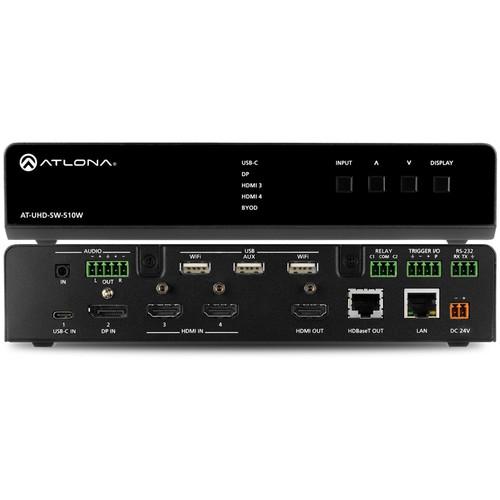
Product description The 4K/UHD 5-Input Universal Switcher with Wireless Presentation Link from Atlona is a 5x1 multi-format switcher with wireless presentation capability. It provides universal BYOD (bring your own device) compatibility with HDMI, DisplayPort, and USB-C inputs, as well as wireless connectivity for mobile devices. This HDCP 2.2 compliant switcher features an HDMI output and a mirrored HDBaseT output that can be used with the Atlona AT-UHD-EX-100CE-RX-PSE HDBaseT receiver. It also includes automatic input switching and automatic display control capability, both applicable to wired and wireless source connections.
Equipped with a USB-C port, the switcher can be used with Mac, Chromebook, and Windows computers. All inputs and the local HDMI output are compatible with video signals up to 4K/UHD at 60 Hz with 4:4:4 chroma sampling, as well as data rates up to 18 Gb/s. With simultaneous 18 Gb/s HDMI and 10 Gb/s HDBaseT outputs, the switcher is suitable for presentation scenarios such as primary and confidence displays in a corporate auditorium or lecture hall. The HDBaseT output extends video, audio, control, and Ethernet up to 328'. - Two HDMI, one DisplayPort, one USB-C input, and a dedicated wireless AV input
- Provides Wi-Fi connectivity for an iOS, Android, Mac, Chromebook, or Windows-based device
- Includes dual IEEE 802.11ac Wi-Fi access points - secondary access point required for Miracast (Wi-Fi Direct)
- Integrated access point can be segregated from the facility network for security reasons
- Allows screen mirroring without the need for a separate app
- Supports wireless video up to 1920 x 1080 at 30 Hz (4:2:0) (up to 1920 x 1080 at 60 Hz with Miracast)
- Supports Miracast over Infrastructure for use of facility Wi-Fi or Ethernet network
- Prevents unauthorized access (room hijacking) or content sharing with user-defined or randomly generated security authentication codes
- Ensures presentation content is not received by SW510W units in adjacent rooms
- Automatically changes display power state, and switches between inputs based on device connection or disconnection from the switcher
- Works for both wired and wireless source devices
- Enables effortless, automated system operation without the need for an external control system
- USB-C charging for laptops, tablets, and smartphones
- Simple one-cable connection for AV and charging
- Compatible with 4K HDR10 and Dolby Vision 60 Hz
- HDBaseT output transmits AV, control, and Ethernet up to 330' at 1920 x 1080 with CAT5e/6 or 4K/UHD using CAT6a/7 cable
- Mirrored 18 Gb/s HDMI and 10 Gb/s HDBaseT outputs provide flexible options for AV system designs and applications
- Allows protected content stream to pass between devices
- HDCP 2.2 supported only for wired AV connections
UPC: 846352005146 In the Box Atlona 4K/UHD 5-Input Universal Switcher with Wireless Presentation Link Limited 10-Year Warranty Table of Contents
|
Upload User Manual
Have you got an user manual for the Atlona 4K UHD 5-Input Universal Switcher with Wireless Presentation Link in electronic form? Please send it to us and help us expand our library of instruction manuals.
Thank you, too, on behalf of other users.
To upload the product manual, we first need to check and make sure you are not a robot. After that, your "Submit Link" or "Upload File" will appear.
Technical parametersAtlona AT-UHD-SW-510W Specs | | | Resolutions | UHD/HD/SD:
4096 x 2160 at 60/30/25/24 Hz, 3840 x 2160 at 60/30/25/24 Hz, 1080p at 60/59.9/50/30/29.97/25/24/23.98 Hz, 1080i at 60/59.94/50 Hz, 720p at 60/59.94/50 Hz, 576p at 50 Hz, 576i at 50 Hz, 480p at 60/59.96 Hz, 480i at 60 Hz
VESA:
2560 x 1600, 2048 x 1536, 1920 x 1200, 1680 x 1050, 1600 x 1200, 1440 x 900, 1400 x 1050, 1280 x 1024, 1280 x 800, 1366 x 768, 1360 x 768, 1152 x 864, 1024 x 768, 800 x 600, 640 x 480
HDMI output supports 4K/UHD at 50/60 Hz with 4:4:4 chroma sampling
HDBaseT output supports 4K/UHD at 50/60 Hz with 4:2:0 chroma sub-sampling | | USB | USB-C: Up to 4K/UHD at 60 Hz for devices supporting USB-C alternate mode video output | | Wireless Capability | Up to 1920 x 1080 at 30 Hz 4:2:0 (up to 1920 x 1080 at 60 Hz with Miracast), dependent on wireless signal quality | | Color Space | YUV, RGB | | Chroma Subsampling | 4:4:4, 4:2:2, 4:2:0 | | Color Depth | 8-/10-/12-bit | | HDR | HDR10 and Dolby Vision at 60 Hz | | | | Formats | Pass-Through Formats: PCM, Dolby Digital, Dolby Digital Plus, Dolby TrueHD, Dolby Atmos, DTS Digital Surround, DTS-HD Master Audio, and DTS:X | | Analog Input | Unbalanced 2-channel, 3.5 mm | | Analog Output | Balanced / unbalanced 2-channel, 5-pin captive screw | | Sample Rate | 32/44.1/48/88.2/96/176.4/192 kHz | | Bit Rate | 24-bit (maximum) | | Distance | HDMI IN/OUT:
4K/UHD: 15' (5 m)
1920 x 1080: 30' (10 m)
CAT5e/6:
4K/UHD: 230' (70 m)
1920 x 1080: 330' (100 m)
CAT6a/7:
4K/UHD: 330' (100 m)
1920 x 1080: 330' (100 m) | | | | Bandwidth | 18 Gb/s (For HDMI 2.0 output, HDBaseT output limited to 10 Gb/s) | | HDCP/CEC Support | CEC Support: Yes HDCP: 2.2 (wired device connections, only) | | | | Port | USB Type-C: USB-C for AV input (Alternate Mode), USB 2.0 Type-A for Wi-Fi antenna modules (3 ports) | | Power | USB-C Power: Up to 60 W / 3 A at 20 V | | Charging Capability | USB-C Device Charging Capability:
Up to 20 V, 3 A
Output: 60 W at 20 V, 36 W at 12 V, 15 W at 5 V | | | | Ethernet Ports | RJ45 | | Protocols | DHCP, HTTP, HTTPS, SFTP, SMTP, SNMP, Telnet, SSH, TCP/IP, UDP | | Ethernet Speed | 10/100/1000 Mb/s | | Addressing | DHCP, static | | Wi-Fi | IEEE 802.11n/ac 2.5 GHz / 5 GHz | | Wi-Fi Protocols | WEP, WPA, PSK, WPA2 PSK, WPA Enterprise, WPA2 Enterprise | | Antenna | Two included | | | | RS-232 | Bidirectional, 3-pin captive screw | | Relay Mode | 3-pin captive screw, normally open (NO), with adjustable toggle and pulse modes
Electrical rating: 48 V at 1 A | | Trigger Connectivity | 4-pin captive screw
Electrical Rating: 30 V at 1 A (maximum) | | | | Operating Temperature | 32 to 122°F (0 to 50°C) | | Storage Temperature | -4 to 140°F (-20 to 60°C) | | Humidity | 20 to 90%, non-condensing (RH) | | Certification | CE, FCC, UL | | Power Consumption | Full Load: 121 W
35 to 40 W (Idle) | | Power Supply | Input: 100-240 VAC, 50/60 Hz
Output: 5 VDC | | Dimensions | With Feet: 1.8 x 8.5 x 10.2" (4.8 x 21.5 x 25.9 cm)
Without Feet: 1.7 x 8.5 x 10" (4.4 x 21.5 x 25.4 cm) | | Weight | 3.7 lb (1.7 kg) | | | | Package Weight | 6.63 lb | | Box Dimensions (LxWxH) | 17.0 x 12.55 x 4.05" |
Rating70% users recommend this product to others. And what about you?

This product has already been rated by 58 owners. Add your rating and experience with the product.
Discussion
 Ask our technicians if you have a problem with your settings,
or if anything is unclear in the user manual you have downloaded.
You can make use of our moderated discussion.
The discussion is public and helps other users of our website who may be encountering similar problems.
Ask our technicians if you have a problem with your settings,
or if anything is unclear in the user manual you have downloaded.
You can make use of our moderated discussion.
The discussion is public and helps other users of our website who may be encountering similar problems.
The discussion is empty - enter the first post
Post a new topic / query / comment:
|
|


