User Manual for Atlona 4K UHD HDR 4x1 Input HDMI Switcher with Auto-Switching and Return Optical Audio Click to enlarge the picture
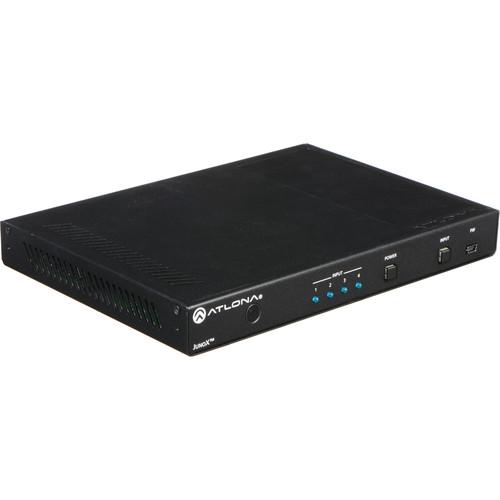 Contents of the user manual for the Atlona 4K UHD HDR 4x1 Input
- Product category: Routers & Switchers Atlona
- Brand: Atlona
- Description and content of package
- Technical information and basic settings
- Frequently asked questions – FAQ
- Troubleshooting (does not switch on, does not respond, error message, what do I do if...)
- Authorized service for Atlona Routers & Switchers
|
User manual for the Atlona 4K UHD HDR 4x1 Input contain basic instructions
that need to be followed during installation and operation.
Before starting your appliance, the user manual should be read through carefully.
Follow all the safety instructions and warnings, and be guided by the given recommendations.
User manual is an integral part of any Atlona product,
and if it is sold or transferred, they should be handed over jointly with the product.
Following the instructions for use is an essential prerequisite for protecting
health and property during use, as well as recognition of liability on the part of the manufacturer
for possible defects should you make a warranty claim. Download an official Atlona user manual in which you will find instructions on how to install, use, maintain and service your product.
And do not forget – unsuitable use of a Atlona product will considerably shorten its lifespan!
|
Product description The 4K/UHD HDR 4x1 Input HDMI Switcher from Atlona is HDCP 2.2 compliant and supports 4K/UHD video @ 60 Hz with 4:4:4 chroma sampling, as well as HDMI data rates up to 18 Gb/s. The JunoX 451 is ideal for residential applications with emerging 4K/UHD and HDR sources and displays. It is compatible with all video resolutions, audio formats, and color space formats supported in the HDMI 2.0a specification, plus the ability to pass metadata for HDR content. The JunoX 451 includes EDID management features and automatic input switching.
The JunoX 451 also supports the HDMI ARC (Audio Return Channel) for receiving digital audio from a television, and includes a TOSLINK digital audio output for sending this audio to an AV receiver or soundbar. This JunoX Series HDMI switcher can be controlled via Ethernet, RS-232, and IR. A handheld IR remote control is included. It is designed to deliver dependable, pristine-quality image presentations in residential as well as commercial applications.
The JunoX 451 automatically selects an input source based on detection of the 5V hot plug detect (HPD) signal, as well as active video. This ensures reliable auto-switching operation for all video sources, including DVRs, DisplayPort / Mini DisplayPort adapters, and other devices that always maintain the HPD line at the 5V high state but may not be delivering active video. It is configured, controlled, and managed using the AMS (Atlona Management System), a powerful network software platform that integrates product configuration, status monitoring, and firmware updates. Specially designed for IP-controllable Atlona products, AMS reduces installation time and enables remote monitoring and support of multiple Atlona devices over a network. General - Reliable HDMI signal switching
- Easy to install and deploy in residential and commercial applications
- Compatible with 4K/UHD and HDR-capable sources and displays
- Supports video resolutions, audio formats, and color space formats in the HDMI 2.0a specification
- HDCP 2.2 compliant adheres to latest specification for high-bandwidth digital content protection and allows protected content stream to pass between devices
- Selects active input when sources are connected or if there is a change in source power status
- Enables simplified, automatic system operation with no user intervention necessary
- Manages EDID communications with the source through a display's EDID or internally stored EDID
- Ensures desired audio formats and video resolutions are provided to the AV system
- Supports the HDMI Audio Return Channel
- Provides a return audio pathway from a television to an AV receiver or soundbar over the TOSLINK digital audio output
- Easy and convenient integration of television audio for over-the-air broadcasts, smart TV apps, and more
- Flexible control options for compatibility with third-party control systems
- Remotely managed by the Atlona Management System software
- Integrates product configuration, management, and updates to reduce installation time and enable remote support
- Supports PCM, Dolby Digital, Dolby Digital Plus, Dolby TrueHD, Dolby Atmos, DTS Digital Surround, and DTS-HD Master Audio
- Front panel USB port provides an easy means for device updates
- Ensures long-term system return on investment
- LED indicators provide HDMI input selection status information
- Provides easy setup and troubleshooting
- Easy installation into racks and confined spaces
- Keeps devices out-of-sight when placed in public spaces
Applications -
- Installations utilizing the latest UHD and HDR sources such as Ultra HD Blu-ray players, plus compatible televisions and projectors
- TV showrooms requiring reliable content distribution to televisions, to properly demonstrate the quality and appeal of 4K and HDR programming
- Professional AV applications with full-motion, highly detailed 4K graphics presentations for visualization, 3D renderings, simulations, and more
UPC: 846352004934 In the Box Atlona 4K/UHD HDR 4x1 Input HDMI Switcher with Auto-Switching and Return Optical Audio Handheld IR Remote Control Limited 10-Year Warranty Table of Contents
|
Upload User Manual
Have you got an user manual for the Atlona 4K UHD HDR 4x1 Input HDMI Switcher with Auto-Switching and Return Optical Audio in electronic form? Please send it to us and help us expand our library of instruction manuals.
Thank you, too, on behalf of other users.
To upload the product manual, we first need to check and make sure you are not a robot. After that, your "Submit Link" or "Upload File" will appear.
Technical parametersAtlona AT-JUNO-451 Specs | | | Video | 4096 x 2160 @ 24/25/30/50/60 Hz, 3840 x 2160 @ 24/25/30/50/60 Hz, 2048 x 1080p, 1080p @ 23.98/24/25/29.97/30/50/59.94/60 Hz, 1080i @ 50/59.94/60 Hz, 720p @ 50/59.94/60 Hz, 576p, 576i, 480p, 480i | | VESA | 2560 x 2048, 2560 x 1600, 2048 x 1536, 1920 x 1200, 1680 x 1050, 1600 x 1200, 1600 x 900, 1440 x 900, 1400 x 1050, 1366 x 768, 1360 x 768, 1280 x 1024, 1280 x 800 1280 x 768, 1152 x 768, 1024 x 768, 800 x 600, 640 x 480 | | Color Space | YUV, RGB | | Chroma Subsampling | 4:4:4, 4:2:2, 4:2:0 | | Color Depth | 8-bit, 10-bit, 12-bit | | | | HDMI | PCM 2Ch, LPCM 5.1, LPCM 7.1, Dolby Digital, DTS 5.1, Dolby Digital+, Dolby TrueHD, DTS-HD Master Audio, Dolby Atmos, DTS:X | | Sample Rate | 32 kHz, 44.1 kHz, 48 kHz, 88.2 kHz, 96 kHz, 176.4 kHz, 192 kHz | | Bit Rate | Up to 24-bit | | Distance | HDMI IN/OUT @ 4K: Up to 15' (5 m)
HDMI IN/OUT @ 1080p: Up to 30' (10 m) | | | | Bandwidth | 18 Gb/s | | CEC | Yes | | HDCP | 2.2 Compliant | | | | Operating Temperature | 32 to 122°F (0 to 50°C) | | Storage Temperature | -4 to 140°F (-20 to 60°C) | | Humidity | 20 to 90% non-condensing | | | | Consumption | 6.6 W | | Idle Consumption | 5.9 W | | Power Supply | Input: 100 to 240 VAC, 50/60 Hz
Output: 5 VDC | | | | Certification | Unit: CE, FCC
Power Supply: CE, FCC, Level VI, RoHS, cULus, RCM, CCC | | Dimensions | 1 x 8.6 x 5.9" (2.5 x 22 x 15 cm) | | Weight | 1.82 lb (0.82 kg) | | | | Package Weight | 3.18 lb | | Box Dimensions (LxWxH) | 13.85 x 8.3 x 2.75" |
Rating100% users recommend this product to others. And what about you?

This product has already been rated by 84 owners. Add your rating and experience with the product.
Discussion
 Ask our technicians if you have a problem with your settings,
or if anything is unclear in the user manual you have downloaded.
You can make use of our moderated discussion.
The discussion is public and helps other users of our website who may be encountering similar problems.
Ask our technicians if you have a problem with your settings,
or if anything is unclear in the user manual you have downloaded.
You can make use of our moderated discussion.
The discussion is public and helps other users of our website who may be encountering similar problems.
The discussion is empty - enter the first post
Post a new topic / query / comment:
|
|


