|
User Manual for Atomos Shogun Studio with G-Technology 512GB SSD Kit Click to enlarge the picture
 Contents of the user manual for the Atomos Shogun Studio with G-Technology 512GB
- Product category: Recorders & Duplication Atomos
- Brand: Atomos
- Description and content of package
- Technical information and basic settings
- Frequently asked questions – FAQ
- Troubleshooting (does not switch on, does not respond, error message, what do I do if...)
- Authorized service for Atomos Recorders & Duplication
|
User manual for the Atomos Shogun Studio with G-Technology 512GB contain basic instructions
that need to be followed during installation and operation.
Before starting your appliance, the user manual should be read through carefully.
Follow all the safety instructions and warnings, and be guided by the given recommendations.
User manual is an integral part of any Atomos product,
and if it is sold or transferred, they should be handed over jointly with the product.
Following the instructions for use is an essential prerequisite for protecting
health and property during use, as well as recognition of liability on the part of the manufacturer
for possible defects should you make a warranty claim. Download an official Atomos user manual in which you will find instructions on how to install, use, maintain and service your product.
And do not forget – unsuitable use of a Atomos product will considerably shorten its lifespan!
|
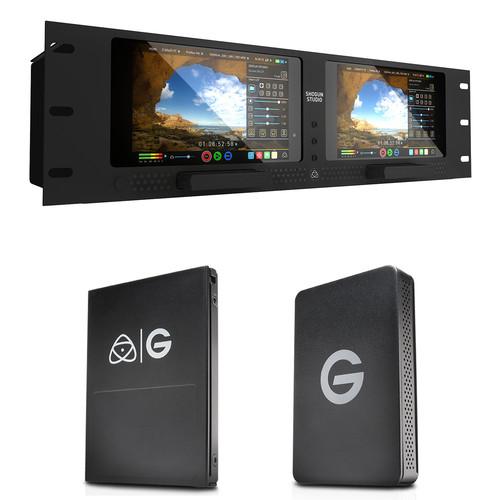
Product description A rackmountable studio recording solution, this Shogun Studio Kit from is built around the Atomos Shogun Studio 4K Recorder and includes a 512GB G-Technology Master Caddy 4K SSD recording drive as well as a G-Technology ev|Series Reader which can read Atomos Master Caddy media and directly interface with select ev|Series hardware. See below for more information on the individual items included in this kit. - Atomos Shogun Studio 4K Monitor / Recorder 6G-SDI, HDMI
- Hands-On Review: Atomos Shogun Inferno
The Atomos Shogun Studio 4K Monitor / Recorder combines two color-calibrated 1920 x 1200 resolution displays with 4K video recording and edit-ready codecs in a 3 RU chassis with removable rackmount ears. This configuration is well-suited for live event, studio, and on-set DIT work. The Shogun Studio utilizes 4K HDMI and 6G-SDI inputs to record clean output signals at resolutions up to UHD 4K (3840 x 2160) at 23.98, 24, 25, 29.97, and 30p, as well as Full HD (1920 x 1080) video up to 120 fps when used with capable cameras. The Shogun records 10-bit, 4:2:2 UHD 4K and HD video to Apple ProRes HQ, 422, or LT formats. It can also record HD video using Avid's DNxHD format and UHD 4K video using Avid's DNxHR. Video is recorded to single or raided 2.5" HDD and SSDs for fast and reliable write speeds.
As a monitor, the Shogun features a 7" IPS capacitive touchscreen display with resolution of 1920 x 1200. It is Rec. 709 color calibrated and supports multi-frequency operation (48/50/60 Hz) for monitoring of a variety of input frame rates. An SDI loop output is available for passing the signal to an additional monitor. As an added convenience, 4K signals can be internally down-converted and output in 1080p at the same frame rate.
The Shogun Studio supports Tally function, custom 3D LUTs, and Genlock In for multi-camera syncing. There are also a variety of onscreen tools to help you set up your shots, including a full waveform monitor, RGB parade display, vectorscope, focus peaking, framing, focus, and exposure-assisting tools. With two slots, one for each monitor for a master recording caddy, you can simultaneously record the signal being fed to each monitor. - Dual Monitors in a Rackmount Chassis
- The Shogun Studio installs two Shogun monitors in a 3 RU rackmount chassis with removable rackmount ears. This configuration is suitable for live event, studio, on-set, and broadcast professionals.
- Record UHD 4K & Raw Video
- Bypass your camera's internal compression and record UHD 4K (3840 x 2160) video to Apple ProRes over HDMI or 6G-SDI at 23.98, 24, 25, 29.97, or 30 fps. The 4K-capable HDMI input makes the Shogun particularly useful for recording 4K output signals from cameras such as the Sony a7S and Panasonic GH4.
- 1080p up to 120 fps
- Record up to 120 fps in Full HD (1920 x 1080) for high-resolution slow-motion shots.
- 10-Bit ProRes 422 Recording
- Record in Apple ProRes 422 or Avid DNxHD or DNxHR formats from your camera's uncompressed SDI or HDMI output, bypassing a round of internal compression and data loss. Uncompressed Cinema DNG Raw 4K video is also supported from capable cameras.
- 7" IPS Touchscreen Monitor with Rec. 709 Color Calibration
- Each of the monitors incorporate a 7" IPS screen features a 1920 x 1200 resolution and provides a wide viewing angle of 178° for easier off-axis monitoring. Each screen is calibrated to SMPTE Rec. 709 with 100% gamut and D65 white point, letting you monitor your colors with confidence. A standard Canon C-Log calibration is also available for use with Canon EOS Cinema cameras so you won't have to look at flat, washed-out looking images on set. On-the-fly recalibration is available with the Atomos Spyder calibration tool, sold separately.
- 3D LUT Support
- You can preview looks on set thanks to the ability to load 3D LUTs onto the Shogun. Simply load Cube files on an SSD and access via the "Display Options" button on the home screen.
- HDD or SSD Storage
- Record to single or raided 2.5" HDDs or SSDs for faster more reliable write speeds to manage 4K recording. A 2TB raided drive will give your over 5 hours of continuous 4K recording in 4K ProRes 422 HQ.
- Monitoring Tools
- The Shogun offers a comprehensive set of tools to help you set up, focus, and properly exposure your shots. These tools include a full waveform monitor, RGB parade display, luma overlay, vectorscope with zoom, and a test pattern generator for signal calibration. The monitor also provides focus peaking with multiple levels and colors, false color in two modes, and fully adjustable zebra from 0 to 100%.
- Supports Video Playback
- You can review what you've shot thanks to in-device video playback. The touchscreen interface allows you to navigate clips and provides softkeys to play, pause, rewind, and stop footage. Additionally, the playback will display a preview frame of the selected clip in the file browser.
- 4K to HD Down-Conversion
- 4K signals can be internally down-converted and output at 1080p resolution in the same frame rate as the input. This enables secondary monitoring on an HD field monitor, or recording a lower resolution proxy copy to a second recording device.
- Start/Stop Trigger
- Trigger record start/stop and record timecode straight from the camera with Atomos' HDMI timecode trigger protocols from Sony, Canon, and other cameras. Over SDI you have full support of all protocols. You also have control over file naming for automatic backup and version control of your footage.
Note: The SDI trigger is manufacturer-specific, you will need to select your camera make from the menu to enable. - Optional CFast Adapter
- Record to small, lightweight, and highly reliable CFast media cards using the optional SATA to CFast adapter.
- Create FCPX XML Projects
- Create Final Cut Pro X XML projects in the field so you are ready to edit straight away. Favorite/reject flags in the metadata let you quickly finding and uploading the best shots into FCP X or Adobe Premiere Pro.
- Genlock Support
- Lock to an external Genlock reference signal to synchronize the Shogun's SDI playout when using multi-camera setups.
- Timecode
- The Shogun lets you synchronize with your camera's timecode. Record Run, Free Run, and Time-of-Day timecodes are also available for independent external recording.
UPC: 814164020329 - G-Technology Atomos Master Caddy 4K (512GB)
- Hands-On Review: Atomos Shogun Inferno
A robust media solution designed for Atomos recorders, the G-Technology Atomos Master Caddy 4K contains a 512GB solid-state drive capable of recording and storing HD as well as 4K video. Shaped like a standard Atomos drive caddy, the Master Caddy 4K SSD will be compatible with any Atomos recorder that uses Master Caddys, including those in the Flame, Inferno, and Shogun series. When video needs to be transferred, simply insert the Master Caddy 4K into the separately available ev Series Reader specially designed for the Master Caddy 4K and offload files at speeds up to 500 MB/s. UPC: 705487203424 - G-Technology ev|Series Reader Atomos Master Caddy Edition
- Hands-On Review: Atomos Shogun Inferno
Seamlessly incorporate Atomos media into your storage workflow with the G-Technology ev|Series Reader Atomos Master Caddy Edition. Whether using standard drives housed in Atomos Master Caddys or G-Technology's Master Caddy drives, this ev|Series Reader offers a convenient way to import your videos. The I/O panel holds a USB-C port for plugging into your computer with the included cables and a SATA port for integrating with other G-Technology Evolution hardware. UPC: 705487203394 In the Box - Shogun Studio 4K Monitor / Recorder 6G-SDI, HDMI trcxcdcufyybbt
- IEC C14 AC Cable
- 5 x Master Caddies
- Docking Station
- Detachable Rack Ears
- Limited 1-Year Warranty, Extendable to 3 Years with Product Registration
- G-Technology - Atomos Master Caddy 4K (512GB) trcxcdcufyybbt
- G-Technology - ev|Series Reader Atomos Master Caddy Edition
Table of Contents
|
Upload User Manual
Have you got an user manual for the Atomos Shogun Studio with G-Technology 512GB SSD Kit in electronic form? Please send it to us and help us expand our library of instruction manuals.
Thank you, too, on behalf of other users.
To upload the product manual, we first need to check and make sure you are not a robot. After that, your "Submit Link" or "Upload File" will appear.
Technical parameters - Atomos Shogun Studio 4K Monitor / Recorder 6G-SDI, HDMI
| | | Screen Size | Dual 7.1" capacitive touch panels | | Resolution | 1920 x 1200
PPI: 323 | | Screen Type | IPS LCD | | Viewing Angle | 179° with 100% sRGB color accuracy | | Color Gamut | 100% sRGB calibrated to Rec 709 with infinite 3D LUT conversion including BT-2020, DCI-P3 | | Bit Depth | 8-bit | | Brightness | 400 cd/m² | | Contrast Ratio | 800:1 | | Tally Light | Front | | | | LUT Support | 3D LUT in .CUBE format
Internal Storage: 8 custom LUTs
Upload from External: Unlimited | | LUT on Output | On screen
On output
Available to burn in to recorded clip | | | | Modes | Pre Roll
HD: 8 seconds
4K: 2 seconds
4K to HD Downscale
Loop out and Playback
Trigger & Timecode for Record
LTC input and loop-through, SDI, HDMI, LANC, Timecode, Custom SDI
Metadata Tagging
Yes | | Formats | 4K-DCI: 24/25/30p
4K-UHD: 24/25/30p, 1080p: 24/25/30/50/60/120
1080i: 50/60
720p: 50/60 | | Codecs | ProRes HQ, 422, LT
DNxHR: HQX, HQ, SQ, LB
DNxHD: 220,145,36
HD Uncompressed V210
DNG Files | | File Type / Wrapper | .MOV
DNG | | Pull Down | 24/25/30PsF > 24/25/30p (2:2 pulldown)
60i > 24p (3:2 pulldown) | | RAW Formats | C500
Sony FS
AJA
ARRI to ProRes
DNxHR
DNG
Uncompressed | | Resolutions from RAW | 4K, UHD, HD: 120/60 | | Simultaneous Recording | 4K ProRes & 2K/HD ProRes
4K DNxHR & 2K/HD DNxHD
4K RAW & 2K/HD RAW
2 x 4K/2K/HD ProRes, DNxHR/HD & RAW
RAW to ProRes/DNxHR | | Convert or Duplicate Files | 4K Avid to 4K ProRes
2K/HD Avid to 2K/HD ProRes
4K ProRes to 2K/ProRes
4K ProRes to 2K/HD Avid
4K Avid to 2K ProRes | | Audio | HDMI: 2 or 8 channel, 24-bit embedded (channels dependent on camera)
SDI: 12 channel, 48 kHz 24-bit
Analog: Mic or Line Level with +48 V phantom power
Maximum Audio Quality: 24-bit, 48 kHz
Audio Delay: From 1 to 99 frames | | | | Input | Per Monitor
HDMI: 1x HDMI 1.4b up to 12-bit
SDI: 1 x 6G/3G/HD
Timecode: LTC input and loop-through, SDI, HDMI, Internal REC Run, Time of Day, Auto Restart
Genlock
Genlock Input for Playout: Black Burst, Tri-Level Sync
Audio
2 x 3-pin XLR | | Output | Per Monitor
HDMI: 1 x HDMI (loop-through)
SDI: 1 x 6G/3G/HD (loop-through)
Timecode: Loop-through, SDI, HDMI, Internal REC Run, Time of Day, Auto Restart
Audio
2 x 3-pin XLR | | | | Drive Slot | 2 channels | | Drive Type | Qualified 2.5" drives supplied in Master Caddy | | Drive Format | exFAT
FAT 32 | | Connections | SATA | | Hot Swap Support | Yes (between channels) | | | | Control Type | AtomOS Capacitive Multi-Touch | | Front Panel Buttons | Power: 2 x (one per monitor)
Screen Lock: 2 x (one per monitor) | | Jog/Shuttle | On screen | | RS422 Remote | Yes | | Ethernet Control | Remote: Yes (AMP) | | Scheduling | Yes: Rec / Play | | Gang Control | Yes | | | | Power | Dual Redundant Power Supplies: IEC c14 PSU FCC, CE, CCC UL, PSE (external Adaptor) | | Operating Temperature | -22 to 104°F / -30 to 40°C | | Rack Height | 3 RU | | Dimensions | 19 x 5.2 x 8" / 482 x 132 x 202 mm | | Weight | 8.2 lb / 3.7 kg | | | | Box Dimensions (LxWxH) | 21.1 x 15.3 x 9.8" | - G-Technology Atomos Master Caddy 4K (512GB)
| | | Interface | SATA III (6 Gb/s) | | Maximum Read Speed | 500 MB/s | | | | Dimensions | 4.1 x 2.9 x 0.5" / 104 x 74 x 12 mm | | Weight | 4.5 oz / 127 g | | | | Box Dimensions (LxWxH) | 6.5 x 4.8 x 2.3" | - G-Technology ev|Series Reader Atomos Master Caddy Edition
| Interface | 1 x USB Type-C
1 x SATA | | Dimensions | 5.1 x 3.2 x 0.9" / 130 x 81 x 22 mm | | Weight | 6.4 oz / 181 g | | | | Box Dimensions (LxWxH) | 6.4 x 4.8 x 2.3" |
Rating80% users recommend this product to others. And what about you?

This product has already been rated by 82 owners. Add your rating and experience with the product.
Discussion
 Ask our technicians if you have a problem with your settings,
or if anything is unclear in the user manual you have downloaded.
You can make use of our moderated discussion.
The discussion is public and helps other users of our website who may be encountering similar problems.
Ask our technicians if you have a problem with your settings,
or if anything is unclear in the user manual you have downloaded.
You can make use of our moderated discussion.
The discussion is public and helps other users of our website who may be encountering similar problems.
The discussion is empty - enter the first post
Post a new topic / query / comment:
|
|
|
| Request for user manual |
You can’t find the operation manual you are looking for? Let us know and we will try to add the missing manual:
I’m looking for a manual / Request for manual
Current requests for instruction manuals:
Call Of Duty World War Two For Xbox...
controller stratus XL...
stratus XL...
smart whatch serie S11 42mm...
Allen & Heath SQ-6 manual...
|
| Discussion |
Latest contributions to the discussion:
AEW R 4100
Name: MAURICIO ANGARITA
Audio-Technica AEW-R4100 UHF Diversity Receiver for
AEW R 4100 has the mute function blocked and does not allow audio to pass. I tried several times to turn off the mute from the transmitter but it does nothing, the mute stays on. Solution?
Thank you...
Instructions for assembling the 2015 Forecast Image Master Consoles GC3-A
Name: mike elam
Forecast Consoles GC3-A ImageMaster Editing Console
Looking for instructions for assembling this console. ...
EMPTY TONER ERROR MESSAGE AFTER REPLACING TONER
Name: LINDA BAD YELLOW EYES
Brother TN223BK Standard-Yield Toner
I HAD TO CHANGE OUT ALL THREE TONERS DUE TO LEAKS IN THE YELLOW AND CYAN. AFTER I REPLACED THEM, THE MACHINE KEEPS GIVING ME AN EMPTY TONER ERROR MESSAGE. HELP!!...
PS480D 20/24 pin Switching 480W Power Supply
Name: swkargo
Logisys 480W Power Supply
This item states in can run -5vdc .It is NOT listed on the board or I beleive is r4 is missing the resitior. Any body have thid issue. Shawn
...
Help needed
Name: Ann Carter
SanDisk 1TB Extreme Portable USB 3.1
When I click the link to download the user manual for my Sandisk Extreme external hard drive, it gives me the manual for the LG Cricket. Can you please change the link so I can download the Sandisk manual and begin using this drive? Thank you....
|
|


