User Manual for Avenview HDMI H.264 IP Matrix Encoder & Decoder Set with Video Wall Support Click to enlarge the picture
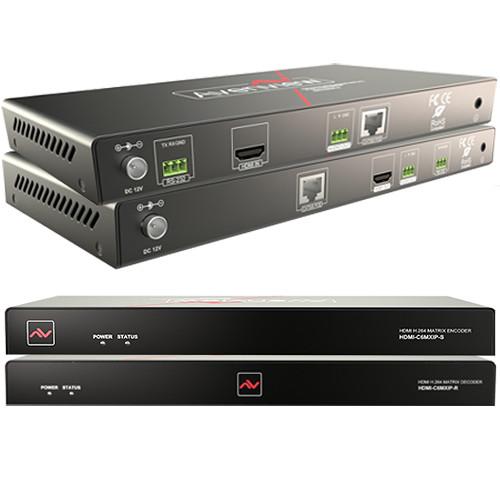 Contents of the user manual for the Avenview HDMI H.264 IP Matrix Encoder
- Product category: Video Extenders & Repeaters Avenview
- Brand: Avenview
- Description and content of package
- Technical information and basic settings
- Frequently asked questions – FAQ
- Troubleshooting (does not switch on, does not respond, error message, what do I do if...)
- Authorized service for Avenview Video Extenders & Repeaters
|
User manual for the Avenview HDMI H.264 IP Matrix Encoder contain basic instructions
that need to be followed during installation and operation.
Before starting your appliance, the user manual should be read through carefully.
Follow all the safety instructions and warnings, and be guided by the given recommendations.
User manual is an integral part of any Avenview product,
and if it is sold or transferred, they should be handed over jointly with the product.
Following the instructions for use is an essential prerequisite for protecting
health and property during use, as well as recognition of liability on the part of the manufacturer
for possible defects should you make a warranty claim. Download an official Avenview user manual in which you will find instructions on how to install, use, maintain and service your product.
And do not forget – unsuitable use of a Avenview product will considerably shorten its lifespan!
|
Product description Deliver end-to-end streaming media over IP networks with the HDMI H.264 IP Matrix Encoder & Decoder from Avenview.
A full-blown HDMI extender, this system can run point-to-point signals over Cat5/6, as well as incorporate network switches to run a point-to-multi setup over IP. A built-in scaler allows you to connect DVI, VGA, YPbPr, and CVBS sources over converters to HDMI. Add additional encoder/decoder units and create comprehensive matrix and video wall solutions for signals up to 1920 x 1200 at 60 Hz, using H.264/MPEG-4 AVC video compression. - Key Features
-
- Flexible PC, Web GUI, and iPad control
- CEC function on the receiver
- Live IP video stream decoding of formats from 480p at 60 Hz to 1920 x 1200 at 60 Hz
- PoE support
- Dual IP stream previewing—via iPad app and Windows 7 software
- HDMI input
- Supports HDMI, DVI, VGA, YPbPr, and CVBS signals over IP (converters required)
- Point-to-Point direct connection via Cat5/6—up to 330 ft
- Point-to-Multi connection
- Matrix and video wall functions
- Audio embedding and de-embedding
- Auto scaler
- Baseline profile, main profile, and high profile H.264 support
- Supports H.264, TCP/IP, Telnet, UDP, and IGMP
- Support Telnet, Web GUI control, and third-party control systems API commands
- Supports auto IP, zero-configuration networking (zeroconf)
- Seamless switching, no black screen, no frame lock
- Configurable encoding bit rate up to 30 Mbps
- Auto input format detection
- HDCP compliant
- Recommended 24-Port Network Switches
-
- Cisco WS-C2960-24TC-L 100 Mbps Ethernet Switch
- Cisco SG300-28 1000 Mbps Ethernet Switch
- Cisco SG300-28P, WS-C2960S-24PS-L, and WS-C2960X-24PSQ-L 1000 Mbps PoE Ethernet Switches
- Huawei S2700-26TP-EI-AC 100 Mbps Ethernet Switch
- Huawei S5700-28P-PWR-LI-AC 1000 Mbps PoE Ethernet Switch
UPC: 606825934386 In the Box Avenview HDMI H.264 IP Matrix Encoder & Decoder Set with Video Wall Support HDM-C6MWIP-S Encoder/Transmitter HDM-C6MWIP-R Decoder/Receiver 2 x Power Supply Units (12 VDC, 1A) with International Adapters 2 x Ear Rack Sets 2 x Phoenix Connectors (3.5mm, 3-Pin, Male) for Transmitter 2 x Phoenix Connectors (3.5mm, 3-Pin, Male) for Receiver Limited 3-Year Warranty Table of Contents
|
Upload User Manual
Have you got an user manual for the Avenview HDMI H.264 IP Matrix Encoder & Decoder Set with Video Wall Support in electronic form? Please send it to us and help us expand our library of instruction manuals.
Thank you, too, on behalf of other users.
To upload the product manual, we first need to check and make sure you are not a robot. After that, your "Submit Link" or "Upload File" will appear.
Technical parametersAvenview HDM-C6MWIP-SET Specs | Video Input | Transmitter:
1 x HDMI 1.3 (DVI, VGA, YPbPr, and CVBS converters supported)
Receiver:
1 x Cat5/6 (H.264/MPEG-4 AVC) | | Input Resolutions | Transmitter:
HDMI:
640 x 480 at 60 Hz, 480i/p at 60 Hz, 576i/p at 50 Hz, 800 x600 at 60 Hz, 1024 x 768 at 60 Hz, 720p at 60/50 Hz, 1280 x 800 at 60 Hz, 1280 x1024 at 60 Hz, 1360 x 768 at 60 Hz, 1366 x 768 at 60 Hz, 1400 x 1050 at 60 Hz, 1440 x 900 at 60 Hz, 1680 x1050 at 60 Hz, 1080i at 60/50 Hz, 1080p at 60/50/30/25/24 Hz, 1920 x 1200 at 60 Hz
DVI:
640 x 480 at 60 Hz, 480i/p at 60 Hz, 576i/p at 50 Hz, 800 x600 at 60 Hz, 1024 x 768 at 60 Hz, 720p at 60/50 Hz, 1280 x 800 at 60 Hz, 1280 x1024 at 60 Hz, 1360 x 768 at 60 Hz, 1366 x 768 at 60 Hz, 1400 x 1050 at 60 Hz, 1440 x 900 at 60 Hz, 1680 x1050 at 60 Hz, 1080i at 60/50 Hz, 1080p at 60/50/30/25/24 Hz, 1920 x 1200 at 60 Hz
VGA:
640 x 480 at 60 Hz, 800 x 600 at 60 Hz, 1024 x 768 at 60 Hz, 1280 x 1024 at 60 Hz, 1280 x 720 at 60 Hz, 1280 x 768 at 60 Hz, 1280 x 800 at 60 Hz, 1360 x 768 at 60 Hz, 1366 x 768 at 60 Hz, 1440 x 900 at 60 Hz, 1400 x 1050 at 60 Hz, 1680 x 1050 at 60 Hz, 1920 x 1080 at 60 Hz, 1920 x 1200 at 60 Hz
YPbPr:
720 x 480i/p at 60 Hz, 720 x 576i/p at 50 Hz, 1280 x 720p at 60/50 Hz, 1920 x 1080i at 60/50 Hz
CVBS:
480i at 60 Hz, 576i at 50 Hz
Receiver:
480p at 60 Hz to 1920 x 1200 at 60 Hz | | Input Video Signal | Transmitter:
0.5 - 1.2 Vpp | | Encoding Data Rate | Transmitter:
Up to 30 Mbps, configurable | | Video Output | Transmitter:
1 x Cat5/6 (H.264/MPEG-4 AVC)
Receiver:
1 x HDMI 1.3 | | Output Resolutions | Transmitter:
Large IP Stream: 480p at 60 Hz to 1920 x 1200 at 60 Hz
Small IP Stream: 352 x 288 at 5 Hz
Receiver:
HDMI:
480p at 60 Hz, 576p at 50 Hz, 800 x 600 at 60 Hz, 1024 x 768 at 60 Hz, 720p at 60/50 Hz, 1280 x 800 at 60 Hz, 1280 x 1024 at 60 Hz, 1366 x 768 at 60 Hz, 1440 x 900 at 60 Hz, 1600 x 1200 at 60 Hz, 1680 x 1050 at 60 Hz, 1080p at 60/50/30/25/24 Hz, 1920 x 1200 at 60 Hz | | Impedance | Transmitter/Receiver:
100 Ohms | | Input DDC Signal | Transmitter:
5 Vpp (TTL) | | End-to-End Latency | Transmitter/Receiver:
About 60-90 ms (low latency mode)
About 250-300 ms (high-quality mode) | | Input Audio Format | Transmitter:
Stereo
Receiver:
Audio embedded in streaming media input | | Output Audio Ports | Transmitter:
1 x Phoenix connector
Receiver:
1 x Phoenix connector | | Output Audio Format | Transmitter/Receiver:
Stereo | | Control Method | Transmitter:
Rear panel Cat5/6 port, PC configurator, and RS-232
Receiver:
PC configurator and RS-232 | | Power Supply | Transmitter/Receiver:
12 VDC, 1 A | | Power Consumption | Transmitter/Receiver:
6 W (max) | | ESD Protection | Transmitter/Receiver Human Body Model:
-±8 kV (Air-gap discharge)
-±4 kV (Contact discharge) | | Operating Temperature | Transmitter/Receiver:
32 to 104°F (0 to 40°C) | | Storage Temperature | -4 to 140°F (-20 to 60°C) | | Relative Humidity | 20 to 90% RH (no condensation) | | Dimensions | Transmitter:
9.3 x 1.0 x 3.7" (23.5 x 2.5 x 9.5 cm)
Receiver:
10.5 x 1.0 x 4.4" (27.0 x 2.5 x 11.2 cm) | | Weight | Transmitter:
1 lb (0.5 kg)
Receiver:
1.3 lb (0.6 kg) | | | | Package Weight | 4.1 lb | | Box Dimensions (LxWxH) | 12.3 x 7.3 x 3.1" |
Rating100% users recommend this product to others. And what about you?

This product has already been rated by 74 owners. Add your rating and experience with the product.
Discussion
 Ask our technicians if you have a problem with your settings,
or if anything is unclear in the user manual you have downloaded.
You can make use of our moderated discussion.
The discussion is public and helps other users of our website who may be encountering similar problems.
Ask our technicians if you have a problem with your settings,
or if anything is unclear in the user manual you have downloaded.
You can make use of our moderated discussion.
The discussion is public and helps other users of our website who may be encountering similar problems.
The discussion is empty - enter the first post
Post a new topic / query / comment:
|
|


