|
User Manual for Avid NewsCutter 11 Editing Software and Nitris DX with AVC Intra-Option Click to enlarge the picture
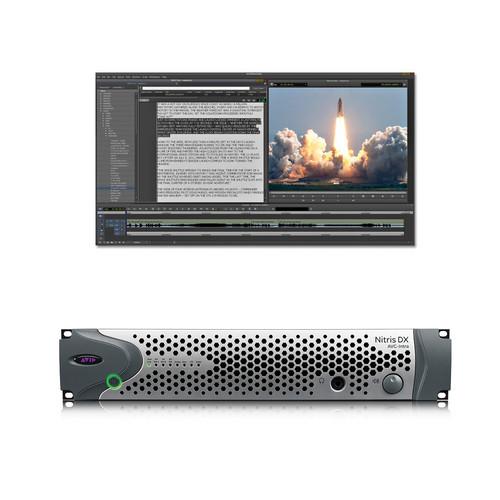 Contents of the user manual for the Avid NewsCutter 11 Editing Software and
- Product category: Computer Hardware Avid
- Brand: Avid
- Description and content of package
- Technical information and basic settings
- Frequently asked questions – FAQ
- Troubleshooting (does not switch on, does not respond, error message, what do I do if...)
- Authorized service for Avid Computer Hardware
|
User manual for the Avid NewsCutter 11 Editing Software and contain basic instructions
that need to be followed during installation and operation.
Before starting your appliance, the user manual should be read through carefully.
Follow all the safety instructions and warnings, and be guided by the given recommendations.
User manual is an integral part of any Avid product,
and if it is sold or transferred, they should be handed over jointly with the product.
Following the instructions for use is an essential prerequisite for protecting
health and property during use, as well as recognition of liability on the part of the manufacturer
for possible defects should you make a warranty claim. Download an official Avid user manual in which you will find instructions on how to install, use, maintain and service your product.
And do not forget – unsuitable use of a Avid product will considerably shorten its lifespan!
|
Product description NewsCutter 11 Editing Software and Nitris DX with AVC Intra-Option is a bundle from Avid for computers running 64-bit versions of either Windows 7 or Windows 8. It features editing software designed for news industry professionals working against tight deadlines as well as an I/O device for SD and HD capture, monitoring, and to provide hardware acceleration of the editing workflow.
Geared toward high-pressure broadcast news editing, NewsCutter is designed to provide all the tools journalists need to produce news-from the field or in the newsroom. Tight integration with newsroom automation systems and playout servers, ultra-fast media acquisition, and support for open and efficient production workflows make NewsCutter a defensible choice for independent stations and worldwide media organizations alike.
The Nitris DX works with Media Composer 7 and Symphony as well as NewsCutter 11. It is more than just an I/O device, as not only does it perform real-time encoding to AVC-Intra, it also provides hardware acceleration to your system when handling files encoded as AVC-Intra, HDV, DVCPro25, and XDCAM EX. This frees up your system's CPU and GPU resources for other tasks including playback and effects rendering.
The Nitris DX features SD-SDI, HD-SDI, component, composite, and S-video I/O connectors. It also features HDMI out for monitoring. It supports ref sync in/out, Longitudinal Timecode (LTC), and Wordclock for digital audio sync. An optional expansion boards allow you to add full frame 3D (stereoscopic) functionality using the AVC-Intra codec, or you can install an optional board to add DNxHD support.
The Nitris DX interfaces with the host computer using a dedicated PCIe host card and therefore requires a desktop computer with a free PCIe slot. Alternatively, an optional ExpressCard/34 host interface will allow the Nitris to be used with qualifying laptop computers that have ExpressCard/34 expansion slots. What's New for Version 11 -
- Remote editing, workgroup collaboration, and upload with Interplay Sphere
- Windows 8 operating system support
- Deliver finished sequences to a standardized AS-11 (AMWA) MXF OP1a file
- Select multiple clips in the timeline without the filler
- View location sound metadata from Broadcast Wave files with support for iXML
- Work with Alpha channel media using the new AMA QuickTime with Alpha plug-in
- New AMA enhancements to streamline your workflow
Editing With NewsCutter - Editing Interface
Edit faster with a freshened and sleeker, but familiar interface. Work the way you want with the mouse, screen buttons, or keyboard shortcuts, with full customization of screen and keyboard layouts designed to speed things up further
Editing Tools
NewsCutter includes streamlined editing tools designed for fast turnaround of news packages. With its flexible interface that is designed to be intuitive and fast to pick up, NewsCutter aims to allow editors of every experience level get up and running quickly
Expert Search
Easily find material using text search in common fields, across bins on local or shared storage - Seamless Integration
- Native Support for SD and HD Codecs
Through AMA (Avid Media Access) you can start editing footage right away without transcoding on the timeline. NewsCutter features native support for a wide range of SD and HD codecs, including: NTSC, PAL, DV, HDV, XDCAM, AVC-Intra, AVCHD, GFCAM, QuickTime, and DVCPRO HD, HDCAM SR Lite, and more
Direct to HD Down-conversion
More content today is shot in high resolution formats such as 4K, while the majority of programming is still HD. With the new FrameFlex tools, you can immediately start working in HD directly from high-res sources and maintain full creative control of the image reframing and keyframing, from beginning to end
Closed Caption and Ancillary Data Support
Seamless SMPTE 436-compliant ancillary data is supported and preserved from ingest, through edit, to playback
H.264 Proxy Support
Edit H.264 proxies created by the AirSpeed server and automatically conform to high res material for faster response, higher stream count, and broader availability across the network
720p Proxy Transcode
Use NewsCutter to create lightweight proxy versions of 720p material for easier collaboration, simpler searching, and efficient high-res archive/low-res on-line workflow
Play-to-Air
When you finish editing the story, push it to AirSpeed or other playout servers with a single click. Plus, you can route audio signals when sending to air for easier multi-version workflows., and pull material from selected play-to-air servers, edit the content, and push it back
Multimedia Export
Use the integrated tools to create a large variety of high-quality output formats for Web or electronic delivery. Take advantage of easy-to-use compression templates or create your own
Broadcast WAV Support
View location sound metadata from Broadcast Wave files with support for iXML. Insert the sequence timecode based on project type when exporting the timeline audio tracks as BWF (Broadcast WAV). Provides fast and easy sync reference for downstream process that do not support OMF or AAF such as slave playback devices
Avid DNxHD Support
Edit HD material in real time on your software system using Avid DNxHD encoding, including HD offline using Avid DNxHD36 media. The high-efficiency Avid DNxHD codec is designed to maintain image quality during multi-generation editing - Collaboration
- Share Media and Ideas in Real Time
NewsCutter is designed for collaboration. With ISIS shared media networks and Interplay Production asset management, teams work in parallel as producers, assistants, and reviewers located anywhere find, shot-list, review, and annotate while editors simultaneously access the same media
Interplay Services
With the Interplay Sphere option for remote cloud-based collaboration, you can edit camera-acquired content in the field, incorporate media on the ISIS storage back at the station, and upload the finished package quickly, easily and transparently using the same tools and workflows you know and trust. As soon as it's on the ISIS storage, everyone in the workgroup -- including others in the field -- can instantly access and use the material
Integrated Graphics Power
Add high-impact graphics and effects with Avid Motion Graphics (AMG). With Avid Motion Graphics, customized graphics and effects from templates created AMG or Deko can be completed in NewsCutter and incorporated into packages, saving time and steps while delivering consistent, eye-catching station branding - Finishing Tools
- Color Correction
NewsCutter Features a fully integrated 10-bit color correction toolset. Use the one-click analysis tool to automatically correct each clip in a sequence, or NaturalMatch to quickly and accurately color-match shots
Titles and Graphics
Complete all elements of your news story in your editing software. Add lower thirds, titles, and graphics using the fully integrated and easy-to-use tools. Create and save templates for a consistent, branded look and feel - Keyboard and Timeline
- One-Step Keys
One-step keys for editing speed: Top, Tail, Review Edit, Extend. Quickly execute commonly used enhanced edits and shortcuts, single-keystroke trimming, and instant edit viewing without shuttling
Edit to Timeline
In this mode material appears directly on the timeline as it's recorded
Top and Tail Buttons
Time saving one-button position marking of in and out points while simultaneously extracting unwanted footage in front of or following the marked points
Edit Review
One button replay of an edit
Play Standby Button
Places play in standby mode to prepare for playback - Capture
- AMA (Avid Media Access)
A plug-in architecture that accelerates file-based workflow by allowing media on removable card or disc devices to viewed and edited right away, eliminating the need to first transcode or copy media to a local drive in order to view or extract the clips. XDCAM, P2, GFCAM, and Canon XF formats are supported as well as QuickTime files. This feature is shared with Media Composer and Symphony
Frame Chase Editing
Play or edit MXF media that is currently being captured by another supported device such as Avid AirSpeed Multi Stream. Eliminates a digitizing bottleneck; multiple workstations can begin editing immediately as footage is acquired
Quick Record
Enables mouse-free and keyboard-free recording and shot selection of material into NewsCutter using the VTR shuttle knob. When Quick Record mode is enabled, NewsCutter starts capturing automatically whenever the servo-lock mode is detected from the deck. When the deck is playing and servo-lock is detected, capturing begins and continues until play is stopped, at which point it will wait for the next servo lock signal. In this way recording and rough NewsCutter edits can be completed just using the VTR jog knob
Timed Capture (Scheduled Recording)
Unattended recording at preset times for multiple events. Allows recording through NewsCutter to local or Avid Unity shared storage of a one-time or regularly occurring event or satellite feed
Custom Record Tool Fields
Extra text fields (up to 10) are available for entry of descriptive metadata and annotation before and during capture such as journalist name, location, etc. The extra text fields appear as columns in the bins - Story Shortcuts
- Voice Over Record
Record voice-overs directly into the NewsCutter application
AutoVO
Quickly repurposes an SOT story into a B-roll video ready for anchor voiceover. A time-saving way of repurposing stories for later use or to quickly create multiple versions of a story
HyperClip
A tag to include information and formatting for any linked clips in a story. When a video clip is hyperlinked to a story, HTML formatting, Javascript code, text, and other elements can be linked as well. HyperClip is also a part of Post to Web functionality
Alternate Edit
Cycles through pre-selected alternate shots within a story to decide which works best in context or to repackage news stories instantly. One button previewing and overwriting of a selected clip in a sequence with any other pre-selected clips. Each time the button is pressed, the clip where the position indicator is located is replaced by a clip in the Alternate Edits bin - Newsroom and Workflow
- Locators
Locators mark a single frame within a clip or sequence to allow the point to be easily found later. The locater can include an attached text note or link. Locators can be added on-the-fly or after recording. Color coding of locators facilitates finding clips b category or content. Eight colored locators are mapped to eight (F5-F12) function keys
NRCS Tool
Opens an iNEWS or ENPS interactive session within NewsCutter. Editors can view rundowns and scripts and edit video to scripts by dropping selected or pre-selected (based on locaters created in iNEWS) text directly to the timeline. Clips are pre-timed to reporter's read rate. Improves, simplifies, and speeds story creation between journalist and editor; full functionality with Asian-language scripts. Includes several capabilities including sending mail within iNEWS workgroups
Loaded Cues
Links that act as pointers within an iNEWS script to master clips stored in Avid bins. Makes it easy to move clips or sequences between scripts and bins as a story is edited. Includes display of a loaded cue icons and head frames
Associations
Locate sequences with associated NRCS stories or locate stories from their associated video sequences. Makes it easier to find stories on the iNEWS server or to load sequences for iNEWS scripts directly into the timeline
Post to Web
Through the NRCS tool, NewsCutter can generate a hypertext version of the iNEWS story for viewing on a web site. The Post to Web feature helps you create internet content directly from a single script rather than requiring the production of multiple content versions for broadcast and for the web. When a story is posted to the web, the Web page can include the text of the iNEWS story, as well as links to video and image files. User-designed templates provide formatting for the Web content. Post to Web automatically changes NRCS scripts that have been written in uppercase to lower case except for the first words in sentences. It also deletes presenter instruction and closed captions. This feature works in conjunction with any application that can receive HTML, and works with the Avid Active Content Manager online news publishing application - Playback
- Send to Playback Command
This command is typically used by an editor or journalist to simultaneously create and send a single "flat" file to a playback or transmission server. Enhancements to this feature in v.8.0 save several steps and simplify workflow, especially when using proxy editing or different resolutions for editing and transmission. With one click the Send to Playback command automatically: - Re-links to full resolution media specified by the target settings
- Renders any un-rendered effects
- Performs necessary transcoding from the editing resolution to desired playback resolution
Digital Cut with Audio Mix Mode
The Digital Cut Tool allows sequences to be easily recorded to another device. In NewsCutter, an Audio Mix Mode button allows the editor to do a pre-mix of audio tracks with preset levels for voice and ambiance, for example. This can avoid the need for mixing by a sound engineer
Disable Resolutions
A user or administrator can specify resolutions that should be disabled, preventing disallowed resolutions to be accidentally played to air
GPI Triggers
NewsCutter can send signals to a V-LAN VLXi deck controller and a general purpose interface GPI Bundled Applications - Interplay Transfer (Standalone Version)
- Manages processor-intensive media transfers to and from video servers and transcoding engines. Broadcasters and post-production facilities can exchange high-resolution media with other workgroups, remote locations, and partner-integrated systems
- Avid DVD
- DVD authoring software to help you compose professional DVD and Blu-ray media complete with full interactive menus
- Avid FX
- Avid's own effects composition software. Avid FX allows you to create and animate titles, effects, transitions, and more
- NewBlue Titler Pro v1
- This dedicated titling application helps you created 2D and 3D titles to add a finished, professional feel to your stories
- Sorenson Squeeze
- Transcoding software that allows you to export your stories to a wide range of formats from broadcast and DVD friendly to Web and mobile optimized
Nitris DX with AVC-Intra Option - Real-time Encoding
Provides real-time, broadcast quality encoding and decoding of Panasonic's popular AVC-Intra I-frame only codec
HD Anamorphic Thin Raster Support
When using anamorphic formats such as HDV, DVCPro25 or XDCAM EX, the Nitris DX takes care of the resizing onboard, leaving more CPU and GPU cycles available for increased playback and effects performance
Ancillary Data Support
Easily integrate into broadcast workflows. With Nitris DX, you can capture and output ancillary data, such as closed captioning and AFD
Integration with Existing Pipelines
- Sync to different video and digital audio clocks, including Black Burst, Tri-level, AES, and S/PDIF
- Clock your audio output to a digital router while capturing video
Audio Monitoring
With a headphone output that includes surround down-mixing capabilities, you get accurate monitoring to create the best mix possible - Flexible Connectivity
- The Nitris DX allows you to capture from a variety of analog and digital video sources, as well as capture analog or digital video:
- Two HD-SDI inputs and outputs which can be combined as dual link for passing high bandwidth 4:4:4 and RGB signals
- One SD-SDI input and output
- Component, composite, and S-video input and output
- Four channels balanced XLR in and out and two channels unbalanced RCA in
- Optical S/PDIF or ADAT in out for up to eight channels
- HDMI and balanced TRS output for monitoring
- Reference sync and timecode in and out
In the Box Avid NewsCutter 11 Editing Software and Nitris DX with AVC Intra-Option - NewsCutter 11
- Nitris DX
User Manual PDF 21.7mbcvtvrwacyrfcvfvtebcazzrtyxyeexrywzx Table of Contents
|
Upload User Manual
Have you got an user manual for the Avid NewsCutter 11 Editing Software and Nitris DX with AVC Intra-Option in electronic form? Please send it to us and help us expand our library of instruction manuals.
Thank you, too, on behalf of other users.
To upload the product manual, we first need to check and make sure you are not a robot. After that, your "Submit Link" or "Upload File" will appear.
Technical parametersAvid 9935-65135-02 Specs | | | System Requirements | Computer: See Avid website for latest qualified Windows-based computers
OS: Windows 7 Professional SP 1 (64-bit), Windows 8 Professional or Enterprise (64-bit)
Processor: Intel Quad Core i7 or Quad Core Xeon
Memory:
4 GB RAM minimum (6 GB or more recommended)
8 GB RAM minimum required to support Interplay Sphere
16 GB RAM minimum recommended to support full-frame stereoscopic 3D, simultaneous background transcoding, Dynamic Media Folders, FrameFlex 4K workflows, Raw format AMA plug-ins, Long GOP media editing, and other high-performance workflows
Graphics Card: Nvidia GeForce family 3 (Q600 or higher recommended), Intel HD4000
Internal Hard Drive: Minimum 250 GB 7200rpm SATA drive or 128 GB SSD
Optical Drive: DVD-ROM required for disc-based software installation
Quicktime: Avid has tested and qualified Apple QuickTime 7.6.9
Windows Media Player: Microsoft Windows Media Player 11 is required to export certain formats and to work with VC-1 material
Note: DNxHD capture with Mojo DX is only supported with Windows-based Intel Core i7 laptops (Quad Core with Hyper-Threading) | | | | Host Connection | PCIe card installed in host computer | | Inputs | 1 x SD-SDI on BNC female
2 x HD-SDI on BNC female -- both inputs can be combined for dual-link capture
1 x Component on 3 x BNC female
1 x S-Video on 4-pin mini-DIN female
1 x Composite on BNC female
1 x 4-channel balanced audio on 4 x XLR female
1 x Stereo unbalanced audio on 2 x RCA female
1 x 8-channel AES -- via XLR breakout cable
1 x 8-channel ADAT on Toslink connector
1 x 2-channel S/PDIF -- shared with ADAT input
8-channels SDI-embedded audio via SDI inputs
1 x LTC on XLR connector
1 x Sync (Black Burst or Tri-level) on BNC female | | Outputs | 1 x SD-SDI on BNC female
2 x HD-SDI on BNC female -- both inputs can be combined for dual-link capture
1 x Component on 3 x BNC female
1 x S-Video on 4-pin mini-DIN female
1 x Composite on BNC female
1 x HDMI -- all formats supported
1 x 4-channel balanced audio on 4 x XLR female
1 x 2-channel balanced audio on 2 x TRS female
1 x 8-channel AES -- via XLR breakout cable
1 x 8-channel ADAT on Toslink connector
1 x 2-channel S/PDIF -- shared with ADAT input
8-channels SDI-embedded audio via SDI inputs
1 x LTC on XLR connector
1 x Sync (loop through) on BNC female
1 x World Clock on BNC female | | System Requirements | 1 x Free PCIe expansion slot for host card
Avid qualified system capable of running compatible editing software | | Power Consumption | Typical: 75 W
Maximum: 113 W | | Dimensions | 2 RU x 19 x 9.7" / 48.3 x 24.7 cm | | Weight | 13 lb / 6 kg |
Rating90% users recommend this product to others. And what about you?

This product has already been rated by 93 owners. Add your rating and experience with the product.
Discussion
 Ask our technicians if you have a problem with your settings,
or if anything is unclear in the user manual you have downloaded.
You can make use of our moderated discussion.
The discussion is public and helps other users of our website who may be encountering similar problems.
Ask our technicians if you have a problem with your settings,
or if anything is unclear in the user manual you have downloaded.
You can make use of our moderated discussion.
The discussion is public and helps other users of our website who may be encountering similar problems.
The discussion is empty - enter the first post
Post a new topic / query / comment:
|
|
|
| Request for user manual |
You can’t find the operation manual you are looking for? Let us know and we will try to add the missing manual:
I’m looking for a manual / Request for manual
Current requests for instruction manuals:
Call Of Duty World War Two For Xbox...
controller stratus XL...
stratus XL...
smart whatch serie S11 42mm...
Allen & Heath SQ-6 manual...
|
| Discussion |
Latest contributions to the discussion:
AEW R 4100
Name: MAURICIO ANGARITA
Audio-Technica AEW-R4100 UHF Diversity Receiver for
AEW R 4100 has the mute function blocked and does not allow audio to pass. I tried several times to turn off the mute from the transmitter but it does nothing, the mute stays on. Solution?
Thank you...
Instructions for assembling the 2015 Forecast Image Master Consoles GC3-A
Name: mike elam
Forecast Consoles GC3-A ImageMaster Editing Console
Looking for instructions for assembling this console. ...
EMPTY TONER ERROR MESSAGE AFTER REPLACING TONER
Name: LINDA BAD YELLOW EYES
Brother TN223BK Standard-Yield Toner
I HAD TO CHANGE OUT ALL THREE TONERS DUE TO LEAKS IN THE YELLOW AND CYAN. AFTER I REPLACED THEM, THE MACHINE KEEPS GIVING ME AN EMPTY TONER ERROR MESSAGE. HELP!!...
PS480D 20/24 pin Switching 480W Power Supply
Name: swkargo
Logisys 480W Power Supply
This item states in can run -5vdc .It is NOT listed on the board or I beleive is r4 is missing the resitior. Any body have thid issue. Shawn
...
Help needed
Name: Ann Carter
SanDisk 1TB Extreme Portable USB 3.1
When I click the link to download the user manual for my Sandisk Extreme external hard drive, it gives me the manual for the LG Cricket. Can you please change the link so I can download the Sandisk manual and begin using this drive? Thank you....
|
|


