|
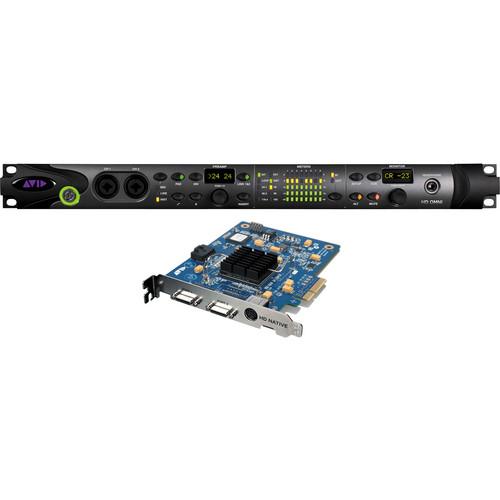
User Manual for Avid Pro Tools HD Native PCIe Card and HD OMNI Interface Bundle Click to enlarge the picture
 Contents of the user manual for the Avid Pro Tools HD Native PCIe
- Product category: Audio Interfaces & Systems Avid
- Brand: Avid
- Description and content of package
- Technical information and basic settings
- Frequently asked questions – FAQ
- Troubleshooting (does not switch on, does not respond, error message, what do I do if...)
- Authorized service for Avid Audio Interfaces & Systems
|
User manual for the Avid Pro Tools HD Native PCIe contain basic instructions
that need to be followed during installation and operation.
Before starting your appliance, the user manual should be read through carefully.
Follow all the safety instructions and warnings, and be guided by the given recommendations.
User manual is an integral part of any Avid product,
and if it is sold or transferred, they should be handed over jointly with the product.
Following the instructions for use is an essential prerequisite for protecting
health and property during use, as well as recognition of liability on the part of the manufacturer
for possible defects should you make a warranty claim. Download an official Avid user manual in which you will find instructions on how to install, use, maintain and service your product.
And do not forget – unsuitable use of a Avid product will considerably shorten its lifespan!
|
Product description The Pro Tools 10 HD Native PCIe Card and HD OMNI Interface Bundle from Avid is a music and post-production core system that allows the professional to create complex, high-quality audio productions, using the full capabilities of Pro Tools HD software in a lower-cost, native solution. With this Pro Tools HD Native system, a single PCIe card handles the mixing and routing duties, with the rest of the DSP processing handled by the computer.
Pro Tools software has been the industry-standard digital audio production platform for years. Pro Tools HD 10 software tightly integrates the HD Native hardware and computer together as one, delivering performance and reliability, even with large mixes. It includes all the tools, advanced workflows, virtual instruments, and plug-ins needed to compose, record, edit, and mix music and/or sound for picture.
The HD OMNI interface can be used to record instrument and vocal performances, while providing dedicated cue mixes for artists and monitoring their performance through a discrete mix. Overdub and Foley recording capabilities are available for post production, in addition to creating monitor mixes with up to 7.1 channels. 7.1 mixes can be folded down to almost any channel configuration subset required. Note: Exchange is available for registered owners of Digi 001, 002 or 003 products. Original systems need to be registered with Avid and under the name of the user that is purchasing the HD Native PCIe system exchange. - PCIe Native System
-
- Harness the power of your desktop or laptop computer with a PCIe card
- Low latency and high performance native digital audio workstation
- Capture and play back audio with pristine clarity using a Pro Tools HD Series interface
- Work with industry-standard Pro Tools HD software in a lower-cost solution for projects that don't require the DSP acceleration of Pro Tools HDX
- Create bigger sessions with up to 256 audio tracks and up to 64 channels of I/O
- Get the ideal tracking experience and set-and-forget direct monitoring with an integrated low-latency monitor mode
- Boost your capabilities with advanced automation, surround mixing, input monitoring, AFL/PFL solo, destructive punch, and other professional features
- Use AAX Native and RTAS plug-ins, plus Automatic Delay Compensation on hardware and software inserts
- Share sessions with Pro Tools HDX and Pro Tools HD users without any loss of data
- Synchronize to Timecode and video reference, with frame-edge accuracy, when using SYNC HD (sold separately)
- Take hands-on control over your mixes using Artist Series or Avid Pro Mixing consoles and control surfaces
- Get total flexibility-work with Mac or Windows, Pro Tools HD or third-party software, and more
- HD OMNI
-
- 24-bit analog-to-digital (A/D) and digital-to-analog (D/A) converters, with support for sample rates up to 192 kHz
- Two high-quality microphone/DI preamps
- Two XLR and 1/4-inch TRS front panel combo inputs for microphone and instrument level input
- Two XLR back panel microphone inputs
- Two 1/4" TRS Send and two 1/4" TRS Return jacks for hardware inserts on channels 1 and 2 (back-panel)
- Four analog 1/4" TRS line level back panel inputs (channels 1-4)
- Soft Clip and Curv limiting circuits to protect against clipping on analog input
- Eight channels of analog output using a DB-25 breakout cable (sold separately) with variable output gain
- Two channels of analog output using 1/4" TRS jacks (mirrors channels 1-2 or 7-8 on DB-25 connector)
- Front panel stereo 1/4" headphone jack
- Route audio independently from Pro Tools with the 14-input persistent monitor mixer
- Eight channels of AES/EBU output (up to 192 kHz Single Wire) using a DB-25 breakout cable (sold separately)
- Two channels of AES/EBU XLR input (up to 192kHz Single Wire)
- Two channels of S/PDIF RCA input and output (up to 192kHz)
- Eight channels of ADAT TOSLink input and output
- Support for ADAT S/MUX optical for sample rates of 88.2, 96, 176.4 and 192 kHz
- Support for two channels of S/PDIF optical with sample rates of up to 96 kHz
- Real-time sample rate conversion (SRC) on digital Inputs 1-2 of either AES/EBU, S/PDIF, or optical S/PDIF
- Additional stereo "CUE" output path in Pro Tools for headphone monitoring from the front panel headphone jack
- Front panel Control Room (MAIN/ALT) and headphone monitoring volume control
- Flexible monitoring with fold-down from all stereo and surround formats (up to 7.1 surround)
- Input mixer for low latency direct monitoring of a variety of incoming signals (configured in the Pro Tools Hardware Setup)
- Loop Sync input and output for connecting additional Pro Tools HD interfaces and peripherals
- External Clock input and output for synchronizing HD OMNI with external Wordclock devices
- Pro Tools HD Software
- Virtual Instruments and Audio Content
- Big Fish Audio 8GB sound library
- Boom drum machine and sequencer
- DB-33 tonewheel organ emulator with rotating speaker simulation
- Mini Grand acoustic grand piano
- Vacuum monophonic vacuum tube synthesizer
- Xpand!2 multi-timbral synthesizer and sample workstation
Sound-Processing, Effects and Utility Plug-Ins - 1-Band EQ III
- 4-Band EQ III
- 7-Band EQ III
- AIR Chorus
- AIR Distortion
- AIR Dynamic Delay
- AIR Enhancer
- AIR Ensemble
- AIR Filter Gate
- AIR Flanger
- AIR Frequency Shifter
- AIR FuzzWah
- AIR KillEQ
- AIR Lo-Fi
- AIR MultiChorus
- AIR Multi-Delay
- AIR Nonlinear Reverb
- AIR Phaser
- AIR Reverb
- AIR Spring Reverb
- AIR StereoWidth
- AIR Talkbox
- AIR Vintage Filter
- BF76 Compressor 1176 emulator
- BF Essential Clip Remover
- BF Essential Correlation Meter phase fixer
- BF Essential Meter Bridge VU metering
- BF Essential Noise Meter
- Chorus
- Click
- Compressor/Limiter
- D-Verb reverb and ambiance
- DC Offset Removal
- De-Esser
- Delay
- DigiReWire
- Dither
- Down Mixer (5.1 to stereo fold down)
- Duplicate
- Eleven Free (guitar amplifier emulator based on Eleven)
- Expander/Gate
- Extra Long Delay II
- Flanger
- Gain
- Invert
- Lo-Fi retro processing
- Long Delay II
- Maxim sound maximizer
- Medium Delay II
- Mod Delay III
- Multi-Tap Delay
- Normalize
- Ping-Pong Delay
- Pitch
- Pitch Shift
- POWr Dither
- Recti-Fi harmonic synthesis
- Reverse
- SansAmp tube amp simulator
- Sci-Fi ring modulator
- Signal Generator
- Short Delay II
- Slap Delay II
- Time Compression Expansion
- Time Shift time/pitch stretching
- TL AutoPan panning effects
- TL InTune digital tuner
- TL MasterMeter oversampling meter
- TL Metro versatile metronome
- Trim
- Vari-Fi speed shifter
In the Box Avid Pro Tools HD Native PCIe Card and HD OMNI Interface Bundle (Exchange) Avid Pro Tools 10 HD Native PCIe HD OMNI - Preamp, I/O, and Monitoring Pro Tools HD Series Interface fqdexxvruztfzxtsbqsfbd User Manual-MADI PDF 2.5mb Table of Contents
|
Upload User Manual
Have you got an user manual for the Avid Pro Tools HD Native PCIe Card and HD OMNI Interface Bundle in electronic form? Please send it to us and help us expand our library of instruction manuals.
Thank you, too, on behalf of other users.
To upload the product manual, we first need to check and make sure you are not a robot. After that, your "Submit Link" or "Upload File" will appear.
Technical parametersAvid 9905-65004-00 Specs | Converters | 24-bit | | Sample Rates | 44.1, 48, 88.2, 96, 176.4 and 192 kHz | | Analog In | 2 x XLR/TRS combi Microphone/Line (front panel)
2 x XLR Microphone (rear panel)
4 x 1/4" TRS phone Line (rear panel)
2 x 1/4" TRS phone Return (rear panel) | | Analog Outputs | 1 x 25-pin D-Sub (outputs 1-8)
2 x 1/4" TRS phone AUX
2 x 1/4" TRS phone Send
1 x 1/4" TRS phone Headphone | | Digital Input Connectors | 1 x XLR AES/EBU (supports AES Single-Wire 192 kHz)
1 x TOSLink ADAT optical (also functions in 2-channel optical S/PDIF mode)
1 x RCA coaxial S/PDIF | | Digital Output Connectors | 1 x 25-pin D-Sub AES/EBU 8 channels (supports AES Single-Wire 192 kHz)
1 x TOSLink ADAT optical (also functions in 2-channel optical S/PDIF mode)
1 x RCA coaxial S/PDIF | | Other Connectors | 2 x BNC Wordclock I/O
2 x BNC Loop Sync I/O
2 x DigiLink Mini Ports
1 x 9-pin Expansion Port | | MIDI In/Out | No | | Microphone Inputs | Frequency Response: 20 Hz to 20 kHz (+/-0.05 dB)
Gain Range: 65 dB
EIN: -128 dB
THD+N: -107 dB (0.00045%)
CMRR: -93 dB | | Line Inputs | Frequency Response: 20 Hz to 20 kHz (+/-0.03 dB)
Dynamic Range: 118 dB (A-weighted)
THD+N: -111 dB (0.00028%) | | Line Outputs | Frequency Response: 20 Hz to 20 kHz (+/-0.03 dB)
Dynamic Range: 120 dB (A-weighted)
THD+N: -108 dB (0.00039%)
Line Output Level /Trim: +10 dBu or +24 dBu/-40 dB to + (0.1 dB steps) | | Headphone Outputs | Frequency Response: 20 Hz to 20 kHz(+/-0.03 dB)
Dynamic Range: 118 dB (A-weighted)
THD+N: -107 dB (0.00045%) | | Power Requirements | 100/240V, 50/60 Hz, internal power supply | | Minimum System Requirements | Due to constantly changing requirements, for comprehensive hardware specifications and system requirements, please refer to Avid's website at http://www.avid.com | | Dimensions (WxDxH) | 1U rack-mountable chassis | | Weight | 16 lb (7.26 kg) | | Specialties | Curv and Soft Clip processing
14 input channels to 2 multi-channel monitoring paths, each with its own fold-down configuration
Monitoring Formats: 7.1, 7.0, 6.1, 6.0, 5.1, 5.0, QUAD, LCRS, LCR, 2.1, Stereo, Mono | | | | Package Weight | 17.7 lb | | Box Dimensions (LxWxH) | 24.5 x 18.5 x 8.0" |
Rating100% users recommend this product to others. And what about you?

This product has already been rated by 44 owners. Add your rating and experience with the product.
Discussion
 Ask our technicians if you have a problem with your settings,
or if anything is unclear in the user manual you have downloaded.
You can make use of our moderated discussion.
The discussion is public and helps other users of our website who may be encountering similar problems.
Ask our technicians if you have a problem with your settings,
or if anything is unclear in the user manual you have downloaded.
You can make use of our moderated discussion.
The discussion is public and helps other users of our website who may be encountering similar problems.
The discussion is empty - enter the first post
Post a new topic / query / comment:
|
|
|
| Request for user manual |
You can’t find the operation manual you are looking for? Let us know and we will try to add the missing manual:
I’m looking for a manual / Request for manual
Current requests for instruction manuals:
Call Of Duty World War Two For Xbox...
controller stratus XL...
stratus XL...
smart whatch serie S11 42mm...
Allen & Heath SQ-6 manual...
|
| Discussion |
Latest contributions to the discussion:
AEW R 4100
Name: MAURICIO ANGARITA
Audio-Technica AEW-R4100 UHF Diversity Receiver for
AEW R 4100 has the mute function blocked and does not allow audio to pass. I tried several times to turn off the mute from the transmitter but it does nothing, the mute stays on. Solution?
Thank you...
Instructions for assembling the 2015 Forecast Image Master Consoles GC3-A
Name: mike elam
Forecast Consoles GC3-A ImageMaster Editing Console
Looking for instructions for assembling this console. ...
EMPTY TONER ERROR MESSAGE AFTER REPLACING TONER
Name: LINDA BAD YELLOW EYES
Brother TN223BK Standard-Yield Toner
I HAD TO CHANGE OUT ALL THREE TONERS DUE TO LEAKS IN THE YELLOW AND CYAN. AFTER I REPLACED THEM, THE MACHINE KEEPS GIVING ME AN EMPTY TONER ERROR MESSAGE. HELP!!...
PS480D 20/24 pin Switching 480W Power Supply
Name: swkargo
Logisys 480W Power Supply
This item states in can run -5vdc .It is NOT listed on the board or I beleive is r4 is missing the resitior. Any body have thid issue. Shawn
...
Help needed
Name: Ann Carter
SanDisk 1TB Extreme Portable USB 3.1
When I click the link to download the user manual for my Sandisk Extreme external hard drive, it gives me the manual for the LG Cricket. Can you please change the link so I can download the Sandisk manual and begin using this drive? Thank you....
|
|


