User Manual for BAE 1023 3-Band EQ, with Power Supply, Rackmount Click to enlarge the picture
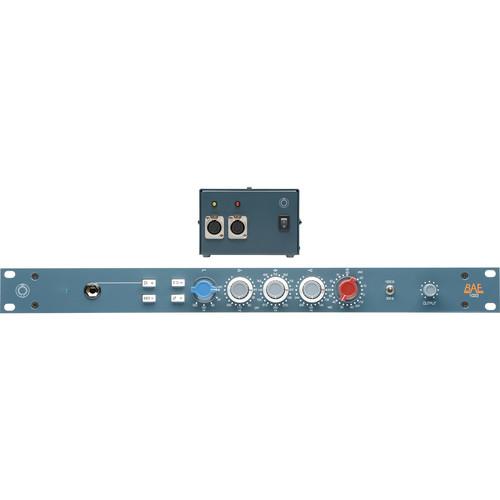 Contents of the user manual for the BAE 1023 3-Band EQ, with Power
- Product category: Microphone Preamps BAE
- Brand: BAE
- Description and content of package
- Technical information and basic settings
- Frequently asked questions – FAQ
- Troubleshooting (does not switch on, does not respond, error message, what do I do if...)
- Authorized service for BAE Microphone Preamps
|
User manual for the BAE 1023 3-Band EQ, with Power contain basic instructions
that need to be followed during installation and operation.
Before starting your appliance, the user manual should be read through carefully.
Follow all the safety instructions and warnings, and be guided by the given recommendations.
User manual is an integral part of any BAE product,
and if it is sold or transferred, they should be handed over jointly with the product.
Following the instructions for use is an essential prerequisite for protecting
health and property during use, as well as recognition of liability on the part of the manufacturer
for possible defects should you make a warranty claim. Download an official BAE user manual in which you will find instructions on how to install, use, maintain and service your product.
And do not forget – unsuitable use of a BAE product will considerably shorten its lifespan!
|
Product description The 1023 from BAE is a completely hand-wired, 3-band equalizer that uses Carnhill (St. Ives) transformers, and offers more EQ frequencies in the mid and high sections. It can be used by musicians, producers, and engineers in audio applications such as broadcast TV, live sound, recording studios, rehearsals, and more. The 1023 features the same mic/line preamps as the 1073 EQ but has more frequencies to play with. In addition, the expanded EQ sections also allow you to play the mid-bell curve directly against the high, and low-shelves where they overlap. This capability opens the tone shaping possibilities in more musical ways. The 1023's back panel is built with an XLR mic input, an XLR line input, and an XLR output jack along with the DC power input jack. The front panel has one DI instrument input jack. Furthermore, the 48V phantom power is built-in and a switch on the front panel allows you to switch it on and off. A 24V PSU power supply is also included. - Expanded High EQ Frequencies
- 10 kHz, 16 kHz, 20 kHz and 24 kHz
- Expanded Mid EQ Frequencies
- 160 Hz, 270 Hz, 510 Hz, 8.2 kHz, and 10 kHz
In the Box BAE 1023 3-Band EQ, with Power Supply, Rackmount 24V Power Supply Limited 5-Year Warranty Table of Contents
|
Upload User Manual
Have you got an user manual for the BAE 1023 3-Band EQ, with Power Supply, Rackmount in electronic form? Please send it to us and help us expand our library of instruction manuals.
Thank you, too, on behalf of other users.
To upload the product manual, we first need to check and make sure you are not a robot. After that, your "Submit Link" or "Upload File" will appear.
Technical parametersBAE 1023WPS Specs | Frequency Response | 10 Hz to -3 dB at 55 kHz | | 3-Band Equalizer | HF: +/-16 dB fixed frequency shelving at 10 kHz,12 kHz, 16 kHz, 20 kHz and 24 kHz
LF: +/-16 dB shelving with selectable frequencies of 35 Hz, 60 Hz, 110 Hz, and 220 Hz
MF: +/-18 dB +/-12 dB or +/-18 dB peaking with switchable selectable centre frequencies of 160 Hz, 270 Hz, 360 Hz, 510 Hz, 700 Hz, 1.6 kHz, 3.2 kHz, 4.8 kHz, 7.2 kHz, 8.2 kHz, and 10 kHz | | High Pass Filter | 45 Hz, 70 Hz, 160 Hz, and 360 Hz | | Mic Input Impedance | 1200/300 ohms | | Line Input Impedance | 10 kOhms | | DI Input Impedance | 150 kOhms | | Output Impedance | 65 ohms | | Common Mode Rejection Ratio | 100 dB min @ 60 Hz | | Maximum Output Level | +27.4 dBu @ 600 ohms | | Power Requirements | 115/230 VAC, 28 W | | Gain | 0 to 80 dB | | Equivalent Input Noise | -110 dBu; unweighted 300 kHz bandwidth | | Dimensions (W x H x D) | 19 x 1.8 x 9" (48 x 4.6 x 23 cm) | | Weight | 10 lb (4.54 kg) |
Rating60% users recommend this product to others. And what about you?

This product has already been rated by 69 owners. Add your rating and experience with the product.
Discussion
 Ask our technicians if you have a problem with your settings,
or if anything is unclear in the user manual you have downloaded.
You can make use of our moderated discussion.
The discussion is public and helps other users of our website who may be encountering similar problems.
Ask our technicians if you have a problem with your settings,
or if anything is unclear in the user manual you have downloaded.
You can make use of our moderated discussion.
The discussion is public and helps other users of our website who may be encountering similar problems.
The discussion is empty - enter the first post
Post a new topic / query / comment:
|
|


