|
User Manual for Barco F-22 1080p Installation Projector Click to enlarge the picture
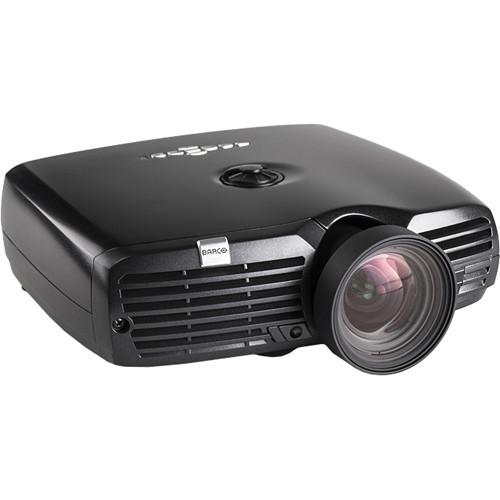 Contents of the user manual for the Barco F-22 1080p Installation Projector
- Product category: Multimedia Projectors Barco
- Brand: Barco
- Description and content of package
- Technical information and basic settings
- Frequently asked questions – FAQ
- Troubleshooting (does not switch on, does not respond, error message, what do I do if...)
- Authorized service for Barco Multimedia Projectors
|
User manual for the Barco F-22 1080p Installation Projector contain basic instructions
that need to be followed during installation and operation.
Before starting your appliance, the user manual should be read through carefully.
Follow all the safety instructions and warnings, and be guided by the given recommendations.
User manual is an integral part of any Barco product,
and if it is sold or transferred, they should be handed over jointly with the product.
Following the instructions for use is an essential prerequisite for protecting
health and property during use, as well as recognition of liability on the part of the manufacturer
for possible defects should you make a warranty claim. Download an official Barco user manual in which you will find instructions on how to install, use, maintain and service your product.
And do not forget – unsuitable use of a Barco product will considerably shorten its lifespan!
|
Product description The white F-22 1080p Multimedia Projector with VizSim Bright Color Wheel and Wide Lens from Barco is a professional installation projector adaptable to a range of use cases, such as flight simulators and theme park rides, museums, visitor attractions, and more. The projector features a brightness of up to 1900 lumens (depending on settings), has a native 1080p (1920 x 1080) resolution and 16:9 aspect ratio format. In addition to its native aspect ratio and resolution, through internal scaling, the F22 can accommodate a wide range of formats, from 480p SD all the way up to WUXGA (1920 x 1200). The F22 features connectivity to accommodate a variety of sources. There are HDMI and DVI inputs for HDTV and digital computer sources. There is a VGA port for analog computer sources or for integration with existing A/V installations. Plus, there are composite, component, and S-video inputs to cover most analog video sources, whether SD or HD. For remote operation, there is an Ethernet port that enables control across a local network, as well as an RS-232 port with loop-through for integration with automation systems such as Crestron. Finally, there is a USB port for direct operation from a computer. - EN17 Wide Angle Lens
- The Wide Angle Lens features a throw ratio of 1.09:1 with 720p, 1.00:1 with SXGA+, 0.92:1 with 1080p, and 0.92:1 with WUXGA. It can be considered a short throw lens - ideal where the projector needs to be placed relatively close to the screen. Throw ratio is one of the most important specifications a projector lens has as it tells you the image size (width) you will get at a given distance from the screen.
- The Right Color Wheel for Your Configuration
- The F22 is available with a range of color wheel options, including High Brightness, Graphics, or VizSim, each with specific characteristics. As the VizSim color wheel focuses on color quality, it lowers color cross-talk and contamination, and reduces artifacting. The Graphics version offers a lower saturation but higher brightness for general AV use, and the High Brightness option provides high-brightness while retaining accurate color reproduction. This particular projector features the VizSim color wheel.
- Simplified Installation and Maintenance
- The F22 can be installed in motion simulators without extra mounting hardware. And, as there's no need to dismount the projector when replacing the lamp, you can simply take off the front panel so that mechanical and optical settings are left untouched.
- Integrated Automation Software
- Thanks to the built-in real time clock and timer, the F22 can be set to perform a specific task - such as automatically starting and switching off, switching between various sources at set intervals. Up to 10 different programs can be stored individually.
- Stereo 3D Support
- The F22 features INFITEC EX 3D support, a stereoscopic 3D technology based on interference filters that sees use in cinema projection and other professional visualization applications.
- Fully Networkable
- Most projector settings and features can be set via the built-in web page, thus allowing for remote asset management.
In the Box Barco F-22 1080p Installation Projector (VizSim Bright/1900 LM/Wide/White) Remote Control with Batteries Limited 3-Year Warranty on Projector Limited 90-Day/500 Hours Warranty on Lamp (Whichever Comes First) Table of Contents
|
Upload User Manual
Have you got an user manual for the Barco F-22 1080p Installation Projector in electronic form? Please send it to us and help us expand our library of instruction manuals.
Thank you, too, on behalf of other users.
To upload the product manual, we first need to check and make sure you are not a robot. After that, your "Submit Link" or "Upload File" will appear.
Technical parametersBarco R9023012 Specs | | | Display System | 1-Chip DLP | | Native Chip Resolution | 1920 x 1080 (Full HD) | | Supported Resolutions | SXGA+ - 1400 x 1050
WUXGA - 1920 x 1200 | | Max Brightness | 1900 Lumens | | Aspect Ratio | Native: 16:10
Supported: 4:3
Supported: 16:9 | | Contrast Ratio | 2500:1 | | Color Wheel | 3-Segment (R, G, B) | | Scan | Horizontal: 15 - 150 Hz
Vertical: 48 - 190 kHz | | Throw Ratio | 0.92:1 | | | | Inputs/Outputs | 1 x DVI-D Video (Input)
1 x HDMI Control (Input)
1 x VGA (DE-15) Video (Input)
1 x HDMI Video (Input)
1 x Component (3RCA) Video (Input)
1 x S-Video (4-Pin DIN) Video (Input)
1 x Composite (BNC) Video (Input)
1 x Ethernet (RJ45) Control (Input/Output)
2 x Unspecified Signal (DE-9) Control (Input/Output)
1 x USB Control (Input/Output)
2 x 1/8" (3.5 mm) Mini Control (Input)
1 x 1/8" (3.5 mm) Mini Control (Input) | | | | Light Source | Lamp (1 x UHP) | | Lamp Power | 220 W | | Expected Lamp Life | Medium Brightness: 2250 Hours
Low Brightness: 3000 Hours | | AC Input Power | 120 to 240 VAC, 50 / 60 Hz | | Heat Dissipation | 1061 BTU | | Temperature | Operating
50 to 104°F (10 to 40°C)
Humidity: 20 - 80%
Storage
-4 to 140°F (-20 to 60°C)
Humidity: 10 - 90% | | Dimensions (W x H x D) | 10.9 x 3.7 x 9.2" / 278.0 x 94.0 x 234.0 mm | | Weight | 6.4 lb / 2.9 kg | Note: Conforms to CE, FCC Class A and cCSAus standards.
Rating90% users recommend this product to others. And what about you?

This product has already been rated by 06 owners. Add your rating and experience with the product.
Discussion
 Ask our technicians if you have a problem with your settings,
or if anything is unclear in the user manual you have downloaded.
You can make use of our moderated discussion.
The discussion is public and helps other users of our website who may be encountering similar problems.
Ask our technicians if you have a problem with your settings,
or if anything is unclear in the user manual you have downloaded.
You can make use of our moderated discussion.
The discussion is public and helps other users of our website who may be encountering similar problems.
The discussion is empty - enter the first post
Post a new topic / query / comment:
|
|
|
| Request for user manual |
You can’t find the operation manual you are looking for? Let us know and we will try to add the missing manual:
I’m looking for a manual / Request for manual
Current requests for instruction manuals:
Call Of Duty World War Two For Xbox...
controller stratus XL...
stratus XL...
smart whatch serie S11 42mm...
Allen & Heath SQ-6 manual...
|
| Discussion |
Latest contributions to the discussion:
AEW R 4100
Name: MAURICIO ANGARITA
Audio-Technica AEW-R4100 UHF Diversity Receiver for
AEW R 4100 has the mute function blocked and does not allow audio to pass. I tried several times to turn off the mute from the transmitter but it does nothing, the mute stays on. Solution?
Thank you...
Instructions for assembling the 2015 Forecast Image Master Consoles GC3-A
Name: mike elam
Forecast Consoles GC3-A ImageMaster Editing Console
Looking for instructions for assembling this console. ...
EMPTY TONER ERROR MESSAGE AFTER REPLACING TONER
Name: LINDA BAD YELLOW EYES
Brother TN223BK Standard-Yield Toner
I HAD TO CHANGE OUT ALL THREE TONERS DUE TO LEAKS IN THE YELLOW AND CYAN. AFTER I REPLACED THEM, THE MACHINE KEEPS GIVING ME AN EMPTY TONER ERROR MESSAGE. HELP!!...
PS480D 20/24 pin Switching 480W Power Supply
Name: swkargo
Logisys 480W Power Supply
This item states in can run -5vdc .It is NOT listed on the board or I beleive is r4 is missing the resitior. Any body have thid issue. Shawn
...
Help needed
Name: Ann Carter
SanDisk 1TB Extreme Portable USB 3.1
When I click the link to download the user manual for my Sandisk Extreme external hard drive, it gives me the manual for the LG Cricket. Can you please change the link so I can download the Sandisk manual and begin using this drive? Thank you....
|
|


