|
User Manual for Behringer S32 Digital Snake I O Box Click to enlarge the picture
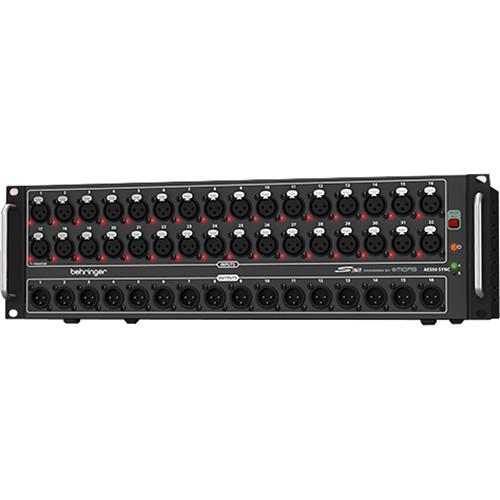 Contents of the user manual for the Behringer S32 Digital Snake I O
- Product category: Digital Mixer Accessories Behringer
- Brand: Behringer
- Description and content of package
- Technical information and basic settings
- Frequently asked questions – FAQ
- Troubleshooting (does not switch on, does not respond, error message, what do I do if...)
- Authorized service for Behringer Digital Mixer Accessories
|
User manual for the Behringer S32 Digital Snake I O contain basic instructions
that need to be followed during installation and operation.
Before starting your appliance, the user manual should be read through carefully.
Follow all the safety instructions and warnings, and be guided by the given recommendations.
User manual is an integral part of any Behringer product,
and if it is sold or transferred, they should be handed over jointly with the product.
Following the instructions for use is an essential prerequisite for protecting
health and property during use, as well as recognition of liability on the part of the manufacturer
for possible defects should you make a warranty claim. Download an official Behringer user manual in which you will find instructions on how to install, use, maintain and service your product.
And do not forget – unsuitable use of a Behringer product will considerably shorten its lifespan!
|
Product description The Behringer S32 Digital Snake I/O Box takes the burden out of connecting your FOH (Front of House) console with the talent monitor. It provides 32 fully programmable, remotely controllable high-end mic preamps, 16 analog, balanced XLR returns at the stage end, and connects to the FOH through a single CAT5 cable without the need for a dedicated router.
This I/O box is designed with multiple scenarios in mind; it works equally well as a stand-alone pair for use with analog mixing consoles, or as part of the trio of a digital mixing solution along with the X32 digital mixer and P16 personal monitoring system. It is a 32-in and 16-out stage box that features AES50 networking with the Klark Teknik SuperMAC technology.
The 32 Midas-designed XLR inputs are fully programmable and remote controllable from the X32 digital mixer. The 16 balanced XLR outputs provide ample sends to the stage for mains and monitoring. The front panel offers indicators for phantom power and AES50 sync. Additionally, a Mute-All-Inputs button quietens all inputs when connecting an input cable.
The dual AES50 jacks allow transmission of all audio and MIDI data to the X32 FOH with a single Ethernet cable, and also allow up to two S32s to be cascaded for maximum channel count. In this scenario, 64 bi-directional audio channels at 24-bit / 48 kHz can be transferred on just one CAT5 line between the FOH console and the stage, including 48 analog inputs from stage, 32 analog outputs on stage, as well as the 16 Ultranet channels, MIDI data, and head amp remote control.
An additional Ultranet output provides 16 channels for use with the P16 Personal Monitoring System through the Ethernet cable, allowing each musician to dial in his or her own custom mix from the stage. A pair of ADAT ports can carry additional sends to the stage beyond the 16 analog outputs, or split the 16 inputs. Lastly, a USB jack allows for future firmware updates. - Massive Connectivity
- When used as part of a complete X32 system, two S32 stage boxes can be cascaded through the built-in AES50 ports, providing connectivity for up to 64 mic / line inputs, 32 balanced outputs, and the Powerplay P16 Personal Monitoring System, which can feed up to 16 individual monitor mixers. It also includes two optical ADAT ports and two AES-3 ports for connecting to outboard devices, MIDI I/O for lighting systems and sound module control, and a convenient USB port for system updates via your PC. The S32 can be cascaded with the S16 or SD16 for full use of the 48-channel bi-directional capacity of the AES50 SuperMAC networking on just one CAT5 line.
- Stand-Alone Snake Mode
- Although it was initially designed for use with the X32 digital console, any mixing board with AES50 networking capability can tap into this powerful feature set. So, if you happen to work on an analog mixing board occasionally, you could use two pairs of S32s and ADA8000s to form a high-performance, lightweight 16 x 16 digital snake, and all on one CAT5 connection, keeping the preamp remote control functionality.
- Seamless Integration with P16 Personal Monitoring System
- The Ultranet port on the S32 lets you connect directly to the optional P16 system, which provides an easy way to give your musicians and vocalists what they really want. The P16-M personal mixers let each performer take control of what they hear, allowing you to concentrate on providing the audience with the best possible listening experience. Fast and easy to set up, a basic system can be installed and configured in a matter of minutes, and the system can be expanded to adapt to changing needs.
- Klark Teknik AES50
- The Klark Teknik SuperMAC (AES50 compliant) technology gives the S32 its high-capacity digital interconnectivity with ultra-low latency operation, superbly simple deployment, and ease of use. The engineers worked hand-in-hand with product developers to ensure that the S32 meets or exceeds the requirements of live performance entertainers and their professional audio engineers. Some of the features are as follows:
- 48 bi-directional audio channels over CAT5 cable (48 kHz)
- 24 bi-directional audio channels over CAT5 cable (96 kHz)
- Single cable duplex interconnection for audio and sample clocks
- Ethernet physical layer audio data transmission
- High channel count and ultra-low deterministic latency
- Accurate phase-aligned clock distribution
- Comprehensive error detection and management
- Provision for redundant networking
- Minimal configuration, total ease of deployment and use
- Ethernet TCP/IP protocol-compatible auxiliary data channel
- Extreme Value
- The S32 is a versatile 32 x 16 digital stage box solution with many unique features. It is built tough to withstand the rigors of the road. It only takes up three rack spaces and connects to FOH with a single CAT5 cable. Now you can have the missing link between the stage and FOH at a fraction of the cost of competing systems.
- Miscellaneous Features
-
- 32 Midas-designed, fully programmable mic preamps for audiophile sound quality
- 16 analog, servo-balanced XLR outputs
- AES50 network ports featuring Klark Teknik’s SuperMAC networking capability for low jitter and latency
- Up to 328’ (100m) networking capability via CAT5e cable (sold separately)
- Dual AES50 ports for cascading units; no merger or router required
- Dual ADAT outputs for use in splitter mode and stand-alone digital multicore applications
- Two AES-3 ports (AES/EBU), e.g. for directly connecting PA system controllers with digital inputs
- Mute-All-Inputs function for quietly patching any inputs on stage
- MIDI in / out for bi-directional communication between FOH console and on-stage MIDI devices
- USB connector for system updates via PC
- Planet Earth switching power supply for maximum flexibility (100 to 240V), noise-free audio, superior transient response, and low power consumption for energy saving
- Built like a tank, yet compact; all-steel 3U rack-mount chassis
- High-quality components and rugged construction ensure long life
UPC: 748252156648 In the Box Behringer S32 Digital Snake I/O Box Limited 10-Year Warranty Table of Contents
|
Upload User Manual
Have you got an user manual for the Behringer S32 Digital Snake I O Box in electronic form? Please send it to us and help us expand our library of instruction manuals.
Thank you, too, on behalf of other users.
To upload the product manual, we first need to check and make sure you are not a robot. After that, your "Submit Link" or "Upload File" will appear.
Technical parametersBehringer S32 Specs | | | Package Weight | 14.6 lb | | Box Dimensions (LxWxH) | 21.0 x 12.0 x 8.5" |
Rating100% users recommend this product to others. And what about you?

This product has already been rated by 27 owners. Add your rating and experience with the product.
Discussion
 Ask our technicians if you have a problem with your settings,
or if anything is unclear in the user manual you have downloaded.
You can make use of our moderated discussion.
The discussion is public and helps other users of our website who may be encountering similar problems.
Ask our technicians if you have a problem with your settings,
or if anything is unclear in the user manual you have downloaded.
You can make use of our moderated discussion.
The discussion is public and helps other users of our website who may be encountering similar problems.
The discussion is empty - enter the first post
Post a new topic / query / comment:
|
|
|
| Request for user manual |
You can’t find the operation manual you are looking for? Let us know and we will try to add the missing manual:
I’m looking for a manual / Request for manual
Current requests for instruction manuals:
Call Of Duty World War Two For Xbox...
controller stratus XL...
stratus XL...
smart whatch serie S11 42mm...
Allen & Heath SQ-6 manual...
|
| Discussion |
Latest contributions to the discussion:
AEW R 4100
Name: MAURICIO ANGARITA
Audio-Technica AEW-R4100 UHF Diversity Receiver for
AEW R 4100 has the mute function blocked and does not allow audio to pass. I tried several times to turn off the mute from the transmitter but it does nothing, the mute stays on. Solution?
Thank you...
Instructions for assembling the 2015 Forecast Image Master Consoles GC3-A
Name: mike elam
Forecast Consoles GC3-A ImageMaster Editing Console
Looking for instructions for assembling this console. ...
EMPTY TONER ERROR MESSAGE AFTER REPLACING TONER
Name: LINDA BAD YELLOW EYES
Brother TN223BK Standard-Yield Toner
I HAD TO CHANGE OUT ALL THREE TONERS DUE TO LEAKS IN THE YELLOW AND CYAN. AFTER I REPLACED THEM, THE MACHINE KEEPS GIVING ME AN EMPTY TONER ERROR MESSAGE. HELP!!...
PS480D 20/24 pin Switching 480W Power Supply
Name: swkargo
Logisys 480W Power Supply
This item states in can run -5vdc .It is NOT listed on the board or I beleive is r4 is missing the resitior. Any body have thid issue. Shawn
...
Help needed
Name: Ann Carter
SanDisk 1TB Extreme Portable USB 3.1
When I click the link to download the user manual for my Sandisk Extreme external hard drive, it gives me the manual for the LG Cricket. Can you please change the link so I can download the Sandisk manual and begin using this drive? Thank you....
|
|


