|
User Manual for BenQ RM7501K 75" Education Interactive Flat Panel Display Click to enlarge the picture
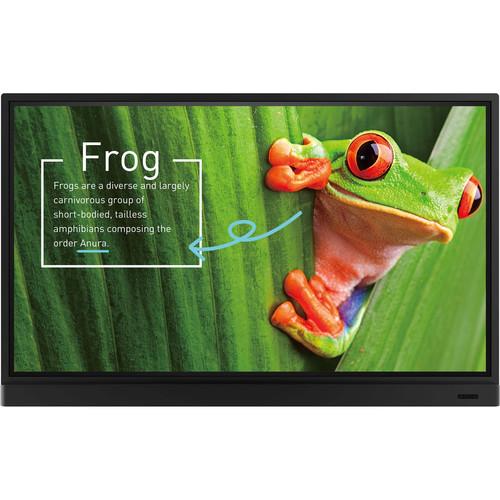 Contents of the user manual for the BenQ RM7501K 75" Education Interactive Flat
- Product category: Commercial Monitors BenQ
- Brand: BenQ
- Description and content of package
- Technical information and basic settings
- Frequently asked questions – FAQ
- Troubleshooting (does not switch on, does not respond, error message, what do I do if...)
- Authorized service for BenQ Commercial Monitors
|
User manual for the BenQ RM7501K 75" Education Interactive Flat contain basic instructions
that need to be followed during installation and operation.
Before starting your appliance, the user manual should be read through carefully.
Follow all the safety instructions and warnings, and be guided by the given recommendations.
User manual is an integral part of any BenQ product,
and if it is sold or transferred, they should be handed over jointly with the product.
Following the instructions for use is an essential prerequisite for protecting
health and property during use, as well as recognition of liability on the part of the manufacturer
for possible defects should you make a warranty claim. Download an official BenQ user manual in which you will find instructions on how to install, use, maintain and service your product.
And do not forget – unsuitable use of a BenQ product will considerably shorten its lifespan!
|
Product description The RM7501K 75" Education Interactive Flat Panel Display from BenQ features a UHD 4K (3840 x 2160 pixels) resolution with 350 cd/m2 brightness for an engaging learning environment. It has an anti-glare glass surface that can effectively reduce reflections, freeing students from excessive squinting with more legible text and clearer images, avoiding eye strain, and facilitating more effective instruction. The display is installed with proficient annotation tools for enhanced class participation. Furthermore, the display features Low Blue Light and Flicker-Free Technologies for a comfortable viewing experience - Ultra-Smooth Handwriting
- The RM7501K offers precise positioning to provide a streamlined and ultra-smooth handwriting experience.
- Dual Pens for Simultaneous Collaboration
- The RM7501K comes with dual pens that allow two users to write or draw with different colors simultaneously, making the display ideal for lively classroom activities. Additionally, teachers can create a more engaging learning experience by using two pens to write and highlight with two different colors, eliminating the need to change colors in a traditional classroom scenario.
- Flexible Display of Brush Mode
- The advanced touchscreen technology displays different stroke thickness based on different types of tools used to write or draw on the screen. The RM7501K is capable of detecting strokes created with fingers, the IFP stylus, watercolor brush, or pencil. This unique feature makes it ideal for drawing or artistic creation in art classes.
- Low Blue Light Technology
- The Low Blue Light technology minimizes blue light exposure and allows for healthier time spent in front of the display, helping you create the best and most comfortable viewing experience for you and your students.
- Flicker-Free Technology
- The Flicker-Free technology is designed to remove LED backlight flickering while providing a zero-flicker viewing experience. This effectively reduces CVS-related eye problems and alleviates discomfort caused by looking at the screen all day.
- Anti-Glare Display
- The anti-glare glass surface can effectively reduce reflections, freeing students from excessive squinting with more legible text and clearer images, avoiding eye strain, and facilitating more effective instruction.
- Intelligent Handwriting Recognition
- The RM7501K's handwriting recognition feature allows presenters to simultaneously convert written text, numbers, forms, and drawings into legible materials without having to switch modes while effectively facilitating smooth teaching flow.
- Floating Tool
- EZWrite 4.1's floating toolbar is compatible with any input source and Android applications. The floating on-screen menu provides immediate access to a range of functions, including screen capture, eraser, pen, and whiteboard, by placing two fingers on the screen.
- Access to Diverse Files on the Fly
- EZWrite 4.1 Lite directly opens a wide range of files and image files for convenient annotations in productive meetings without the need for external PCs.
- Data-to-Go
- Save annotations as .pdf or .png files and share them as review materials through e-mails, QR code, print, USB drive, internal memory.
- Tool Box
- Tool Box offers a wide range of useful teaching tools, including calculator, geometry, and team post.
- Wireless Solution for Seamless Collaboration
- InstaQShare is the software designed for seamless wireless presentation and collaboration during lectures. It allows the smooth streaming of video, audio files, and Full HD quality videos. Users can also mirror content from mobile devices, and invite up to 16 participants for seamless collaboration.
- Front-Facing Speakers and External Microphone Compatibility
- Besides for the built-in 20W speakers, the RM7501K comes with a Mic-In port that allows you to connect external microphones.
- Freeze and Blank Functions
- Blank function darkens the screen so students can remain focused on teachers' instructions. Freeze function pauses the screen so teachers can capture certain segments from videos or highlight on the screen (through the remote control or hotkey)
- Instant Plug and Play
- Simply connect to a PC via USB and you're all set to deliver touch-enhanced lessons.
- Multiple Display Application
- The RM7501K supports dual display application through HDMI output, allowing teachers to share teaching materials to more than one screen and increase the efficiency of teaching and student engagement.
- Multi-Platform Compatibility
- Can work seamlessly with a wide range of computing and mobile devices running most major operating systems, from Windows to Mac, Linux and Chrome, through its plug-and-play feature.
- Recommended Apps through "BenQ Suggest"
- RM7501K incorporates several recommended Android apps into BenQ Suggest, which further expand the IFPs' potential by simplifying app updates and downloading in the future.
- MDA (Multiple Display Administrator)
- MDA (Multiple Display Administrator) allows operators to remotely control display on/off time or backlight via LAN or RS-232.
- DMS 1.0 (Display Management System)
- Android apps can be installed for a selection of displays through BenQ's cloud server.
- OTA (Over-the-Air) Update
- The OTA tool is designed to install the latest firmware onto your displays through the internet without complex physical access.
UPC: 840046039745 In the Box BenQ RM7501K 75" Education Interactive Flat Panel Display Remote Controller 6 x Power Cords (By Region) 4.9' HDMI Cable 4.9' VGA Cable 9.8' USB Cable for Touch 2 x Touch Pen (Stylus) Pen Tray Limited 3-Year Warranty Table of Contents
|
Upload User Manual
Have you got an user manual for the BenQ RM7501K 75" Education Interactive Flat Panel Display in electronic form? Please send it to us and help us expand our library of instruction manuals.
Thank you, too, on behalf of other users.
To upload the product manual, we first need to check and make sure you are not a robot. After that, your "Submit Link" or "Upload File" will appear.
Technical parametersBenQ RM7501K Specs | | | Screen Size | 75" | | Backlight | DLED | | Resolution (Pixel) | UHD 4K 3840 x 2160 pixels | | Brightness | 350 cd/m2 (Typical) | | Dynamic Contrast Ratio | 30,000:1 (Typical) | | Viewing Angle (H/V) | 178/178° | | Response Time | 8 ms | | Color Gamut | 65% | | Panel Bit | 10-bit | | Backlight Life Expectancy | 30,000 hours | | Display Orientation | Landscape | | Glass | Tempered: 4 mm
Type: Anti-glare coating | | | | Touch Technology | IR Touch | | Number of Touch Points | Up to 10 point multi-touch | | Resolution | 32,767 x 32,767 | | Interface | 1 x USB Type-B | | OS Supported | Windows XP/7/8/10/Vista, Linux, Mac, Android, Chrome | | | | Internal Speaker | 2 x 20 W | | Input | 1 x 3.5 mm line input | | Output | 1 x 3.5 mm line output
1 x 3.5 mm microphone output | | | | Input/Output | 1 x VGA input
4 x HDMI 2.0 input (1 MHL)
1 x HDMI output
1 x OPS slot
4 x USB (photo, video; 2 x 2.0, 2 x 3.0) | | Control | 1 x RS-232 input
1 x RJ45 port
USB/OTA Firmware Update | | | | AC Power | 1 x Power (AC) input
1 x Power switch | | Voltage | 100 to 240 VAC, 50/60 Hz | | Power Consumption | 310 W (Typical) | | | | On-Screen Display Languages | English / French / German / Dutch / Polish / Russian / Czech / Danish / Swedish / Italian / Romanian / Finnish / Norwegian / Greek / Hungarian / Spanish / Portuguese / Traditional Chinese / Simplified Chinese / Arabic / Japanese / Thai / Persian / Vietnamese (24 Languages) | | VESA Wall Mounting | 4 holes (600 x 400 mm)
Screw M8 x 20 mm | | Dimensions | 68.4 x 42.7 x 5.4" / 173.7 x 108.5 x 13.7 cm | | Weight | 134 lb / 60.8 kg |
Rating100% users recommend this product to others. And what about you?

This product has already been rated by 04 owners. Add your rating and experience with the product.
Discussion
 Ask our technicians if you have a problem with your settings,
or if anything is unclear in the user manual you have downloaded.
You can make use of our moderated discussion.
The discussion is public and helps other users of our website who may be encountering similar problems.
Ask our technicians if you have a problem with your settings,
or if anything is unclear in the user manual you have downloaded.
You can make use of our moderated discussion.
The discussion is public and helps other users of our website who may be encountering similar problems.
The discussion is empty - enter the first post
Post a new topic / query / comment:
|
|
|
| Request for user manual |
You can’t find the operation manual you are looking for? Let us know and we will try to add the missing manual:
I’m looking for a manual / Request for manual
Current requests for instruction manuals:
Call Of Duty World War Two For Xbox...
controller stratus XL...
stratus XL...
smart whatch serie S11 42mm...
Allen & Heath SQ-6 manual...
|
| Discussion |
Latest contributions to the discussion:
AEW R 4100
Name: MAURICIO ANGARITA
Audio-Technica AEW-R4100 UHF Diversity Receiver for
AEW R 4100 has the mute function blocked and does not allow audio to pass. I tried several times to turn off the mute from the transmitter but it does nothing, the mute stays on. Solution?
Thank you...
Instructions for assembling the 2015 Forecast Image Master Consoles GC3-A
Name: mike elam
Forecast Consoles GC3-A ImageMaster Editing Console
Looking for instructions for assembling this console. ...
EMPTY TONER ERROR MESSAGE AFTER REPLACING TONER
Name: LINDA BAD YELLOW EYES
Brother TN223BK Standard-Yield Toner
I HAD TO CHANGE OUT ALL THREE TONERS DUE TO LEAKS IN THE YELLOW AND CYAN. AFTER I REPLACED THEM, THE MACHINE KEEPS GIVING ME AN EMPTY TONER ERROR MESSAGE. HELP!!...
PS480D 20/24 pin Switching 480W Power Supply
Name: swkargo
Logisys 480W Power Supply
This item states in can run -5vdc .It is NOT listed on the board or I beleive is r4 is missing the resitior. Any body have thid issue. Shawn
...
Help needed
Name: Ann Carter
SanDisk 1TB Extreme Portable USB 3.1
When I click the link to download the user manual for my Sandisk Extreme external hard drive, it gives me the manual for the LG Cricket. Can you please change the link so I can download the Sandisk manual and begin using this drive? Thank you....
|
|


