|
User Manual for Black Box iCOMPEL S Series VESA Wi-Fi Digital Signage Publisher Click to enlarge the picture
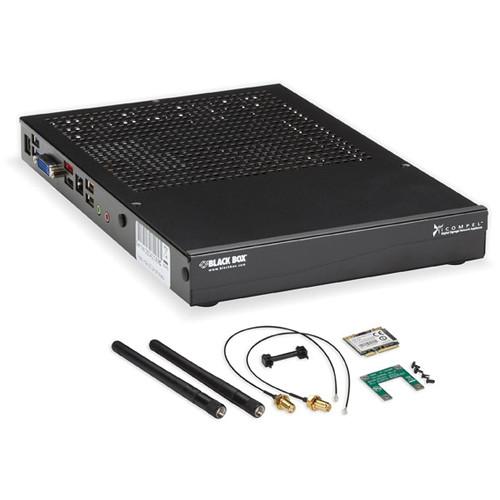 Contents of the user manual for the Black Box iCOMPEL S Series VESA
- Product category: Digital Signage Players Black Box
- Brand: Black Box
- Description and content of package
- Technical information and basic settings
- Frequently asked questions – FAQ
- Troubleshooting (does not switch on, does not respond, error message, what do I do if...)
- Authorized service for Black Box Digital Signage Players
|
User manual for the Black Box iCOMPEL S Series VESA contain basic instructions
that need to be followed during installation and operation.
Before starting your appliance, the user manual should be read through carefully.
Follow all the safety instructions and warnings, and be guided by the given recommendations.
User manual is an integral part of any Black Box product,
and if it is sold or transferred, they should be handed over jointly with the product.
Following the instructions for use is an essential prerequisite for protecting
health and property during use, as well as recognition of liability on the part of the manufacturer
for possible defects should you make a warranty claim. Download an official Black Box user manual in which you will find instructions on how to install, use, maintain and service your product.
And do not forget – unsuitable use of a Black Box product will considerably shorten its lifespan!
|
Product description The Black Box iCOMPEL S Series VESA Wi-Fi Digital Signage Publisher features 40GB of onboard SSD storage and it is designed for a variety of digital signage applications including small business and industrial applications. It's ready-to-go right out-of-the-box with all necessary software already preinstalled. Software updates are free and there's also no annual license fees to worry about - resulting in a lower overall cost of ownership. The iCOMPEL supports Gigabit Ethernet and Wi-Fi network connectivity. The iCOMPEL is designed to integrate seamlessly into your existing digital signage setup, which means you'll experience less IT and security problems. Plus, the publisher supports a wide variety of audio, video, photo, data, animation, and text file formats so you'll be able to easily create an exciting, attention-grabbing audiovisual experience. Network connectivity allows you to easy to integrate the publisher into your existing network so you can manage the device over a Web browser. You'll even be able to send media to colleagues across the planet. Setup is easy and a built-in firewall keeps access limited to authorized users only. Plus, there's no need to install any third-party software or virus protection because the iCOMPEL uses HTTP and HTTPS security protocols. It also supports the LDAP authentication protocol and VPN capabilities for secure remote access. Plus, the iCOMPEL is designed for standard SMB digital signage display. The integrated Intel Celeron G450 2.5 GHz processor works well for displaying optimized Flash content at less than 20 fps and video content at less than 30 fps. Other useful iCOMPEL features include USB 2.0 and 3.0 connectivity, an HDMI output, a DVI-I output, support for up to 15 HTML zones, and support for unlimited text/image zones. You can create multiple screen layouts containing multiple display zones. Plus, every zone can have its own continuous-loop playlist where you can add several additional media files that will run on a preset schedule. You can play different layouts at different times. You can also automatically collect and display text crawl feeds from the Internet. This makes it possible for your layouts to contain up-to-the-minute streaming news, weather reports, stock info, etc.
While this Black Box Publisher can connect directly to a single display, it is also compatible with iCOMPEL subscriber units. One iCOMPEL Publisher can send media over your network to multiple iCOMPEL Subscribers for showcasing your digital signage content, even from remote locations. The iCOMPEL Subscriber connects directly to your monitor, and one unit is required for each monitor in your digital signage network. - An appliance-based solution that sets up fast with all software preinstalled
- Black Box's standard-performing publisher model for playing SMB signage content
- Intel Celeron G540 2.5 GHz CPU optimized for processing Flash content at <20 fps and video content at <30 fps
- Gigabit Ethernet allows easy integration into your digital signage network system with other iCOMPEL appliances
- Free updates and no licensing fees for a lower overall cost of ownership
- Controllable via a standard Web browser connection
- Easy to scale and you can use the standalone with one screen or across a network to show content on multiple screens
- Screen content can be updated locally and you can instantly add text messages or alerts for an audience
- Supports HD digital media and a video output up to 1920 x 1080 Full HD resolution
- Equipped with HDMI and DVI-I video outputs
- Plays up to two simultaneous videos, which is ideal for showing different videos on a screen
- Also supports unlimited zones for text and images as well as up to 15 zones for HTML
- Supports the display of optimized Flash content alongside video, static images, HTML, XML, and RSS Web content
- Easy to change and alter layouts and graphical effects with drag-and-drop tools
- Set up multizone layouts with each zone playing different media from its own playlist
- Simple to stream dynamic RSS feeds from the Internet (supports XML)
- Rotate screen images for either portrait or landscape orientation
- Secure Linux based appliance with built-in firewall
- GPIO external device input capabilities (for motion detectors, sensors, etc.)
- Small form factor with 40GB of onboard SSD digital signage storage and VESA hardware for mounting on back of a compatible display
- Aluminum heat sink and high-capacity heat pipes for rapid heat transfer/dissipation
In the Box Black Box iCOMPEL S Series VESA Wi-Fi Digital Signage Publisher Antennas (with Hardware) Table of Contents
|
Upload User Manual
Have you got an user manual for the Black Box iCOMPEL S Series VESA Wi-Fi Digital Signage Publisher in electronic form? Please send it to us and help us expand our library of instruction manuals.
Thank you, too, on behalf of other users.
To upload the product manual, we first need to check and make sure you are not a robot. After that, your "Submit Link" or "Upload File" will appear.
Technical parametersBlack Box ICSS-VE-PU-W Specs | Processor | Intel Celeron G540 2.5 GHz Processor | | Memory | 4 GB (RAM) | | Storage | 40 GB (SSD) | | Video Output Resolution | Full HD 1920 x 1080p (digital) | | Connectivity | HDMI x 1 (female)
DVI-I x 1 (female)
1/8" (3.5 mm) audio mini-jack x 1 (female)
USB 2.0 (type-A) ports x 2 (female)
USB 3.0 (type-A) sleep-and-charge ports x 2 (female)
Gigabit Ethernet (10/100/1000 Mbps) RJ-45 x 1 (female)
eSATA external storage interface x 1 (female) | | Wireless Connectivity | Yes (Wi-Fi) | | PCI Card Type | Wireless Card (PCI express half mini-card) | | Wi-Fi Protocols | 802.11a/n (11 non-overlapping channels)
802.11b/g/n 11 (1-11) | | Wireless Data Rate | 54 Mbps (802.11a)
11 Mbps (802.11b)
54 Mbps (802.11g)
144.4 Mbps (802.11n / 20 MHz bandwidth)
300 Mbps (802.11n / 400 MHz bandwidth) | | Wireless Range | 802.11a:
Outdoor: 164' (50 m) at 54 Mbps
Outdoor: 984.2' (300 m) at 6 Mbps
Indoor: 98.4' (30 m) at 54 Mbps
Indoor: 328' (100 m) at 6 Mbps
802.11b:
Outdoor: 492.1' (150 m) at 54 Mbps
Outdoor: 984.2' (300 m) at 6 Mbps
Indoor: 98.4' (30 m) at 54 Mbps
Indoor: 328' (100 m) at 6 Mbps
802.11g:
Outdoor: 492.1' (150 m) at 54 Mbps
Outdoor: 984.2' (300 m) at 6 Mbps
Indoor: 98.4' (30 m) at 54 Mbps
Indoor: 328' (100 m) at 6 Mbps
802.11n:
Outdoor: 98.4' (30 m) at 300 Mbps
Outdoor: 98.4' (30 m) at 130 Mbps
Outdoor: 820.2' (250 m) at 6.5 Mbps
Indoor: 65.6' (20 m) at 300 Mbps
Indoor: 65.6' (20 m) at 130 Mbps
Indoor: 328' (100 m) at 6.5 Mbps | | Wireless Security | AES-CCM/TKIP | | Wireless Frequency Range | 2.400 - 2.483 GHz
5.15 - 5.35 GHz
5.47 - 5.725 GHz
5.725 - 5.825 GHz | | Video | SD Video (Encoded up to 10 MB, except where indicated)
MPEG2 (MP at ML, POPAI Standard 59)
MPEG2 (DVB-T)
MPEG4 (OpenDivX, POPAI Standard E7)
MPEG4 (H.264 AVC, POPAI Standard S11)
MPEG4 (DVB-T H.264)
Microsoft MPEG4 (V1, V2, V3)
WMV V9 - VC1 also up to 20 Mbps (POPAI Standard E4)
Apple QuickTime (SMC, RPZA Codecs)
HD Video (up to 1920 x 1080p Resolution)
MPEG2 (MP at HL, POPAI Standards S10, S12, E6)
MPEG2 (DVB-T)
MPEG4 (OpenDivX)
MPEG4 (H.264 AVC, POPAI Standards S12, E8)
MPEG4 (DVB-T H.264)
Microsoft MPEG4 (V1, V2, V3)
WMV 9 VC1 (POPAI Standard E5)
Apple QuickTime (SMC, RPZA Codecs) | | Animation | HTML/JavaScript/SVG (as per WebKit)
Animated GIF (within an HTML file)
Flash (.SWF) v11 | | Data | Microsoft PowerPoint 2010 (save as WMV)
Apple Keynote (save as MOV) | | Still Image | TIFF
JPEG/JPG (POPAI Standard S1)
GIF
BMP
PNG (POPAI Standards E1, E2, E3) | | Audio | WAV
MP3 (POPAI Standard S5)
WMA (V1, V2, V3)
AC3
AAC | | Text | RSS
Formatted text
European languages (and Greek, Russian, Chinese, Japanese, Korean, Arabic in OpenType)
TrueType fonts | | Media Zones Supported | Unlimited text zones (per layout)
Unlimited still image zones (per layout)
Unlimited audio zones (per layout)
Two video zones (per layout)
Transparent zone capable | | Input Voltage | 90 - 250 VAC (50/60 Hz) | | Compliances | FCC (publisher / power supply)
RoHS (publisher / power supply)
WEEE (publisher / power supply)
UL (power supply)
CE (power supply)
CSA (power supply) | | Dimensions (WxHxD) | 11 x 1.1 x 7.3" (280 x 29 x 186 mm) | | Weight | 4 lb (1.8 kg) |
Rating80% users recommend this product to others. And what about you?

This product has already been rated by 82 owners. Add your rating and experience with the product.
Discussion
 Ask our technicians if you have a problem with your settings,
or if anything is unclear in the user manual you have downloaded.
You can make use of our moderated discussion.
The discussion is public and helps other users of our website who may be encountering similar problems.
Ask our technicians if you have a problem with your settings,
or if anything is unclear in the user manual you have downloaded.
You can make use of our moderated discussion.
The discussion is public and helps other users of our website who may be encountering similar problems.
The discussion is empty - enter the first post
Post a new topic / query / comment:
|
|
|
| Request for user manual |
You can’t find the operation manual you are looking for? Let us know and we will try to add the missing manual:
I’m looking for a manual / Request for manual
Current requests for instruction manuals:
Call Of Duty World War Two For Xbox...
controller stratus XL...
stratus XL...
smart whatch serie S11 42mm...
Allen & Heath SQ-6 manual...
|
| Discussion |
Latest contributions to the discussion:
AEW R 4100
Name: MAURICIO ANGARITA
Audio-Technica AEW-R4100 UHF Diversity Receiver for
AEW R 4100 has the mute function blocked and does not allow audio to pass. I tried several times to turn off the mute from the transmitter but it does nothing, the mute stays on. Solution?
Thank you...
Instructions for assembling the 2015 Forecast Image Master Consoles GC3-A
Name: mike elam
Forecast Consoles GC3-A ImageMaster Editing Console
Looking for instructions for assembling this console. ...
EMPTY TONER ERROR MESSAGE AFTER REPLACING TONER
Name: LINDA BAD YELLOW EYES
Brother TN223BK Standard-Yield Toner
I HAD TO CHANGE OUT ALL THREE TONERS DUE TO LEAKS IN THE YELLOW AND CYAN. AFTER I REPLACED THEM, THE MACHINE KEEPS GIVING ME AN EMPTY TONER ERROR MESSAGE. HELP!!...
PS480D 20/24 pin Switching 480W Power Supply
Name: swkargo
Logisys 480W Power Supply
This item states in can run -5vdc .It is NOT listed on the board or I beleive is r4 is missing the resitior. Any body have thid issue. Shawn
...
Help needed
Name: Ann Carter
SanDisk 1TB Extreme Portable USB 3.1
When I click the link to download the user manual for my Sandisk Extreme external hard drive, it gives me the manual for the LG Cricket. Can you please change the link so I can download the Sandisk manual and begin using this drive? Thank you....
|
|


