User Manual for Blackmagic Design DeckLink Mini Monitor Click to enlarge the picture
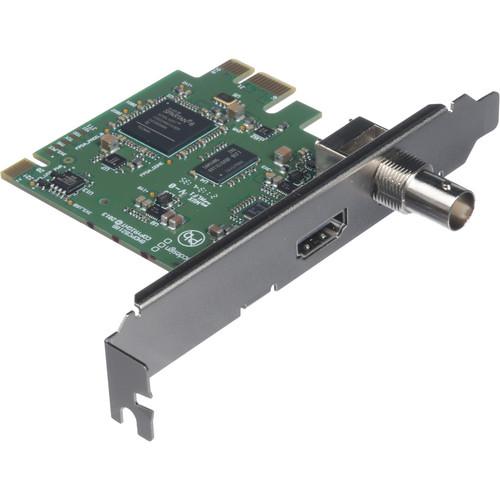 Contents of the user manual for the Blackmagic Design DeckLink Mini Monitor
- Product category: Computer Hardware Blackmagic Design
- Brand: Blackmagic Design
- Description and content of package
- Technical information and basic settings
- Frequently asked questions – FAQ
- Troubleshooting (does not switch on, does not respond, error message, what do I do if...)
- Authorized service for Blackmagic Design Computer Hardware
|
User manual for the Blackmagic Design DeckLink Mini Monitor contain basic instructions
that need to be followed during installation and operation.
Before starting your appliance, the user manual should be read through carefully.
Follow all the safety instructions and warnings, and be guided by the given recommendations.
User manual is an integral part of any Blackmagic Design product,
and if it is sold or transferred, they should be handed over jointly with the product.
Following the instructions for use is an essential prerequisite for protecting
health and property during use, as well as recognition of liability on the part of the manufacturer
for possible defects should you make a warranty claim. Download an official Blackmagic Design user manual in which you will find instructions on how to install, use, maintain and service your product.
And do not forget – unsuitable use of a Blackmagic Design product will considerably shorten its lifespan!
|
Product description Blackmagic Design Announces New Cameras: ATEM 4K and More Read More srqxadfyruvsvbzzesq The Blackmagic Design DeckLink Mini Monitor is a 1-lane PCIe slot playback card with SDI and HDMI outputs, compatible with 1-, 4-, 8-, and 16-lane PCIe slots. In contrast to a full capture and playback input/output card, the DeckLink Mini Monitor provides you with just the playback and monitoring functionality for performing color-correction and delivering client presentations on high-resolution HDMI or SDI monitors. The card supports up to 1080p30 formats and it outputs up to 10-bit uncompressed video.
You can output via both the SDI and HDMI connections simultaneously or just one of them. The outputs are active and begin functioning right away when you plug into them. The card also automatically switches between SD and HD formats, so it'll handle all common video formats. Two PCIe shields are included for both full-height and low-profile PCIe slots. Note: For use on a Mac, a Mac Pro is required with PCI Express slots. - Key Features
-
- Playback and monitoring functionality for color-correction and client presentations on high-resolution monitors
- SDI output, 10-bit SD/HD switchable, supports 8 channels of embedded audio
- HDMI output, supports 8 channels of embedded audio
- Supports up to 1080p30 resolution
- Outputs up to 10-bit uncompressed video
- Support for YUV 4:2:2 sampling and 48 kHz/24-bit audio sampling
- REC 601/709 color space support
- Hardware-based real-time color space conversion
- Software-based down conversion during video playback
- Software-based cross conversion from 720p to 1080 HD on playback
- PCIe Compatibility
- PCIe 1-lane card, compatible with 1-, 4-, 8-, and 16-lane PCIe slots on Mac, Windows, and Linux (for use on a Mac, a Mac Pro is required with PCI Express slots)
- Supported Codecs
- AVC-Intra, AVCHD, Canon XF MPEG2, Digital SLR, DV-NTSC, DV-PAL, DVCPRO50, DVCPROHD, DPX, HDV, XDCAM EX, XDCAM HD, XDCAM HD422, DNxHR, DNxHD, Apple ProRes 4444, Apple ProRes 422 HQ, Apple ProRes 422, Apple ProRes LT, Apple ProRes 422 Proxy, Uncompressed 8-bit 4:2:2, Uncompressed 10-bit 4:2:2
In the Box Blackmagic Design DeckLink Mini Monitor SD Card with Media Express, Disk Speed Test, LiveKey, Blackmagic Desktop Video Utility and Blackmagic driver on Mac and Windows; Media Express, Blackmagic Desktop Video Utility and Blackmagic driver on Linux Full-Height PCIe Shield Low-Profile PCIe Shield Limited 3-Year Warranty User Manual PDF 13.4mb Table of Contents
|
Upload User Manual
Have you got an user manual for the Blackmagic Design DeckLink Mini Monitor in electronic form? Please send it to us and help us expand our library of instruction manuals.
Thank you, too, on behalf of other users.
To upload the product manual, we first need to check and make sure you are not a robot. After that, your "Submit Link" or "Upload File" will appear.
Technical parametersBlackmagic Design BDLKMINIMON Specs | Outputs | 1 x SDI on BNC, 10-bit SD/HD switchable, supports 8-channel audio embedded in SD and HD
1 x HDMI 1.4 type A, supports 8-channel audio embedded in SD and HD | | Computer Interface | 1 x PCI Express 1-lane, compatible with 4-, 8-, and 16-lane PCIe slots | | Supported Codecs | AVC-Intra, AVCHD, Canon XF MPEG2, Digital SLR, DV-NTSC, DV-PAL, DVCPRO50, DVCPROHD, DPX, HDV, XDCAM EX, XDCAM HD, XDCAM HD422, DNxHR, DNxHD, Apple ProRes 4444, Apple ProRes 422 HQ, Apple ProRes 422, Apple ProRes LT, Apple ProRes 422 Proxy, Uncompressed 8-bit 4:2:2, Uncompressed 10-bit 4:2:2. | | Supported Formats | 1080p30, 1080p29.97, 1080p25, 1080p24, 1080p23.98, 1080PsF30, 1080PsF29.97, 1080PsF25, 1080PsF24, 1080PsF23.98, 1080i60, 1080i59.94, 1080i50, 720p60, 720p59.94, 720p50 | | SDI Compliance | SMPTE 259M and 292M | | SDI Metadata Support | RP 188/SMPTE 12M-2 and closed captioning | | Supported Audio Sampling | Television standard sample rate of 48 kHz and 24-bit | | Supported Sampling Rate | YUV 4:2:2 | | Supported Color Space | REC 601, REC 709 | | HDMI Configuration | HDMI automatically configures to connected display | | HDMI Resolution | Pixel for pixel HD resolution output to connected device | | Multiple Rate Support | HDMI and SDI video outputs are switchable between standard definition and high definition | | Color Space Conversion | Hardware-based real time | | HD to SD Down Conversion | Software-based down conversion during video playback | | HD Cross Conversion | Software-based cross conversion from 720p to 1080 HD on playback | | Real Time Effects Processing | DaVinci Resolve, Final Cut Pro X, and Avid Media Composer internal effects; Adobe Premiere Pro CC Mercury Playback Engine effects | | Supported Software | DaVinci Resolve, Fusion, Final Cut Pro X, Adobe Premiere Pro CC, Adobe After Effects CC, Adobe Photoshop CC, Avid Media Composer, Avid Pro Tools, Steinberg Cubase, Steinberg Nuendo, The Foundry Nuke, Grass Valley Edius, Sony Catalyst Production Suite, Tools On Air Just: Play & Live & In, Softron MovieRecorder & MReplay, Adobe Flash Media Live Encoder, Telestream Wirecast, Livestream Producer, Resolume Arena, Magix Vegas Pro & Movie Edit Pro Premium, Corel VideoStudio Pro, CyberLink PowerDirector, Vidblaster X & Studio & Broadcast, Uniplay One & CG, CasparCG Server, Magicsoft CG, Xsplit Broadcaster, Imagine Communications Velocity & InfoCaster, DevTek Easy Media Suite, Metus Ingest, Boinx Software MimoLive, Cinegy Capture Pro, vMix Live, Renewed Vision ProPresenter, Ventuz Director, Class X Liveboard & Coral CG, Glookast Capturer, Open Broadcaster Software Studio, Nautilus NEMO3D | | Operating System Requirements | Mac OS X 10.11, macOS 10.12 Sierra, macOS 10.13 High Sierra or later (*for use on a Mac, a Mac Pro is required with PCI Express slots)
Windows (64-bit) 7, 8.1, and 10
Linux | | Power Consumption | 4 W | | EMC Certifications | FCC, CE, and C-Tick | | Operating Temperature | 32 to 104°F / 5 to 40°C | | Storage Temperature | -4 to 113°F / -20 to 45°C | | Relative Humidity | 0 to 90% non-condensing | | Dimensions | 3.6" deep / 9.2 cm | | Weight | 2 oz / 57 g | | | | Package Weight | 0.35 lb | | Box Dimensions (LxWxH) | 5.4 x 5.4 x 1.2" |
Rating78% users recommend this product to others. And what about you?

This product has already been rated by 44 owners. Add your rating and experience with the product.
Discussion
 Ask our technicians if you have a problem with your settings,
or if anything is unclear in the user manual you have downloaded.
You can make use of our moderated discussion.
The discussion is public and helps other users of our website who may be encountering similar problems.
Ask our technicians if you have a problem with your settings,
or if anything is unclear in the user manual you have downloaded.
You can make use of our moderated discussion.
The discussion is public and helps other users of our website who may be encountering similar problems.
The discussion is empty - enter the first post
Post a new topic / query / comment:
|
|


