User Manual for Blackmagic Design DeckLink Mini Recorder Click to enlarge the picture
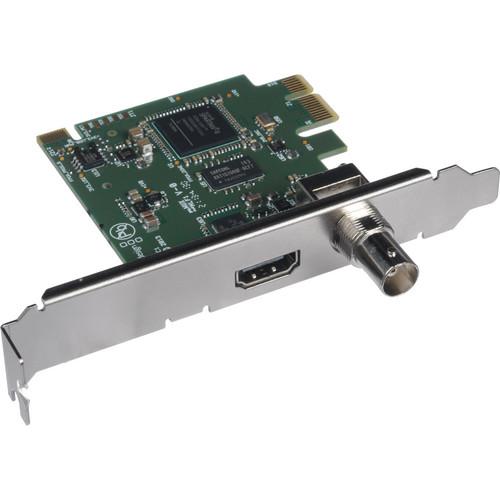 Contents of the user manual for the Blackmagic Design DeckLink Mini Recorder
- Product category: Computer Hardware Blackmagic Design
- Brand: Blackmagic Design
- Description and content of package
- Technical information and basic settings
- Frequently asked questions – FAQ
- Troubleshooting (does not switch on, does not respond, error message, what do I do if...)
- Authorized service for Blackmagic Design Computer Hardware
|
User manual for the Blackmagic Design DeckLink Mini Recorder contain basic instructions
that need to be followed during installation and operation.
Before starting your appliance, the user manual should be read through carefully.
Follow all the safety instructions and warnings, and be guided by the given recommendations.
User manual is an integral part of any Blackmagic Design product,
and if it is sold or transferred, they should be handed over jointly with the product.
Following the instructions for use is an essential prerequisite for protecting
health and property during use, as well as recognition of liability on the part of the manufacturer
for possible defects should you make a warranty claim. Download an official Blackmagic Design user manual in which you will find instructions on how to install, use, maintain and service your product.
And do not forget – unsuitable use of a Blackmagic Design product will considerably shorten its lifespan!
|
Product description Blackmagic Design Announces New Cameras: ATEM 4K and More Read More srqxadfyruvsvbzzesq The Blackmagic Design DeckLink Mini Recorder is a PCIe slot capture card with both SDI and HDMI inputs for capturing uncompressed 10-bit video from a camera directly into your computer. You'll be able to ingest footage as the camera's recording live or from a playback of the camera's recording. The inputs are active, so once you plug a cable into them, they'll begin functioning. This card automatically switches between SD and HD, so it'll be able to handle all common video formats. The point of ingesting through a capture card is to bypass unnecessary compressions and hence data loss. The card performs just one compression, upon delivery to your computer, where your footage gets encoded into an edit-ready codec of your choice. - Inputs
-
- SDI 10-bit SD/HD switchable video with 16 ch HD / 8 ch SD embedded audio
- HDMI type A video with 8 ch audio embedded in SD and HD
- 1-Lane PCI Express Card
- The Mini Monitor is a 1-lane PCI Express card and is compatible with 4, 8 and 16 lane PCI Express slots on Mac OS X, Windows, and Linux. The only Mac capable of accepting the card is a Mac Pro as other Macs can't be opened to enable installation. The card features two PCIe shields for both full height and low profile slots.
- Codecs Supported
- AVC-Intra, AVCHD, Canon XF MPEG2, Digital SLR, DV-NTSC, DV-PAL, DVCPRO50, DVCPROHD, DPX, HDV, XDCAM EX, XDCAM HD, XDCAM HD422, Apple ProRes 4444, Apple ProRes 422 (HQ), Apple ProRes 422, Apple ProRes (LT), Apple ProRes 422 (Proxy), Uncompressed 8-bit 4:2:2, Uncompressed 10-bit 4:2:2
- Internal Software Upgrade
- Firmware built into software driver. Loaded at system start or via updater software.
In the Box Blackmagic Design DeckLink Mini Recorder Software CD Consists of:
Media Express, Disk Speed Test, LiveKey and Blackmagic System Preferences and Driver for Mac
Media Express, Disk Speed Test, LiveKey, Blackmagic Control Panel and Driver for Windows 7 or 8
Media Express, Blackmagic Control Panel and Driver for Linux 3-Year Limited Warranty User Manual PDF 13.4mb Table of Contents
|
Upload User Manual
Have you got an user manual for the Blackmagic Design DeckLink Mini Recorder in electronic form? Please send it to us and help us expand our library of instruction manuals.
Thank you, too, on behalf of other users.
To upload the product manual, we first need to check and make sure you are not a robot. After that, your "Submit Link" or "Upload File" will appear.
Technical parametersBlackmagic Design BDLKMINIREC Specs | Connections | 1x SDI input:
Inputs 10-bit SD/HD switchable video and 16 ch audio embedded in HD and 8 ch in SD
1x HDMI type A input:
Inputs video and 8 ch audio embedded in SD and HD | | Computer Interface | 1x PCI Express 1 lane, compatible with 4, 8 and 16 lane PCIe slots | | Codecs Supported | AVC-Intra, AVCHD, Canon XF MPEG2, Digital SLR, DV-NTSC, DV-PAL, DVCPRO50, DVCPROHD, DPX, HDV, XDCAM EX, XDCAM HD, XDCAM HD422, Apple ProRes 4444, Apple ProRes 422 (HQ), Apple ProRes 422, Apple ProRes (LT), Apple ProRes 422 (Proxy), Uncompressed 8-bit 4:2:2, Uncompressed 10-bit 4:2:2 | | Software Supported | Final Cut Pro X, Adobe Premiere Pro, Avid Media Composer, Adobe After Effects, Nuke - The Foundry, DaVinci Resolve, Avid Pro Tools, Cubase, Autodesk Smoke, Adobe Photoshop, Avid Symphony, Avid News Cutter, Tools On Air just:in, Tools On Air live:cut, Tools On Air just:play, Tools On Air just:live, Softron OnTheAir MovieRecorder, Softron OnTheAir CG, Steinberg Nuendo, Flash Media Encoder, Wirecast, Livestream Procaster, Resolume Avenue 4, Sony Vegas Pro, Corel VideoStudio Pro X4, CyberLink Power Director, MAGIX Video Pro X4, Vidcaster Pro, Vidcaster Studio, Vidcaster Broadcast, Uniplay, Playbox AirBox, CasparCG, Magicsoft CG, Steinberg Nuendo, Flash Media Encoder, Xsplit Broadcaster, Wirecast, Livestream Procaster, Harris Infocaster | | SD Format Support | 625/25 PAL, 525/29.97 NTSC | | HD Format Support | 720p50, 720p59.94, 720p60, 1080PsF23.98, 1080p23.98, 1080PsF24, 1080p24, 1080PsF25, 1080p25, 1080PsF29.97, 1080p29.97, 1080PsF30, 1080p30, 1080i50, 1080i59.94 and 1080i60 | | SDI Compliance | SMPTE 259M and 292M | | SDI Metadata Support | VITC read for 3:2 pulldown removal. VANC capture and playback using up to 3 lines of video in file. HD RP188 and closed captioning. | | Audio Sampling | Television standard sample rate of 48 kHz and 24 bit | | Video Sampling | 4:2:2 | | Color Precision | 10-bit | | Color Space | REC 601, REC 709 | | HDMI Configuration | HDMI automatically configures to connected display | | HDMI Resolution | Pixel for pixel HD resolution input to connected device | | HDMI Color Precision | 10-bit | | Multiple Rate Support | SDI and HDMI are switchable between SD and HD | | Copy Protection | HDMI input is unable to capture from copy protected HDMI sources. Always confirm copyright ownership before capture or distribution of content. | | Colorspace Conversion | Hardware based real time | | HD Up Conversion | Software based up conversion during video playback | | Real Time Effects | Apple Final Cut Pro internal effects
Adobe Premiere Pro Mercury Playback Engine effects
Avid Media Composer 6 internal effects | | Operating System Requirements | Mac OS X 10.10 Yosemite
Mac OS X 10.11 El Capitan or later
Windows 7, 8.1, and 10, all 64-bit
Linux | | Operating Temperature | 32 to 104°F (5 to 40°C) | | Storage Temperature | -4 to 113°F (-20 to 45°C) | | Relative Humidity | 0 to 90% non-condensing | | Dimensions | 3.6" deep (9.2 cm) | | Weight | .17 oz (5 g) | | | | Package Weight | 0.3 lb | | Box Dimensions (LxWxH) | 5.6 x 5.3 x 1.1" |
Rating84% users recommend this product to others. And what about you?

This product has already been rated by 45 owners. Add your rating and experience with the product.
Discussion
 Ask our technicians if you have a problem with your settings,
or if anything is unclear in the user manual you have downloaded.
You can make use of our moderated discussion.
The discussion is public and helps other users of our website who may be encountering similar problems.
Ask our technicians if you have a problem with your settings,
or if anything is unclear in the user manual you have downloaded.
You can make use of our moderated discussion.
The discussion is public and helps other users of our website who may be encountering similar problems.
The discussion is empty - enter the first post
Post a new topic / query / comment:
|
|


