User Manual for Blackmagic Design HyperDeck Studio 12G Click to enlarge the picture
 Contents of the user manual for the Blackmagic Design HyperDeck Studio 12G
- Product category: Recorders & Duplication Blackmagic Design
- Brand: Blackmagic Design
- Description and content of package
- Technical information and basic settings
- Frequently asked questions – FAQ
- Troubleshooting (does not switch on, does not respond, error message, what do I do if...)
- Authorized service for Blackmagic Design Recorders & Duplication
 |
User manual for the Blackmagic Design HyperDeck Studio 12G contain basic instructions
that need to be followed during installation and operation.
Before starting your appliance, the user manual should be read through carefully.
Follow all the safety instructions and warnings, and be guided by the given recommendations.
User manual is an integral part of any Blackmagic Design product,
and if it is sold or transferred, they should be handed over jointly with the product.
Following the instructions for use is an essential prerequisite for protecting
health and property during use, as well as recognition of liability on the part of the manufacturer
for possible defects should you make a warranty claim. Download an official Blackmagic Design user manual in which you will find instructions on how to install, use, maintain and service your product.
And do not forget – unsuitable use of a Blackmagic Design product will considerably shorten its lifespan!
|
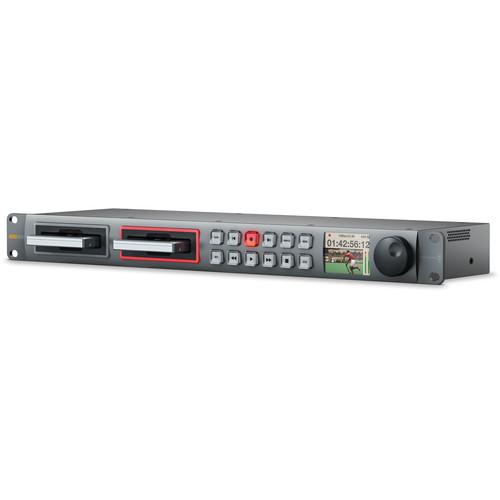
Product description UHD 4K playback and recording at up to 60p is introduced with the Blackmagic Design HyperDeck Studio 12G. This file-based deck provides the familiar jog/shuttle interface of traditional VTRs, but instead of tape use SSD drives for recording media. It records in uncompressed QuickTime, ProRes, or Avid DNxHD formats all with up to 4:2:2 color sampling at 10-bit color space. With two SSD slots, you can record almost endlessly - as one SSD becomes full, recording automatically continues on to the other. The Studio 12G features one 12G-SDI input that is 3G-, HD-, and SD-SDI compatible along with one HDMI 2.0 input. In addition, there are four total SDI outputs and one HDMI 2.0 output for monitoring and connection to other equipment in your studio. All of the SDI connectors plus both of the HDMI ports support UHD 4K (3840 x 2160) at up to 60 fps.
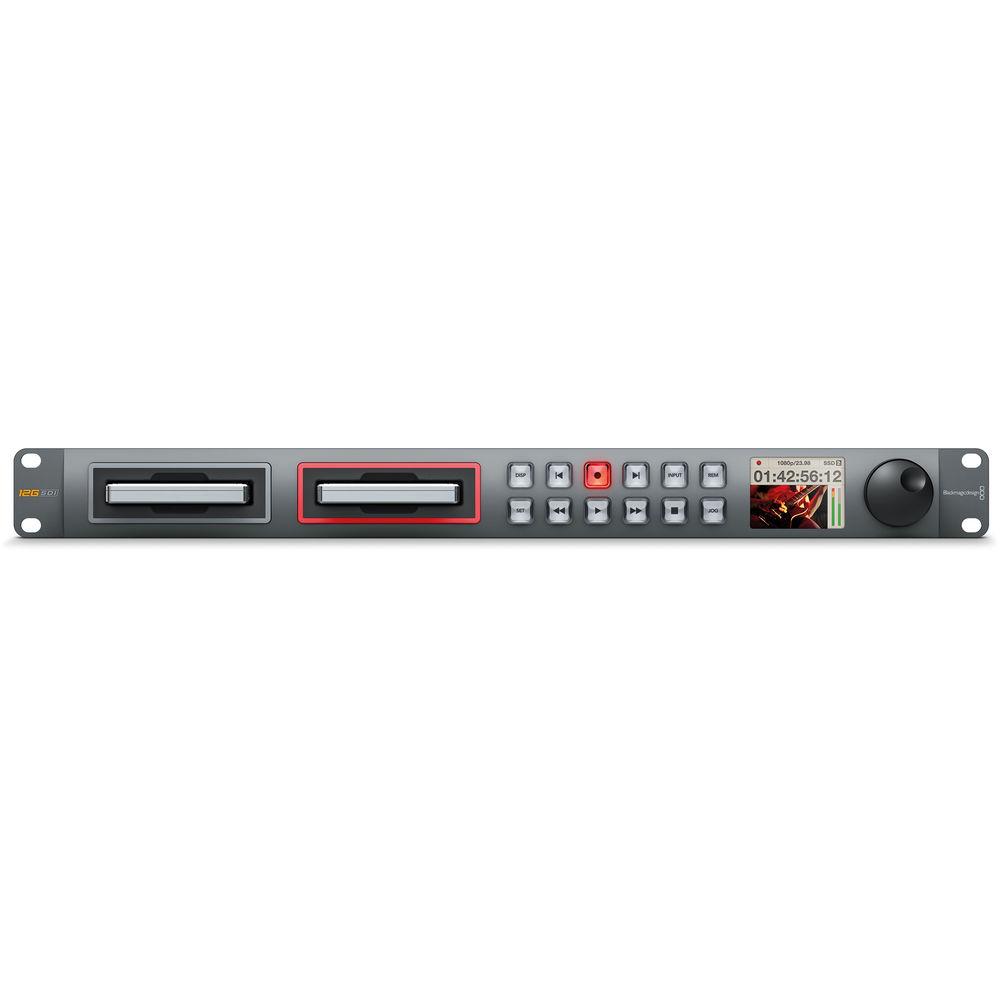
The Studio 12G is housed in a 1RU rackmountable unit, with built-in rackmount ears. It features illuminated front panel button control and a jog/shuttle wheel for analog scrubbing. RS-422 control is supported for external control. You can also control the unit using either the USB port or over Ethernet via the RJ-45 connector. An integrated LCD on the front panel allows you to monitor the video, and display timecode and transport information. - UHD 4K Recording and Playback
- The HypeDeck Studio 12G records video to uncompressed QuickTime at 10-bit with 4:2:2 color sampling at up to UHD 4K (3840 x 2160) at 60 fps. It also records to ProRes 422(HQ), ProRes 422, ProRes 422 (LT), ProRes 422 (Proxy), as well as Avid DNxHD and Avid DNxHD MXF, also all in SD and SD
- Two SSD Bays
- For accepting storage media, the unit incorporates two 2.5" slots with SATA connectors for use with SSD drives. The ability to swap out drives while recording enables almost endlessly durations, seamlessly switching from one SSD to the other as the first one fills up.
- Video Inputs
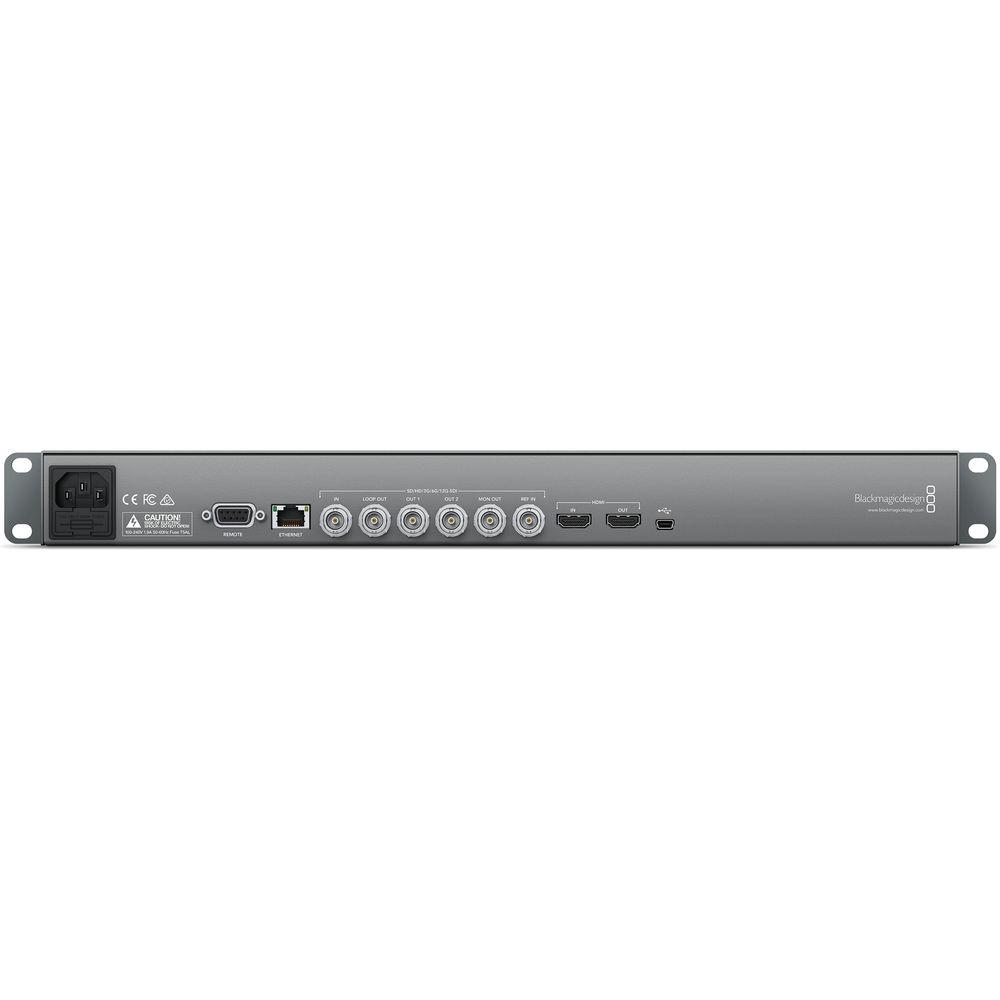
- The HyperDeck Studio 12G supports SD, HD, 3G, 6G, and 12G signals over SDI and up to UHD 4K at 60p via HDMI 2.0.
- Video Outputs
- A total of four SDI outputs are provided: a single loop-out that mirrors the incoming signal, two playback outputs, and a dedicated monitor output. Additionally, there is a single HDMI 2.0 output with UHD 4K at 60p support that can serve as a loop-out, be used for playback, or connected to a local monitor
- VTR Style Controls
- The HyperDeck Studio 12G features VTR style front panel controls for record and playback. With illuminated buttons, for working in dim locations or settings, while a built-in jog/shuttle wheel provides analog style control over your playback.
- Remote
- The unit is controllable via RS-422 control and over the Ethernet or USB port.
- Built-In LCD Monitor
- The unit's front panel also features a built-in LCD screen that allows you to monitor input or playback video as well as timecode, format, and audio levels.
- Included Software
- The HyperDeck Studio 12G includes HyperDeck Utility, Media Express, Disk Speed test, Blackmagic System Preferences, and Blackmagic driver software.
In the Box Blackmagic Design HyperDeck Studio 12G Software CD Limited 1-Year Warranty suxstwtvddwtdqftur Table of Contents
|
Upload User Manual
Have you got an user manual for the Blackmagic Design HyperDeck Studio 12G in electronic form? Please send it to us and help us expand our library of instruction manuals.
Thank you, too, on behalf of other users.
To upload the product manual, we first need to check and make sure you are not a robot. After that, your "Submit Link" or "Upload File" will appear.
Technical parametersBlackmagic Design HYPERD/ST/12G Specs | | | Video Input | 1 x 12G-SDI (SD/HD/3G/6G/12G switchable; supports single link 4:2:2, 10-bit)
1 x HDMI 2.0 (type A connector; supports up to UHD 4K at 60p; 10-bit, 4:2:2) | | Video Output | 2 x 12G-SDI (SD/HD/3G/6G/12G switchable; supports 10-bit)
1 x 12G-SDI loop-through (SD/HD/3G/6G/12G switchable; supports 10-bit)
1 x 12G-SDI monitor output (SD/HD/3G/6G/12G switchable; supports 10-bit)
1 x HDMI 2.0 (type A connector; supports up to UHD 4K at 60p; 10-bit, 4:2:2) | | Audio Input | SDI:
16 channels embedded in SD, HD, and UHD in QuickTime files
2 channels embedded in HD in Avid DNxHD MXF files
HDMI
8 channels embedded in SD, HD, and UHD in QuickTime files
2 channels embedded in HD in Avid DNxHD MXF files | | Audio Output | SDI:
16 channels embedded in SD, HD, and UHD in QuickTime files
2 channels embedded in HD in Avid DNxHD MXF files
HDMI
8 channels embedded in SD, HD, and UHD in QuickTime files
2 channels embedded in HD in Avid DNxHD MXF files | | Sync Input | 1 x Blackburst or tri-level sync (BNC) | | Device Control | 1 x RS-422 deck control port on DB9 female (Sony protocol) | | Ethernet | 1 x RJ-45 for remote operation | | Computer Interface | 1 x mini-USB 2.0 for software updates and HyperDeck Utility software control | | SSD Interface | 2 x 2.5" SATA 6 Gb/s | | | | Supported Resolutions | SD
625/25 PAL and 525/29.97 NTSC
480p60 and 576p50 (via HDMI only)
HD
1280 x 720p: 50, 59.94, 60, 1920 x 1080i: 50, 59.94, 60
1920 x 1080PsF: 23.98, 24
1920 x 1080p: 23.98, 24, 25, 29.97, 30, 50, 59.94, 60
4K
3840 x 2160p: 23.98, 24, 25, 29.97, 30, 50, 59.94, 60 | | SDI Compliance | SMPTE 259M, SMPTE 292M, SMPTE 296M, SMPTE 425M | | SDI Metadata Support | HD RP188 and closed captioning (CEA-708) | | Video Sampling | 4:2:2 | | Color Depth | 10-bit | | Color Space | REC 601, REC 709 | | Audio Sampling | Television standard 24-bit, 48 kHz | | Multiple Rate Support | SDI and HDMI switchable between SD, HD, and Ultra HD
SDI switches between 270 Mb/s standard definition SDI, 1.5G-SDI HD, 3G-SDI, 6G-SDI, and 12G-SDI | | Copy Protection | HDMI input is unable to capture from copy protected HDMI sources | | | | Supported Codecs | Uncompressed QuickTime
Apple ProRes 422 QuickTime
Apple ProRes 422 (LT)
Apple ProRes 422 (Proxy)
Avid DNxHD QuickTime (up to 1080i60)
Avid DNxHD MXF up to (up to 1080i60) | | | | Operating System | OS X 10.9 (Mavericks), 10.10 (Yosemite), or later
Windows: 7 or 8 | | | | Display | Built-in LCD for video, audio, and timecode monitoring and menu settings | | User Interface | 12 buttons and jog wheel for local control | | Rack Height | 1RU | | Power Supply | 1 x built-in international AC power supply with IEC C14 inlet
110 to 240 VAC, 50 to 60 Hz | | Operating Temperature | 41 to 104°F / 5 to 40°C | | Storage Temperature | -4 to 113°F / -20 to 45°C | | Relative Humidity | 0 to 90% non-condensing | | Dimensions | 19 x 1.75 x 6.7" / 48.3 x 4.4 x 17 cm | | Weight | Not specified by manufacturer | | | | Package Weight | 4.35 lb | | Box Dimensions (LxWxH) | 19.1 x 7.5 x 3.4" |
Rating70% users recommend this product to others. And what about you?

This product has already been rated by 94 owners. Add your rating and experience with the product.
Discussion
 Ask our technicians if you have a problem with your settings,
or if anything is unclear in the user manual you have downloaded.
You can make use of our moderated discussion.
The discussion is public and helps other users of our website who may be encountering similar problems.
Ask our technicians if you have a problem with your settings,
or if anything is unclear in the user manual you have downloaded.
You can make use of our moderated discussion.
The discussion is public and helps other users of our website who may be encountering similar problems.
The discussion is empty - enter the first post
Post a new topic / query / comment:
|
|


