User Manual for Blackmagic Design Teranex Mini HDMI to Optical 12G Converter Click to enlarge the picture
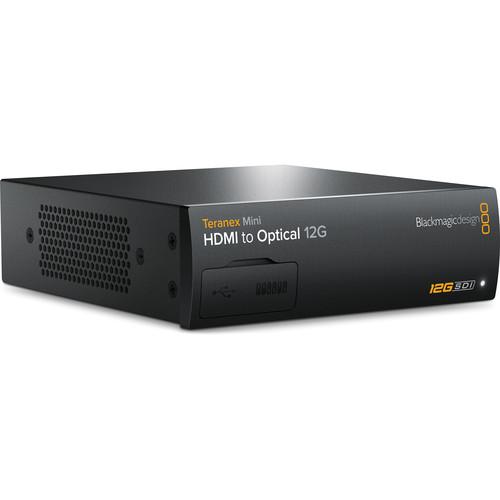 Contents of the user manual for the Blackmagic Design Teranex Mini HDMI to
- Product category: Signal Converters Blackmagic Design
- Brand: Blackmagic Design
- Description and content of package
- Technical information and basic settings
- Frequently asked questions – FAQ
- Troubleshooting (does not switch on, does not respond, error message, what do I do if...)
- Authorized service for Blackmagic Design Signal Converters
|
User manual for the Blackmagic Design Teranex Mini HDMI to contain basic instructions
that need to be followed during installation and operation.
Before starting your appliance, the user manual should be read through carefully.
Follow all the safety instructions and warnings, and be guided by the given recommendations.
User manual is an integral part of any Blackmagic Design product,
and if it is sold or transferred, they should be handed over jointly with the product.
Following the instructions for use is an essential prerequisite for protecting
health and property during use, as well as recognition of liability on the part of the manufacturer
for possible defects should you make a warranty claim. Download an official Blackmagic Design user manual in which you will find instructions on how to install, use, maintain and service your product.
And do not forget – unsuitable use of a Blackmagic Design product will considerably shorten its lifespan!
|
Product description The Teranex Mini HDMI to Optical 12G Converter from Blackmagic Design allows you to convert an HDMI signal to a 12G-SDI output, or install an optional optical fiber module and convert an HDMI signal to fiber. In either case, the output will automatically match the HDMI input resolution. Up to DCI 4K (4096 x 2160) 60p resolution is supported on both input and output.
An optical fiber module is not included but is supported on the rear. 3G and 6G modules are currently available (model #s ADPT-3GBI/OPT and ADPT-6GBI/OPT), and 12G modules are in the works.
The Teranex Mini HDMI to Optical 12G Converter also features full-size XLR inputs that are switchable between balanced analog and AES/EBU digital audio, and which allow you to connect separate audio. The converter also has an Ethernet port that allows you to manage the converter remotely from a Mac or Windows computer using the included Converter Utility software. This capability is especially useful when you're in a larger facility using numerous converters.
The Ethernet port can alternatively be used for Power-over-Ethernet (PoE). If you don't want to use PoE, you won't have to deal with cumbersome power supplies, as the Teranex Mini features a built-in 90-240V power supply, and all you'll need is a standard IEC power cable, sold separately.
The Teranex Mini can be used rack-mounted, concealed in cable ducts, or desktop-mounted. Its compact size makes it useful for portable racks at live events or in broadcast trucks. Up to three units can easily be installed in an optional 1 RU 19" rack tray.
The standard front panel can be replaced with an optional Smart Panel that offers a spin knob, color LCD, and six control buttons, including a menu button. The substantially large LCD will show you the video conversion in progress and will also let you monitor audio levels and verify timecode. The standard front panel simply comes off and the Smart Panel easily attaches in its place. When you're using the standard front panel, you'll have access to an array of mini switches that will let you change settings instantly in correspondence with a diagram printed on the converter. If you swap in the optional Smart Panel, you'll instead be able to use simple on-screen menus while seeing exactly what you're converting.
The Teranex Mini is designed with intelligent heat dissipation that prevents overheating. What makes this feature so effective is a smart thermal design with crossflow cooling that achieves the optimal heat dissipation even when you have units rack-mounted side-by-side one another. An intelligent thermal subsystem and internal heat pipe assist with cooling and keep the air flowing at all times while minimizing noise. Moreover, if the Teranex Mini gets too hot, you'll instantly receive a notification through the remote control Ethernet utility and on the front panel. When multiple units are rack-mounted side by side, each Teranex Mini works together to pull air through the rack, keeping all units cool and providing redundancy for each one. - Key Features
-
- Convert an HDMI signal to a 12G-SDI output
- Convert HDMI to optical fiber via optional fiber module
- Supports up to DCI 4K (4096 x 2160) 60p signals on input and output
- Full-size XLR inputs switchable between balanced analog and AES/EBU audio
- Ethernet port supporting PoE or remote control via included Mac/Windows software
- Built-in 90-240V power supply (optional standard IEC power cable required)
- Can be installed in 19" racks (up to 3 units side-by-side), cable ducts, or desktop-mounted
- Front panel is replaceable with an optional LCD Smart Panel
- Intelligent thermal heat dissipation
- Full SDI re-clocking and low jitter
In the Box Blackmagic Design Teranex Mini HDMI to Optical 12G Converter (Optical Fiber Module Not Included) Software SD Card Limited 3-Year Warranty Table of Contents
|
Upload User Manual
Have you got an user manual for the Blackmagic Design Teranex Mini HDMI to Optical 12G Converter in electronic form? Please send it to us and help us expand our library of instruction manuals.
Thank you, too, on behalf of other users.
To upload the product manual, we first need to check and make sure you are not a robot. After that, your "Submit Link" or "Upload File" will appear.
Technical parametersBlackmagic Design CONVNTRM/MB/HOPT Specs | Optical Fiber Support | Supports optional optical fiber module | | HDMI Input | 1x HDMI 2.0 type A | | SDI Video Output | 1x 12G-SDI on BNC, automatically matches the HDMI video input resolution | | Analog Audio Input | 2 channels professional balanced analog audio via XLR connectors
Right XLR can be configured for timecode input | | AES/EBU Audio Input | 4 channels professional 110 ohm balanced digital audio via XLR connectors
Right XLR can be configured for timecode input | | Multi Rate Support | Automatic switching between SD, HD, 2K, and 4K | | Updates and Configuration | USB or Ethernet | | Re-Clocking | Yes | | SD Format Support | 525/29.97 NTSC, 625/25 PAL | | HD Format Support | 1280 x 720p50, 1280 x 720p59.94, 1280 x 720p60, 1920 x 1080i50, 1920 x 1080i59.94, 1920 x 1080i60, 1920 x 1080p23.98, 1920 x 1080p24, 1920 x 1080p25, 1920 x 1080p29.97, 1920 x 1080p30, 1920 x 1080p50, 1920 x 1080p59.94, 1920 x 1080p60 | | 2K Format Support | 2048 x 1080PsF23.98, 2048 x 1080PsF24, 2048 x 1080PsF25, 2048 x 1080p23.98, 2048 x 1080p24, 2048 x 1080p25 | | 4K Format Support | 3840 x 2160p23.98, 3840 x 2160p24, 3840 x 2160p25, 3840 x 2160p29.97, 3840 x 2160p30, 3840 x 2160p50, 3840 x 2160p59.94, 3840 x 2160p60, 4096 x 2160p23.98, 4096 x 2160p24, 4096 x 2160p25, 4096 x 2160p29.97, 4096 x 2160p30, 4096 x 2160p50, 4096 x 2160p59.94, 4096 x 2160p60 | | SDI Compliance | SMPTE 292M, SMPTE 259M, SMPTE 296M, SMPTE 372M, SMPTE 424M-B, SMPTE 425M, SMPTE 297M for Optical Fiber SDI | | SDI Video Rates | SDI video connections are auto switching between SD-SDI, HD-SDI, high definition level B 3G-SDI, 6G-SDI, and 12G-SDI | | SDI Video Sampling | 4:2:2 and 4:4:4 | | SDI Audio Sampling | Television standard sample rate of 48 kHz and 24-bit | | SDI Color Precision | YUV 4:2:2 and RGB 4:4:4 in HD, 2K, and 4K | | SDI Color Space | REC 601, REC 709 | | HDMI Format Support | 525/29.97 NTSC, 625/25 PAL, 1280 x 720p50, 1280 x 720p59.94, 1280 x 720p60, 1920 x 1080i50, 1920 x 1080i59.94, 1920 x 1080i60, 1920 x 1080p23.98, 1920 x 1080p24, 1920 x 1080p25, 1920 x 1080p29.97, 1920 x 1080p30, 1920 x 1080p50, 1920 x 1080p59.94, 1920 x 1080p60, 2048 x 1080p23.98, 2048 x 1080p24, 2048 x 1080p25, 3840 x 2160p23.98, 3840 x 2160p24, 3840 x 2160p25, 3840 x 2160p29.97, 3840 x 2160p30, 3840 x 2160p50, 3840 x 2160p59.94, 3840 x 2160p60, 4096 x 2160p23.98, 4096 x 2160p24, 4096 x 2160p25, 4096 x 2160p29.97, 4096 x 2160p30, 4096 x 2160p50, 4096 x 2160p59.94, 4096 x 2160p60 | | HDMI Color Space | REC 601, REC 709 | | HDMI Color Precision | YUV 4:2:2 and RGB 4:4:4 in HD, 2K, and 4K | | Software Control | Mac OS X and Windows software upgrade via USB and Ethernet | | Internal Software Upgrade | Via included updater application | | Basic Settings Control | Mini Switches, USB, and Ethernet via free software utility | | Power Supply | 1x built-in international AC power supply with IEC C14 inlet
IEC power cable required (not included)
90 - 240 VAC input | | Power Over Ethernet | Can be powered via 48 VDC using PoE (Power-over-Ethernet) | | Power Consumption | 15 W | | Operational Voltage Range | 90 - 240 VAC | | Operating Temperature | 32 to 104°F (0 to 40°C) | | Storage Temperature | -4 to 140°F (-20 to 60°C) | | Relative Humidity | 0 to 90% non-condensing | | Dimensions | W x H x D: 5.5 x 1.8 x 6.7" (14 x 4.6 x 17 cm) (with SDI port included) | | Weight | 1.3 lb (0.6 kg) | | | | Package Weight | 1.9 lb | | Box Dimensions (LxWxH) | 9.0 x 7.8 x 2.2" |
Rating70% users recommend this product to others. And what about you?

This product has already been rated by 21 owners. Add your rating and experience with the product.
Discussion
 Ask our technicians if you have a problem with your settings,
or if anything is unclear in the user manual you have downloaded.
You can make use of our moderated discussion.
The discussion is public and helps other users of our website who may be encountering similar problems.
Ask our technicians if you have a problem with your settings,
or if anything is unclear in the user manual you have downloaded.
You can make use of our moderated discussion.
The discussion is public and helps other users of our website who may be encountering similar problems.
The discussion is empty - enter the first post
Post a new topic / query / comment:
|
|


