User Manual for Blue Cat Audio Energy Pack Plug-In Bundle Click to enlarge the picture
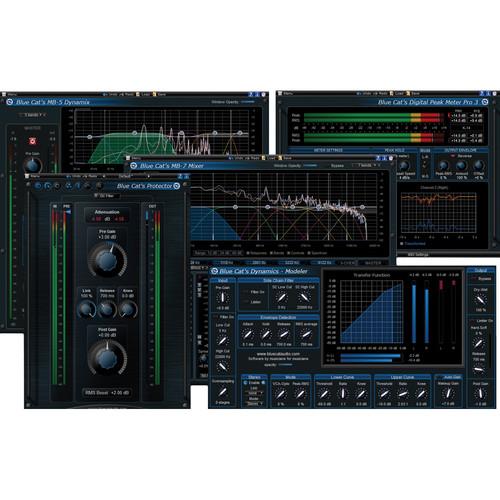 Contents of the user manual for the Blue Cat Audio Energy Pack Plug-In
- Product category: Virtual Processor Plug-Ins Blue Cat Audio
- Brand: Blue Cat Audio
- Description and content of package
- Technical information and basic settings
- Frequently asked questions – FAQ
- Troubleshooting (does not switch on, does not respond, error message, what do I do if...)
- Authorized service for Blue Cat Audio Virtual Processor Plug-Ins
|
User manual for the Blue Cat Audio Energy Pack Plug-In contain basic instructions
that need to be followed during installation and operation.
Before starting your appliance, the user manual should be read through carefully.
Follow all the safety instructions and warnings, and be guided by the given recommendations.
User manual is an integral part of any Blue Cat Audio product,
and if it is sold or transferred, they should be handed over jointly with the product.
Following the instructions for use is an essential prerequisite for protecting
health and property during use, as well as recognition of liability on the part of the manufacturer
for possible defects should you make a warranty claim. Download an official Blue Cat Audio user manual in which you will find instructions on how to install, use, maintain and service your product.
And do not forget – unsuitable use of a Blue Cat Audio product will considerably shorten its lifespan!
|
Product description Assembled to provide you with tools for controlling the dynamics and energy of your audio tracks, the Energy Pack Plug-In Bundle from Blue Cat Audio includes their DP Meter Pro audio meter and side-chaining tool, their Dynamics plug-in, their MB-5 Dynamix multiband dynamics processor, their MB-7 multiband mixer, and the Protector brickwall limiter. They support VST, AU, RTAS, AAX, and DirectX formats on Mac and Windows. - DP Meter Pro Audio Meter and Side-Chaining Plug-In Giving you access you multiple metering options including a wide range of customization, the DP Meter Pro Audio Meter and Side-Chaining Plug-In from Blue Cat Audio features peak, RMS, and crest factor meters in addition to side-chaining control capabilities via MIDI and automation outputs. 5 different metering scales, including Bob Katz's K-System are included by default, with support for creation of your own scales. Your track's statistics are visualized in colored displays with histograms to track its progress over time.
The DP Meter Pro is compatible with mono, stereo, and surround tracks, and features a mid/side switch to check mono and stereo field compatibility. All envelopes can be reused for monitoring or side-chaining applications, recorded as automation curves, or sent as MIDI CC messages. - Multichannel peak, RMS & crest factor meter
- True dynamic range measurement with levels histograms
- Instant, average and maximum audio levels
- Modular user interface to fit into your workflow, with multiple screen sizes
- Total control over the metering characteristics, including attack/release shape
- Bob Katz's K-System scales support (K-12 / K-14 / K-20 and custom)
- Mono, stereo, mid-side or surround analysis
- Record measurements (peak, RMS, crest factor, clip etc.) as automation curves
- Control in real time any MIDI-compatible plug-in or external MIDI device with the generated envelopes thanks to the plug-in's MIDI CC output
- Manage the shape of the output envelope: record reversed envelope, change amount of signal, and offset the generated envelope. This lets you use the plug-in for side-chain ducking, compression, and much more
- 'Stereoness' and phase cancelation measurement.
- Native DSP code for optimal performance
- Full MIDI control and automation support with silent, zipper-free parameters update, advanced response control and MIDI Learn
- No CPU load on idle: when the plug-in is fed with silence, the processing smoothly shuts down, to optimize the CPU usage of your Digital Audio Workstation
- Skinnable and customizable user interface with transparency management
- Automation and MIDI output: record output parameters as automation curves or send MIDI CC messages to other plug-ins for powerful side chain effects
- Smooth Bypass: activate/deactivate the plug-in with absolutely no noise
- Full featured integrated presets manager
- Copy/paste the plug-in's state between instances using the system clipboard
- Any sample rate supported
- Dynamics All-In-One Dynamics Processing Plug-In Providing multiple dynamics processing options in a single plug-in, the Dynamics All-In-One Dynamics Processing Plug-In from Blue Cat Audio can function as a compressor, limiter, gate, expander, and waveshaper. It features a dual-threshold system that allows for intricate dynamic response control, along with a wet/dry knob that allows for parallel processing without the need for creating auxiliary tracks.
Further control is provided via an input filter as well as a side-chain input for triggered compression or gating, while the selectable VCA/Opto and peak/RMS controls allow you to dictate how the compression will react to your source audio. Additionally, mid/side processing and multiple stereo linking options help you customize the control of stereo material. The plug-in is Mac and Windows compatible and requires VST, AU, RTAS, AAX, or DirectX compatible host software. - Full featured dynamics processor: compressor, gate, limiter, expander, and waveshaper
- Total control over the processor: continuous peak/RMS and Opto/VCA modes selection
- Total control over the signal: dry/wet control for parallel compression, input, and side chain filters
- Stereo or mid-side processing with multiple channels linking options
- Post brickwall limiter or waveshaper
- Optimal monitoring: dynamics response and input/output envelopes real time display with zooming capability, the main compression information can be recorded as automation curves
- Side chaining made easy: perform side chain compression, ducking, gating and much more
- Multiple skins included for customizable user experience.
- Plug-in window transparency management
- Full MIDI control and automation support with silent, zipper-free parameters update, advanced response control and MIDI Learn
- No CPU load on idle: when the plug-in is fed with silence, the processing smoothly shuts down, to optimize the CPU usage of your Digital Audio Workstation
- Automation and MIDI output: record output parameters as automation curves or send MIDI CC messages to other plug-ins for powerful side chain effects
- Smooth Bypass: activate/deactivate the plug-in with absolutely no noise
- Import/Export presets in a host independent format
- Any sample rate supported
- MB-5 Dynamix Multiband Dynamic Processing Plug-In Giving you access to multiband compression, limiting, gating, and expansion in addition to a waveshaper, the MB-5 Dynamix Multiband Dynamic Processing Plug-In from Blue Cat Audio allows you to use those modules independently or combined, splitting them up between frequency bands if desired. Additionally, internal side-chaining abilities allow you to use parameters from one effect to control parameters of another. For final dynamics control, there is an output brickwall limiter and clipper available.
Visual feedback is provided via input and output level meters for each channel, as well as through a spectral meter. The plug-in also has MIDI and automation output capabilities allowing it to control parameters of other plug-ins. It supports VST, AU, RTAS, AAX, and DirectX formats on Mac and Windows. - Multiband dynamics processor: compressor, gate, limiter, expander, waveshaper
- Up to 5 bands, with crossover filters from 6 to 60 dB/octave for optimal separation
- Unique envelope routing capability for cross-band dynamics effects (one band may trigger another)
- Dry/wet control for parallel processing
- Stereo or mid-side processing with multiple channels linking options
- Post brickwall limiter or waveshaper
- Complete Visual feedback with real time response curves and levels display
- Easy copy/paste settings between bands
- Side chaining made easy: a unique way to perform multi-band side chain compression, ducking, gating and much more
- Plug-in window transparency management
- Native DSP code for optimal performance
- Full MIDI control and automation support with silent, zipper-free parameters update, advanced response control and MIDI Learn
- No CPU load on idle: when the plug-in is fed with silence, the processing smoothly shuts down, to optimize the CPU usage of your Digital Audio Workstation
- Skinnable and customizable user interface with transparency management
- Automation and MIDI output: record output parameters as automation curves or send MIDI CC messages to other plug-ins for powerful side chain effects
- Smooth Bypass: activate/deactivate the plug-in with absolutely no noise
- Import/Export presets in a host independent format
- Any sample rate supported
- MB-7 Mixer Multiband Mixing Console and VST/AU Host Plug-In Giving you the ability to split up a track into multiple frequency bands, and then load up to 4 VST or AU plug-ins on each for frequency-specific processing, the MB-7 Mixer Multiband Mixing Console and VST/AU Host Plug-In from Blue Cat Audio features a fader with bypass, mute, or solo functions for each band. When on a stereo track, you also have access to the stereo width and position in the stereo field.
The VST or AU plug-ins can be loaded pre or post fader with latency compensation, and can be individually bypassed for comparison listening. It also features MIDI and automation input capabilities, and can be used for side-chaining features as well. It supports VST, AU, RTAS, AAX, and DirectX host software on Mac and Windows. - Multiband mixing console: adjust the levels, panning and "stereoness" of each band separately
- Multiband VST and Audio Unit Host: insert third party VST and AU plug-ins and process each band independently
- Pre and post fader VST/AU plug-in inserts, with full latency compensation
- Up to 7 bands, with crossover filters from 6 to 96 dB/Oct for optimal separation
- Multiple instances linking: group bands within a single instance or between multiple instances of the plug-in. Modify the spectrum on multiple tracks with a single slider
- Bypass, mute, solo on every band
- Mono switch on master for mono compatibility check
- Dual Mode: independent left and right or mid and side channels control
- Complete visual feedback with real time response curves, spectrogram, and levels display for each band
- Side chaining made easy: a unique way to perform multi-band side chain compression, ducking, gating and much more
- Fully customizable modular user interface, with multiple sizes
- Native DSP code for optimal performance
- Full MIDI control and automation support with silent, zipper-free parameters update, advanced response control and MIDI Learn
- No CPU load on idle: when the plug-in is fed with silence, the processing smoothly shuts down, to optimize the CPU usage of your Digital Audio Workstation
- Skinnable and customizable user interface with transparency management
- Automation and MIDI output: record output parameters as automation curves or send MIDI CC messages to other plug-ins for powerful side chain effects
- Smooth Bypass: activate/deactivate the plug-in with absolutely no noise
- Full featured integrated presets manager
- Copy/paste the plug-in's state between instances using the system clipboard
- Any sample rate supported
- Protector Brickwall Limiter Plug-In Designed to sit on your master bus of your DAW to protect against the occasional level clip, the Protector Brickwall Limiter Plug-In from Blue Cat Audio is capable of limiting your general volume while increasing the perceived loudness of your track thanks to its transparent frequency response. While it is intended for straightforward operation, it is also capable of a range of sounds including creative applications such as distortion, track pumping, or heavy limiting.
The Protector's interface provides feedback via colored meters with dynamic histograms. A side-chain input allows you to tweak the plug-in's performance while its MIDI CC output lets you use the Protector to control other effect parameters. It supports VST, AU, RTAS, AAX, and DirectX formats on Mac and Windows. - 0 dB brickwall peak limiter and waveshaper
- Continuous control of the dynamics response from transparent limiting to colorful distortion
- DC Filter to get rid of DC offset
- Large zoomable peak and RMS audio levels and gain reduction meters for optimal monitoring
- Loudness boost monitoring
- Fully configurable dynamics response histogram
- Native DSP code for optimal performance
- Full MIDI control and automation support with silent, zipper-free parameters update, advanced response control and MIDI Learn
- No CPU load on idle: when the plug-in is fed with silence, the processing smoothly shuts down, to optimize the CPU usage of your Digital Audio Workstation
- Skinnable and customizable user interface with transparency management
- Automation and MIDI output: record output parameters as automation curves or send MIDI CC messages to other plug-ins for powerful side chain effects
- Smooth Bypass: activate/deactivate the plug-in with absolutely no noise
- Full featured integrated presets manager
- Copy/paste the plug-in's state between instances using the system clipboard
- Any sample rate supported
In the Box Bundle Items DP Meter Pro Audio Meter and Side-Chaining Plug-In rvqrdqzy Dynamics All-In-One Dynamics Processing Plug-In MB-5 Dynamix Multiband Dynamic Processing Plug-In MB-7 Mixer Multiband Mixing Console and VST/AU Host Plug-In Protector Brickwall Limiter Plug-In Table of Contents
|
Upload User Manual
Have you got an user manual for the Blue Cat Audio Energy Pack Plug-In Bundle in electronic form? Please send it to us and help us expand our library of instruction manuals.
Thank you, too, on behalf of other users.
To upload the product manual, we first need to check and make sure you are not a robot. After that, your "Submit Link" or "Upload File" will appear.
Technical parameters - DP Meter Pro Audio Meter and Side-Chaining Plug-In
| System Requirements | Windows:
Processor: SSE2-enabled (Pentium 4 or later)
OS: XP, Vista, 7, 8
Host Software: Any DirectX, VST, RTAS, or AAX compatible host software, 32 or 64-bit
Mac:
Processor: Intel
OS: 10.5 to 10.9
Host Software: Any VST, AU (32 or 64-bit), RTAS, or AAX compatible host software | - Dynamics All-In-One Dynamics Processing Plug-In
| System Requirements | Windows:
Processor: SSE2-enabled (Pentium 4 or later)
OS: XP, Vista, 7, 8
Host Software: Any DirectX, VST, RTAS, or AAX compatible host software, 32 or 64-bit
Mac:
Processor: Intel
OS: 10.5 to 10.9
Host Software: Any VST, AU (32 or 64-bit), RTAS, or AAX compatible host software | - MB-5 Dynamix Multiband Dynamic Processing Plug-In
| System Requirements | Windows:
Processor: SSE2-enabled (Pentium 4 or later)
OS: XP, Vista, 7, 8
Host Software: Any DirectX, VST, RTAS, or AAX compatible host software, 32 or 64-bit
Mac:
Processor: Intel
OS: 10.5 to 10.9
Host Software: Any VST, AU (32 or 64-bit), RTAS, or AAX compatible host software | - MB-7 Mixer Multiband Mixing Console and VST/AU Host Plug-In
| System Requirements | Windows:
Processor: SSE2-enabled (Pentium 4 or later)
OS: XP, Vista, 7, 8
Host Software: Any DirectX, VST, RTAS, or AAX compatible host software, 32 or 64-bit
Mac:
Processor: Intel
OS: 10.5 to 10.9
Host Software: Any VST, AU (32 or 64-bit), RTAS, or AAX compatible host software | - Protector Brickwall Limiter Plug-In
| System Requirements | Windows:
Processor: SSE2-enabled (Pentium 4 or later)
OS: XP, Vista, 7, 8
Host Software: Any DirectX, VST, RTAS, or AAX compatible host software, 32 or 64-bit
Mac:
Processor: Intel
OS: 10.5 to 10.9
Host Software: Any VST, AU (32 or 64-bit), RTAS, or AAX compatible host software |
Rating100% users recommend this product to others. And what about you?

This product has already been rated by 25 owners. Add your rating and experience with the product.
Discussion
 Ask our technicians if you have a problem with your settings,
or if anything is unclear in the user manual you have downloaded.
You can make use of our moderated discussion.
The discussion is public and helps other users of our website who may be encountering similar problems.
Ask our technicians if you have a problem with your settings,
or if anything is unclear in the user manual you have downloaded.
You can make use of our moderated discussion.
The discussion is public and helps other users of our website who may be encountering similar problems.
The discussion is empty - enter the first post
Post a new topic / query / comment:
|
|


