User Manual for BlueFish444 Create 3D Ultra Video Card Click to enlarge the picture
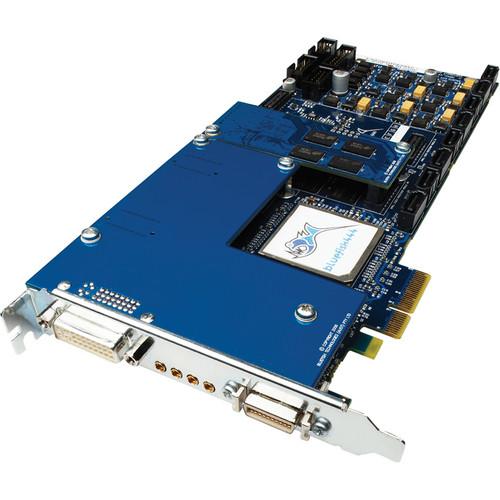 Contents of the user manual for the BlueFish444 Create 3D Ultra Video Card
- Product category: Computer Hardware BlueFish444
- Brand: BlueFish444
- Description and content of package
- Technical information and basic settings
- Frequently asked questions – FAQ
- Troubleshooting (does not switch on, does not respond, error message, what do I do if...)
- Authorized service for BlueFish444 Computer Hardware
|
User manual for the BlueFish444 Create 3D Ultra Video Card contain basic instructions
that need to be followed during installation and operation.
Before starting your appliance, the user manual should be read through carefully.
Follow all the safety instructions and warnings, and be guided by the given recommendations.
User manual is an integral part of any BlueFish444 product,
and if it is sold or transferred, they should be handed over jointly with the product.
Following the instructions for use is an essential prerequisite for protecting
health and property during use, as well as recognition of liability on the part of the manufacturer
for possible defects should you make a warranty claim. Download an official BlueFish444 user manual in which you will find instructions on how to install, use, maintain and service your product.
And do not forget – unsuitable use of a BlueFish444 product will considerably shorten its lifespan!
|
Product description BlueFish444 Creates 3D Ultra Video Card Updates Read More - The Bluefish444 Advantage
The Bluefish444 Create 3D Ultra Video Card, with 3G-SDI, can be used for 4:4:4 digital intermediary workflow and integrated with symmetry software for windows DI acquisition, preview, and playout. The Ultra video card offers support for 2048x1556PsF@14.98Hz, 15Hz, 18.98Hz, 19Hz video modes, and incorporates dual link inputs.
Incorporating a 3 x 1D LUT (look up tables used to calculate preview colors) on all outputs, the Create 3D Ultra Video Card enables accurate calibration of the display device and log/linear conversion. The DVI/HDMI preview output features hardware based 25 x 25 TAP Sinc(x) scaling algorithm that bypasses the low quality internal scaler of the LCD/Plasma, and converts the selected input/output to display the native resolution and frame rate. In addition, the scaling features up/down conversions between 2K, HD & SD for HD film monitoring, between HD & SD standard definition for simultaneous production of both formats.
The Create 3D Ultra Video Card features 12-bit video processing for inter conversion between RGB and YUV color spaces for monitoring, compositing, and animating graphics in the true YUV broadcast color space. It can be utilized for uncompressed HD/SD digital content creation, and is suitable for users needing to connect digital VTRs, cameras, and monitors in HD or SD SDI (standard definition serial digital interface). In addition, the Create 3D Ultra Video Card supports hardware based real-time up, down, or cross conversion during video capture or playback. Dual SDI (serial digital interface) enables broadcasting of an actual and converted signal at the same time. - Features 3G-SDI (serial digital interface consisting of a single 2.970 Gbit/s serial link)
- Can be used for 4:4:4 digital intermediary workflow and integrated with symmetry software for windows DI acquisition, preview and playout
- Offers support for 2048x1556PsF @ 14.98Hz, 15Hz, 18.98Hz, 19Hz video modes, and incorporates dual link inputs
- Incorporates 3 x 1D LUT (lookup tables used to calculate preview colors) on all outputs enabling accurate calibration of the display device and log/linear conversion
- DVI/HDMI preview output features hardware based 25 x 25 TAP Sinc(x) scaling algorithm that bypasses the low quality internal scaler of the LCD/Plasma and converts the selected input/output to display native resolution and frame rate
- Scaling features up/down conversions between 2K, HD (high definition) & SD (standard definition) for HD film monitoring, between HD (high definition) & SD standard definition for simultaneous production of both formats
- 12-bit video processing for inter conversion between RGB and YUV color spaces for monitoring, compositing, and animating graphics in the true YUV broadcast color space
- Can be utilized for uncompressed HD/SD digital content creation, and is suitable for users needing to connect digital VTRs, cameras and monitors in HD or SD SDI (standard definition serial digital interface)
- Supports hardware based real-time up, down or cross conversion during video capture or playback
- Dual SDI (serial digital interface) enables broadcasting of an actual and converted signal at the same time
- Incorporates anamorphic, letterbox, and center cut or 'pillarbox' 4:3 footage and scaling to 16:9 SD footage
- Supports cross conversions from 720 to 1080 and 1080 to 720
- Supports frame rate conversions with 2:3:2:3 and 2:3:3:2 cadences (3:2 pull down)
- Supports 1 x 2K/HD/SD 4:2:2 SDI, 2 x 2K/HD/SD 4:2:2 SDI, 2K/HD/SD 4:4:4, 4:4:4:4 (RGBA/YUVA), HD/SD 4:2:2:4 Video and Key (YUVA) input signal formats
- Supports 2 x 2K/HD/SD 4:2:2 SDI, 2K/HD/SD 4:4:4, 4:4:4:4 (RGBA/YUVA), HD/SD 4:2:2:4 Video and Key (YUVA) output signal formats
- Supports closed captioning
In the Box BlueFish444 Create 3D Ultra Video Card 3-Year Warranty BlueFish444 Create 3D Ultra Video Card Michael Christensen 02/28/2013 User Manual PDF 2mb Table of Contents
|
Upload User Manual
Have you got an user manual for the BlueFish444 Create 3D Ultra Video Card in electronic form? Please send it to us and help us expand our library of instruction manuals.
Thank you, too, on behalf of other users.
To upload the product manual, we first need to check and make sure you are not a robot. After that, your "Submit Link" or "Upload File" will appear.
Technical parametersBlueFish444 Create|3D Ultra Specs | Video Modes | 720x486i @ 59.94 Hz NTSC, 720x576i @ 50.00 Hz PAL
1280x720p @ 23.976Hz, 24Hz, 25Hz, 29.97Hz, 30Hz, 50Hz, 59.94Hz, 60Hz
1920x1080i @ 47.96Hz, 48Hz, 50Hz, 59.94Hz, 60Hz
1920x1080PsF @ 23.976Hz, 24Hz, 25Hz, 29.97Hz, 30Hz
1920x1080p @ 23.976Hz, 24Hz, 25Hz, 29.97Hz, 30Hz, 47.96Hz, 48Hz, 50Hz, 59.94Hz, 60Hz
2048X1080p @ 23.976Hz, 24Hz, 25Hz, 29.97Hz, 30Hz, 47.96Hz, 48Hz, 50Hz,59.94Hz, 60Hz
2048X1080i @ 47.96Hz, 48Hz, 50Hz, 59.94Hz, 60Hz
2048x1556PsF @ 14.98Hz, 15Hz, 18.98Hz, 19Hz | | Digital Video | Input Signal Formats - 3G-SDI capable, 12 bit Input, 1 x 2K/HD/SD 4:2:2 SDI, 2 x 2K/HD/SD 4:2:2 SDI, 2K/HD/SD 4:4:4, 4:4:4:4 (RGBA/YUVA), HD/SD 4:2:2:4 Video and Key (YUVA)
Output Signal Formats - 3G-SDI capable, 12 bit Output, 2 x 2K/HD/SD 4:2:2 SDI, 2K/HD/SD 4:4:4, 4:4:4:4 (RGBA/YUVA), HD/SD 4:2:2:4 Video and Key (YUVA) | | I/O | Analog Video and DVI/HDMI I/O - SD Composite, SD Component
HD Component, DVI/HDMI | | Ancillary | HANC - RP188 timecode In, RP188 timecode Out, Embedded Audio
VANC - Closed Captioning | | Digital Audio Format | Input Signal Format - 6 channels of AES/EBU (Balanced, XLR), 8 Channels of AES ID3 (Unbalanced, BNC), 16 Channels of embedded audio per SDI
Output Signal Format - 6 channels of AES/EBU (Balanced, XLR), 8 Channels of AES ID3 (Unbalanced, BNC), 16 Channels of embedded audio per SDI signal | | Analog Audio | 2 channels -10dBu (Unbalanced, RCA) | | Hardware | Features - Input: Audio sample rate converters, Genlock Bi, Tri and Cross Lock = Bi for HD
Tri for SD
Output: Real time hardware overlay for internal keying, 3 x 1D LUTs on all SDI Outputs, Built-in safe area, safe title and letterbox generator | | Scaling | Hardware Scaling - Up, down & cross conversion between 2K/HD/SD resolutions
12 bit scale processing
Sinc(x) video interpolation algorithm using 25 X 25 TAPS
1/128th sub pixel accuracy
Frame store for frame rate conversion
Hardware deinterlacing
3:2 Pulldown | | Preview | DVI/HDMI Preview - Inbuilt Hardware Scaling Module for Up, Down, Cross Conversion of SD/HD/2K resolutions
2K/HD/SD resolutions previewed as DVI up to 1920 x 1200p 60Hz 4:4:4
2K/HD/SD resolutions previewed as HDMI up to 1920 x 1200p 60Hz 4:2:2 / 4:4:4 & 8 Channels of 24bit embedded audio
3 x 1D LUTs for color calibrating preview and log/linear conversion | | Supported APIs | DirectShow Filters API, Mac OS X QuickTime API | | Compatibility | Application Compatibility - Adobe Creative Studio 4, Autodesk 3D Studio Max
Apple Final Cut Studio 2, BluefIsh444 Symmetry
Assimilate Scratch, Eyeon Digital Fusion, Autodesk Combustion Final Cut Pro 2/6/7 not supported | | | | Package Weight | 3.0 lb | | Box Dimensions (LxWxH) | 15.0 x 9.0 x 2.5" |
Rating100% users recommend this product to others. And what about you?

This product has already been rated by 24 owners. Add your rating and experience with the product.
Discussion
 Ask our technicians if you have a problem with your settings,
or if anything is unclear in the user manual you have downloaded.
You can make use of our moderated discussion.
The discussion is public and helps other users of our website who may be encountering similar problems.
Ask our technicians if you have a problem with your settings,
or if anything is unclear in the user manual you have downloaded.
You can make use of our moderated discussion.
The discussion is public and helps other users of our website who may be encountering similar problems.
The discussion is empty - enter the first post
Post a new topic / query / comment:
|
|


