|
User Manual for Boris FX Continuum 11 Color and Tone Unit Click to enlarge the picture
 Contents of the user manual for the Boris FX Continuum 11 Color and
- Product category: Video Editing Plug-Ins Boris FX
- Brand: Boris FX
- Description and content of package
- Technical information and basic settings
- Frequently asked questions – FAQ
- Troubleshooting (does not switch on, does not respond, error message, what do I do if...)
- Authorized service for Boris FX Video Editing Plug-Ins
|
User manual for the Boris FX Continuum 11 Color and contain basic instructions
that need to be followed during installation and operation.
Before starting your appliance, the user manual should be read through carefully.
Follow all the safety instructions and warnings, and be guided by the given recommendations.
User manual is an integral part of any Boris FX product,
and if it is sold or transferred, they should be handed over jointly with the product.
Following the instructions for use is an essential prerequisite for protecting
health and property during use, as well as recognition of liability on the part of the manufacturer
for possible defects should you make a warranty claim. Download an official Boris FX user manual in which you will find instructions on how to install, use, maintain and service your product.
And do not forget – unsuitable use of a Boris FX product will considerably shorten its lifespan!
|
Product description The Boris FX Continuum 11 Color and Tone Unit is a collection of professional color-grade and toning filters with scopes for ensuring safe colors. Some of the filters also feature a built-in PixelChooser with integrated Mocha planar tracking that allows for greater control over which areas of the image the filter should affect.
The Color and Tone Unit is a multi-host plug-in compatible with Adobe, Avid, Resolve, Vegas Pro, and Nuke. It can be used in all host applications at the same time as long as they are on the same computer. - Key Features
-
- Built-in presets
- On-screen control widgets
- FX browser (not supported in Apple hosts)
- PixelChooser matte and masking system with integrated Mocha planar tracking for select filters
- Hardware acceleration (OpenGL/OpenCL) for select filters
- Multi-processor (SMP) and multi-core (CMP) support
- Beat Reactor for audio-generated VFX
- Support for Adobe host native mask shapes light
Filters - Correct Selected Color
- Correct Selected Color allows you to adjust a specified range of colors in the source image, leaving colors outside the range unaffected. To correct two or more separate colors within an image, apply the Correct Selected filter as many times as needed.
- Tritone
- Tritone creates a toned image from the source image's luma channel or any of its RGB channels. The Input Channel maps to a color range that goes from the Black Color to the Middle Color to the White Color. The default Tritone uses the source's luma channel as the Input Channel to produce an image that is black where the source is black, white where the source is white, and blue-toned in the gray regions.
- Brightness and Contrast
- Adjusts the brightness and contrast in your image.
- Color Balance
- Color Balance performs a true photographic RGB color correction, allowing you to make independent adjustments to the red, green, and blue channels of the image.
- Color Correction
- Color Correction improves the color of images or creates dramatic color effects. In addition to the ability to adjust luminance levels and saturation, the filter allows users to fine tune Brightness, Contrast, and Hue.
- Color Match
- Color Match simplifies the process of matching the color or luma values of two clips in the timeline. For instance, if two clips with different lighting conditions are spliced together, the color and luma values will differ between the clips. Match Color automates the process of removing or balancing the difference between the two clips by setting color or luma values for the quarter, mid, and three-quarter areas of the image. Ideally, you want to view both the Source and Target clips so that you can sample colors.
- Colorize
- Colorize uses a gradient of up to six colors to tone the image. All of the parameters in this filter can be animated and linked to other parameters.
- 3 Way Color Grade
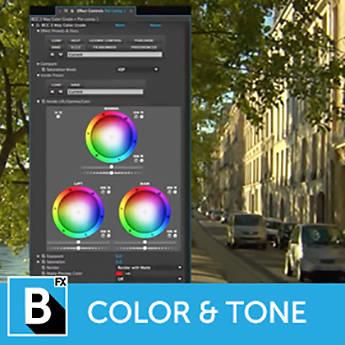
- 3 Way Color Grade enables you to color-correct an input image using industry standard Lift-Gamma-Gain controls with an intuitive color sphere and slider interface. The filter includes a built-in keying option for isolating secondary colors from the primaries and power window style masking (with 2-point motion tracking), which allow you to isolate or selectively apply the color correction to specific region of the image. Independent color correction adjustments can be applied to points inside and outside of the key-mask selection within a single instance of the filter. Compare controls, located at the top of the filter, let you compare the input and processed image, or two independent color correction settings applied to the image. All internal processing in this filter is done in 32-bit floating point for maximum precision, thereby eliminating any round-off errors. This allows you to combine extreme settings of the different controls without introducing banding on the image output.
- Hue-Sat-Lightness
- Hue-Saturation-Lightness converts the image to the Hue/Saturation/Lightness color space, makes corrections to the image, and converts it back to RGB.
- Invert Solarize
- Invert Solarize inverts one or more channels in the source image. With the Channels menu, you can specify which channels to invert. You can choose from a number of available options, such as RGB, RGBA (RGB and Alpha), Alpha, Luminance, Hue, Saturation, Lightness, and any combination of red, green, and blue.
- Levels Gamma
- Levels Gamma provides options for adjusting contrast and eliminating noise in your image. Video shot at night or in poorly-lit settings often contains noise in the dark areas. Increasing Input Black removes this noise by treating all areas darker than the Input Black setting as black. Washed out or overexposed images do not contain the full range of levels. Increasing Input Black and/or decreasing Input White can boost the contrast of the image.
- MultiTone Mix
- MultiTone Mix uses the source image's color, luma, or alpha information to create a toned image that uses up to five independent colors. MultiTone Mix works by creating a color map based on a specific channel in the source image, then replacing each color range in the map with a new color.
- Safe Colors
- Safe Colors prevents clips from having saturation values that exceed the legal limits of broadcast standards. Use this filter to limit the values that are present in the image. In addition to being able to adjust the saturation limits, the filter allows you to fine-tune the pixels in the image that are affected.
- Videoscope
- Videoscope was designed to provide a helpful way to measure the chroma and luma values in a clip. Because it is applied as a filter, it can be moved or positioned anywhere in the filter effects stack in the effects controls window and thereby display important information.
Table of Contents
|
Upload User Manual
Have you got an user manual for the Boris FX Continuum 11 Color and Tone Unit in electronic form? Please send it to us and help us expand our library of instruction manuals.
Thank you, too, on behalf of other users.
To upload the product manual, we first need to check and make sure you are not a robot. After that, your "Submit Link" or "Upload File" will appear.
Technical parametersBoris FX BCCOLOR Specs | | | Delivery Method | Download | | Version | Standard | | Number of Users Supported | 1 | | | | VRAM Requirement | 1 GB (Minimum)
2 GB (Recommended) |
Rating60% users recommend this product to others. And what about you?

This product has already been rated by 99 owners. Add your rating and experience with the product.
Discussion
 Ask our technicians if you have a problem with your settings,
or if anything is unclear in the user manual you have downloaded.
You can make use of our moderated discussion.
The discussion is public and helps other users of our website who may be encountering similar problems.
Ask our technicians if you have a problem with your settings,
or if anything is unclear in the user manual you have downloaded.
You can make use of our moderated discussion.
The discussion is public and helps other users of our website who may be encountering similar problems.
The discussion is empty - enter the first post
Post a new topic / query / comment:
|
|
|
| Request for user manual |
You can’t find the operation manual you are looking for? Let us know and we will try to add the missing manual:
I’m looking for a manual / Request for manual
Current requests for instruction manuals:
Call Of Duty World War Two For Xbox...
controller stratus XL...
stratus XL...
smart whatch serie S11 42mm...
Allen & Heath SQ-6 manual...
|
| Discussion |
Latest contributions to the discussion:
AEW R 4100
Name: MAURICIO ANGARITA
Audio-Technica AEW-R4100 UHF Diversity Receiver for
AEW R 4100 has the mute function blocked and does not allow audio to pass. I tried several times to turn off the mute from the transmitter but it does nothing, the mute stays on. Solution?
Thank you...
Instructions for assembling the 2015 Forecast Image Master Consoles GC3-A
Name: mike elam
Forecast Consoles GC3-A ImageMaster Editing Console
Looking for instructions for assembling this console. ...
EMPTY TONER ERROR MESSAGE AFTER REPLACING TONER
Name: LINDA BAD YELLOW EYES
Brother TN223BK Standard-Yield Toner
I HAD TO CHANGE OUT ALL THREE TONERS DUE TO LEAKS IN THE YELLOW AND CYAN. AFTER I REPLACED THEM, THE MACHINE KEEPS GIVING ME AN EMPTY TONER ERROR MESSAGE. HELP!!...
PS480D 20/24 pin Switching 480W Power Supply
Name: swkargo
Logisys 480W Power Supply
This item states in can run -5vdc .It is NOT listed on the board or I beleive is r4 is missing the resitior. Any body have thid issue. Shawn
...
Help needed
Name: Ann Carter
SanDisk 1TB Extreme Portable USB 3.1
When I click the link to download the user manual for my Sandisk Extreme external hard drive, it gives me the manual for the LG Cricket. Can you please change the link so I can download the Sandisk manual and begin using this drive? Thank you....
|
|


