User Manual for Bosch DIVAR Hybrid 5000 Series 16-Channel Recorder Click to enlarge the picture
 Contents of the user manual for the Bosch DIVAR Hybrid 5000 Series 16-Channel
- Product category: Digital Video Recorders (DVRs) Bosch
- Brand: Bosch
- Description and content of package
- Technical information and basic settings
- Frequently asked questions – FAQ
- Troubleshooting (does not switch on, does not respond, error message, what do I do if...)
- Authorized service for Bosch Digital Video Recorders (DVRs)
|
User manual for the Bosch DIVAR Hybrid 5000 Series 16-Channel contain basic instructions
that need to be followed during installation and operation.
Before starting your appliance, the user manual should be read through carefully.
Follow all the safety instructions and warnings, and be guided by the given recommendations.
User manual is an integral part of any Bosch product,
and if it is sold or transferred, they should be handed over jointly with the product.
Following the instructions for use is an essential prerequisite for protecting
health and property during use, as well as recognition of liability on the part of the manufacturer
for possible defects should you make a warranty claim. Download an official Bosch user manual in which you will find instructions on how to install, use, maintain and service your product.
And do not forget – unsuitable use of a Bosch product will considerably shorten its lifespan!
|
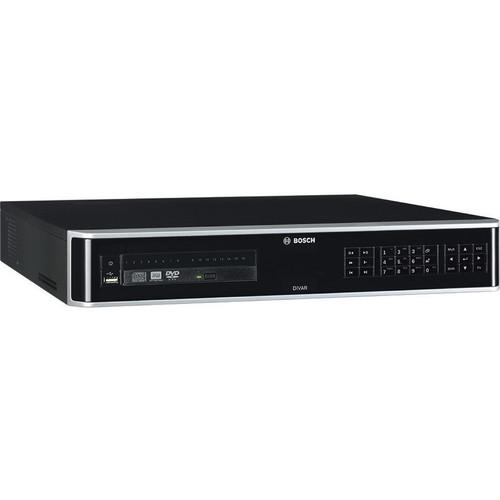
Product description The DIVAR Hybrid 5000 Series 16-Channel Recorder from Bosch comes with 4TB HDD for video storage. It can simultaneously record and view video from traditional analog cameras as well as from IP cameras. The recorder can be connected to the following camera configurations - a maximum 32 IP cameras recording at resolutions up to 12MP, a maximum 16 analog cameras recording at resolutions up to 960H, a combination of up to 16 analog cameras and 16 IP cameras. Simultaneous remote or local monitoring, recording, archive, and playback functions are guided by menu selections and operator commands. The recorder can support a maximum of 4 internal 6TB HDDs for video storage. UPC: 800549834452 In the Box Bosch DIVAR Hybrid 5000 Series 16-Channel Recorder (4TB HDD) Limited 3-Year Warranty Table of Contents
|
Upload User Manual
Have you got an user manual for the Bosch DIVAR Hybrid 5000 Series 16-Channel Recorder in electronic form? Please send it to us and help us expand our library of instruction manuals.
Thank you, too, on behalf of other users.
To upload the product manual, we first need to check and make sure you are not a robot. After that, your "Submit Link" or "Upload File" will appear.
Technical parametersBosch DIVAR Hybrid 5000 Specs | | | IP Resolution | 3840 x 2160, 1920 x 1080, 1280 x 1024, 1280 x 720, 1024 x 768 | | Maximum Analog Resolutions | 960 x 480, 704 x 480, 352 x 480, 352 x 240, 176 x 120 | | OSD | Camera title, time, video loss, motion detection, recording, PTZ | | | | Internal Storage | Maximum 4 SATA HDD
Maximum Capacity per HDD: 6 TB
Maximum Supported Speed per HDD: 6 Gb/s Maximum 4 SATA HDD
Maximum Capacity per HDD: 6 TB
Maximum Supported Speed per HDD: 6 Gb/s | | External Storage | eSATA-connected storage device | | | | Motion Detection | Set by Camera: Essential or Intelligent Video Analytics (IVA), Motion + | | Activation | Video loss, motion detection, input alarm, system alarm | | Trigger Connectivity | Recording, PTZ movement, alarm out, email, buzzer, screen message, Mon A and B activated | | Inputs | 16 x inputs configurable NO/NC, maximum input voltage 5 VDC | | Outputs | 6 x relay outputs | | Relay Contacts | Maximum rated, 30 VDC, 2 A continuous or 125 VAC, 1 A (activated) | | | | USB | Flash memory or external HDD (FAT32) | | Network | Video Client or Web Client software | | | | Video Input | 16 x BNC for connecting maximum 16 analog cameras | | Video Output | D-Sub (loop through to other devices) | | Ethernet | RJ45 Ethernet connection (10/100/1000Base-T according to IEEE 802.3) | | Monitor Output | 1 x D-Sub, 1 x HDMI, 1 x HDMI (output for spot monitor) | | Alarm Input / Output | 16 x screw terminal inputs, cable diameter AWG26‑16 (1.29-0.4 mm) | | Audio Input | 4 x RCA | | Audio Output | 1 x RCA | | Mic Input | 1 x RCA (Audio input) | | RS-485 | Screw terminal output (Dome control) | | Keyboard | Screw terminal output | | RS-232 | DB9 male, 9-pin D-type (Dome control) | | USB | One front (2.0) and two rear (3.0) USB connectors for mouse or USB memory device | | Power Input | With On/Off switch 100 to 240 VAC, 50 to 60 Hz, 1.9 A, 75 W | | | | Multi-Channel Playback | Simultaneous 1/4/9/16 channels | | Mode | Forward, reverse, slow play, fast play, frame-by-frame | | Search | Time, channel, type, smart | | Network | Video client, web client, app | | View Restriction | Restrict video by user rights for viewing | | Protection | Protect video against overwriting | | Data Retention | Automatically delete recordings after 1 to 365 days | | | | Decoding | H.265 / H.264 / MJPEG | | Speed | Maximum 30 IPS per channel, configurable | | Bit Rate | 16 kb/s to 24 Mb/s per channel | | Interval | 1 to 120 min (Default: 60 min)
Pre-Record: 1 to 30 sec
Post-Record: 10 to 300 sec | | Mode | Manual, scheduled (regular, motion detection, alarm), stop | | | | Maximum Camera Supported | 16 analog + 16 IP or 32 IP | | Bandwidth | Maximum Incoming: 320 Mb/s
Maximum Recording: 256 Mb/s
Maximum Transmission: 128 Mb/s | | IP Resolution | 3840 x 2160, 1920 x 1080, 1280 x 1024, 1280 x 720, 1024 x 768 | | Analog Recording | 960 x 480, 704 x 480, 352 x 480, 352 x 240, 176 x 120 | | | | Input | 4-channel (via RCA) 200 to 3000 mV, 10 kOhms | | Mic Input | 1-channel (via RCA) 200 to 3000 mV, 10 kOhms | | Output | 1-channel (via RCA) 200 to 3000 mV, 5 kOhms | | Direction | Bi-directional (audio input and output connected via device) | | | | Ethernet | RJ45 port (10/100/1000 Mb/s) | | PC | Software: Video client, web client | | Apps for Mobile Devices | iPhone, Android | | User Access | Maximum 128 users | | Protocols | HTTP, HTTPS, TCP/IP, IPv4/IPv6, UPnP, RTSP, UDP, SMTP, NTP, DHCP, DNS/DDNS, IP Filter, PPPoE, FTP | | | | External Power Adapter | AC Input: 100 to 240 VAC; 50 to 60 Hz; 1.9 A, 75 W | | Battery | Lithium CR2032, 3 VDC | | Power Consumption | Max 20 W | | | | Operating Temperature | 32 to 104°F (0 to 40°C) | | Storage Temperature | -40 to 158°F (-40 to 70°C) | | Operating Humidity | <93% non-condensing | | Storage Humidity | <95% non-condensing | | | | Alarm | EN 50130-5:2011, Alarm systems - Part 5: Environmental test methods, Class I, Fixed equipment | | Lightning Protection | To ALL long input / output - and supply-wiring. Alarm inputs and relay output, Video inputs and Outputs, dome-control outputs, power-cable, Audio In/Out. ± 0.5, 1kV line to line, ± 0.5, 1 and 2kV line to earth | | EMC | 47CFR part 15 (FCC), Class B | | Safety | UL 62368-1, Edition 2, Dec 1, 2014 (UL, cUL) | | | | Dimensions | 17.3 x 16.1 x 3" (440 x 408 x 76 mm) | | Weight | Approximately 14.7 lb (6.67 kg) excluding HDD and DVD | | | | Package Weight | 23.85 lb | | Box Dimensions (LxWxH) | 23.2 x 21.5 x 8.8" |
Rating80% users recommend this product to others. And what about you?

This product has already been rated by 97 owners. Add your rating and experience with the product.
Discussion
 Ask our technicians if you have a problem with your settings,
or if anything is unclear in the user manual you have downloaded.
You can make use of our moderated discussion.
The discussion is public and helps other users of our website who may be encountering similar problems.
Ask our technicians if you have a problem with your settings,
or if anything is unclear in the user manual you have downloaded.
You can make use of our moderated discussion.
The discussion is public and helps other users of our website who may be encountering similar problems.
The discussion is empty - enter the first post
Post a new topic / query / comment:
|
|


