User Manual for Bosch FLEXIDOME 5000i 5MP Network Dome Camera with Night Vision Click to enlarge the picture
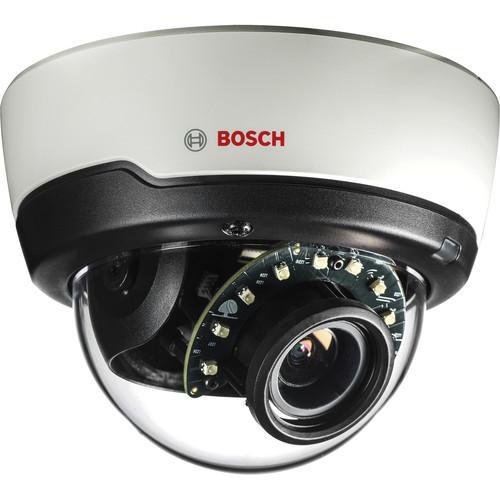 Contents of the user manual for the Bosch FLEXIDOME 5000i 5MP Network Dome
- Product category: Wired IP Cameras Bosch
- Brand: Bosch
- Description and content of package
- Technical information and basic settings
- Frequently asked questions – FAQ
- Troubleshooting (does not switch on, does not respond, error message, what do I do if...)
- Authorized service for Bosch Wired IP Cameras
|
User manual for the Bosch FLEXIDOME 5000i 5MP Network Dome contain basic instructions
that need to be followed during installation and operation.
Before starting your appliance, the user manual should be read through carefully.
Follow all the safety instructions and warnings, and be guided by the given recommendations.
User manual is an integral part of any Bosch product,
and if it is sold or transferred, they should be handed over jointly with the product.
Following the instructions for use is an essential prerequisite for protecting
health and property during use, as well as recognition of liability on the part of the manufacturer
for possible defects should you make a warranty claim. Download an official Bosch user manual in which you will find instructions on how to install, use, maintain and service your product.
And do not forget – unsuitable use of a Bosch product will considerably shorten its lifespan!
|
Product description The FLEXIDOME 5000i 5MP Network Dome Camera from Bosch comes with a 1/2.9" CMOS progressive scan sensor and 3-10mm AVF (Automatic Varifocal) lens for capturing videos at a maximum resolution of 3072 x 1728. The camera comes with an auto zoom/focus lens wizard that can be activated from PC or a built-in button. This day/night camera provides 24-hour surveillance thanks to a removable IR cut filter and a built-in IR illuminator with night vision up to 98'. The camera features built-in Essential Video Analytics that trigger relevant alerts and quickly retrieves data. It also features an integrated gyro/accelerometer sensor that automatically corrects image orientation in steps of 90° if the camera is mounted at right angles or upside-down. The sensor image can also be rotated manually through steps of 90°. - Captures videos in 3072 x 1728 resolution up to 30 fps
- Easy to install with 3-10mm AVF (Automatic Varifocal) lens, auto zoom/focus wizard, and pre-configured modes
- Automatic motorized zoom/focus adjustment with 1:1 pixel mapping ensures the camera is always accurately focused
- Offers true day/night functionality with mechanical IR cut filter
- Built-in active infrared illuminator provides 98'
- Fully-configurable H.265 multi-streaming
- Offers High Dynamic Range up to 120 dB
- Intelligent streaming reduces bandwidth and storage requirements
- Area-based encoding allows you to set compression parameters for up to eight user-definable regions
- Built-in Essential Video Analytics to trigger relevant alerts and quickly retrieve data
- Two-way audio for communication as well as generating an alarm via audio detection
- Hybrid mode provides simultaneous HD video streaming and an analog video output via an SMB connector
- Integrated gyro/accelerometer sensor offers automatic image rotation and precise calibration of the built-in video analytics
- Supports tamper and motion detection with alarm triggering
- microSD card slot supports up to 2TB of storage for edge recording or local alarm recording
- Time- or alarm-based video clips/JPEG images can be posted to four different accounts on FTP servers or cloud-based storage facilities
- Alarms can be set up to trigger an email or SMS notification
- Conforms with ONVIF Profile S and Profile G for third-party system integration
- Offers 3-level password protection and AES 256-bit data encryption
- Provides web browser access via HTTPS and firmware updates with authenticated secure uploads
- On-board Trusted Platform Module (TPM) and Public Key Infrastructure (PKI) provide protection from malicious attacks
- Advanced certificate handling offers self-signed unique certificates automatically created when required, client and server certificates for authentication, client certificates for proof of authenticity, and certificates with encrypted private keys
- Supports Bosch's video security mobile app for remote viewing live/recorded footage and accessing camera controls
- Can be simultaneously powered via PoE or 12 VDC / 24 VAC power supplies
- Uninterruptible Power Supplies (UPS) can be used for continuous operation, even during a power failure
- Supports Auto-MDIX interface that allows the use of straight or crossover cables for trouble-free network cabling
UPC: 800549810883 In the Box Bosch FLEXIDOME 5000i 5MP Network Dome Camera with Night Vision Limited 3-Year Warranty Table of Contents
|
Upload User Manual
Have you got an user manual for the Bosch FLEXIDOME 5000i 5MP Network Dome Camera with Night Vision in electronic form? Please send it to us and help us expand our library of instruction manuals.
Thank you, too, on behalf of other users.
To upload the product manual, we first need to check and make sure you are not a robot. After that, your "Submit Link" or "Upload File" will appear.
Technical parametersBosch 5000i Specs | Imager | 1/2.9" CMOS progressive scan | | Effective Pixels (H x V) | 3072 x 1944 | | Minimum Illumination | Color: 0.24 lux at 3100K, reflectivity 89%, 1/25, f/1.3, 30 IRE
Mono: 0.03 lux at 3100K, reflectivity 89%, 1/25, f/1.3, 30 IRE
0 lux with IR on | | Wide Dynamic Range | High Dynamic Range: 120 dB
107 dB (measured according to IEC 62676 Part 5) | | Day/Night | Color, Monochrome, Auto (adjustable switch points) | | IR Distance | 98' (30 m) | | LEDs | 10-LED high-efficiency array, 850 nm | | Light Intensity | Adjustable IR intensity | | Adjustable Picture Settings | Contrast, Saturation, Brightness | | White Balance | 2500 to 10,000K
4 automatic modes (Basic, Standard, Sodium vapor, Dominant color)
Manual mode and Hold mode | | Shutter | AES (Automatic Electronic Shutter)
Fixed (1/25[30] to 1/15,000 sec) selectable
Default shutter | | Backlight Compensation | On/off | | Contrast Enhancement | On/off | | Signal-to-Noise Ratio (SNR) | >55 dB | | Noise Reduction | Intelligent Dynamic Noise Reduction with separate temporal and spatial adjustments | | Sharpness | Sharpness enhancement level selectable | | Defog | Intelligent Defog automatically adjusts parameters for best picture in foggy or misty scenes (switchable) | | Privacy Masking | 8 independent areas, fully programmable | | Intelligent Video Analytics | Essential Video Analytics | | Scene Modes | Standard, Sodium lighting, Traffic, Intelligent AE, Vibrant, Low bit rate, Sports & Gaming, and Retail | | Other Functions | Image mirror, Image flip, Pixel counter, Video watermarking, Display stamping, Location | | Camera Rotation | Automatic detection with manual override (0/90/180/270°) | | | | Lens Type | 3-10mm Automatic Varifocal (AVF) lens, IR corrected | | Aperture | f/1.3 to 360 | | Iris | DC | | Lens Mount | Board | | Adjustment | Motorized zoom/focus | | Iris Control | Automatic iris control | | Day/Night | Switched mechanical IR filter | | Field of View | Horizontal: 92 to 29°
Vertical: 50 to 18° | | | | Video Compression | H.265, H.264, MJPEG | | Streaming | Multiple configurable streams in H.264 or H.265 and MJPEG, configurable frame rate and bandwidth
Regions of Interest (ROI) | | Video Resolutions | 3072 x 1728, 5 MP (16:9)
2688 x 1512, 4 MP (16:9)
2304 x 1296, 3 MP (16:9)
1920 x 1080
1280 x 1024, 1.3 MP (5:4)
1280 x 720
640 x 480
320 x 240
Upright Mode:
1728 x 3072, 5 MP
1512 x 2688, 4 MP
1296 x 2304, 3 MP
1080 x 1920 | | Bit Rate | 5 MP:
1597 kb/s at 30 fps
1205 kb/s at 12 fps
799 kb/s at 5 fps
344 kb/s at 2 fps
4 MP:
1210 kb/s at 30 fps
913 kb/s at 12 fps
605 kb/s at 5 fps
261 kb/s at 2 fps
3 MP:
864 kb/s at 30 fps
652 kb/s at 12 fps
432 kb/s at 5 fps
186 kb/s at 2 fps
1080p:
600 kb/s at 30 fps
438 kb/s at 12 fps
284 kb/s at 5 fps
122 kb/s at 2 fps | | Latency | Camera Processing Latency:
<55 ms (maximum average at 1080p 30 fps)
<65 ms (maximum average at 5 MP at 30 fps) | | GOP Structure | IP | | Encoding | Interval: 1 to 25[30] fps
Regions: Up to 8 areas with encoder quality settings per area | | | | Analog Video Out | SMB connector, CVBS (NTSC), 1 V p-p, 75 Ohms | | Audio Line In | 0.707 Vrms max, 10 kOhms typical, jack connector | | Audio Line Out | 0.707 Vrms at 16 Ohms typical, jack connector | | Audio Input | Built-in microphone (can be permanently disabled) | | Alarm Input | 1 input, short or 5 VDC activation | | Alarm Output | 1 output
Output Voltage: 30 VDC, maximum load 0.5 A | | Ethernet | RJ45 | | | | Standard | G.711, 8 kHz sampling rate
L16, 16 kHz sampling rate
AAC-LC, 48 kb/s at 16 kHz sampling rate
AAC-LC, 80 kb/s at 16 kHz sampling rate | | Signal-to-Noise Ratio | >50 dB | | Audio Streaming | Full-duplex / half duplex | | | | RAM | Internal: 60 sec pre-alarm recording | | Memory Card Slot | Supports up to 32 GB microSDHC / 2 TB microSDXC card. (A memory card of Class 6 or higher is recommended for HD recording) | | Recording | Continuous
Ring recording
Alarm/events/schedule recording | | | | System Detection | Via IP Helper | | Configuration | Via web browser or Configuration Manager | | Firmware Updates | Remotely programmable | | Viewing | Software Viewing:
Web browser
Video Security Client
Video Security App
Bosch Video Management System
Bosch Video Client or third-party software | | | | Protocols | IPv4, IPv6, UDP, TCP, HTTP, HTTPS, RTP/ RTCP, IGMP V2/V3, ICMP, ICMPv6, RTSP, FTP, Telnet, ARP, DHCP, APIPA (Auto-IP, link local address), NTP (SNTP), SNMP (V1, MIBII), 802.1x, DNS, DNSv6, DDNS (DynDNS.org, selfHOST.de, no-ip.com), SMTP, iSCSI, UPnP (SSDP), DiffServ (QoS), LLDP, SOAP, Dropbox, CHAP, digest authentication | | Encryption | TLS 1.0/1.2, AES128, AES256 | | Ethernet | 10/100Base-T, auto-sensing, half/full duplex | | Connectivity | Auto-MDIX | | Interoperability | GB/T 28181 | | | | Input Voltage | 12 VDC
Rating80% users recommend this product to others. And what about you?

This product has already been rated by 97 owners. Add your rating and experience with the product.
Discussion
 Ask our technicians if you have a problem with your settings,
or if anything is unclear in the user manual you have downloaded.
You can make use of our moderated discussion.
The discussion is public and helps other users of our website who may be encountering similar problems.
Ask our technicians if you have a problem with your settings,
or if anything is unclear in the user manual you have downloaded.
You can make use of our moderated discussion.
The discussion is public and helps other users of our website who may be encountering similar problems.
The discussion is empty - enter the first post
Post a new topic / query / comment:
|
|
|
| Request for user manual |
You can’t find the operation manual you are looking for? Let us know and we will try to add the missing manual:
I’m looking for a manual / Request for manual
Current requests for instruction manuals:
Call Of Duty World War Two For Xbox...
controller stratus XL...
stratus XL...
smart whatch serie S11 42mm...
Allen & Heath SQ-6 manual...
|
| Discussion |
Latest contributions to the discussion:
AEW R 4100
Name: MAURICIO ANGARITA
Audio-Technica AEW-R4100 UHF Diversity Receiver for
AEW R 4100 has the mute function blocked and does not allow audio to pass. I tried several times to turn off the mute from the transmitter but it does nothing, the mute stays on. Solution?
Thank you...
Instructions for assembling the 2015 Forecast Image Master Consoles GC3-A
Name: mike elam
Forecast Consoles GC3-A ImageMaster Editing Console
Looking for instructions for assembling this console. ...
EMPTY TONER ERROR MESSAGE AFTER REPLACING TONER
Name: LINDA BAD YELLOW EYES
Brother TN223BK Standard-Yield Toner
I HAD TO CHANGE OUT ALL THREE TONERS DUE TO LEAKS IN THE YELLOW AND CYAN. AFTER I REPLACED THEM, THE MACHINE KEEPS GIVING ME AN EMPTY TONER ERROR MESSAGE. HELP!!...
PS480D 20/24 pin Switching 480W Power Supply
Name: swkargo
Logisys 480W Power Supply
This item states in can run -5vdc .It is NOT listed on the board or I beleive is r4 is missing the resitior. Any body have thid issue. Shawn
...
Help needed
Name: Ann Carter
SanDisk 1TB Extreme Portable USB 3.1
When I click the link to download the user manual for my Sandisk Extreme external hard drive, it gives me the manual for the LG Cricket. Can you please change the link so I can download the Sandisk manual and begin using this drive? Thank you....
|
|


