User Manual for Bosch MIC IP fusion 9000i 2MP Outdoor Dual Thermal Visible Network PTZ Camera Click to enlarge the picture
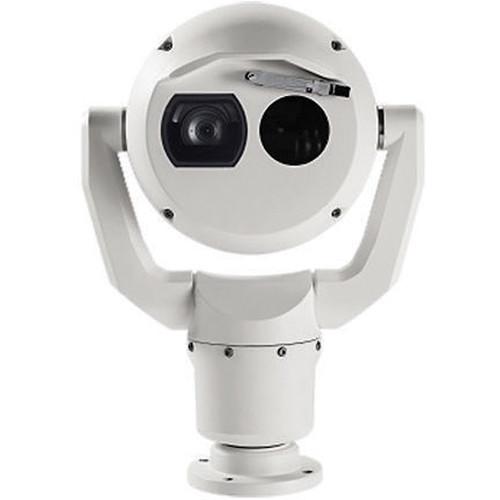 Contents of the user manual for the Bosch MIC IP fusion 9000i 2MP
- Product category: Security Cameras Bosch
- Brand: Bosch
- Description and content of package
- Technical information and basic settings
- Frequently asked questions – FAQ
- Troubleshooting (does not switch on, does not respond, error message, what do I do if...)
- Authorized service for Bosch Security Cameras
|
User manual for the Bosch MIC IP fusion 9000i 2MP contain basic instructions
that need to be followed during installation and operation.
Before starting your appliance, the user manual should be read through carefully.
Follow all the safety instructions and warnings, and be guided by the given recommendations.
User manual is an integral part of any Bosch product,
and if it is sold or transferred, they should be handed over jointly with the product.
Following the instructions for use is an essential prerequisite for protecting
health and property during use, as well as recognition of liability on the part of the manufacturer
for possible defects should you make a warranty claim. Download an official Bosch user manual in which you will find instructions on how to install, use, maintain and service your product.
And do not forget – unsuitable use of a Bosch product will considerably shorten its lifespan!
|
Product description The gray MIC IP fusion 9000i 2MP Outdoor Dual Thermal/Visible Network PTZ Camerafrom Bosch consists of thermal and visible camera cores for capturing thermal and visible videos, helping you to detect and react to long-range threats. The thermal imager features FPA (Focal Plane Array), uncooled vanadium oxide microbolometer and 19mm athermal fixed lens for capturing videos at a maximum resolution of 320 x 240. The visible imager features a 1/2.8" Exmor R CMOS sensor and 4.3-129mm varifocal lens for capturing videos at a maximum resolution of 1920 x 1080.
Enclosed in an IP66- and IK10-rated housing, the camera can be used in both indoor and outdoor environments. The camera features a silicone wiper to remove moisture from both the glass and germanium windows. In addition, both windows incorporate embedded defrosters that minimize buildup of snow and ice to ensure clear images are captured in extreme cold and moist conditions. The wiper can also be integrated with third-party washer systems for regular cleaning and maintenance. The camera can be powered using a standard 24 VAC power source and/or via network-compliant 95W high PoE (switch available separately). Thermal Imager - The thermal imager incorporates an uncooled vanadium oxide microbolometer and a 19mm athermal lens. The imager offers a maximum resolution of 320 x 240.
Visible Imager - The 1080p, 60 fps-capable visible imager has starlight technology and a 30x optical/12x digital zoom lens that provides 1080p images, improved color performance, and increased low-light sensitivity. High dynamic range ensures clear image reproduction in high-contrast scenes.
Ruggedized Design - The camera is weather-sealed and complies with Type 6P and IP68 standards when attached to a MIC-DCA or a MIC-WMB. This level of protection eliminates any risk of dust or water ingress, making the camera a suitable choice for use in environments with rain, dust, snow, flying debris, and other challenges. The camera can be used in temperatures from -40 to 149°F. The all-metal body has been engineered to withstand IK10-level impacts, and continuous low-frequency vibrations.
Intelligent Video Analytics - The camera includes Intelligent Video Analytics for monitoring both visible and thermal image streams. It can detect, track, and analyze moving objects while suppressing unwanted alarms from spurious sources in the image, even in harsh weather conditions. Advanced tasks like multiple line crossing, loitering, idle/removed object detection, crowd density estimation, occupancy, and people counting are available for live alarming and forensic search. Object filters based on size, speed, direction, aspect ratio, and color can be defined. Setup time is minimized because only the installation height of the camera must be entered to calibrate the analytics. After the camera is calibrated, the analytics engine can automatically classify objects as an upright person, a car, a bike, or a truck.
Intelligent Tracking - The Intelligent Tracking feature is designed to provide smoother camera motion for comfortable viewing and to reliably track objects under challenging conditions.
Recording and Storage Management - The Bosch Video Recording Manager application can control recording management for the camera. Alternately, the camera can use its embedded local storage and iSCSI targets directly without any recording software. The camera's embedded local storage (internal EMMC-based memory) can be used for recording "at the edge" or for Automatic Network Replenishment (ANR) to improve the overall recording reliability. During full streaming conditions comprising of both visible and thermal image streams, metadata and audio up to four hours of local storage time is possible. Furthermore, pre-alarm recording is available to capture details of an incident before the alarm actually occurs.
System Integration and ONVIF Conformance - The camera conforms to the Open Network Video Interface Forum (ONVIF) Profile S and Profile G specifications. For H.265 configuration, the camera also supports Media Service 2 which is part of the future ONVIF Profile T. Compliance with these standards ensure interoperability between network video products regardless of manufacturer. Third-party integrators can easily access the internal feature set of the camera for integration into large projects.
In the Box Bosch MIC IP fusion 9000i 2MP Outdoor Dual Thermal/Visible Network PTZ Camera (9 Hz, Gray) Limited 3-Year Warranty Table of Contents
|
Upload User Manual
Have you got an user manual for the Bosch MIC IP fusion 9000i 2MP Outdoor Dual Thermal Visible Network PTZ Camera in electronic form? Please send it to us and help us expand our library of instruction manuals.
Thank you, too, on behalf of other users.
To upload the product manual, we first need to check and make sure you are not a robot. After that, your "Submit Link" or "Upload File" will appear.
Technical parametersBosch MIC IP Fusion 9000i Specs | | | Imager | Focal Plane Array (FPA), uncooled vanadium oxide microbolometer | | Effective Picture Elements | 320 x 240 | | Pixel Pitch | 17 μm | | Frame Rate | <9 Hz | | Lens | Athermal 19mm (f/1.1) | | Field of View | 16 x 12° | | Spectral Response | 8 to 14 μm | | Thermal Sensitivity | <62mK at room temperature with noise reduction on | | Focus | Factory-set at infinity | | Focus Distance | 46' to infinity (14 to infinity) | | Contrast Enhancement | On/Off | | Gain Level | User adjustable | | Brightness Level (cd/m) | User adjustable | | Noise Reduction | On/Off | | Color Modes | Selectable Thermal Color Modes: 12 | | | | Imager | 1/2.8" Exmor R CMOS sensor | | Effective Picture Elements | 1945 x 1097 (2.13 MP) | | Resolution | 1920 x 1080 | | Lens | 30x motorized zoom
4.3-129mm
f/1.6-4.7 | | Field of View | 63.7 to 2.3° | | Focus | Automatic with manual override | | Iris | Automatic with manual override | | Digital Zoom | 12x | | Sensitivity | 3100K, reflectivity 89%, 1/30, f/1.6, 30 IRE
Color: 0.0077 lux
Monochrome: 0.0008 lux | | Gain Control | AGC, fixed | | Aperture Correction | Horizontal and vertical | | Electronic Shutter Speed | 1/10,000 to 1 sec (22 steps) | | Signal-to-Noise Ratio | >55 dB | | Day/Night Switching | Automatic IR cut filter | | White Balance | 2000 to 10,000K
ATW, AWB Hold, Extended ATW, Manual, Sodium Lamp Auto, Sodium Lamp | | Day/Night | Monochrome, Color, Auto | | Defog | Intelligent Defog: Improves visibility when viewing foggy or other low-contrast scenes | | High Dynamic Range | 120 dB (25/30 fps) | | | | Type | Intelligent Video Analytics | | Covered Configurations | Off / Global VCA / Profiles 1 to 16 | | | | Video Compression | H.265, H.264 (ISO/IEC 14496), MJPEG, JPEG | | Streaming | Multiple and independent streams using H.264 or H.265, plus MJPEG
Configurable frame rate and bandwidth | | Streams | SD
720p
1080p
D1 4:3 (cropped)
640 x 480
1280 x 1024 (cropped) | | Resolution (H x V) | 1080p HD: 1920 x 1080
720p HD: 1280 x 720
432p SD: 768 x 432
288p SD: 512 x 288
144p SD: 256 x 144 | | Protocols | IPv4, IPv6, UDP, TCP, HTTP, HTTPS, RTP/RTCP, IGMP V2/V3, ICMP, ICMPv6, RTSP, FTP, ARP, DHCP, APIPA (Auto-IP, link local address), NTP (SNTP), SNMP (V1, MIB-II), 802.1x, DNS, DNSv6, DDNS (DynDNS.org, selfHOST.de, no-ip.com), SMTP, iSCSI, UPnP (SSDP), DiffServ (QoS), LLDP, SOAP, Dropbox, CHAP, digest authentication | | Ethernet | 10Base-T/100Base-TX, auto-sensing, half/full duplex | | Encryption | TLS 1.0, SSL, DES, 3DES, AES | | Ethernet Connector | RJ45 | | GOP Structure | IP, IBP, IBBP | | Data Rate | H.265, 1080P: 61 kb/s to 2.8 Mb/s (depending on the scene, the frame rate, and the quality settings)
H.264: 9.6 kb/s to 6 M/ps | | Overall IP Delay | 30 fps: 120 ms
60 fps: 67 ms | | Connectivity | ONVIF Profile S, ONVIF Profile G, Auto-MDIX | | Quality of Service (QoS) | User-selectable options | | | | Setup | Via Internet Explorer 7.0 or later, Bosch Configuration Manager, Bosch Video Management System (BVMS), Bosch Video Security Client (VSC), or support for third party software | | Protocols | Supported Serial Protocols: Bosch OSRD, Pelco D/P, Forward Vision, Cohu
Requires separate eLicense installation | | Services | Cloud-based
Time-based or alarm-based JPEG posting to four different accounts
Accounts can address FTP servers or cloud-based storage facilities
Alarm events can be set up to trigger an email or SMS notification | | Firmware Updates | Completed over network using built-in web browser or from Bosch Configuration Manager | | | | Control Interfaces | RS-485, simplex, half and full duplex, user-selectable baud rate or auto-baud | | Power | Network
Ethernet High PoE (95 W)
RJ45 10/100Base-Tx, male connector
Female-to-female RJ45 coupler included
Pigtail: 24 VAC (nominal) | | Ground Contact | Chassis Ground: Ground wire with connector lug | | | | Compression | G.711, AAC, and L16 (live and recording) | | Signal-to-Noise Ratio (SNR) | Audio-in: 47 dBA (A-weighting)
Audio Out: 50 dBA (A-weighting) | | Mode | Two-way, full duplex audio communication | | User Connections | Line in: 15 kOhms typical, 1 Vrms, max
Line out: 0.8 Vrms at 12 kOhms, typical | | | | Drive Unit | Brushless, integral pan/tilt motor drive | | Mounting Orientation | Upright
Inverted | | Pan Range | 360° continuous rotation | | Tilt Angle | 292° | | Tilt Range | -56 to 90° | | Pan Speed | 0.2 to 120°/s | | Tilt Speed | Variable: 0.2 to 90°/s | | Tracking Speed | 4 to 120°/s | | Pre-Position Speed | Maximum 120°/s with no more than 2.5 sec to reach new position (excluding time to zoom and focus at new position) | | Accuracy | Preposition: 0.05° (typical) | | Proportional Pan / Tilt to Zoom | Yes | | Audible Noise | <65 dB | | | | Input Voltage | 21 to 30 VAC, 50/60 Hz, and/or High Power over Ethernet 56 VDC nominal | | Current Consumption | 4 A (24 VAC)
1.5 A (High PoE) | | Power Consumption | 72 W (24 VAC), 72 W (High PoE) typical with heater, defroster, and fan | | PoE | High PoE
95 W High Power over Ethernet (Requires NPD-9501A midspan from Bosch / sold separately) | | Redundancy | Connect both High PoE Midspan and a separate 24 VAC power source
If either the High PoE or 24 VAC power source fails, the camera seamlessly transitions over to use the remaining power source | | Surge Protection | Built-in surge protection for power, data, and network interfaces | | | | Authentication | Video Authentication: Off / Watermark / MD5 / SHA-1 / SHA-256
802.1x Network Authentication with EAP/TLS: Supports TLS 1.2 with updated cipher suites including AES 256-bit encryption | | Stamp | Display Stamping: Name, Time, Pre-position title, Sector title, Compass/telemetry, Lens zoom factor, Alarm message, Custom Logo bitmap | | Pixel Counter | Selectable area | | Indicator | Live Image Indicator: On/Off | | Recording Capacity | 16 GB of internal EMMC-based memory | | Password Protection | Three-level | | Security | HTTPS | | Firmware Updates | Protected with authenticated secure uploads | | TPM | Supported | | Infrastructure Support | Public Key Infrastructure | | SSL Certificate Support | Supported for use with HTTPS | | AES Encryption | Supports independent encryption with 128-bit keys | | Sectors/Titling | 4, 8, 12, or 16 user-selectable, independent sectors, each with 20 characters per Title | | Privacy Masking | 32, individually configurable
Maximum 8 per Preposition
Programmable with 3, 4 or 5 corners (Black, White, or Gray)
24 individually configurable virtual masks | | Pre-positions | 256, each with 20 characters per Title | | Guard Tours | Custom Recorded Tours: 2, Total Duration: 30 minutes
1 Pre-position tour consisting of up to 256 scenes consecutively and 1 customized with up to 256 user-defined scenes | | Supported Languages | English, Czech, Dutch, French, German, Italian, Polish, Portuguese, Russian, Spanish, Japanese, Chinese | | Alarm Control | Rules-based logic supports basic and complex predefined user-specified commands | | Monitoring | Integrated sensors monitor operational status such as internal temperature, humidity level, incoming voltage level, vibration, and shock events | | | | Ingress Protection | IP68 / Type 6P (dust and immersion) when installed on a MIC-DCA or on a MIC wall mount
IP67 (moisture and dust) rating on connectors in the base of the camera when using the IP67 Connector Kit (MIC-9KIP67-5PK), which is also required when using non-Bosch mounts
IP66 (directed spray) when installed on a MIC-DCA or on a MIC wall mount | | Vandal Resistance | IK10 (excluding windows) | | Operating Temperature | -40 to 149°F (-40 to 65°C)
NEMA TS 2-2003 (R2008), para 2.1.5.1 using fig. 2.1 test profile: -30 to 165°F (-34 to 74°C) | | Storage Temperature | -40 to 158°F (-40 to 70°C) | | Humidity | 0 to 100% | | Wind Loading | 100 mph / 160 km/h sustained
150 mph / 241 km/h gusts | | Effective Projected Area (EPA) | Camera: 0.98 ft
Rating70% users recommend this product to others. And what about you?

This product has already been rated by 81 owners. Add your rating and experience with the product.
Discussion
 Ask our technicians if you have a problem with your settings,
or if anything is unclear in the user manual you have downloaded.
You can make use of our moderated discussion.
The discussion is public and helps other users of our website who may be encountering similar problems.
Ask our technicians if you have a problem with your settings,
or if anything is unclear in the user manual you have downloaded.
You can make use of our moderated discussion.
The discussion is public and helps other users of our website who may be encountering similar problems.
The discussion is empty - enter the first post
Post a new topic / query / comment:
|
|
|
| Request for user manual |
You can’t find the operation manual you are looking for? Let us know and we will try to add the missing manual:
I’m looking for a manual / Request for manual
Current requests for instruction manuals:
Call Of Duty World War Two For Xbox...
controller stratus XL...
stratus XL...
smart whatch serie S11 42mm...
Allen & Heath SQ-6 manual...
|
| Discussion |
Latest contributions to the discussion:
AEW R 4100
Name: MAURICIO ANGARITA
Audio-Technica AEW-R4100 UHF Diversity Receiver for
AEW R 4100 has the mute function blocked and does not allow audio to pass. I tried several times to turn off the mute from the transmitter but it does nothing, the mute stays on. Solution?
Thank you...
Instructions for assembling the 2015 Forecast Image Master Consoles GC3-A
Name: mike elam
Forecast Consoles GC3-A ImageMaster Editing Console
Looking for instructions for assembling this console. ...
EMPTY TONER ERROR MESSAGE AFTER REPLACING TONER
Name: LINDA BAD YELLOW EYES
Brother TN223BK Standard-Yield Toner
I HAD TO CHANGE OUT ALL THREE TONERS DUE TO LEAKS IN THE YELLOW AND CYAN. AFTER I REPLACED THEM, THE MACHINE KEEPS GIVING ME AN EMPTY TONER ERROR MESSAGE. HELP!!...
PS480D 20/24 pin Switching 480W Power Supply
Name: swkargo
Logisys 480W Power Supply
This item states in can run -5vdc .It is NOT listed on the board or I beleive is r4 is missing the resitior. Any body have thid issue. Shawn
...
Help needed
Name: Ann Carter
SanDisk 1TB Extreme Portable USB 3.1
When I click the link to download the user manual for my Sandisk Extreme external hard drive, it gives me the manual for the LG Cricket. Can you please change the link so I can download the Sandisk manual and begin using this drive? Thank you....
|
|


