User Manual for Bosch NBE-6502-AL 2MP Outdoor Network Bullet Camera with Night Vision & 2.8-12mm Lens Click to enlarge the picture
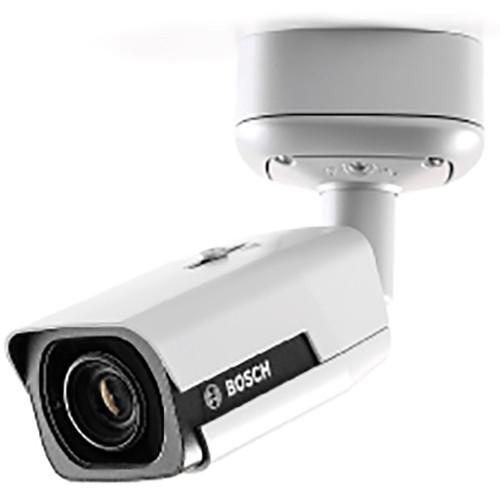 Contents of the user manual for the Bosch NBE-6502-AL 2MP Outdoor Network Bullet
- Product category: Wired IP Cameras Bosch
- Brand: Bosch
- Description and content of package
- Technical information and basic settings
- Frequently asked questions – FAQ
- Troubleshooting (does not switch on, does not respond, error message, what do I do if...)
- Authorized service for Bosch Wired IP Cameras
|
User manual for the Bosch NBE-6502-AL 2MP Outdoor Network Bullet contain basic instructions
that need to be followed during installation and operation.
Before starting your appliance, the user manual should be read through carefully.
Follow all the safety instructions and warnings, and be guided by the given recommendations.
User manual is an integral part of any Bosch product,
and if it is sold or transferred, they should be handed over jointly with the product.
Following the instructions for use is an essential prerequisite for protecting
health and property during use, as well as recognition of liability on the part of the manufacturer
for possible defects should you make a warranty claim. Download an official Bosch user manual in which you will find instructions on how to install, use, maintain and service your product.
And do not forget – unsuitable use of a Bosch product will considerably shorten its lifespan!
|
Product description The NBE-6502-AL 2MP Outdoor Network Bullet Camera from Bosch provides video at a resolution of 1920 x 1080. Built-in infrared LEDs provide quality night-time monitoring with a 196' range. The 2.8-12mm AVF lens allows you to choose the coverage area remotely. Automatic motorized zoom/focus adjustment with 1:1 pixel mapping ensures the camera is accurately focused. H.265 compression provides clear images while reducing bandwidth and storage requirements by up to 80%. The multi-streaming feature delivers various H.264 or H.265 streams together with an MJPEG stream. The camera is vandal- and dust-resistant and is rated to IK10 and IP67 standards. - Video Analytics
- The system detects, tracks, and analyzes objects, and alerts you when predefined alarms are triggered. Metadata is attached to your video to add sense and structure to quickly retrieve relevant images from hours of stored video.
- High Dynamic Range
- High dynamic range mode is based on a multiple exposure process that captures more details in highlights and in shadows in the same scene.
- Area-Based Encoding
- Compression parameters for up to eight user-definable regions can be set. This allows uninteresting regions to be highly compressed, leaving more bandwidth for important parts of the scene.
- Multiple Streams
- The multi-streaming feature delivers various H.264 or H.265 streams together with an MJPEG stream. These streams facilitate bandwidth-efficient viewing and recording as well as integration with third-party video management systems.
- Regions of Interest and E-PTZ
- ROI (Regions of Interest) can be user defined. Remote E-PTZ (Electronic Pan/Tilt/Zoom) controls allow you to select specific areas of the parent image.
- Two-Way Audio and Audio Alarm
- Two-way audio allows the operator to communicate with visitors or intruders via an external audio line input and output. Audio detection can be used to generate an alarm.
- Tamper and Motion Detection
- A wide range of configuration options are available for alarms signaling camera tampering. A built-in algorithm for detecting movement in video can also be used for alarm signaling.
- Storage Management
- Recording management can be controlled by the Bosch Video Recording Manager (Video Recording Manager) or the camera can use iSCSI targets directly without any recording software.
- Edge Recording
- The microSD card slot supports up to 2TB of storage capacity. Pre-alarm recording in RAM reduces recording bandwidth on the network.
- Cloud-Based Services
- The camera supports time-based or alarm-based JPEG posting to four different accounts. These accounts can address FTP servers or cloud-based storage facilities (for example, Dropbox). Video clips or JPEG images can also be exported to these accounts. Alarms can be set up to trigger an email or SMS notification so you are always aware of abnormal events.
- Hybrid Mode
- An analog video output enables the camera to operate in hybrid mode.
- Data Security
- Three-level password protection with security recommendations allows users to customize device access. Web browser access can be protected using HTTPS and firmware updates can be protected with authenticated secure uploads. Onboard TPM (Trusted Platform Module) and PKI (Public Key Infrastructure) support provide protection from malicious attacks. 802.1x network authentication with EAP/TLS, supports TLS 1.0/1.2 with updated cipher suites including AES256 encryption.
- Complete Viewing Software
- There are many ways to access the camera's features including a web browser, with the Bosch Video Management System, with the free Bosch Video Client or Video Security Client, the video security mobile app, or third-party software.
- Video Security App
- The app is designed to give you complete control of all your cameras, from panning and tilting to zoom and focus functions. This app will allow you to fully utilize dynamic transcoding features so you can play back images even over low-bandwidth connections.
- System Integration
- The camera conforms to ONVIF Profile S and Profile G specifications.
- Additional Functions
- Scene Modes: Nine default modes, scheduler
Privacy Masking: Eight independent areas, fully programmable
Video Authentication: Off/watermark/MD5/SHA-1/SHA-256
Display Stamping: Name, logo, time, alarm message
Pixel Counter: Selectable area UPC: 800549832434 In the Box Bosch NBE-6502-AL 2MP Outdoor Network Bullet Camera with Night Vision & 2.8-12mm Lens Mounting Hardware Limited 3-Year Warranty Table of Contents
|
Upload User Manual
Have you got an user manual for the Bosch NBE-6502-AL 2MP Outdoor Network Bullet Camera with Night Vision & 2.8-12mm Lens in electronic form? Please send it to us and help us expand our library of instruction manuals.
Thank you, too, on behalf of other users.
To upload the product manual, we first need to check and make sure you are not a robot. After that, your "Submit Link" or "Upload File" will appear.
Technical parametersBosch 6000i Specs | Sensor Type | 1/2.8" CMOS | | Total Image Sensor Pixels | 1937 x 1097, approximately 2.12 MP | | Sensitivity | 3200K, reflectivity 89%, f/1.3, 30IRE
Color: 0.0225 lux
Mono: 0.0051 lux
With IR: 0 lux | | Dynamic Range | High: 134 dB WDR
Measured According to IEC 62676 Part 5: 107 dB WDR | | Video Compression | H.265; H.264; MJPEG | | Streaming | Multiple configurable streams in H.264 or H.265 and MJPEG, configurable frame rate and bandwidth
Regions of Interest (ROI) | | Latency | <65 ms (1080p 60 fps) | | GOP Structure | IPIP, IBP, IBBP | | Encoding | Interval: 1 to 60 fps | | Video Resolution | 1920 x 1080 | | Frame Rate | Base: 25/30/50/60 fps | | Mirror Image | On/Off | | Rotate | 0/90/180/270° | | Positioning | Coordinate/Mounting | | Wizard | Lens: Zoom, autofocus | | Video Adjustments | Color
Adjustable Picture Settings: Contrast, saturation, brightness
White Balance: 2500 to 10,000K, 4 automatic modes (basic, standard, sodium lamp, dominant color), manual mode and hold mode
ALC
Day/Night: Auto (adjustable), color, monochrome
Shutter: Automatic Electronic Shutter (AES); fixed shutter (1/15000 to 1/30 sec) selectable; default shutter
Enhance
Sharpness: Sharpness enhancement level selectable
Backlight Compensation: On / off / Intelligent Auto Exposure
Contrast Enhancement: On/off
Noise Reduction: Intelligent Dynamic Noise Reduction with separate temporal and spatial adjustment
Intelligent Defog automatically adjusts parameters for best picture in foggy or misty scenes (switchable) | | Signal to Noise Ratio | >55 dB | | Local Storage | Internal RAM: 60 sec pre-alarm recording
Memory Card Slot: Supports up to 32 GB microSDHC / 2 TB microSDXC card. (A memory card of Class 6 or higher is recommended for HD recording)
Recording: Continuous recording, ring recording. alarm/events/schedule recording | | Night Vision Range | 196' (60 m)
LED 4 LED high efficiency array, 850 nm | | Lens Type | Automatic varifocal 2.8-12mm, DC iris f/1.4 to 360 | | Lens Mount | Board mounted | | Horizontal Field of View (degree) | 100 to 33° | | Vertical Field of View (degree) | 52 to 19° | | Input/Output Connections | Analog Video Output: CVBS, 1 V p-p, BNC connector, 75 Ohms selectable standard
Alarm Input: Short or 5 VDC activation
Alarm Output: Maximum 0.5 A, 30 VAC / 40 VDC
Audio Input: Wires; 10 kOhms typ. 0.707 Vrms
Audio Output: Wires; 16 Ohms typ. 0.707 Vrms
Network Connector: RJ45 | | Software | Unit Discovery: IP Helper
Unit Configuration: Via web browser or Configuration Manager
Firmware Update: Remotely programmable
Software Viewing: Web browser, Video Security Client, Video Security App, Bosch Video Management System, Bosch Video Client, or third-party software | | Protocols | IPv4, IPv6, UDP, TCP, HTTP, HTTPS, RTP/RTCP, IGMP V2/V3, ICMP, ICMPv6, RTSP, FTP, Telnet, ARP, DHCP, APIPA (Auto-IP, link local address), NTP (SNTP), SNMP (V1, MIBII), 802.1x, DNS, DNSv6, DDNS (DynDNS.org, selfHOST.de, no-ip.com), SMTP, iSCSI, UPnP (SSDP), DiffServ (QoS), LLDP, SOAP, Dropbox, CHAP, digest authentication | | Encryption | TLS 1.0/1.2, AES128, AES256 | | Ethernet | 10/100Base-T, auto-sensing, half/full duplex | | Connectivity | Auto-MDIX | | Interoperability | ONVIF Profile S; GB/T 28181 | | Operating Temperature | -40 to 140°F / -40 to 60°C | | Storage Temperature | -40 to 158°F / -40 to 70°C | | Operating Humidity | 5 to 100% relative humidity condensing | | Storage Humidity | 0 to 93% relative humidity non-condensing | | Input Voltage | Power-over-Ethernet (48 VDC nominal); or 24 VAC
Rating50% users recommend this product to others. And what about you?

This product has already been rated by 50 owners. Add your rating and experience with the product.
Discussion
 Ask our technicians if you have a problem with your settings,
or if anything is unclear in the user manual you have downloaded.
You can make use of our moderated discussion.
The discussion is public and helps other users of our website who may be encountering similar problems.
Ask our technicians if you have a problem with your settings,
or if anything is unclear in the user manual you have downloaded.
You can make use of our moderated discussion.
The discussion is public and helps other users of our website who may be encountering similar problems.
The discussion is empty - enter the first post
Post a new topic / query / comment:
|
|
|
| Request for user manual |
You can’t find the operation manual you are looking for? Let us know and we will try to add the missing manual:
I’m looking for a manual / Request for manual
Current requests for instruction manuals:
Call Of Duty World War Two For Xbox...
controller stratus XL...
stratus XL...
smart whatch serie S11 42mm...
Allen & Heath SQ-6 manual...
|
| Discussion |
Latest contributions to the discussion:
AEW R 4100
Name: MAURICIO ANGARITA
Audio-Technica AEW-R4100 UHF Diversity Receiver for
AEW R 4100 has the mute function blocked and does not allow audio to pass. I tried several times to turn off the mute from the transmitter but it does nothing, the mute stays on. Solution?
Thank you...
Instructions for assembling the 2015 Forecast Image Master Consoles GC3-A
Name: mike elam
Forecast Consoles GC3-A ImageMaster Editing Console
Looking for instructions for assembling this console. ...
EMPTY TONER ERROR MESSAGE AFTER REPLACING TONER
Name: LINDA BAD YELLOW EYES
Brother TN223BK Standard-Yield Toner
I HAD TO CHANGE OUT ALL THREE TONERS DUE TO LEAKS IN THE YELLOW AND CYAN. AFTER I REPLACED THEM, THE MACHINE KEEPS GIVING ME AN EMPTY TONER ERROR MESSAGE. HELP!!...
PS480D 20/24 pin Switching 480W Power Supply
Name: swkargo
Logisys 480W Power Supply
This item states in can run -5vdc .It is NOT listed on the board or I beleive is r4 is missing the resitior. Any body have thid issue. Shawn
...
Help needed
Name: Ann Carter
SanDisk 1TB Extreme Portable USB 3.1
When I click the link to download the user manual for my Sandisk Extreme external hard drive, it gives me the manual for the LG Cricket. Can you please change the link so I can download the Sandisk manual and begin using this drive? Thank you....
|
|


