|
User Manual for Bosch NFN-70122-F1A Flexidome IP Panoramic 7000 Flush Mount 12MP Camera with 180° Lens Click to enlarge the picture
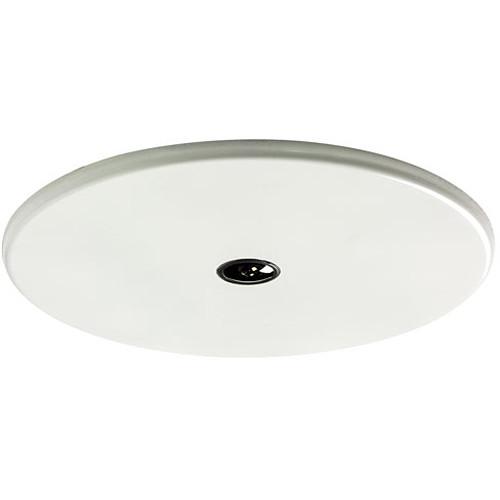 Contents of the user manual for the Bosch NFN-70122-F1A Flexidome IP Panoramic 7000
- Product category: Wired IP Cameras Bosch
- Brand: Bosch
- Description and content of package
- Technical information and basic settings
- Frequently asked questions – FAQ
- Troubleshooting (does not switch on, does not respond, error message, what do I do if...)
- Authorized service for Bosch Wired IP Cameras
|
User manual for the Bosch NFN-70122-F1A Flexidome IP Panoramic 7000 contain basic instructions
that need to be followed during installation and operation.
Before starting your appliance, the user manual should be read through carefully.
Follow all the safety instructions and warnings, and be guided by the given recommendations.
User manual is an integral part of any Bosch product,
and if it is sold or transferred, they should be handed over jointly with the product.
Following the instructions for use is an essential prerequisite for protecting
health and property during use, as well as recognition of liability on the part of the manufacturer
for possible defects should you make a warranty claim. Download an official Bosch user manual in which you will find instructions on how to install, use, maintain and service your product.
And do not forget – unsuitable use of a Bosch product will considerably shorten its lifespan!
|
Product description The NFN-70122-F1A Flexidome IP Panoramic 7000 Flush Mount 12MP Camera from Bosch is a discreet, flat-profile design camera that can be mounted in a ceiling or wall. It comes equipped with a 12MP image sensor and a 180° 2.1mm lens to provide full panoramic surveillance for complete area coverage. For situational awareness, the camera is capable of simultaneous ePTZ views at up to 3640 x 2160 resolution. The camera records footage in circular format, but dewarping settings can enable viewing on a standard rectangular monitor. To facilitate system integration, you can choose edge dewarping inside the camera or client-side dewarping (software not included) on an external platform. The camera uses Intelligent Video Analytics (IVA) software that offers movement tracking throughout the full image circle, without having to jump to different cameras. The system reliably detects, tracks, and analyzes objects, and alerts you when predefined alarms are triggered. The camera works to optimize bit rate and bandwidth use to make adjustments in of high noise for improved performance. It conforms to the ONVIF specifications for third-party integration. This camera is suitable for wall mounting or for ceiling mounting in corridors. Its cover plate is designed to be easily painted so it can blend in with almost all surroundings 12MP Sensor at 30 fps - 12MP sensor resolution with a frame rate of 30 fps offers detailed images with smooth camera motion. The effective resolution of for this camera is 8MP.
Panoramic Vision and Intelligent Video Analytics - Intelligent Video Analytics (IVS) software combined with full panoramic vision produces a surveillance tool for improved situational awareness. With intelligent tracking, movement can be followed continuously throughout the full image circle without having to jump to different cameras.
- The system detects, tracks, and analyzes objects, and alerts you when predefined alarms are triggered. A smart set of alarm rules simplify complex tasks and reduces false alarms. Intelligent Video Analytics continuously monitor the full image circle, so you still receive alarms even if you are zoomed in on a particular region.
- Intelligent Video Analytics help to add sense and structure to your video by adding metadata, which is generated from the full image circle, and also separately on the ePTZ channel. This enables you to retrieve the relevant images from hours of stored video efficiently. Metadata can also be used to provide forensic evidence or to optimize business processes based on people counting or crowd density information.
Edge Dewarping - Edge dewarping provides three separate video channels simultaneously at 12.5 fps—full image circle (Video 1 channel), dewarped view mode (Video 2 channel), and ePTZ (Video 3 channel). Different view modes can be selected for the video 2 channel. Your selection will depend on the resolution and view
View modes available for the second channel include the panoramic, ePTZ, and corridor view. ePTZ and Regions of Interest - ePTZ controls allow you to select specific areas of the full image circle. These Regions of Interest (ROI) can be defined, allowing the most interesting part of a scene to be monitored separately. High resolution recording prevents detail from being lost even when using the electronic zoom. Situational awareness is retained even when zooming in on a particular object of interest. The ePTZ function helps navigation, and presets are available as they are with regular PTZ cameras.
Intelligent Dynamic Noise Reduction - Quiet scenes with little or no movement require a lower bit rate. By intelligently distinguishing between noise and relevant information, Intelligent Dynamic Noise Reduction reduces bit rate by up to 50%. Because noise is reduced at the source during image capture, the lower bit rate does not compromise video quality.
Intelligent Dynamic Noise Reduction adjusts spatial and temporal filtering (3DNR) based on intelligent analysis of the scene content. Motion compensated temporal filtering (MCTF) reduces motion blur normally associated with standard temporal filtering. This maintains image quality of fast moving objects while still optimizing bit rate. Measured Dynamic Range - The camera offers 92 dB of wide dynamic range plus an extra 16 dB when combined with Intelligent Auto Exposure.
Priority Exposure Control - To optimize image quality, eight zones for measuring exposure can be drawn on the full image circle and assigned a priority level. These zones are given a higher or lower priority when the camera calculates exposure level. This ensures that the important areas of the scene have the best possible exposure level.
Intelligent Auto Exposure - The Intelligent Auto Exposure feature automatically adjusts the exposure of the camera. It offers front light and backlight compensation by automatically adapting to changing light conditions.
Scene Modes - Nine configurable modes are provided with the optimum settings for a variety of applications. Different scene modes can be selected for day or night situations.
Storage Management - Recording management can be controlled by the Bosch Video Recording Manager (VRM) or the camera can use iSCSI targets directly without any recording software.
Edge recording - Insert a memory card (available separately) into the card slot to store up to 2TB of local alarm recording. Pre-alarm recording in RAM reduces recording bandwidth on the network, and extends the effective life of the memory card.
Cloud-Based Services - The camera supports time-based or alarm-based JPEG posting to four different accounts. These accounts can address FTP servers or cloud-based storage facilities. Video clips or JPEG images can also be exported to these accounts. Alarms can also be set up to trigger an email or SMS notification.
Access Security - Password protection with three levels and 802.1x authentication is supported. To secure web browser access, use HTTPS with an SSL certificate stored in the camera.
Complete Viewing Software - Camera features can be easily accessed using a web browser, with the Bosch Video Management System, with the free Bosch Video Client or Video Security Client, with the video security mobile app, or via third-party software. The Video Security Client has extensive dewarping capabilities and can be used for client-side dewarping as well as for viewing the available modes.
System Integration - The camera conforms to the ONVIF Profile S, ONVIF Profile Q, and ONVIF Profile G specifications for third-party integration. Third-party integrators can access the internal feature set of the camera for integration into large projects.
- The IR corrected, factory-focused lens is not restricted by a bubble to simplify installation and sharpen images. Camera is powered via a Power-over-Ethernet compliant network cable connection so that a single cable connection is required to view, power, and control the camera.
UPC: 800549806138 In the Box Bosch NFN-70122-F1A Flexidome IP Panoramic 7000 Flush Mount 12MP Camera with 180° Lens Limited 3-Year Warranty Table of Contents
|
Upload User Manual
Have you got an user manual for the Bosch NFN-70122-F1A Flexidome IP Panoramic 7000 Flush Mount 12MP Camera with 180° Lens in electronic form? Please send it to us and help us expand our library of instruction manuals.
Thank you, too, on behalf of other users.
To upload the product manual, we first need to check and make sure you are not a robot. After that, your "Submit Link" or "Upload File" will appear.
Technical parametersBosch NFN-70122-F1A Specs | | | Type | 1/2.3" CMOS | | Total Image Sensor Pixels | 12 MP | | Effective Pixels | 3648 x 2160 (8 MP) | | Sensitivity | Color: 0.46 lux (3100K, reflectivity 89%, f/2.8, 30 IRE)
Mono: 0.15 lux (3100K, reflectivity 89%, f/2.8, 30 IRE) | | | | Video Compression | H.264 (Main Profile); MJPEG | | Streaming | Multiple configurable streams in H.264 and M-JPEG, configurable frame rate and bandwidth
Multiple channels with edge-dewarping
Regions of Interest (ROI) | | Overall IP Delay | Minimum: 120 ms
Maximum: 340 ms | | Interval | Encoding Interval: 1 to 25 (30) ips | | Region | Encoder Regions: 8 independent areas for setting encoder quality to optimize bitrate | | Video Resolution Supported | Channel 1:
Image Circle View: 3640 x 2160
Channel 2:
Panoramic View: 2688 x 800
ePTZ View: 2048 x 1152
Corridor View: 1600 x 1200
Channel 3:
ePTZ View 1280 x 720 | | | | Image Settings | Adjustable Picture Settings: Contrast, saturation, brightness | | White Balance | 2,500 to 10,000K
4 automatic modes (basic, standard, sodium vapor, dominant color)
Manual mode and hold mode | | Automatic Light Compensation (ALC) | Adjustable | | Saturation | Adjustable from peak to average | | Shutter | Automatic Electronic Shutter (AES)
Fixed shutter (1/25[30] to 1/15000) selectable
Default shutter | | Day/Night | Mechanical IR filter
Auto (adjustable switch points), color, monochrome | | Sharpness | Sharpness enhancement level selectable | | Backlight Compensation | On / Off / Intelligent Auto Exposure (IAE) | | Contrast Enhancement | On / Off | | Dynamic Range | 92 dB WDR (+16 dB IAE) | | Noise Reduction | Intelligent Dynamic Noise Reduction with separate temporal and spatial adjustments | | Defog | Intelligent Defog automatically adjusts parameters for best picture in foggy or misty scenes (switchable) | | | | Type | Intelligent Video Analytics (IVA) | | Configuration | Silent VCA / Profile1/2 / Scheduled / Event triggered | | Alarm Control | Alarm Rules (Combinable): Any object
Object in field
Line crossing
Enter / leave field
Loitering
Follow route
Idle / removed object
Counting
Occupancy
Crowd density estimation
Condition change
Similarity search
Flow / counter flow | | Filters | Object Filters:
Duration
Size
Aspect ratio
Speed
Direction
Color
Object classes (4) | | Tracking Modes | Standard (2D) tracking
3D tracking
3D people tracking
Ship tracking
Museum mode | | Calibration | Automatic based on gyro / accelerometer data and camera height | | Tamper Detection | Maskable | | Detection | Audio, face | | Scene Modes | 9 default modes, scheduler | | Privacy Masking | 8 independent areas, fully programmable | | Authentication | Off / Watermark / MD5 / SHA-1 / SHA-256 | | Stamp | Name; Logo; Time; Alarm message | | Pixel Counter | Selectable area | | | | Lens | 2.1mm fixed-focus lens (IR corrected), f/2.8 | | Lens Mount | Board mounted | | Iris Control | Fixed iris | | Field of View (H x V) | 180° x 93° | | Minimum Object Distance | Minimum: 0.3' (0.1 m)
Center Image DORI Values for High Mounting Applications: Detect: 181' (55 m)
Observe: 72' (22 m)
Recognize: 35' (10.5 m)
Identify: 18' (5.5 m) | | Distances Supported | Coverage radius when camera is mounted at a height of 10' (3 m)
Detect 8 px/ft (25 px/m) @ 92' (28 m)
Observe 19 px/ft (63 px/m) @ 40' (12 m)
Recognize 38 px/ft (125 px/m) @ 22' (6.5 m)
Identify 76 px/ft (250 px/m) @ 12' (3.5 m) | | | | RAM | Internal RAM: 10 sec pre-alarm recording | | Memory Card Slot | Supports up to 32 GB microSDHC / 2 TB microSDXC card (card not included, Class 6 or higher is recommended for HD recording) | | Recording | Continuous recording, ring recording
Alarm/events/schedule recording | | | | Discovery | IP Helper | | Unit Configuration | Via web browser or Configuration Manager | | Firmware Updates | Remotely programmable | | Viewing | Web browser; Video Security Client; Video Security App; Bosch Video Management System; Bosch Video Client; or third party software | | | | Protocols | IPv4, IPv6, UDP, TCP, HTTP, HTTPS, RTP/RTCP, IGMP V2/V3, ICMP, ICMPv6, RTSP, FTP, Telnet, ARP, DHCP, APIPA (Auto-IP, link local address), NTP (SNTP), SNMP (V1, MIB-II), 802.1x, DNS, DNSv6, DDNS (DynDNS.org, selfHOST.de, no-ip.com), SMTP, iSCSI, UPnP (SSDP), DiffServ (QoS), LLDP, SOAP, Dropbox, CHAP, digest authentication | | Encryption | TLS 1.2, SSL, DES, 3DES | | Ethernet | 10/100 Base-T, auto-sensing, half/full duplex | | Connectivity | Auto-MDIX | | Interoperability | ONVIF Profile S; ONVIF Profile G ; ONVIF Profile Q
GB/T 28181 | | | | Power Supply | PoE 48 VDC nominal | | PoE Standard | IEEE 802.3af (802.3at Type 1) | | Current Draw | 200 mA maximum (PoE) | | | | Operating Temperature | -4 to 104°F (-20 to 40°C) | | Storage Temperature | -4 to 140°F (-20 to 60°C) | | Operating Humidity | 20 to 93% RH | | Storage Humidity | up to 98% RH | | Certifications & Approvals | Emission:
EN 50121-4:2006, +AC:2008; EN 55022: 2010, +AC (2011), Class B; CFR 47 FCC part 15:2012-10-1, Class B;
Immunity:
EN 50121-4:2006, +AC:2008; EN 50130-5:2011
Safety:
EN 60950-1:2006, +A11:2009, +A1:2010, +A12:2011, AC:2011; UL 60950-1, 2nd edition:2011; CAN/CSA-C 22.2 No. 60950-1-07, 2nd edition
Environmental Tests:
EN 50130-4:2011, Class II (Indoor in general, fixed equipment), Alarm systems - Part 5: Environmental test methods
Environmental:
EN 50581 (2012)
Marks:
CE, cULus, WEEE, PADS, RCM and China RoHS | | Vandal Resistance | Camera: IK06
Lens: IK04 | | | | Dimensions | Camera: 7.68 x 2.68" (195 x 68.2 mm)
Flush Profile: 7.68 x 0.28" (195 x 7 mm) | | Weight | 1.68 lb (0.76 kg) |
Rating100% users recommend this product to others. And what about you?

This product has already been rated by 95 owners. Add your rating and experience with the product.
Discussion
 Ask our technicians if you have a problem with your settings,
or if anything is unclear in the user manual you have downloaded.
You can make use of our moderated discussion.
The discussion is public and helps other users of our website who may be encountering similar problems.
Ask our technicians if you have a problem with your settings,
or if anything is unclear in the user manual you have downloaded.
You can make use of our moderated discussion.
The discussion is public and helps other users of our website who may be encountering similar problems.
The discussion is empty - enter the first post
Post a new topic / query / comment:
|
|
|
| Request for user manual |
You can’t find the operation manual you are looking for? Let us know and we will try to add the missing manual:
I’m looking for a manual / Request for manual
Current requests for instruction manuals:
Call Of Duty World War Two For Xbox...
controller stratus XL...
stratus XL...
smart whatch serie S11 42mm...
Allen & Heath SQ-6 manual...
|
| Discussion |
Latest contributions to the discussion:
AEW R 4100
Name: MAURICIO ANGARITA
Audio-Technica AEW-R4100 UHF Diversity Receiver for
AEW R 4100 has the mute function blocked and does not allow audio to pass. I tried several times to turn off the mute from the transmitter but it does nothing, the mute stays on. Solution?
Thank you...
Instructions for assembling the 2015 Forecast Image Master Consoles GC3-A
Name: mike elam
Forecast Consoles GC3-A ImageMaster Editing Console
Looking for instructions for assembling this console. ...
EMPTY TONER ERROR MESSAGE AFTER REPLACING TONER
Name: LINDA BAD YELLOW EYES
Brother TN223BK Standard-Yield Toner
I HAD TO CHANGE OUT ALL THREE TONERS DUE TO LEAKS IN THE YELLOW AND CYAN. AFTER I REPLACED THEM, THE MACHINE KEEPS GIVING ME AN EMPTY TONER ERROR MESSAGE. HELP!!...
PS480D 20/24 pin Switching 480W Power Supply
Name: swkargo
Logisys 480W Power Supply
This item states in can run -5vdc .It is NOT listed on the board or I beleive is r4 is missing the resitior. Any body have thid issue. Shawn
...
Help needed
Name: Ann Carter
SanDisk 1TB Extreme Portable USB 3.1
When I click the link to download the user manual for my Sandisk Extreme external hard drive, it gives me the manual for the LG Cricket. Can you please change the link so I can download the Sandisk manual and begin using this drive? Thank you....
|
|


