User Manual for Bracket 1 Base A - Handle Mount 3 Wireless Receiver Mount Kit A Click to enlarge the picture
 Contents of the user manual for the Bracket 1 Base A - Handle
- Product category: Receiver Camera Mounts Bracket 1
- Brand: Bracket 1
- Description and content of package
- Technical information and basic settings
- Frequently asked questions – FAQ
- Troubleshooting (does not switch on, does not respond, error message, what do I do if...)
- Authorized service for Bracket 1 Receiver Camera Mounts
 |
User manual for the Bracket 1 Base A - Handle contain basic instructions
that need to be followed during installation and operation.
Before starting your appliance, the user manual should be read through carefully.
Follow all the safety instructions and warnings, and be guided by the given recommendations.
User manual is an integral part of any Bracket 1 product,
and if it is sold or transferred, they should be handed over jointly with the product.
Following the instructions for use is an essential prerequisite for protecting
health and property during use, as well as recognition of liability on the part of the manufacturer
for possible defects should you make a warranty claim. Download an official Bracket 1 user manual in which you will find instructions on how to install, use, maintain and service your product.
And do not forget – unsuitable use of a Bracket 1 product will considerably shorten its lifespan!
|
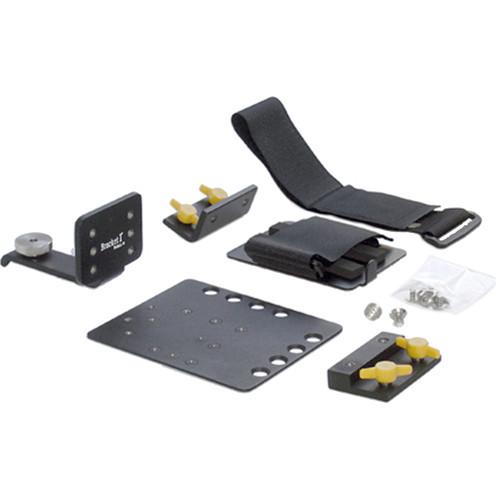
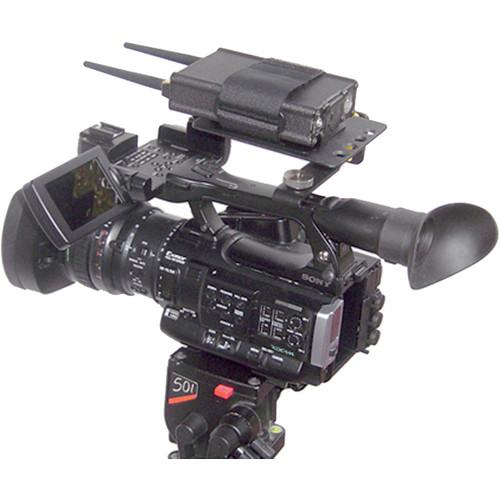
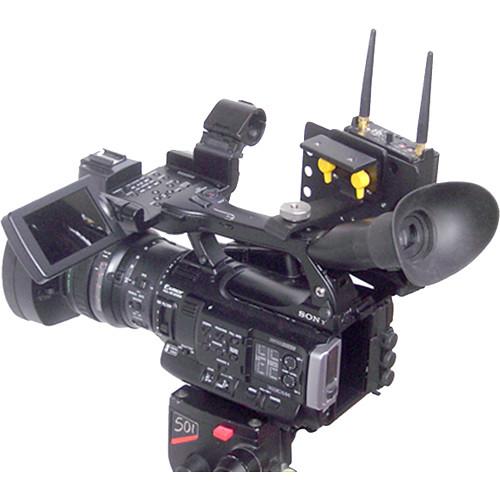
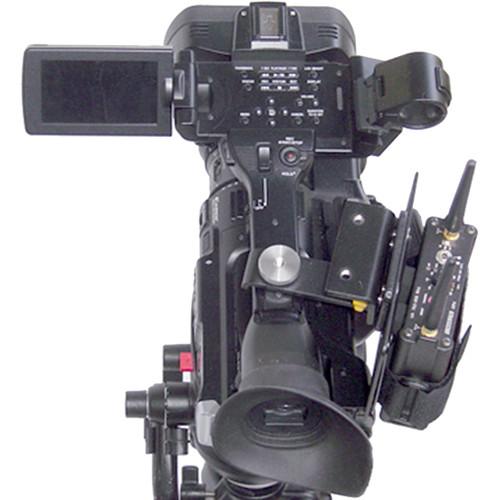
Product description The Base A - Handle Mount 3 with Wireless Receiver Mount Kit-A by Bracket 1 consists of a Threaded Handle Mount 3, Accessory Mounting Plate, Quick Release Plate, 90° Short Adapter, a Quick Plate and a touch-tab fastener in a kit. It works as a camera mounting system for attaching wireless microphone receivers, and additional accessories in different configurations on your camcorder's threaded handle. This mounting kit will fit select models of cameras as well as those with at least one 1/4"-20 threaded hole on top of the camera handle. The items in the kit are built with aluminum and stainless-steel hardware. Mounting surfaces include horizontal and vertical offset 8-32 threaded bolt patterns on each side of the Accessory Mounting Plate and a number of 1/4"-20 threaded holes. Add a second Quick Plate or wireless receiver box to mount a second receiver or accessory. Add a Battery Mounting Plate to attach Anton Bauer or IDX Battery kits or a second plate to further diversify your mounting surface options. - Fits These Cameras
- Sony F5, PMW-F55, PMW-TD300, PXW-FS7, PXW-X70, PXW-X180, PXW-X200, PXW-X500, PXW-Z100, SRWDCR-VX2200E, DVW-970, F65, HDC-2400, HDC-2500, HDR-FX1, HDW650F, HDW-790, HDW-F900R, HSC-100, HSC-300, HVR-S270, HVR-Z5U, HVR-Z5P, HVR-Z7P, HVR-Z7U, HXR-NX3, HXR-NX5P, HXR-NX5U, NEX-EA50, PDW-530, PDW-700, PDW-800, PDW-850, PMW-100, PMW-150, PMW-160, PMW-200, PMW-300, PMW-320, PMW-400, PMW-500, PMW-EX1R, PMW-F3, PMW-9000, PXW-X400, PXW-Z150
Canon C300, C500, XF100, XF105, XF200, XF205, XF300, XF305
JVC GY-HD200, GY-HD250, GY-HM150U, GY-HM200, GY-HM600, GY-HM620, GY-HM650, GY-HM660, GY-HM70, GY-HM700, GY-HM710U, GY-HM750, GY-HM790, GY-HM850, GY-HM890, GY-HMQ10, GY-LS300
Panasonic AG-3DA1, AG-3DP1GJ, AG-AF100, AG-AC130, AG-AC160, AG-HPX170, AG-HPX250, AG-HPX255, AG-HPX370, AG-HPX600, AG-HPX500, AJ-HPX2000, AJ-HPX2700, AJ-HPX3100, AJ-HPX3700, AG-HVX200, AJ-PX270, AJ-PX5000, AJ-PX800, P2
Blackmagic Pocket Camera, URSA, URSA Mini
AJA CION
Ikegami HDS-V10
ForA FT-ONE
Other Cameras fits other cameras with at least one 1/4"-20 threaded hole on top of the camera handle - Accessory Mounting Plate
- Mount your gear on one or both sides of this plate. Includes industry standard 4-hole pattern mounting pattern in horizontal and vertical positions on both sides of plate for mounting accessories in a wide array of positions.
- Quick Release Adapter
- Add this Quick Release Adapter to your Accessory Mounting Plate or Battery Mounting Plate for quick and easy removal and reconfiguration of your Base A bracket system.
- Short 90 Adapter
- Short 90 Degree Angle Quick Release Adapter for customizing the configuration of your "Base A" system. Attaches to the Base A Handle Mount 1, 2 or 3, giving you an additional mounting position for an Accessory Plate, Battery Plate, Recorder Cradle or any other accessory.
- Quick Plate
- This is a universal accessory mounting adapter. It features a low-cost solution for attaching your wireless receiver, Audio/Video recorder or other accessories to the Bracket 1 bracket system or any camera with the industry standard mounting pattern. A touch-tab strap cinches tight around the accessory, firmly holding the receiver against two rubber pads. Two Quick Plates can be mounted back to back on any Bracket 1 to hold 2 wireless receivers or accessories.
In the Box Bracket 1 Base A - Handle Mount 3 Wireless Receiver Mount Kit A Base A Threaded Handle Mount 3 Base A Accessory Mounting Plate Base A Quick Release Base A 90 Degree Short Adapter Quick Plate Long Touch-Tab Fastener Limited Lifetime Warranty Table of Contents
|
Upload User Manual
Have you got an user manual for the Bracket 1 Base A - Handle Mount 3 Wireless Receiver Mount Kit A in electronic form? Please send it to us and help us expand our library of instruction manuals.
Thank you, too, on behalf of other users.
To upload the product manual, we first need to check and make sure you are not a robot. After that, your "Submit Link" or "Upload File" will appear.
Technical parametersBracket 1 VISLBA3KA Specs | Dimensions and Weight | Mount 3: 3.50 x 2.50 x 2.25" (8.9 x 6.30 x 5.70 cm)
Weight: 4 oz (0.11 kg)
Accessory Mounting Plate: 4.25 x 5 x 0.1" (11 x 13 x 0.25 cm)
Weight: 3 oz (0.9 kg)
Quick Release Adapter: 2.5 x 1.5 x 0.5" (6.3 x 3.8 x 1.3 cm)
Weight: 2.5 oz (0.07 kg)
Short 90° Adapter: 2.5 x 1.25 x 1.25 (6.3 x 3.2 x 3.2 cm)
Weight: 2 oz (0.06 kg)
Universal Mounting Plate: 4.5 x 3.0 x 0.3" (11 x 7.6 x 0.8 cm)
Weight: 3 oz (0.9 kg)
Touch-Tab Fastener: Not specified by manufacturer | | | | Package Weight | 1.0 lb | | Box Dimensions (LxWxH) | 11.0 x 8.0 x 3.0" |
Rating90% users recommend this product to others. And what about you?

This product has already been rated by 26 owners. Add your rating and experience with the product.
Discussion
 Ask our technicians if you have a problem with your settings,
or if anything is unclear in the user manual you have downloaded.
You can make use of our moderated discussion.
The discussion is public and helps other users of our website who may be encountering similar problems.
Ask our technicians if you have a problem with your settings,
or if anything is unclear in the user manual you have downloaded.
You can make use of our moderated discussion.
The discussion is public and helps other users of our website who may be encountering similar problems.
The discussion is empty - enter the first post
Post a new topic / query / comment:
|
|


